How to Add Webhooks to Your SaaS Product in 2026
A complete guide for SaaS founders and engineers on implementing webhooks—from event design and payload structure to build vs buy decisions and customer experience best practices.

How to Add Webhooks to Your SaaS Product in 2026
Customers expect webhooks. They unlock workflow automation, data synchronization, and integrations—making your product indispensable. But implementation requires careful event design, reliability, security, and customer experience.
This guide covers the complete journey: which events to expose, payload design, build vs buy decisions, and integration patterns.
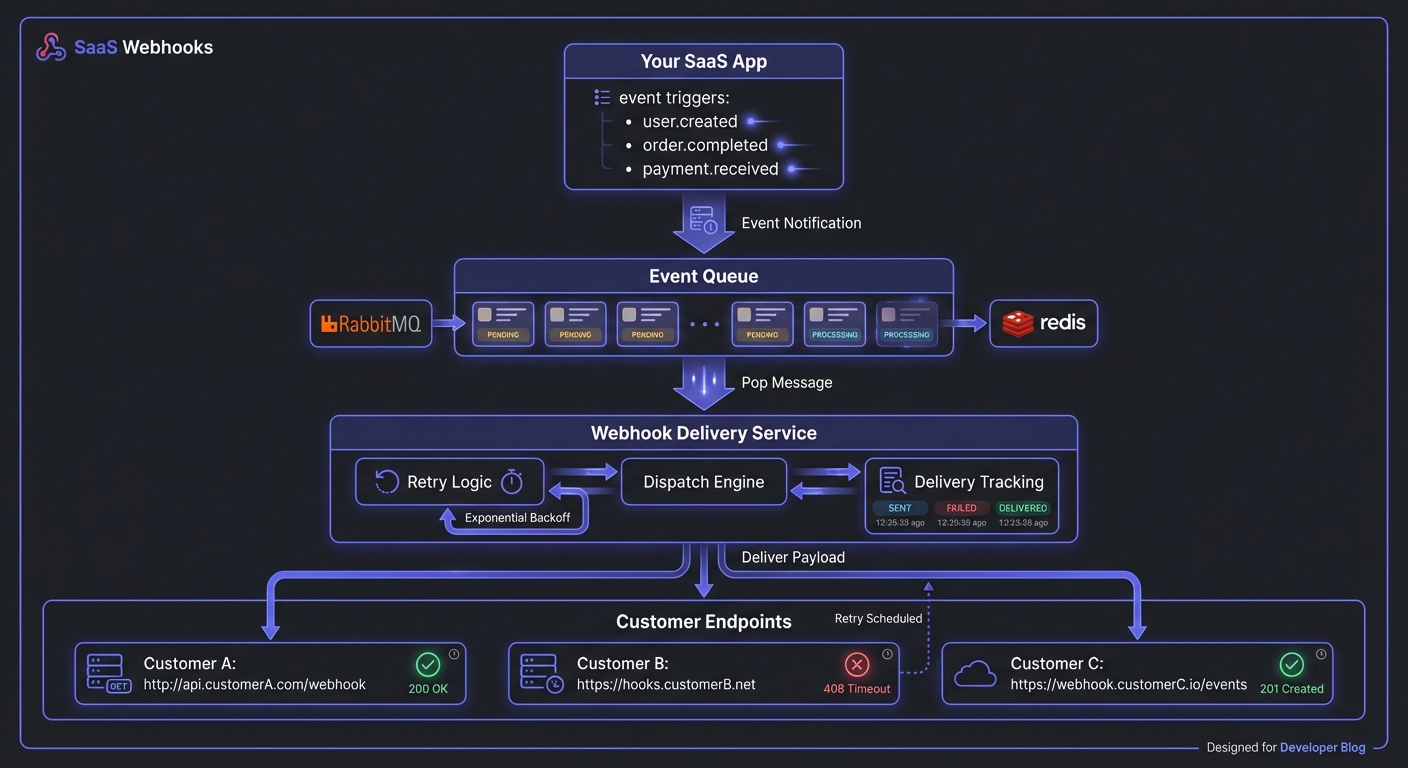
Why Webhooks Matter
Without webhooks, customers either manually check for changes or poll constantly—both inefficient. Webhooks flip the model: your system pushes events in real-time when they occur.
This unlocks:
- Workflow automation: Trigger actions in other tools when events occur in your product
- Data synchronization: Keep external systems in sync without constant polling
- Custom integrations: Build connections to internal tools and niche software you'll never integrate with directly
- Real-time notifications: Alert the right people the moment something important happens
For your business: reduced support load, integration stickiness, and positioning as the professional choice.
Planning Your Events
Decide which events to expose before writing code. This is product design.
Start With Customer Use Cases
Common patterns:
- Resource lifecycle events:
user.created,order.completed,subscription.cancelled - State changes:
invoice.paid,ticket.resolved,project.archived - Threshold alerts:
usage.limit.approached,balance.low
Event Naming Conventions
Adopt a consistent naming scheme early. The resource.action pattern (like Stripe uses) works well:
user.created
user.updated
user.deleted
invoice.paid
invoice.payment_failed
subscription.renewed
subscription.cancelled
This convention is predictable, scannable, and groups related events naturally.
Event Granularity
Coarse-grained events (e.g., user.updated) are simpler but require customers to filter. Fine-grained events are explicit but multiply your event types. Start with coarse-grained events including a changes array showing modified fields. Add specific events later based on demand.
Payload Design
Your webhook payload is an API contract.
Consistent Envelope
Wrap every webhook consistently:
{
  "id": "evt_1234567890",
  "type": "invoice.paid",
  "created_at": "2026-01-20T14:32:00Z",
  "data": {
    "id": "inv_abc123",
    "amount": 9900,
    "currency": "usd",
    "customer_id": "cus_xyz789",
    "paid_at": "2026-01-20T14:31:58Z"
  }
}
The envelope provides metadata while data contains the resource. Customers can route events before parsing.
Include Context
Include relevant resource data directly. If order.shipped only has the order ID, customers need an extra API call—defeating the purpose.
Versioning
Your payloads will change:
- Include an
api_versionfield in your envelope - Document your versioning policy (how long you support old versions, how you communicate changes)
- Consider letting customers pin their webhook endpoints to specific versions
Build vs Buy
Build Requirements
Production-grade systems need:
- Reliable delivery: Queue management, retry logic with exponential backoff, dead letter handling
- Security: Signature verification, HTTPS enforcement, IP allowlisting options
- Observability: Delivery logs, failure alerting, debugging tools
- Customer experience: Subscription UI, endpoint testing, log access
- Scale handling: Rate limiting, circuit breakers, slow endpoint handling
This isn't a weekend project. Ongoing maintenance includes edge case handling, customer debugging, and volume scaling.
Queue-First Architecture
Production webhook systems should decouple event creation from delivery. Queue events immediately, then process asynchronously:
// Event occurs in your app - queue immediately
async function handleUserCreated(user) {
  // Store in database or queue (Redis, RabbitMQ, SQS)
  await webhookQueue.add({
    type: 'user.created',
    data: user,
    created_at: new Date().toISOString()
  });
  // Don't wait for delivery - return immediately
}

// Separate worker processes the queue
async function processWebhookQueue() {
  const event = await webhookQueue.next();

  for (const subscription of await getSubscriptions(event.type)) {
    await deliverWithRetry(subscription.endpoint, event);
  }
}
This pattern provides:
- Fast response times: Your app doesn't block on webhook delivery
- Failure isolation: One failing endpoint doesn't affect others
- Natural retry handling: Failed deliveries stay in queue
- Horizontal scaling: Add workers as volume grows
When Building Makes Sense
Build your own if:
- Webhooks are core to your product (you're building an integration platform)
- You have unusual requirements that services don't address
- You have dedicated infrastructure engineers with time to maintain it
- Volume is extremely high and cost optimization is critical
Managed Services
Use a service like Hook Mesh if engineering time is your scarcest resource. Weeks building infrastructure (plus ongoing maintenance) rarely makes sense when services exist for this.
Subscription Models: Static vs Dynamic
How customers configure webhooks matters as much as how you deliver them.
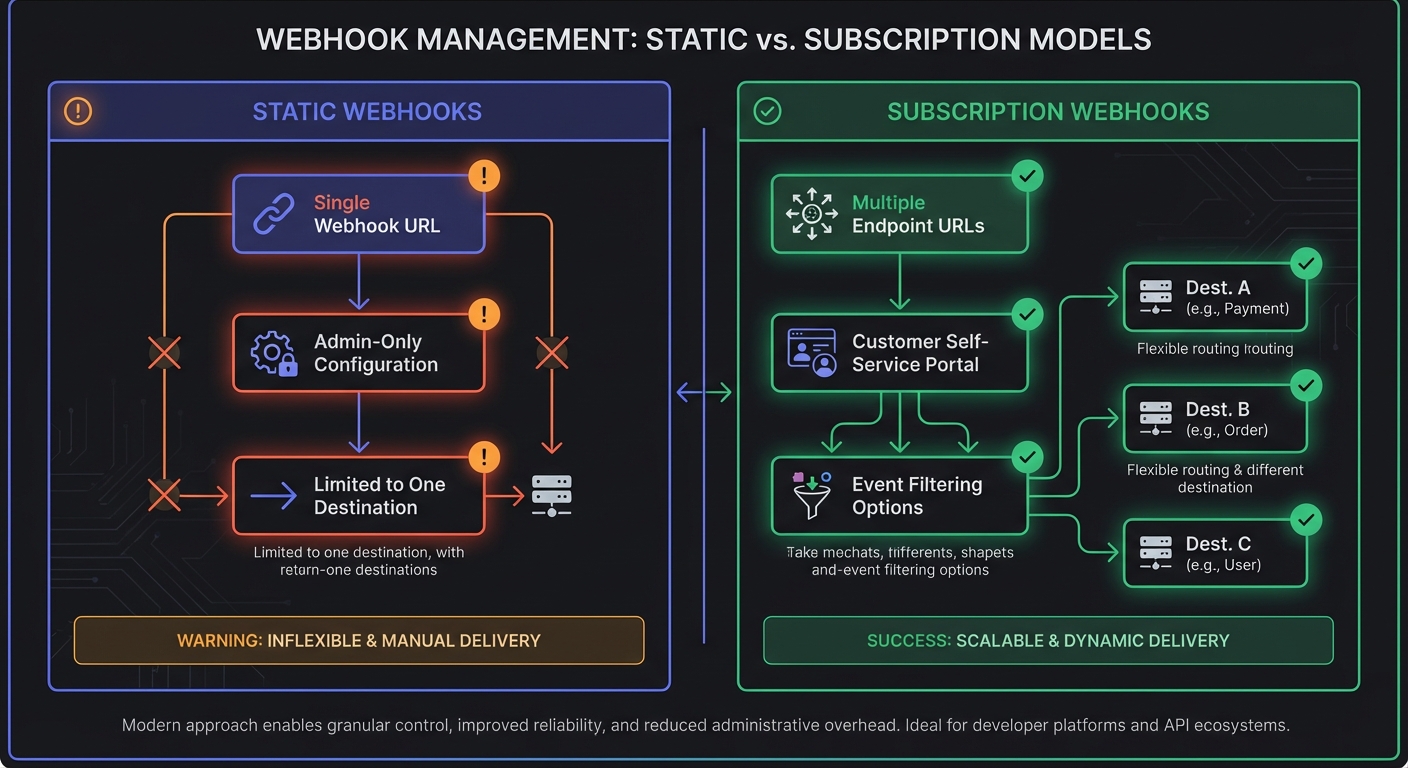
Static Webhooks
The simplest approach: a single webhook URL configured in your admin dashboard.
- Pros: Quick to implement, minimal UI work
- Cons: One URL per customer, no event filtering, admin-only configuration
Static webhooks work for internal integrations but frustrate customers who need multiple endpoints or different events for different systems.
Subscription Webhooks
The professional approach: customers manage their own webhook subscriptions via API or UI.
// Customer creates multiple subscriptions
POST /api/webhooks/subscriptions
{
  "url": "https://customer.com/billing-webhooks",
  "events": ["invoice.paid", "invoice.failed"],
  "secret": "whsec_..."
}

POST /api/webhooks/subscriptions
{
  "url": "https://customer.com/user-webhooks",
  "events": ["user.created", "user.deleted"],
  "secret": "whsec_..."
}
Subscription webhooks allow:
- Multiple endpoints: Different URLs for different purposes
- Event filtering: Subscribe only to relevant events
- Customer self-service: No support tickets for webhook changes
- Better security: Unique secrets per subscription
Integrating With a Service
Send events to the service, which handles delivery, retries, and customer-facing features.
Sending Events
// When an order is completed in your system
async function handleOrderCompleted(order) {
  await hookMeshClient.sendEvent({
    type: 'order.completed',
    data: {
      id: order.id,
      customer_id: order.customerId,
      total: order.total,
      currency: order.currency,
      items: order.items,
      completed_at: new Date().toISOString()
    }
  });
}
# Python equivalent
def handle_order_completed(order):
hook_mesh.send_event(
event_type="order.completed",
data={
"id": order.id,
"customer_id": order.customer_id,
"total": order.total,
"currency": order.currency,
"items": order.items,
"completed_at": datetime.utcnow().isoformat()
}
)The service delivers to all subscribed endpoints, handles retries, and logs everything.
Endpoint Management
Customers subscribe their endpoints to events. Embed pre-built components or build with the API:
// Fetch your customer's webhook subscriptions
const subscriptions = await hookMeshClient.subscriptions.list({
  customer_id: 'cus_xyz789'
});

// Create a new subscription for a customer
await hookMeshClient.subscriptions.create({
  customer_id: 'cus_xyz789',
  endpoint_url: 'https://customer-site.com/webhooks',
  events: ['order.completed', 'order.refunded'],
  secret: generateWebhookSecret()  // For signature verification
});
Testing & Debugging
Essential tools customers need:
- Test events for endpoint verification
- Delivery logs with full request/response details
- Replay for recovery
- Alerting for failing endpoints
Customer Portal: Self-Service Webhook Management
Enterprise customers expect self-service. A webhook management portal reduces support load and improves customer experience.
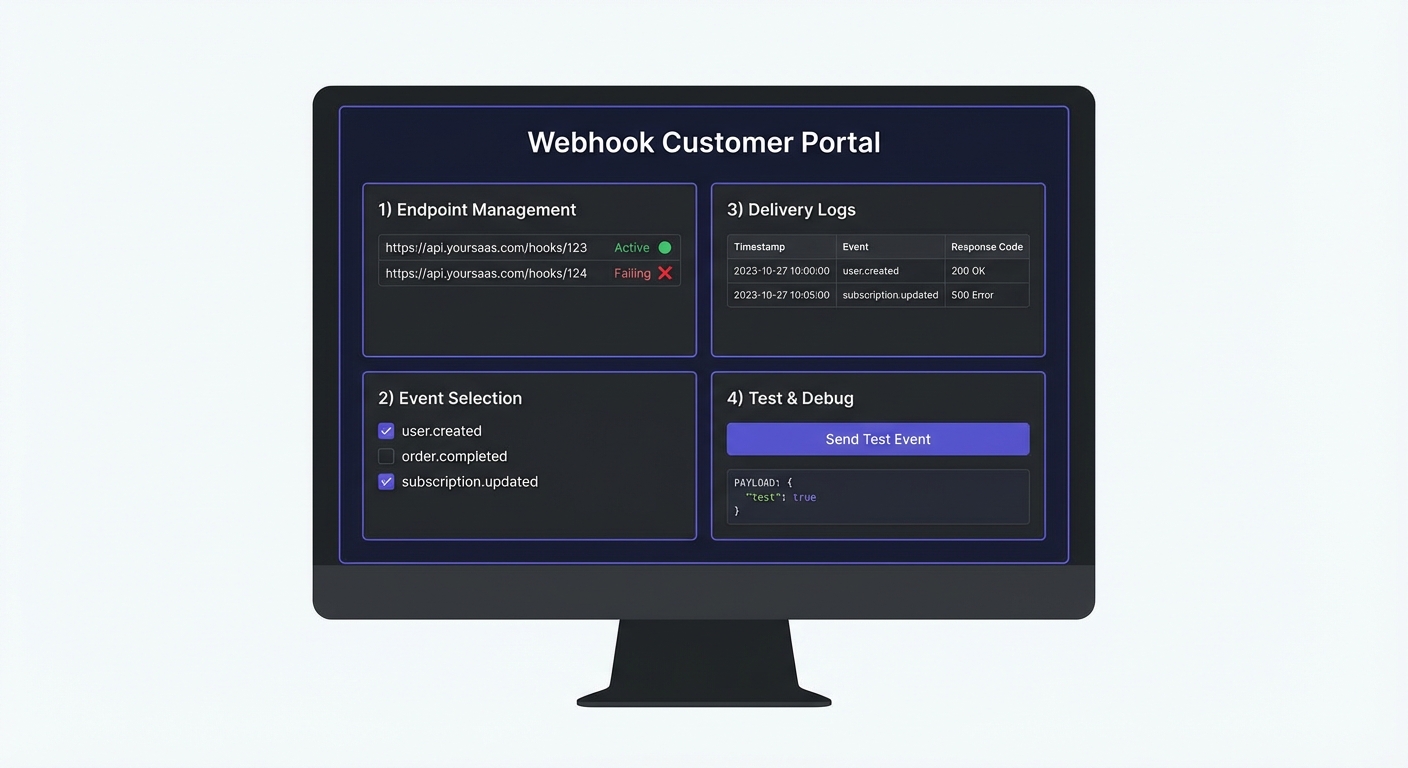
Essential Portal Features
Endpoint Management
- Add, edit, and delete webhook URLs
- Enable/disable endpoints without deleting
- View endpoint health status (active, failing, disabled)
Event Selection
- Subscribe to specific event types
- Group related events (all user events, all billing events)
- Preview sample payloads for each event type
Delivery Logs
- Recent webhook attempts with timestamps
- Request/response details for debugging
- Filter by status (success, failed, pending)
Testing Tools
- Send test events to verify endpoint setup
- Retry failed deliveries
- View raw payload and headers
Thin vs Snapshot Events
Decide how much data to include in webhook payloads:
Snapshot Events (recommended for most cases):
{
  "type": "order.completed",
  "data": {
    "id": "ord_123",
    "total": 9900,
    "items": [...],
    "customer": {...}
  }
}
Thin Events (ID only, customer fetches details):
{
  "type": "order.completed",
  "data": {
    "id": "ord_123"
  }
}
Snapshot events are self-contained—customers don't need API calls to get context. Thin events reduce payload size but require extra API calls and introduce timing issues if the resource changes between webhook and fetch.
Reconciliation: Your Safety Net
Webhooks aren't guaranteed delivery. Networks fail, endpoints go down, and events get lost. Reconciliation jobs catch what webhooks miss.
# Daily reconciliation job - catches missed webhooks
def reconcile_orders():
    # Fetch orders completed in last 24 hours
    recent_orders = Order.objects.filter(
        completed_at__gte=now() - timedelta(hours=24)
    )

    for order in recent_orders:
        # Check if customer system has this order
        if not customer_api.has_order(order.id):
            # Re-send via webhook or direct API push
            send_webhook('order.completed', order)
            log.info(f"Reconciled missing order: {order.id}")
Shopify recommends this pattern: "Your app shouldn't rely solely on receiving data from webhooks. Implement reconciliation jobs to periodically fetch data."
Best Practices
Documentation
Document every event type, when it fires, and provide payload examples. Customers shouldn't guess.
Endpoint Verification
Verify customers control their endpoint URL before sending real events.
Signatures
Always sign webhooks so customers verify authenticity. Include clear documentation and code samples:
// Customer-side verification
const isValid = verifyWebhookSignature(
  payload,
  headers['x-webhook-signature'],
  webhookSecret
);

if (!isValid) {
  return res.status(401).send('Invalid signature');
}
Graceful Degradation
Back off from failing endpoints with exponential delays. Pause delivery with clear notification, then make recovery easy.
Launch Path
- Define 5-10 events customers need most
- Design consistent, documented payloads
- Implement queue-first delivery architecture
- Build customer self-service portal (or embed one from a service)
- Add reconciliation jobs as a safety net
- Document thoroughly and launch
Common Mistakes to Avoid
Inline delivery: Sending webhooks synchronously in request handlers. Use a queue—one slow endpoint shouldn't block your app.
Missing idempotency: Not including unique event IDs. Customers can't deduplicate retries without them. See our idempotency guide.
Weak signatures: Using MD5 or no signatures at all. HMAC-SHA256 is the standard. See webhook security best practices.
No customer portal: Requiring support tickets for webhook changes. Self-service reduces support load and improves customer experience.
Ignoring failures: Not notifying customers when their endpoints fail repeatedly. Alert at 3-5 consecutive failures.
Skipping reconciliation: Assuming webhooks always arrive. Network failures happen—reconciliation jobs catch what webhooks miss.
Webhooks transform your product into a platform. They're expected in 2026, and achievable for teams of any size with the right architecture.
Related Posts
What Are Webhooks? A Complete Guide for Developers
Learn what webhooks are, how they work, and why they're essential for modern applications. This comprehensive guide covers webhook basics, real-world use cases, code examples, and best practices for startup developers.
Webhook Security Best Practices: The Complete Guide
Learn how to secure your webhook implementations with HMAC signature verification, replay attack prevention, SSRF mitigation, and more. Includes code examples in Node.js and Python.
Webhooks for Startups: A Practical Guide
A comprehensive guide for startup founders and engineers on implementing webhooks - when to add them, what to build first, and how to scale without over-engineering.
MVP Webhook Architecture: Start Simple, Scale Later
A practical guide for startups building their first webhook system. Learn what you need on day one versus later, avoid common over-engineering mistakes, and understand when to build versus buy.
Send Webhooks with Node.js: A Complete Tutorial
Learn how to send webhooks from your Node.js application. This hands-on tutorial covers payload structure, HMAC signatures, error handling, retry logic, and testing—with complete code examples using modern ES modules and fetch.