Webhook Fundamentals: The Complete Beginner's Guide
Everything you need to know about webhooks, from basic concepts to your first implementation. A comprehensive learning hub for developers new to event-driven integrations.
Webhook Fundamentals: The Complete Beginner's Guide
Webhooks power payment notifications, CI/CD pipelines, real-time collaboration, and countless integrations. This guide gives you everything you need to understand how they work and implement them in your own projects.
Table of Contents
- What Are Webhooks?
- Testing Webhooks Safely
- Webhooks vs APIs
- Getting Started
- Security Basics
- Reliability Basics
- From Development to Production
- Your First Implementation
- Real-World Examples
- Industry Context
- Next Steps
What Are Webhooks?
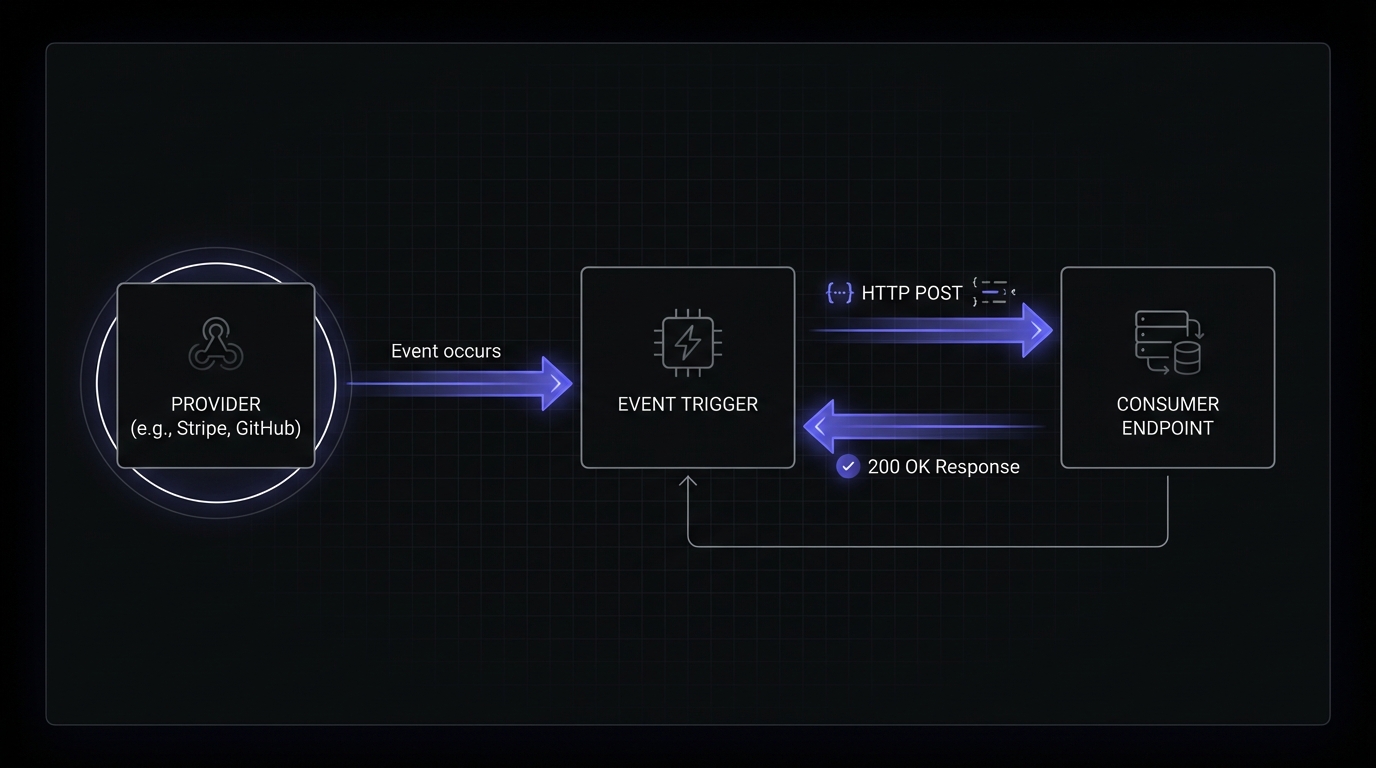
Webhooks are automated messages sent when events occur—a push model instead of constantly polling for changes. When Stripe processes a payment, it sends a webhook. When GitHub receives a code push, it sends a webhook. When Shopify creates an order, it sends a webhook. These automated notifications enable real-time integrations that polling cannot match.
Key components of a webhook:
- Provider: The service sending the webhook (Stripe, GitHub, etc.)
- Consumer: Your application receiving the webhook
- Payload: The JSON data containing event details
- Endpoint: The URL on your server that receives the webhook
How these components work together:
Continue learning: What Are Webhooks? A Complete Guide for Developers
Testing Webhooks Safely
Several free tools let you experiment with webhooks safely.
Webhook.site
Webhook.site is the fastest way to see webhooks in action. Visit the site, get a unique URL, and configure your provider to send events to it. See full request details including headers, payload, and timing.
RequestBin (Pipedream)
Pipedream RequestBin offers similar functionality with additional features. You can create persistent endpoints, view request history, and even build simple workflows that respond to incoming webhooks. For learning purposes, either Webhook.site or RequestBin works well.
ngrok for Local Development
ngrok creates a public URL that tunnels traffic to your localhost, letting you test webhook handlers locally:
ngrok http 3000
# Get a URL like: https://abc123.ngrok.io
# Use this in the provider's webhook endpoint configuration
Webhooks now reach your local development server where you can debug and iterate.
Testing with curl
Test your endpoint directly with curl to simulate webhook deliveries:
curl -X POST https://your-endpoint.com/webhooks \
  -H "Content-Type: application/json" \
  -H "X-Webhook-Signature: your-test-signature" \
  -d '{
    "event": "payment.completed",
    "data": {
      "id": "pay_123",
      "amount": 2500,
      "currency": "usd"
    }
  }'
Test edge cases, malformed payloads, and error handling without waiting for real events.
Webhooks vs APIs
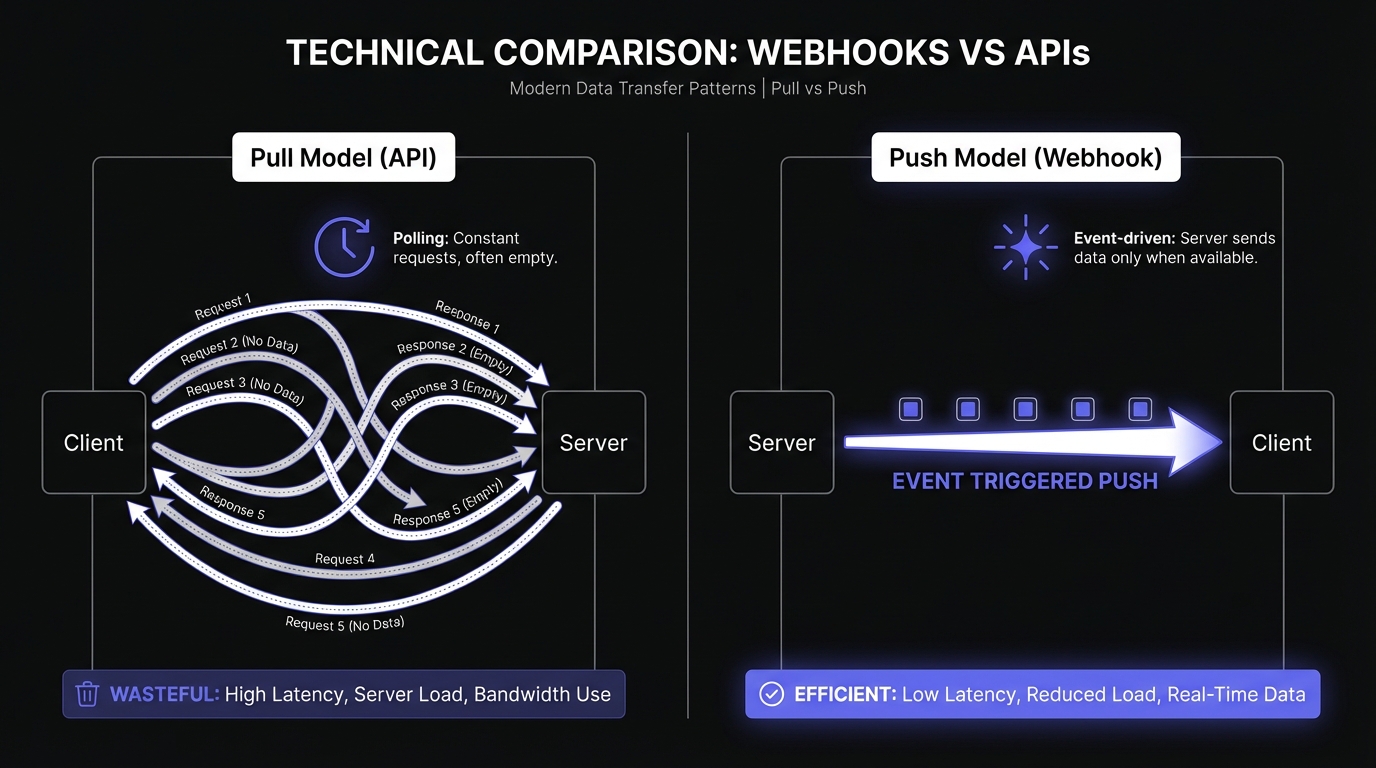
APIs follow a pull model: Your application requests data when needed. Good for on-demand queries (searching products, fetching profiles).
Webhooks follow a push model: Services send data when events occur. Good for real-time notifications where timing matters.
| Scenario | Best Approach |
|---|---|
| User requests their order history | API |
| Payment completes successfully | Webhook |
| Searching for products | API |
| Inventory level changes | Webhook |
| Generating a monthly report | API |
| New message arrives in chat | Webhook |
The most robust integrations often combine both approaches. Use webhooks for real-time event notifications, and use APIs for data retrieval and recovery when webhooks fail.
Trade-offs
Efficiency: Polling every 30 seconds wastes resources if orders only come a few times per day. Webhooks eliminate this waste.
Latency: Polling introduces 1-second delays. Webhooks deliver within milliseconds.
Complexity: Webhooks require reliable endpoints, signature verification, and idempotent processing. APIs put control in the consumer's hands.
Best practice: Use both. Webhooks for real-time notifications, APIs as a fallback. If your webhook handler crashes, use the API to recover missed events. Stripe encourages this: listen for webhooks in real-time, but periodically reconcile with their API.
Continue learning: Webhooks vs APIs: When to Use Each
Getting Started
Adding webhooks transforms your application into a platform that fits into your customers' workflows.
-
Choose events: Decide which events customers need. Common patterns: resource lifecycle (
user.created,order.completed) and state changes (invoice.paid,subscription.cancelled). -
Design payload structure: Create a consistent format with metadata (event IDs, timestamps) alongside data.
-
Build or buy infrastructure: Webhook delivery requires retry logic, signature verification, and logging. Managed services handle this so you focus on your core product.
-
Document and ship: Provide clear documentation for quick integration.
Continue learning: How to Add Webhooks to Your SaaS Product
Security Basics
Webhook endpoints are public URLs vulnerable to malicious requests. Security is fundamental to trustworthy integrations.
Real Attack Scenarios
Fake payment confirmations: An attacker discovers your /webhooks/stripe endpoint and sends a forged payment_intent.succeeded event. Without signature verification, your system marks the order as paid and ships the product. The attacker gets free goods, and you lose both the product and the money.
Unauthorized actions from fake events: Imagine an attacker sends a fake user.deleted event to your webhook handler. If you blindly trust incoming webhooks, you might delete a legitimate user's account, their data, and their access. The real user never requested this.
Server-Side Request Forgery (SSRF): Some webhook handlers fetch additional data based on URLs in the payload. An attacker could craft a webhook containing internal URLs like http://169.254.169.254/latest/meta-data/ (AWS metadata endpoint) or http://localhost:6379/ (Redis). If your handler fetches these URLs, the attacker can access internal services or steal cloud credentials.
Denial of Service via flooding: Without rate limiting, an attacker can overwhelm your webhook endpoint with millions of requests. Even if each request fails validation, the volume alone can exhaust your server resources, database connections, or trigger expensive autoscaling.
Signature verification is your first line of defense. Most providers sign payloads using HMAC-SHA256. Recalculate the signature using your shared secret and compare it to the provided one. Matching signatures prove authenticity and integrity.
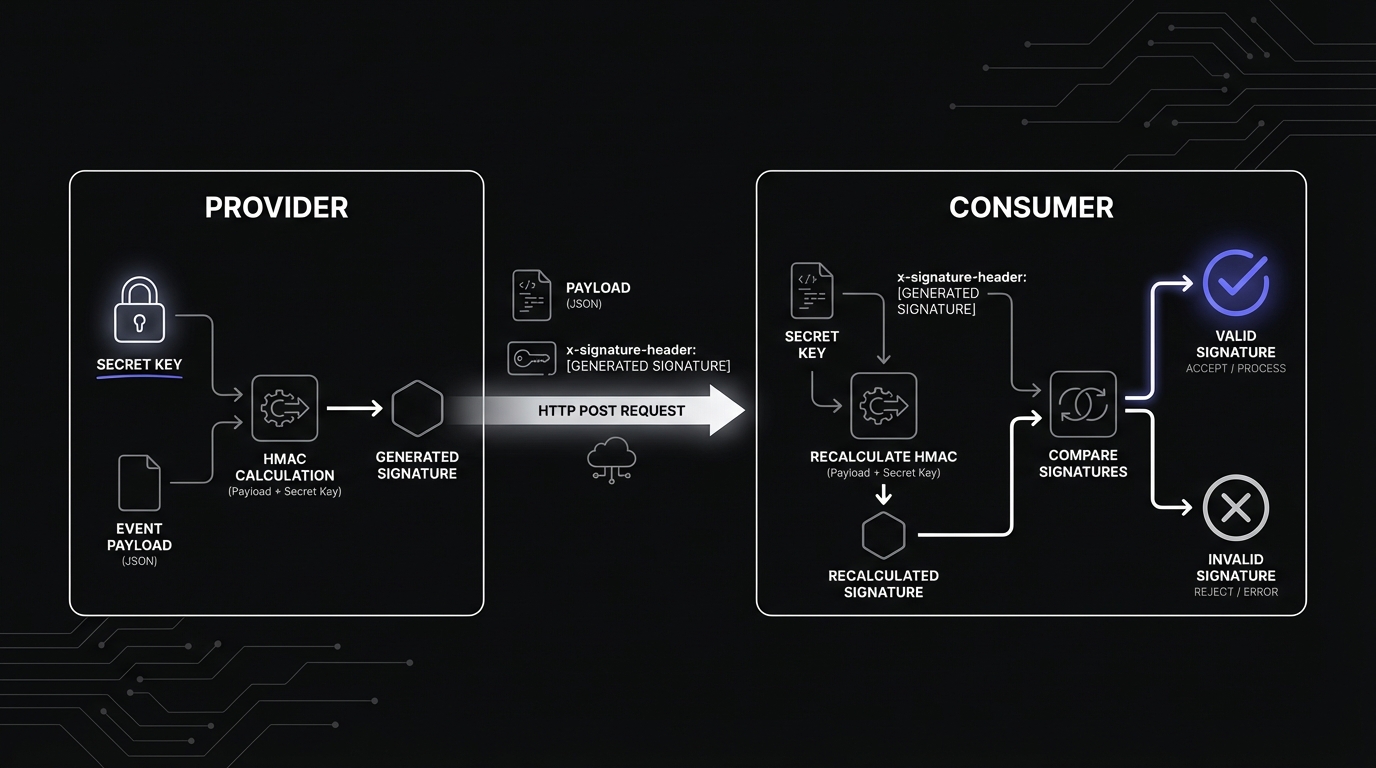
// Always verify signatures before processing webhooks
const isValid = crypto.timingSafeEqual(
  Buffer.from(receivedSignature),
  Buffer.from(expectedSignature)
);
Additional defenses:
- HTTPS everywhere: Never accept plain HTTP
- Timestamp validation: Reject old requests to prevent replay attacks
- Rate limiting: Protect from abuse
- IP allowlisting: When providers publish IP ranges
Compromised endpoints lead to data breaches, unauthorized actions, and fraud. Prioritize security from day one.
Continue learning:
Reliability Basics
Webhooks use "at-least-once" delivery semantics. Events may be delivered multiple times due to network issues, timeouts, or retries. Your code must handle duplicates gracefully.
Retry Strategies
When webhook delivery fails, providers retry with increasing delays. The industry standard is exponential backoff with jitter:
- First retry: 30 seconds
- Second retry: 1 minute
- Third retry: 2 minutes
- And so on, with randomness added to prevent synchronized retry storms
This approach gives struggling systems time to recover while efficiently covering long outage windows.
Idempotency
Idempotency ensures processing the same webhook twice has the same effect as processing it once—preventing duplicate charges and orders.
Implement idempotency:
- Extract the unique event ID from each webhook
- Check if you've already processed it
- Store processed IDs with a time-to-live
- Skip processing if the ID exists
Network hiccups without idempotency mean double charges or duplicate shipments.
Continue learning:
- Webhook Retry Strategies: Linear vs Exponential Backoff
- Webhook Idempotency: Why It Matters and How to Implement It
From Development to Production
Production webhook handling differs fundamentally from local testing.
Key Challenges
Webhooks cannot be easily replayed: Some providers offer replay functionality, others don't. By the time you discover a production bug, events are already missed or misprocessed.
Traffic spikes are unpredictable: Endpoints receive a trickle most days, then get slammed with thousands per second when jobs fire, campaigns launch, or major customers act. Without proper infrastructure, spikes crash your application.
The 10-second response rule: Providers timeout after 10 seconds. Slow handlers (database/API calls) trigger retries and duplicate processing.
Required Production Infrastructure
Asynchronous processing: Return 200 OK immediately, process webhooks in the background. Use job queues (Redis, Bull, Celery, goroutines). Respond quickly without blocking other webhooks.
Message queues: Durable queues prevent data loss. If workers crash, jobs stay queued and retry automatically. Queues buffer traffic spikes, letting you process at your own pace.
Logging: Log every webhook with timestamp, signature verification, and status. When production breaks at 2 AM, logs are your lifeline. Include event IDs for tracing.
Monitoring and alerts: Alert on error rate spikes, unbounded queue growth, and verification failures. Catch issues before customers report them.
Idempotency storage: Persistent storage (database, cache layer) tracks processed event IDs with time-to-live cleanup.
Most teams benefit from managed webhook services. Hook Mesh handles async delivery, queuing, retries, logging, monitoring, and idempotency. Build yourself only with dedicated engineering resources.
Continue learning:
- Building Reliable Webhook Infrastructure from Scratch
- Webhook Monitoring and Observability
- Why SMBs Choose Managed Webhook Services
Your First Implementation
Node.js
Node.js handles webhooks naturally with event-driven architecture. Tutorials cover payload structure, HMAC signatures, error handling, and retry logic.
// Simple webhook sender in Node.js
async function sendWebhook(url, payload) {
  const response = await fetch(url, {
    method: 'POST',
    headers: { 'Content-Type': 'application/json' },
    body: JSON.stringify(payload),
  });
  return response;
}
Start here: Send Webhooks with Node.js
Python
Python's simplicity works well for webhooks. Learn to send signed webhooks with Flask or Django, with proper error handling and async delivery.
# Simple webhook sender in Python
import requests

def send_webhook(url, payload):
    response = requests.post(url, json=payload)
    return response
Start here: Send Webhooks with Python
Go
Go's performance suits high-throughput webhook systems. Covers idiomatic patterns for delivery, including context handling and graceful shutdown.
Start here: Send Webhooks with Go
Real-World Examples
Stripe Webhooks
Stripe webhooks notify when payments succeed, subscriptions change, and invoices are created. Critical for never missing payment events.
Key topics: Setup, signature verification, common event types, idempotent handlers.
Learn more: How to Receive Stripe Webhooks Reliably
GitHub Webhooks
GitHub webhooks power CI/CD pipelines, automated deployments, and code review workflows. Enable instant reactions to code pushes and pull requests.
Key topics: Configuration, secrets, push/PR events, automated workflows.
Learn more: GitHub Webhooks: Setup and Security Guide
Industry Context
The State of Webhooks in 2026
Webhooks evolved from HTTP callbacks to mission-critical infrastructure. Event-driven architecture moved from trend to standard.
Key trends:
- Webhook-as-a-service growth: Complex infrastructure drives adoption of managed solutions
- AI/ML callbacks: ML pipelines and agents rely on webhooks for async communication
- Real-time expectations: Latency requirements continue dropping
Learn more: The Webhook Landscape in 2026: Trends and Predictions
Learning from Stripe
Stripe set the standard for webhook documentation and developer experience.
Learn more: Reviewing Stripe's Webhook Documentation
Next Steps
Choose your learning path:
If you are integrating with third-party webhooks:
- Start with the platform-specific guide (Stripe, GitHub, etc.)
- Implement signature verification immediately
- Build idempotent handlers before going to production
- Set up monitoring for failed deliveries
If you are adding webhooks to your own product:
- Read the complete guide on adding webhooks to your SaaS
- Design your event schema and payload structure
- Evaluate build vs buy for your infrastructure needs
- Implement security best practices from day one
If you want to go deeper:
- Webhook Circuit Breakers - Advanced reliability patterns
- Webhook Observability - Monitoring and debugging
- Webhook Authentication Methods Compared - Beyond HMAC-SHA256
Start Building Today
Webhooks unlock real-time integrations, but production infrastructure requires attention to security, reliability, and scale.
Hook Mesh handles infrastructure complexity. Our free tier includes automatic retries, signature verification, delivery logs, and more.
Get started free and have reliable webhooks running in minutes, not months.
Questions? Check our guides or reach out to the Hook Mesh team.