Send Webhooks with Python: A Complete Tutorial
Learn how to send webhooks with Python using the requests library. This hands-on tutorial covers payload structure, HMAC signatures, error handling, retry logic with exponential backoff, and async options.

Send Webhooks with Python: A Complete Tutorial
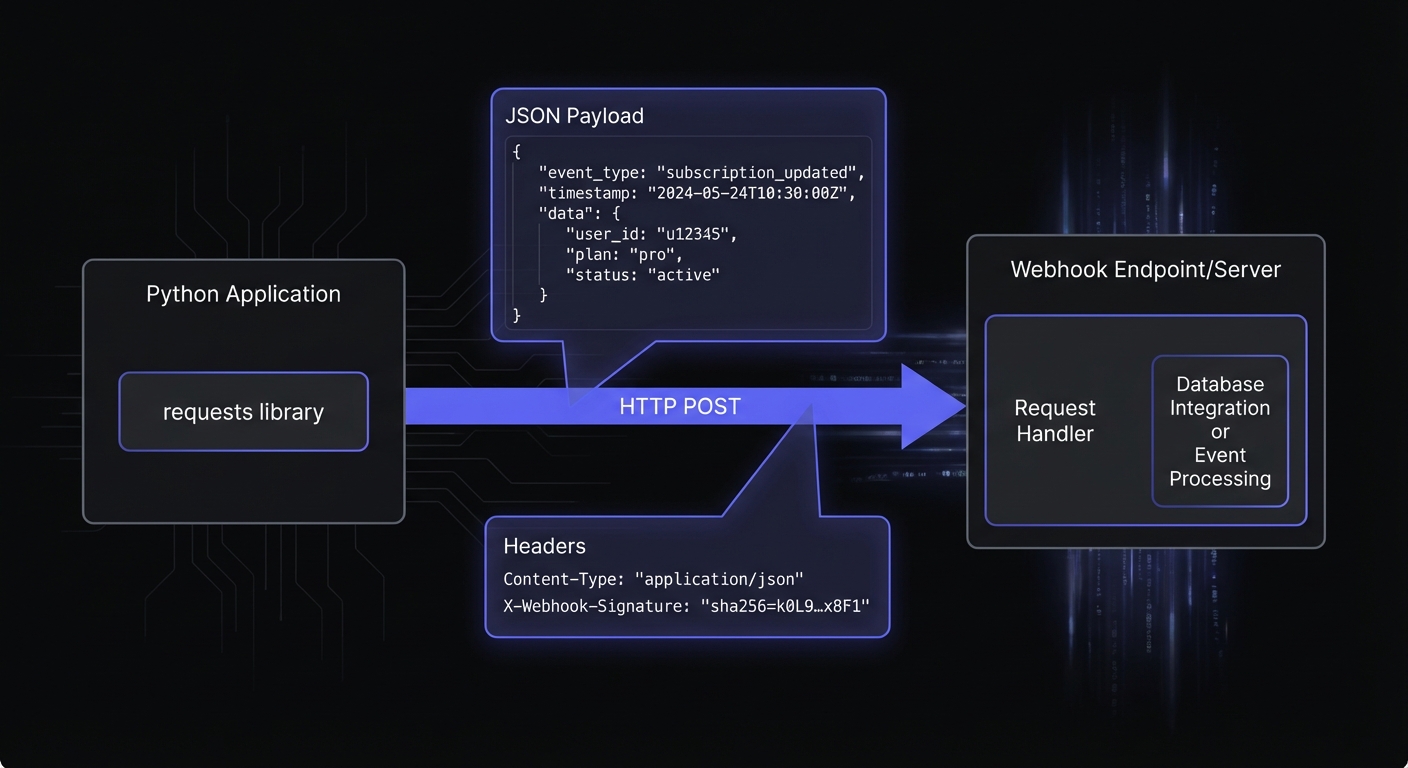
This tutorial walks you through sending webhooks with Python, from basic delivery to production-ready implementations with signatures, error handling, and intelligent retry logic.
Prerequisites
You'll need Python 3.10+ and the requests library:
pip install requestsBasic Webhook Delivery
Let's start with the simplest possible webhook sender:
import requests
import json
from datetime import datetime, timezone

def send_webhook(url: str, payload: dict) -> requests.Response:
    """Send a basic webhook to the specified URL."""
    headers = {
        "Content-Type": "application/json",
    }

    response = requests.post(url, json=payload, headers=headers, timeout=30)
    response.raise_for_status()
    return response

# Example usage
payload = {
    "event": "order.completed",
    "created_at": datetime.now(timezone.utc).isoformat(),
    "data": {
        "order_id": "ord_12345",
        "customer_id": "cus_67890",
        "total": 9999,
        "currency": "usd"
    }
}

response = send_webhook("https://example.com/webhooks", payload)
print(f"Delivered: {response.status_code}")
This works, but production systems need authentication, error handling, and reliability.
Structuring Your Webhook Payload
import uuid
from datetime import datetime, timezone
from typing import Any

def create_webhook_payload(event_type: str, data: dict[str, Any]) -> dict:
    """Create a consistently structured webhook payload."""
    return {
        "id": f"evt_{uuid.uuid4().hex[:16]}",
        "type": event_type,
        "api_version": "2026-01-01",
        "created_at": datetime.now(timezone.utc).isoformat(),
        "data": data
    }

# Create a payment webhook
payload = create_webhook_payload(
    event_type="payment.succeeded",
    data={
        "payment_id": "pay_abc123",
        "amount": 5000,
        "currency": "usd",
        "customer_email": "user@example.com"
    }
)
This provides unique ID, event type, version, timestamp, and data for reliable processing.
Adding HMAC-SHA256 Signatures
Signatures let receivers verify webhook authenticity. For detailed implementation, see our HMAC-SHA256 webhook signatures guide.
import hmac
import hashlib
import time

def sign_payload(payload: str, secret: str) -> tuple[str, int]:
    """
    Sign a webhook payload using HMAC-SHA256.
    Returns the signature header value and timestamp.
    """
    timestamp = int(time.time())

    # Create the signed payload string: timestamp.payload
    signed_payload = f"{timestamp}.{payload}"

    # Generate HMAC-SHA256 signature
    signature = hmac.new(
        secret.encode("utf-8"),
        signed_payload.encode("utf-8"),
        hashlib.sha256
    ).hexdigest()

    return f"t={timestamp},v1={signature}", timestamp


def send_signed_webhook(url: str, payload: dict, secret: str) -> requests.Response:
    """Send a webhook with HMAC-SHA256 signature."""
    # Serialize with consistent formatting (no extra whitespace)
    payload_string = json.dumps(payload, separators=(",", ":"))

    # Generate signature
    signature, _ = sign_payload(payload_string, secret)

    headers = {
        "Content-Type": "application/json",
        "X-Webhook-Signature": signature,
    }

    response = requests.post(
        url,
        data=payload_string,  # Use pre-serialized string
        headers=headers,
        timeout=30
    )
    response.raise_for_status()
    return response

# Usage
webhook_secret = "whsec_your_secret_key_here"
payload = create_webhook_payload("user.created", {"user_id": "usr_123"})
response = send_signed_webhook(
    "https://example.com/webhooks",
    payload,
    webhook_secret
)
The format t=timestamp,v1=signature prevents replay attacks—receivers reject old timestamps.

Handling Errors with Try/Except
from requests.exceptions import RequestException, Timeout, HTTPError

class WebhookDeliveryError(Exception):
    """Raised when webhook delivery fails."""
    def __init__(self, message: str, status_code: int | None = None):
        super().__init__(message)
        self.status_code = status_code


def send_webhook_with_error_handling(
    url: str,
    payload: dict,
    secret: str
) -> dict:
    """
    Send a webhook with comprehensive error handling.
    Returns delivery status information.
    """
    payload_string = json.dumps(payload, separators=(",", ":"))
    signature, timestamp = sign_payload(payload_string, secret)

    headers = {
        "Content-Type": "application/json",
        "X-Webhook-Signature": signature,
    }

    try:
        response = requests.post(
            url,
            data=payload_string,
            headers=headers,
            timeout=30
        )

        # Check for HTTP errors (4xx, 5xx)
        response.raise_for_status()

        return {
            "success": True,
            "status_code": response.status_code,
            "response_body": response.text[:500],  # Truncate for logging
        }

    except Timeout:
        raise WebhookDeliveryError("Request timed out", status_code=None)

    except HTTPError as e:
        status_code = e.response.status_code if e.response else None

        # Distinguish between client errors (don't retry) and server errors (retry)
        if status_code and 400 <= status_code < 500:
            raise WebhookDeliveryError(
                f"Client error: {status_code}",
                status_code=status_code
            )
        raise WebhookDeliveryError(
            f"Server error: {status_code}",
            status_code=status_code
        )

    except RequestException as e:
        raise WebhookDeliveryError(f"Request failed: {str(e)}")
This separates failure types: client errors (4xx) shouldn't be retried; server errors (5xx) and network failures are transient.
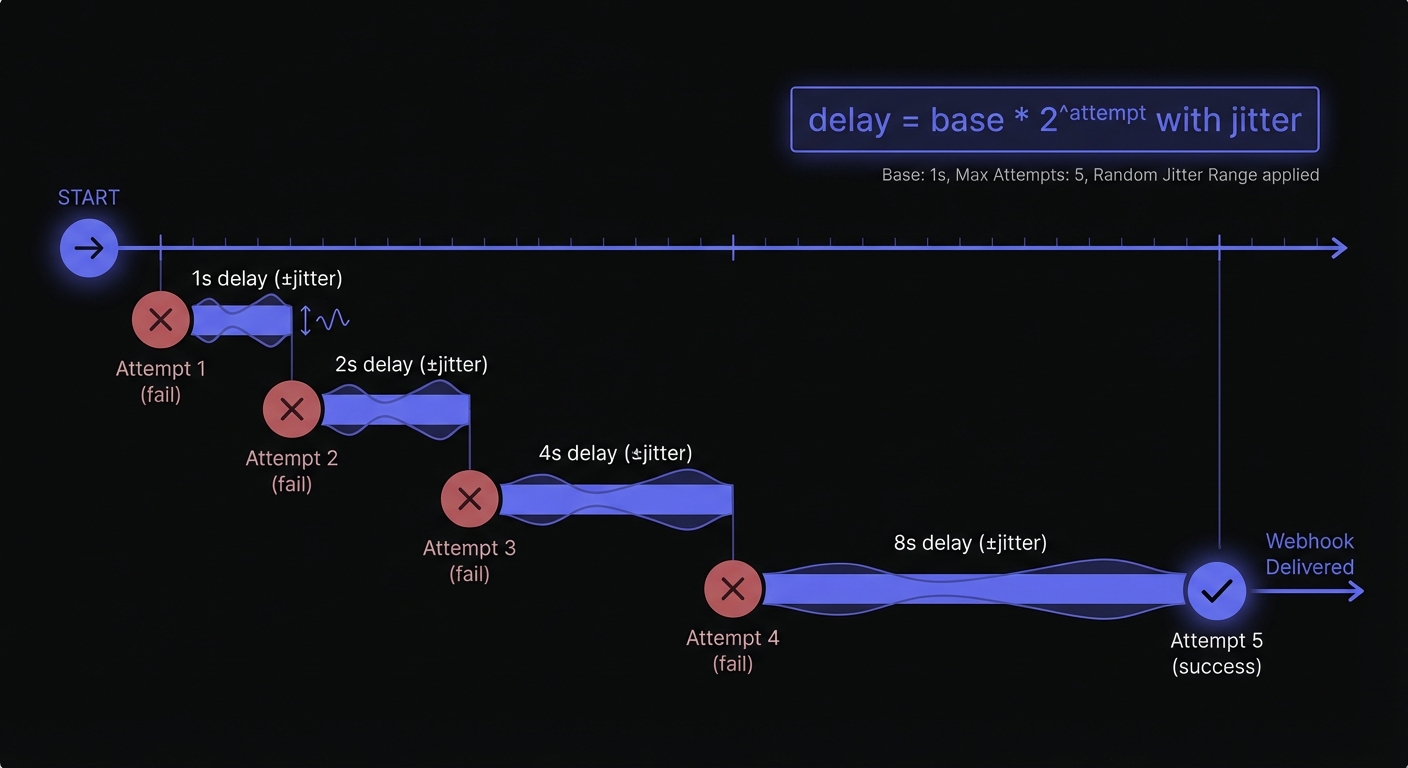
Retry Logic with Exponential Backoff
For a comprehensive look at retry patterns, see our guide on webhook retry strategies.
import random
import time
from typing import Callable

def exponential_backoff_with_jitter(
    attempt: int,
    base_delay: float = 1.0,
    max_delay: float = 300.0
) -> float:
    """
    Calculate delay using exponential backoff with full jitter.
    This prevents thundering herd problems when many webhooks retry simultaneously.
    """
    exponential_delay = base_delay * (2 ** attempt)
    capped_delay = min(exponential_delay, max_delay)
    return random.uniform(0, capped_delay)


def send_webhook_with_retries(
    url: str,
    payload: dict,
    secret: str,
    max_attempts: int = 5,
    base_delay: float = 1.0
) -> dict:
    """
    Send a webhook with automatic retries using exponential backoff.
    """
    last_error: Exception | None = None

    for attempt in range(max_attempts):
        try:
            result = send_webhook_with_error_handling(url, payload, secret)
            result["attempts"] = attempt + 1
            return result

        except WebhookDeliveryError as e:
            last_error = e

            # Don't retry client errors (4xx)
            if e.status_code and 400 <= e.status_code < 500:
                raise

            # Don't sleep after the last attempt
            if attempt < max_attempts - 1:
                delay = exponential_backoff_with_jitter(attempt, base_delay)
                print(f"Attempt {attempt + 1} failed, retrying in {delay:.2f}s")
                time.sleep(delay)

    # All attempts exhausted
    raise WebhookDeliveryError(
        f"Failed after {max_attempts} attempts: {last_error}",
        status_code=getattr(last_error, "status_code", None)
    )


# Usage
try:
    result = send_webhook_with_retries(
        url="https://example.com/webhooks",
        payload=create_webhook_payload("invoice.paid", {"invoice_id": "inv_456"}),
        secret="whsec_your_secret",
        max_attempts=5
    )
    print(f"Delivered in {result['attempts']} attempt(s)")
except WebhookDeliveryError as e:
    print(f"Delivery failed: {e}")
    # Move to dead letter queue for manual review
Jitter prevents synchronized load spikes when many webhooks retry simultaneously.
Async Webhook Delivery with aiohttp
For high-throughput systems, send many webhooks concurrently:
import aiohttp
import asyncio

async def send_webhook_async(
    url: str,
    payload: dict,
    secret: str,
    session: aiohttp.ClientSession
) -> dict:
    """Send a webhook asynchronously using aiohttp."""
    payload_string = json.dumps(payload, separators=(",", ":"))
    signature, _ = sign_payload(payload_string, secret)

    headers = {
        "Content-Type": "application/json",
        "X-Webhook-Signature": signature,
    }

    async with session.post(
        url,
        data=payload_string,
        headers=headers,
        timeout=aiohttp.ClientTimeout(total=30)
    ) as response:
        return {
            "success": response.status < 400,
            "status_code": response.status,
        }


async def send_webhooks_batch(
    webhooks: list[tuple[str, dict]],
    secret: str
) -> list[dict]:
    """Send multiple webhooks concurrently."""
    async with aiohttp.ClientSession() as session:
        tasks = [
            send_webhook_async(url, payload, secret, session)
            for url, payload in webhooks
        ]
        return await asyncio.gather(*tasks, return_exceptions=True)
This approach is ideal when you need to fan out a single event to many subscriber endpoints simultaneously.
For production async webhooks with built-in retry support, use aiohttp-retry:
pip install aiohttp-retryfrom aiohttp_retry import RetryClient, ExponentialRetry
async def send_webhook_with_async_retries(
url: str,
payload: dict,
secret: str
) -> dict:
"""Send webhook with automatic async retries."""
payload_string = json.dumps(payload, separators=(",", ":"))
signature, _ = sign_payload(payload_string, secret)
retry_options = ExponentialRetry(
attempts=5,
start_timeout=1.0,
max_timeout=30.0,
statuses={500, 502, 503, 504}
)
async with RetryClient(retry_options=retry_options) as client:
async with client.post(
url,
data=payload_string,
headers={
"Content-Type": "application/json",
"X-Webhook-Signature": signature,
}
) as response:
return {
"success": response.status < 400,
"status_code": response.status,
}Testing Webhooks Locally
Before deploying, test your webhook sender against a local endpoint:
webhook.site - Instantly capture and inspect incoming webhooks without any setup. Visit webhook.site to get a unique URL.
ngrok - Expose your local development server to the internet for testing with real webhook providers:
# Install ngrok and expose local port
ngrok http 8000

# Use the generated URL (e.g., https://abc123.ngrok.io/webhooks)
Local Flask receiver - Create a minimal endpoint for development:
from flask import Flask, request

app = Flask(__name__)

@app.route("/webhooks", methods=["POST"])
def receive_webhook():
    print(f"Headers: {dict(request.headers)}")
    print(f"Payload: {request.json}")
    return "", 200

if __name__ == "__main__":
    app.run(port=8000, debug=True)
Run the receiver, then send test webhooks to http://localhost:8000/webhooks.
Using Hook Mesh for Production Webhooks
Hook Mesh handles queuing, persistent retry storage, monitoring, and debugging tools:
from hookmesh import HookMesh

client = HookMesh(api_key="hm_live_your_api_key")

# Send an event - Hook Mesh handles delivery, retries, and logging
client.events.send(
    event_type="order.completed",
    data={
        "order_id": "ord_12345",
        "customer_id": "cus_67890",
        "total": 9999,
        "currency": "usd"
    }
)
Hook Mesh provides automatic retries, HMAC signatures, monitoring dashboard, and customer-facing webhook management.
Best Practices Summary
When building your own webhook sender:
- Always sign your webhooks - HMAC-SHA256 signatures prevent forgery
- Include timestamps - Enables replay attack prevention
- Use consistent payload structure - Makes life easier for receivers
- Handle errors by type - Retry server errors, fail fast on client errors
- Implement exponential backoff with jitter - Prevents overwhelming struggling endpoints
- Set reasonable timeouts - 30 seconds is typical; don't wait forever
- Log everything - You'll need delivery history for debugging
Conclusion
Sending webhooks with Python requires attention to security, error handling, and reliability. The code in this tutorial gives you a solid foundation. Hook Mesh provides production infrastructure; custom solutions use the patterns shown here.
Next, learn how to receive and verify webhooks in Python to understand API consumer requirements. If you're building with Django, check out our Django webhook integration guide. For more tutorials, visit our webhook implementation guides.
Related Posts
Receive and Verify Webhooks in Python: A Complete Guide
Learn how to securely receive and verify webhooks in Python using Flask and FastAPI. Covers HMAC signature verification, timestamp validation, and common security pitfalls to avoid.
HMAC-SHA256 Webhook Signatures: Implementation Guide
Learn how to implement secure webhook signature verification using HMAC-SHA256. Complete guide with code examples for signing and verifying webhook payloads in Node.js and Python.
Webhook Retry Strategies: Linear vs Exponential Backoff
A technical deep-dive into webhook retry strategies, comparing linear and exponential backoff approaches, with code examples and best practices for building reliable webhook delivery systems.
Building Webhooks with Django and Hook Mesh
A complete tutorial for Django developers on implementing webhooks—sending events from views and signals, receiving webhooks securely, signature verification, and integrating with Hook Mesh for reliable delivery.
Webhook Implementation Guides by Language and Framework
The complete developer hub for webhook implementation tutorials. Find guides for sending, receiving, and verifying webhooks in Node.js, Python, Go, and popular frameworks like Next.js, Django, and Express.