HMAC-SHA256 Webhook Signatures: Implementation Guide
Learn how to implement secure webhook signature verification using HMAC-SHA256. Complete guide with code examples for signing and verifying webhook payloads in Node.js and Python.
HMAC-SHA256 Webhook Signatures: Implementation Guide
Without webhook signature verification, attackers can forge requests to trigger unauthorized actions. HMAC-SHA256 is the industry standard for solving this. This guide covers implementation—from cryptographic foundations to production-ready code. For broader security guidance, see our webhook security best practices.
What is HMAC-SHA256?
HMAC (Hash-based Message Authentication Code) is a cryptographic algorithm that combines a secret key with a message to produce a unique signature. SHA256 refers to the specific hash function used—SHA-256 from the SHA-2 family.
The formula looks like this:
HMAC(key, message) = Hash((key XOR opad) || Hash((key XOR ipad) || message))
Every major programming language provides built-in HMAC functions. What matters are these properties:
- Deterministic: The same key and message always produce the same signature
- Irreversible: You cannot derive the key or original message from the signature
- Collision-resistant: It's computationally infeasible to find two different messages that produce the same signature
- Key-dependent: Without the secret key, an attacker cannot forge a valid signature
Why Webhook Signature Verification Matters
Webhook endpoints are public URLs. Without verification, attackers can forge payments, trigger unauthorized actions, or inject malicious data. Signature verification ensures only requests signed with your shared secret are processed, and detects any payload tampering in transit. For a comparison with JWT and mTLS, see webhook authentication methods compared.
How Webhook Signing Works (Sender Side)
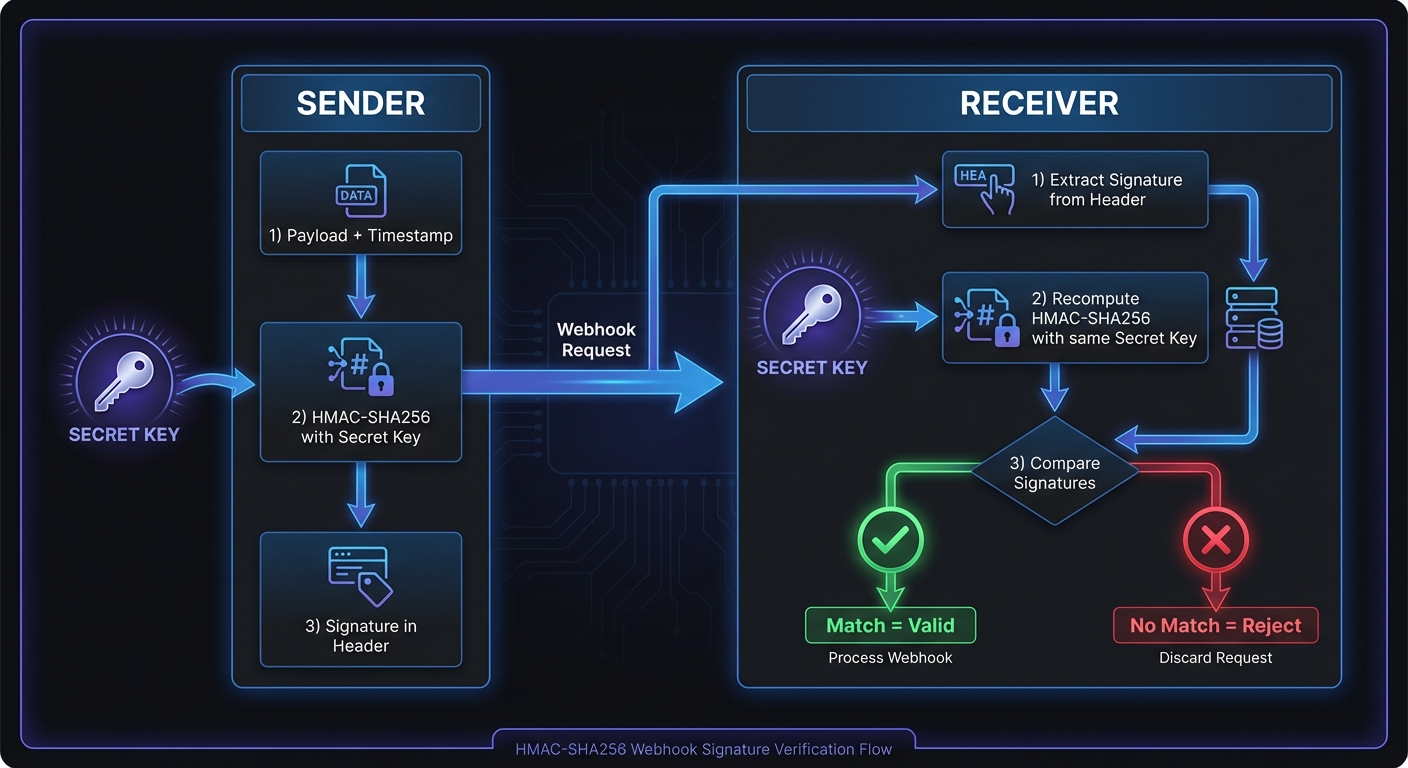
The signing process:
- Serialize the webhook payload (typically as JSON)
- Compute the HMAC-SHA256 signature using the shared secret
- Include the signature in a request header
- Send the HTTP request to your endpoint
Node.js Signing Implementation
const crypto = require('crypto');

function signWebhookPayload(payload, secret) {
  const timestamp = Math.floor(Date.now() / 1000);
  const payloadString = JSON.stringify(payload);

  // Create the signed payload string (timestamp + payload)
  const signedPayload = `${timestamp}.${payloadString}`;

  // Generate HMAC-SHA256 signature
  const signature = crypto
    .createHmac('sha256', secret)
    .update(signedPayload)
    .digest('hex');

  return {
    signature: `t=${timestamp},v1=${signature}`,
    timestamp,
    body: payloadString
  };
}

// Usage
const payload = { event: 'order.completed', orderId: '12345' };
const secret = 'whsec_your_webhook_secret_here';
const signed = signWebhookPayload(payload, secret);

// Send webhook with headers
// 'X-Webhook-Signature': signed.signature
Python Signing Implementation
import hmac
import hashlib
import json
import time

def sign_webhook_payload(payload: dict, secret: str) -> dict:
    timestamp = int(time.time())
    payload_string = json.dumps(payload, separators=(',', ':'))

    # Create the signed payload string
    signed_payload = f"{timestamp}.{payload_string}"

    # Generate HMAC-SHA256 signature
    signature = hmac.new(
        secret.encode('utf-8'),
        signed_payload.encode('utf-8'),
        hashlib.sha256
    ).hexdigest()

    return {
        'signature': f"t={timestamp},v1={signature}",
        'timestamp': timestamp,
        'body': payload_string
    }

# Usage
payload = {'event': 'order.completed', 'orderId': '12345'}
secret = 'whsec_your_webhook_secret_here'
signed = sign_webhook_payload(payload, secret)
How Verification Works (Receiver Side)
Reverse the signing process:
- Extract the signature and timestamp from the header
- Reconstruct the signed payload string using the timestamp and raw request body
- Compute the expected signature using your copy of the shared secret
- Compare your computed signature with the received signature
- Validate the timestamp to prevent replay attacks
Node.js Verification Implementation
const crypto = require('crypto');

function verifyWebhookSignature(payload, signature, secret, toleranceSeconds = 300) {
  // Parse the signature header
  const elements = signature.split(',');
  const timestamp = elements.find(e => e.startsWith('t='))?.slice(2);
  const receivedSig = elements.find(e => e.startsWith('v1='))?.slice(3);

  if (!timestamp || !receivedSig) {
    throw new Error('Invalid signature format');
  }

  // Check timestamp tolerance (prevent replay attacks)
  const currentTime = Math.floor(Date.now() / 1000);
  if (Math.abs(currentTime - parseInt(timestamp)) > toleranceSeconds) {
    throw new Error('Timestamp outside tolerance window');
  }

  // Reconstruct the signed payload
  const signedPayload = `${timestamp}.${payload}`;

  // Compute expected signature
  const expectedSig = crypto
    .createHmac('sha256', secret)
    .update(signedPayload)
    .digest('hex');

  // Timing-safe comparison
  const isValid = crypto.timingSafeEqual(
    Buffer.from(receivedSig, 'hex'),
    Buffer.from(expectedSig, 'hex')
  );

  if (!isValid) {
    throw new Error('Signature verification failed');
  }

  return true;
}

// Express.js middleware example
app.post('/webhooks', express.raw({ type: 'application/json' }), (req, res) => {
  const signature = req.headers['x-webhook-signature'];
  const secret = process.env.WEBHOOK_SECRET;

  try {
    verifyWebhookSignature(req.body.toString(), signature, secret);
    const event = JSON.parse(req.body);
    // Process the verified webhook
    res.status(200).send('OK');
  } catch (err) {
    console.error('Webhook verification failed:', err.message);
    res.status(401).send('Invalid signature');
  }
});
Python Verification Implementation
import hmac
import hashlib
import time

def verify_webhook_signature(
    payload: str,
    signature: str,
    secret: str,
    tolerance_seconds: int = 300
) -> bool:
    # Parse the signature header
    elements = dict(e.split('=', 1) for e in signature.split(','))
    timestamp = elements.get('t')
    received_sig = elements.get('v1')

    if not timestamp or not received_sig:
        raise ValueError('Invalid signature format')

    # Check timestamp tolerance
    current_time = int(time.time())
    if abs(current_time - int(timestamp)) > tolerance_seconds:
        raise ValueError('Timestamp outside tolerance window')

    # Reconstruct the signed payload
    signed_payload = f"{timestamp}.{payload}"

    # Compute expected signature
    expected_sig = hmac.new(
        secret.encode('utf-8'),
        signed_payload.encode('utf-8'),
        hashlib.sha256
    ).hexdigest()

    # Timing-safe comparison
    if not hmac.compare_digest(received_sig, expected_sig):
        raise ValueError('Signature verification failed')

    return True

# Flask example
from flask import Flask, request

@app.route('/webhooks', methods=['POST'])
def handle_webhook():
    signature = request.headers.get('X-Webhook-Signature')
    secret = os.environ['WEBHOOK_SECRET']

    try:
        verify_webhook_signature(request.data.decode(), signature, secret)
        event = request.get_json()
        # Process the verified webhook
        return 'OK', 200
    except ValueError as e:
        return f'Invalid signature: {e}', 401
Timing-Safe Comparison: Why It Matters
Use crypto.timingSafeEqual (Node.js) or hmac.compare_digest (Python), not naive string comparison like ===.
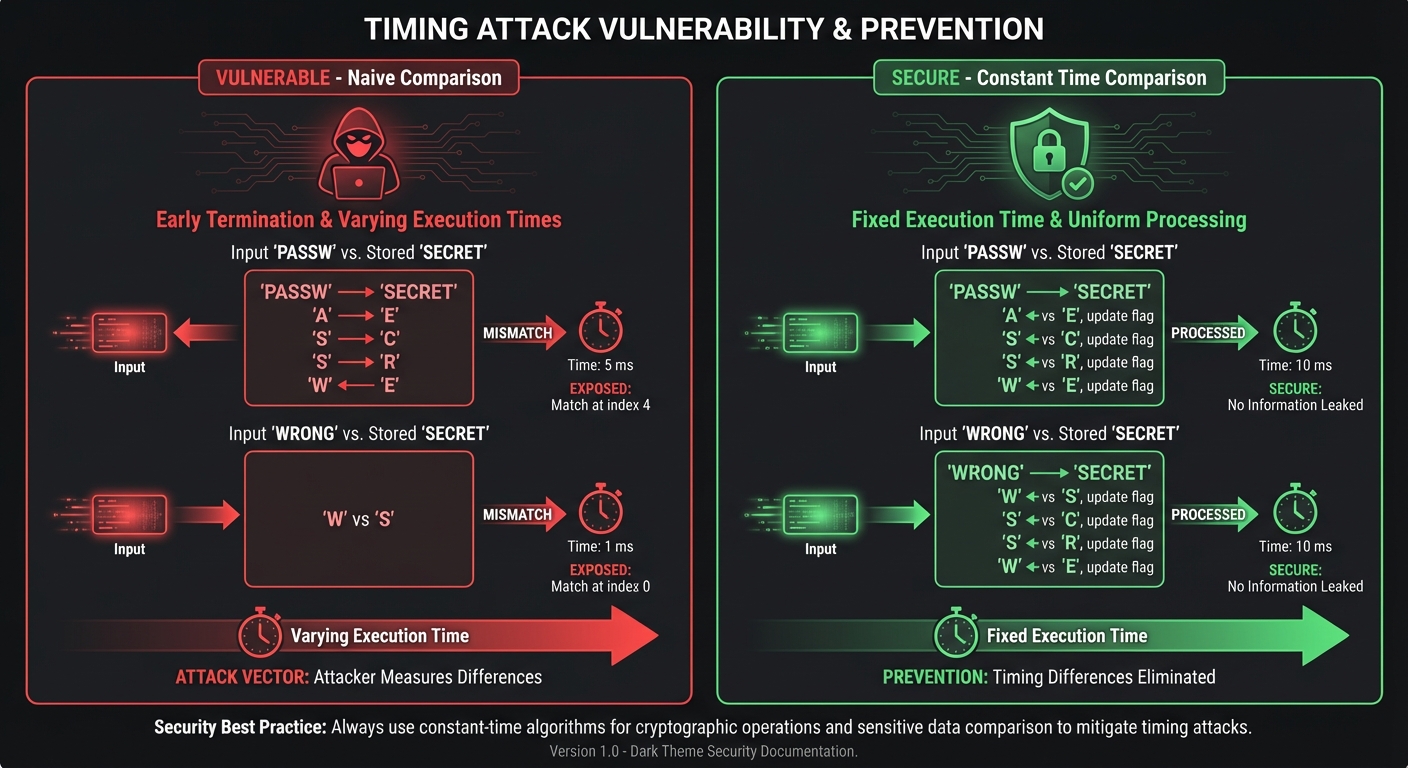
A naive comparison returns false immediately on the first mismatched character. Attackers can measure response times to learn the correct signature byte-by-byte, then forge valid signatures. Constant-time comparison always takes the same duration regardless of where mismatches occur, eliminating this timing side channel.
Common Implementation Mistakes
Using the parsed JSON instead of raw body: HMAC is computed over the exact bytes sent. If you parse the JSON and re-serialize it, whitespace or key ordering differences will cause verification to fail. Always compute signatures over the raw request body.
Incorrect encoding: Ensure consistent UTF-8 encoding for both the payload and secret. Encoding mismatches are a common source of verification failures.
Missing timestamp validation: Without checking timestamps, attackers can replay captured webhooks indefinitely. Enforce a reasonable tolerance window (5 minutes typical). See our guides for verifying webhooks in Node.js and verifying webhooks in Python.
Logging secrets or signatures: Never log your webhook secrets or received signatures. These could be exploited if logs are compromised.
Provider Signature Header Formats
Different providers use different header names and signature formats. Here's a reference for major platforms:
| Provider | Signature Header | Format | Algorithm |
|---|---|---|---|
| Stripe | Stripe-Signature | t=timestamp,v1=signature | HMAC-SHA256 |
| GitHub | X-Hub-Signature-256 | sha256=signature | HMAC-SHA256 |
| Shopify | X-Shopify-Hmac-SHA256 | Base64-encoded signature | HMAC-SHA256 |
| Slack | X-Slack-Signature | v0=signature | HMAC-SHA256 |
| Twilio | X-Twilio-Signature | Base64-encoded signature | HMAC-SHA1 (legacy) |
| Square | X-Square-Hmacsha256-Signature | Base64-encoded signature | HMAC-SHA256 |
Always consult your provider's documentation for the exact header name and encoding format.
Why SHA256 Over SHA1
SHA-1 has known theoretical weaknesses and demonstrated collision attacks. The cryptographic community has moved to SHA-256 as the minimum standard. SHA-256 provides 256-bit output versus SHA-1's 160-bit, offering better security margins with no performance penalty.
Replay Attack Prevention with Timestamps
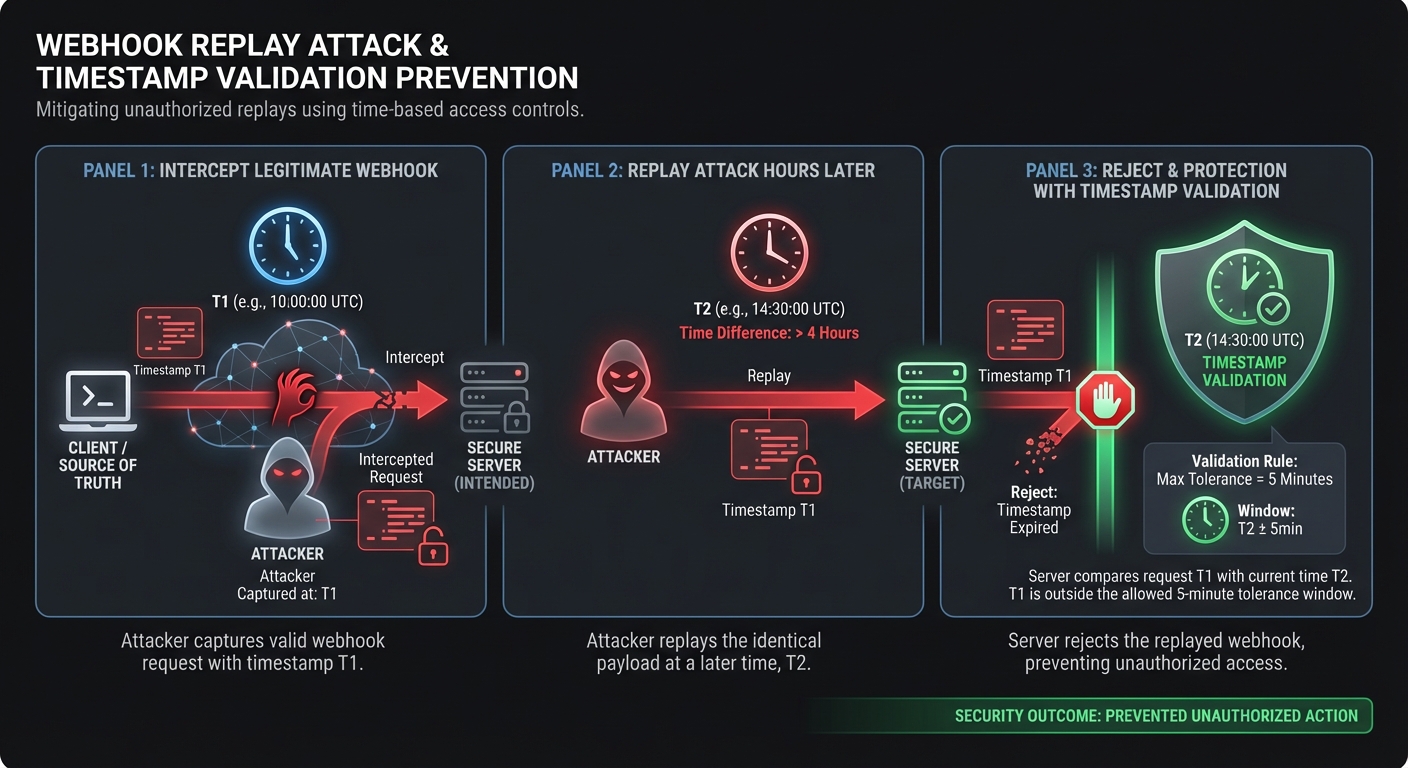
Including a timestamp in the signed payload provides:
- Freshness: Reject webhooks with timestamps too far in the past or future
- Uniqueness: Identical payloads produce different signatures at different times
A 5-minute tolerance window accommodates clock skew and network delays while limiting replay windows. For additional protection, store processed webhook IDs and reject duplicates. See Stripe's pattern.
Testing Your Implementation
Use these test vectors to validate your HMAC-SHA256 implementation before going live:
// Test vector (from GitHub documentation pattern)
const testSecret = 'It\'s a Secret to Everybody';
const testPayload = 'Hello, World!';
const expectedSignature = '757107ea0eb2509fc211221cce984b8a37570b6d7586c22c46f4379c8b043e17';

// Your implementation should produce this exact signature
const signature = crypto
  .createHmac('sha256', testSecret)
  .update(testPayload)
  .digest('hex');

console.assert(signature === expectedSignature, 'HMAC implementation mismatch');
# Python test vector
import hmac
import hashlib
test_secret = "It's a Secret to Everybody"
test_payload = "Hello, World!"
expected_signature = "757107ea0eb2509fc211221cce984b8a37570b6d7586c22c46f4379c8b043e17"
signature = hmac.new(
test_secret.encode('utf-8'),
test_payload.encode('utf-8'),
hashlib.sha256
).hexdigest()
assert signature == expected_signature, "HMAC implementation mismatch"Debugging Verification Failures
When signature verification fails, check these common causes:
-
Payload encoding: Print the raw bytes you're signing. Verify UTF-8 encoding on both ends.
-
Whitespace differences: JSON serializers may add or remove spaces. Compare exact byte sequences.
-
Header parsing: Extract the signature carefully. Watch for leading/trailing whitespace.
-
Secret mismatch: Confirm you're using the correct secret for the environment (test vs production).
-
Proxy modifications: Load balancers or API gateways may modify headers or body content.
Debug logging (remove after troubleshooting):
// Temporary debugging - REMOVE before production
console.log('Raw payload bytes:', Buffer.from(payload).toString('hex'));
console.log('Secret length:', secret.length);
console.log('Computed signature:', computedSignature);
console.log('Received signature:', receivedSignature);
Secret Rotation Best Practices
Rotate secrets periodically for security hygiene and immediately if compromised:
- Generate a new secret in your webhook provider's dashboard
- Update your application to accept signatures from both old and new secrets
- Wait for the provider to sign with the new secret
- Verify webhooks arrive with new signatures
- Remove the old secret from your application
During rotation, verify with each configured secret, succeeding if any match.
Hook Mesh: Secure Webhook Delivery Built In
Every webhook delivered through Hook Mesh includes HMAC-SHA256 signatures automatically, with timestamp inclusion, proper header formatting, and secure secret management. Our dashboard provides one-click secret rotation, signature debugging tools, and detailed delivery logs for troubleshooting verification issues.
Conclusion
HMAC-SHA256 provides strong, well-understood security when implemented correctly. Key points: use the raw request body, implement timing-safe comparison, validate timestamps, and handle secret rotation. Before going live, review our production security checklist.
Related Posts
Webhook Security Best Practices: The Complete Guide
Learn how to secure your webhook implementations with HMAC signature verification, replay attack prevention, SSRF mitigation, and more. Includes code examples in Node.js and Python.
Webhook Authentication: HMAC vs JWT vs mTLS Compared
A comprehensive comparison of webhook authentication methods including HMAC-SHA256, JWT, mTLS, Basic Auth, and API Keys. Learn when to use each method, with code examples and security recommendations.
Receive and Verify Webhooks in Node.js: A Complete Guide
Learn how to securely receive and verify webhooks in Node.js using Express.js. Covers HMAC signature verification, timestamp validation, replay attack prevention, and common mistakes to avoid.
Receive and Verify Webhooks in Python: A Complete Guide
Learn how to securely receive and verify webhooks in Python using Flask and FastAPI. Covers HMAC signature verification, timestamp validation, and common security pitfalls to avoid.
How to Receive Stripe Webhooks Reliably
A comprehensive guide to setting up, verifying, and handling Stripe webhooks in production. Learn best practices for idempotency, event ordering, and building reliable webhook endpoints with Node.js and Python examples.