Send Webhooks with Node.js: A Complete Tutorial
Learn how to send webhooks from your Node.js application. This hands-on tutorial covers payload structure, HMAC signatures, error handling, retry logic, and testing—with complete code examples using modern ES modules and fetch.
Send Webhooks with Node.js: A Complete Tutorial
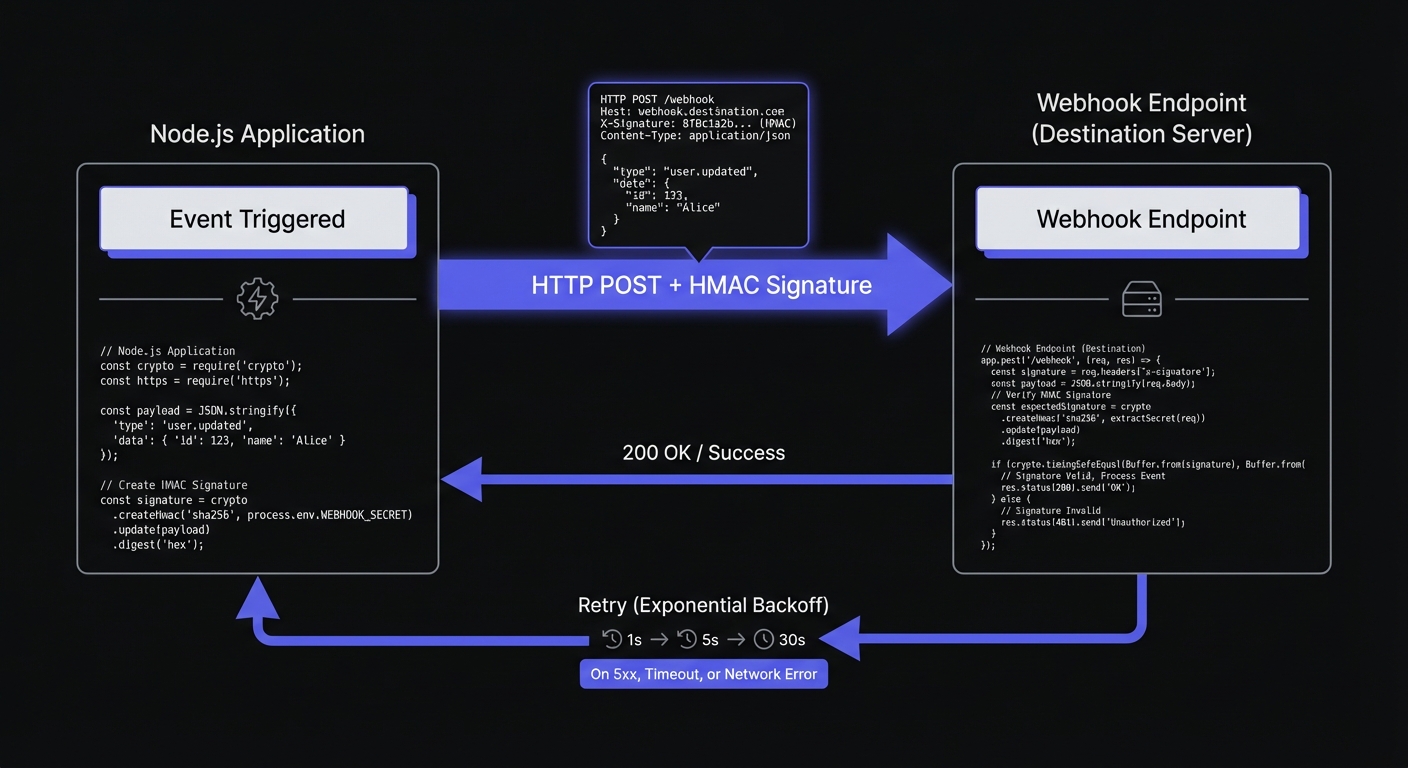
This tutorial walks you through sending webhooks from Node.js—from basic HTTP requests to production-ready implementations with signatures, retries, and error handling. You'll learn both the DIY approach and using Hook Mesh for production reliability.
Prerequisites
This tutorial uses modern Node.js features:
- Node.js 18+ (for native
fetchsupport) - ES modules (
import/exportsyntax) - Basic familiarity with async/await
Setting Up a Basic Webhook Sender
At its core, sending a webhook is just an HTTP POST request with a JSON payload. Let's start simple:
async function sendWebhook(url, payload) {
  const response = await fetch(url, {
    method: 'POST',
    headers: {
      'Content-Type': 'application/json',
    },
    body: JSON.stringify(payload),
  });

  return response;
}

// Example usage
const webhookUrl = 'https://example.com/webhooks';
const event = {
  type: 'order.completed',
  data: {
    orderId: 'ord_123',
    amount: 9900,
    currency: 'usd',
  },
};

await sendWebhook(webhookUrl, event);
This works, but production webhooks need: consistent payload structure, authentication, error handling, and retry logic.
Designing Your Payload Structure
function createWebhookPayload(eventType, data) {
  return {
    id: `evt_${crypto.randomUUID()}`,
    type: eventType,
    created_at: new Date().toISOString(),
    data: data,
  };
}

// Usage
const payload = createWebhookPayload('invoice.paid', {
  invoiceId: 'inv_456',
  amount: 4999,
  customerId: 'cus_789',
});

// Result:
// {
//   id: 'evt_a1b2c3d4-e5f6-7890-abcd-ef1234567890',
//   type: 'invoice.paid',
//   created_at: '2026-01-20T15:30:00.000Z',
//   data: { invoiceId: 'inv_456', amount: 4999, customerId: 'cus_789' }
// }
Use unique id for deduplication, type for routing, created_at for ordering.
Adding HMAC-SHA256 Signatures
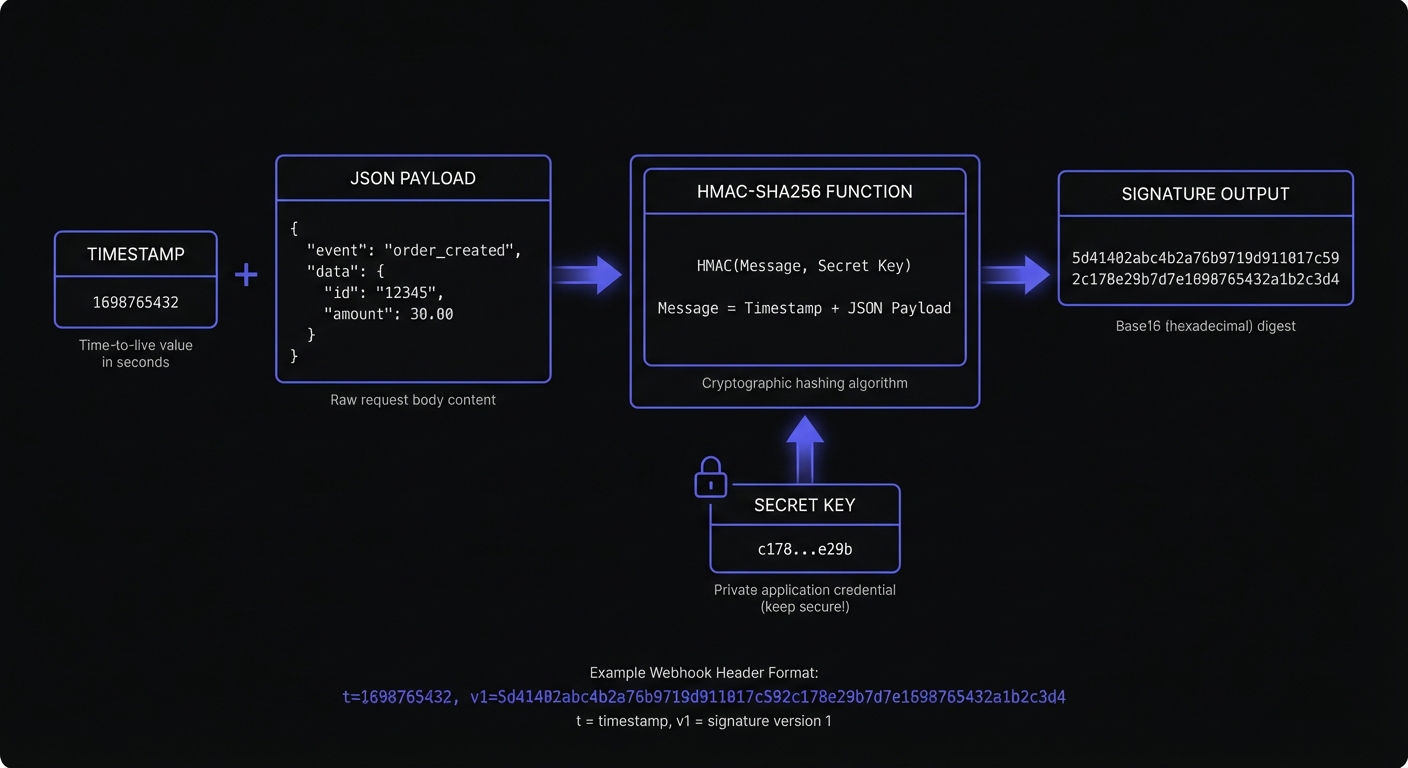
HMAC-SHA256 signatures prove webhook authenticity—without them, anyone discovering your endpoint could send fake events.
import crypto from 'crypto';

function signPayload(payload, secret) {
  const timestamp = Math.floor(Date.now() / 1000);
  const payloadString = JSON.stringify(payload);
  const signedContent = `${timestamp}.${payloadString}`;

  const signature = crypto
    .createHmac('sha256', secret)
    .update(signedContent)
    .digest('hex');

  return {
    signature: `t=${timestamp},v1=${signature}`,
    body: payloadString,
  };
}

async function sendSignedWebhook(url, payload, secret) {
  const { signature, body } = signPayload(payload, secret);

  const response = await fetch(url, {
    method: 'POST',
    headers: {
      'Content-Type': 'application/json',
      'X-Webhook-Signature': signature,
    },
    body: body,
  });

  return response;
}
The signature format includes timestamp (replay prevention) and HMAC hash. Receivers verify using the shared secret.
Handling Responses and Errors
class WebhookDeliveryError extends Error {
  constructor(message, statusCode, responseBody) {
    super(message);
    this.name = 'WebhookDeliveryError';
    this.statusCode = statusCode;
    this.responseBody = responseBody;
  }
}

async function sendWebhookWithErrorHandling(url, payload, secret) {
  const { signature, body } = signPayload(payload, secret);

  let response;
  try {
    response = await fetch(url, {
      method: 'POST',
      headers: {
        'Content-Type': 'application/json',
        'X-Webhook-Signature': signature,
      },
      body: body,
      signal: AbortSignal.timeout(30000), // 30 second timeout
    });
  } catch (error) {
    if (error.name === 'TimeoutError') {
      throw new WebhookDeliveryError('Request timed out', null, null);
    }
    throw new WebhookDeliveryError(`Network error: ${error.message}`, null, null);
  }

  const responseBody = await response.text();

  // 2xx responses are successful
  if (response.ok) {
    return { success: true, statusCode: response.status, body: responseBody };
  }

  // 4xx errors are permanent failures (don't retry)
  if (response.status >= 400 && response.status < 500) {
    throw new WebhookDeliveryError(
      `Client error: ${response.status}`,
      response.status,
      responseBody
    );
  }

  // 5xx errors are temporary (retry)
  throw new WebhookDeliveryError(
    `Server error: ${response.status}`,
    response.status,
    responseBody
  );
}
4xx (permanent failures) shouldn't be retried; 5xx (temporary) may succeed on retry.
Implementing Retry Logic
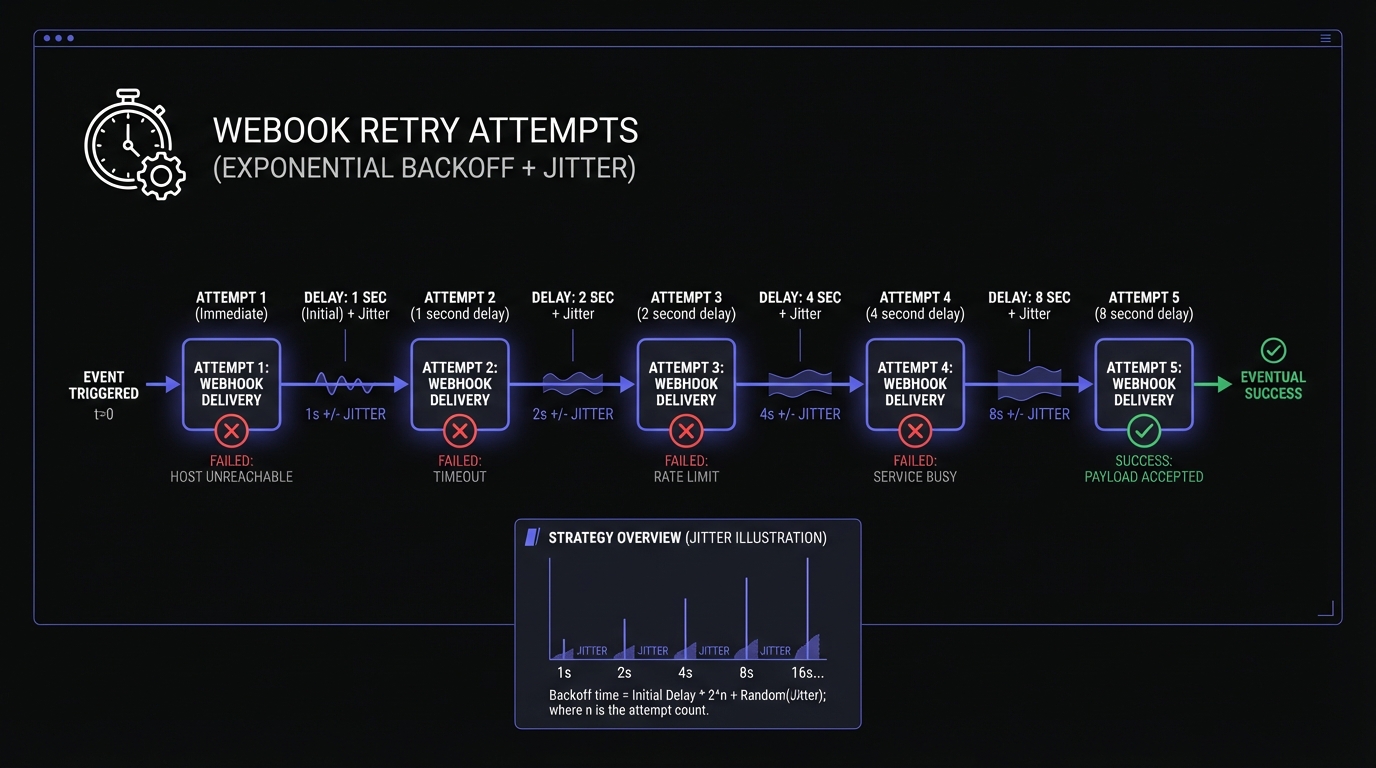
Exponential backoff with jitter handles transient failures gracefully.
function sleep(ms) {
  return new Promise(resolve => setTimeout(resolve, ms));
}

function calculateBackoff(attempt, baseDelay = 1000, maxDelay = 60000) {
  const exponentialDelay = baseDelay * Math.pow(2, attempt);
  const cappedDelay = Math.min(exponentialDelay, maxDelay);
  // Add jitter: random value between 0 and cappedDelay
  return Math.floor(Math.random() * cappedDelay);
}

async function sendWebhookWithRetry(url, payload, secret, maxAttempts = 5) {
  let lastError;

  for (let attempt = 0; attempt < maxAttempts; attempt++) {
    try {
      const result = await sendWebhookWithErrorHandling(url, payload, secret);
      return result;
    } catch (error) {
      lastError = error;

      // Don't retry client errors (4xx)
      if (error.statusCode >= 400 && error.statusCode < 500) {
        throw error;
      }

      // Wait before retrying (except on last attempt)
      if (attempt < maxAttempts - 1) {
        const delay = calculateBackoff(attempt);
        console.log(`Attempt ${attempt + 1} failed, retrying in ${delay}ms...`);
        await sleep(delay);
      }
    }
  }

  throw new WebhookDeliveryError(
    `Failed after ${maxAttempts} attempts: ${lastError.message}`,
    lastError.statusCode,
    lastError.responseBody
  );
}
Jitter prevents synchronized retries from overwhelming endpoints.
Complete DIY Implementation
import crypto from 'crypto';

class WebhookClient {
  constructor(secret, options = {}) {
    this.secret = secret;
    this.timeout = options.timeout || 30000;
    this.maxAttempts = options.maxAttempts || 5;
    this.baseDelay = options.baseDelay || 1000;
  }

  createPayload(eventType, data) {
    return {
      id: `evt_${crypto.randomUUID()}`,
      type: eventType,
      created_at: new Date().toISOString(),
      data: data,
    };
  }

  sign(payload) {
    const timestamp = Math.floor(Date.now() / 1000);
    const payloadString = JSON.stringify(payload);
    const signedContent = `${timestamp}.${payloadString}`;

    const signature = crypto
      .createHmac('sha256', this.secret)
      .update(signedContent)
      .digest('hex');

    return {
      signature: `t=${timestamp},v1=${signature}`,
      body: payloadString,
    };
  }

  async send(url, eventType, data) {
    const payload = this.createPayload(eventType, data);
    const { signature, body } = this.sign(payload);

    let lastError;
    for (let attempt = 0; attempt < this.maxAttempts; attempt++) {
      try {
        const response = await fetch(url, {
          method: 'POST',
          headers: {
            'Content-Type': 'application/json',
            'X-Webhook-Signature': signature,
          },
          body: body,
          signal: AbortSignal.timeout(this.timeout),
        });

        if (response.ok) {
          return { success: true, eventId: payload.id };
        }

        if (response.status >= 400 && response.status < 500) {
          throw new Error(`Permanent failure: ${response.status}`);
        }

        lastError = new Error(`Server error: ${response.status}`);
      } catch (error) {
        lastError = error;
        if (error.message.startsWith('Permanent failure')) throw error;
      }

      if (attempt < this.maxAttempts - 1) {
        const delay = Math.floor(Math.random() * this.baseDelay * Math.pow(2, attempt));
        await new Promise(r => setTimeout(r, delay));
      }
    }

    throw lastError;
  }
}

// Usage
const client = new WebhookClient('whsec_your_secret_here');

await client.send(
  'https://customer-endpoint.com/webhooks',
  'order.completed',
  { orderId: 'ord_123', amount: 9900 }
);
Using Hook Mesh SDK
Hook Mesh handles queuing, persistent retries, endpoint monitoring, and customer-facing logs:
import { HookMesh } from '@hookmesh/node';

const hookmesh = new HookMesh('sk_live_your_api_key');

// Send a webhook event - Hook Mesh handles delivery, retries, and logging
await hookmesh.events.send({
  eventType: 'order.completed',
  payload: {
    orderId: 'ord_123',
    amount: 9900,
    currency: 'usd',
  },
});
Hook Mesh handles signature generation, exponential backoff, dead letter queues, delivery logs, and replay capabilities.
For multiple endpoints or customer-specific routing:
// Send to a specific customer's subscribed endpoints
await hookmesh.events.send({
  eventType: 'invoice.paid',
  customerId: 'cus_789',
  payload: {
    invoiceId: 'inv_456',
    amount: 4999,
  },
});
Testing Your Webhooks
Local Testing with a Simple Server
Create a test endpoint to inspect incoming webhooks:
import http from 'http';

const server = http.createServer((req, res) => {
  let body = '';
  req.on('data', chunk => body += chunk);
  req.on('end', () => {
    console.log('Headers:', req.headers);
    console.log('Body:', body);
    res.writeHead(200);
    res.end('OK');
  });
});

server.listen(3000, () => console.log('Test server on http://localhost:3000'));
Testing Failure Scenarios
// Test server that fails the first 2 requests
let requestCount = 0;
const server = http.createServer((req, res) => {
  requestCount++;
  if (requestCount <= 2) {
    res.writeHead(503);
    res.end('Service Unavailable');
  } else {
    res.writeHead(200);
    res.end('OK');
  }
});
Using Webhook Testing Services
For testing without running local servers, services like webhook.site provide temporary URLs that capture and display incoming requests. Hook Mesh also includes built-in testing tools for sending sample events and inspecting delivery attempts.
Conclusion
Sending webhooks from Node.js requires consistent payload structures, HMAC signatures, error handling, and intelligent retries. The DIY approach gives you complete control; Hook Mesh provides production-grade infrastructure so you can focus on your product.
The patterns in this tutorial—structured payloads, signatures, and exponential backoff—form the foundation of reliable delivery. Next, learn how recipients verify webhooks in Node.js to understand the full integration flow. For more language and framework tutorials, see our webhook implementation guides.
Related Posts
Receive and Verify Webhooks in Node.js: A Complete Guide
Learn how to securely receive and verify webhooks in Node.js using Express.js. Covers HMAC signature verification, timestamp validation, replay attack prevention, and common mistakes to avoid.
HMAC-SHA256 Webhook Signatures: Implementation Guide
Learn how to implement secure webhook signature verification using HMAC-SHA256. Complete guide with code examples for signing and verifying webhook payloads in Node.js and Python.
Webhook Retry Strategies: Linear vs Exponential Backoff
A technical deep-dive into webhook retry strategies, comparing linear and exponential backoff approaches, with code examples and best practices for building reliable webhook delivery systems.
Building Webhooks with Express.js: Best Practices
Learn how to build production-ready webhooks with Express.js. Complete guide covering sending webhooks, receiving webhooks, raw body parsing, signature verification middleware, error handling, and queue integration.
Webhook Implementation Guides by Language and Framework
The complete developer hub for webhook implementation tutorials. Find guides for sending, receiving, and verifying webhooks in Node.js, Python, Go, and popular frameworks like Next.js, Django, and Express.