Webhook Dead Letter Queues: Complete Technical Guide
Learn how to implement dead letter queues (DLQ) for handling permanently failed webhook deliveries. Covers queue setup, failure criteria, alerting, and best practices for webhook reliability.
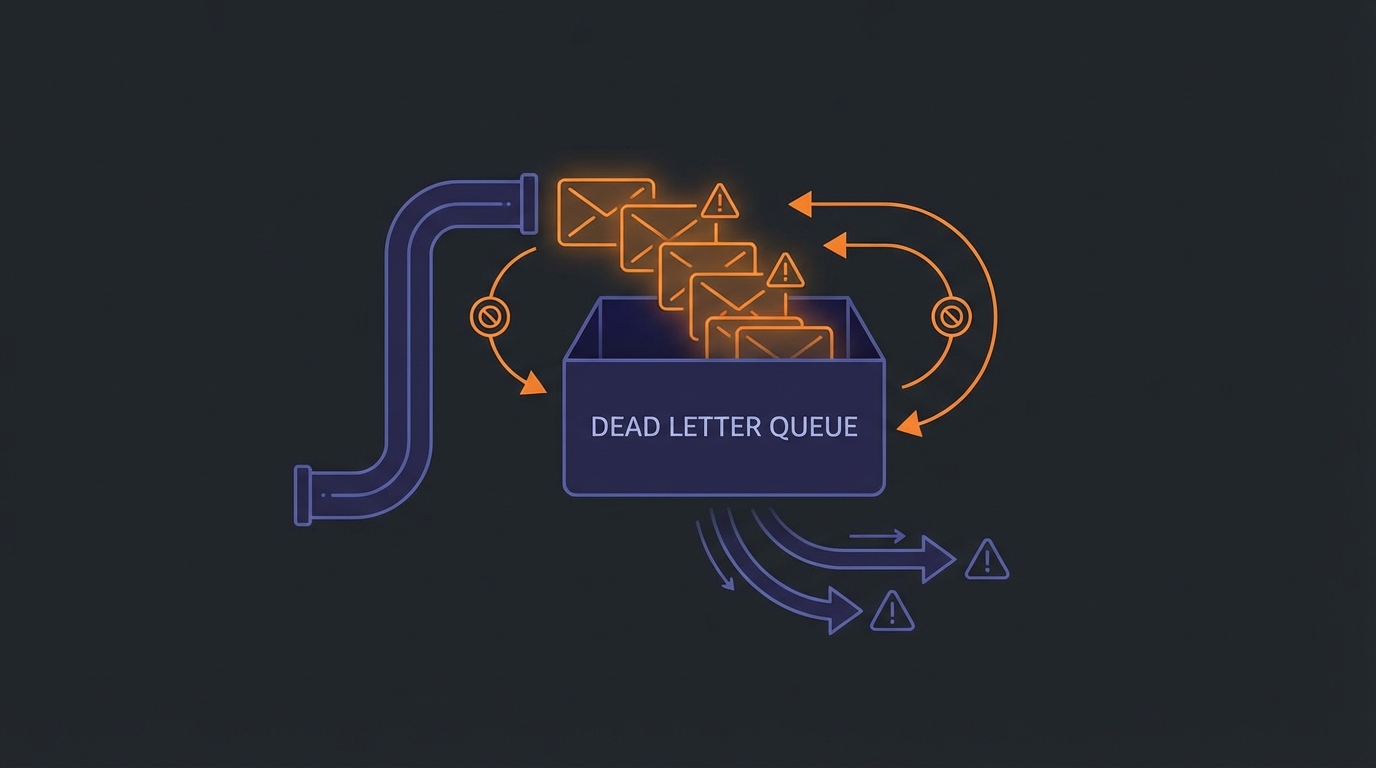
Dead Letter Queues for Failed Webhooks
Some deliveries permanently fail. Endpoints disappear, servers reject payloads, or retries exhaust themselves. Dead letter queues (DLQs) capture these failures instead of silently dropping them—preserving data for analysis, manual retry, or recovery.
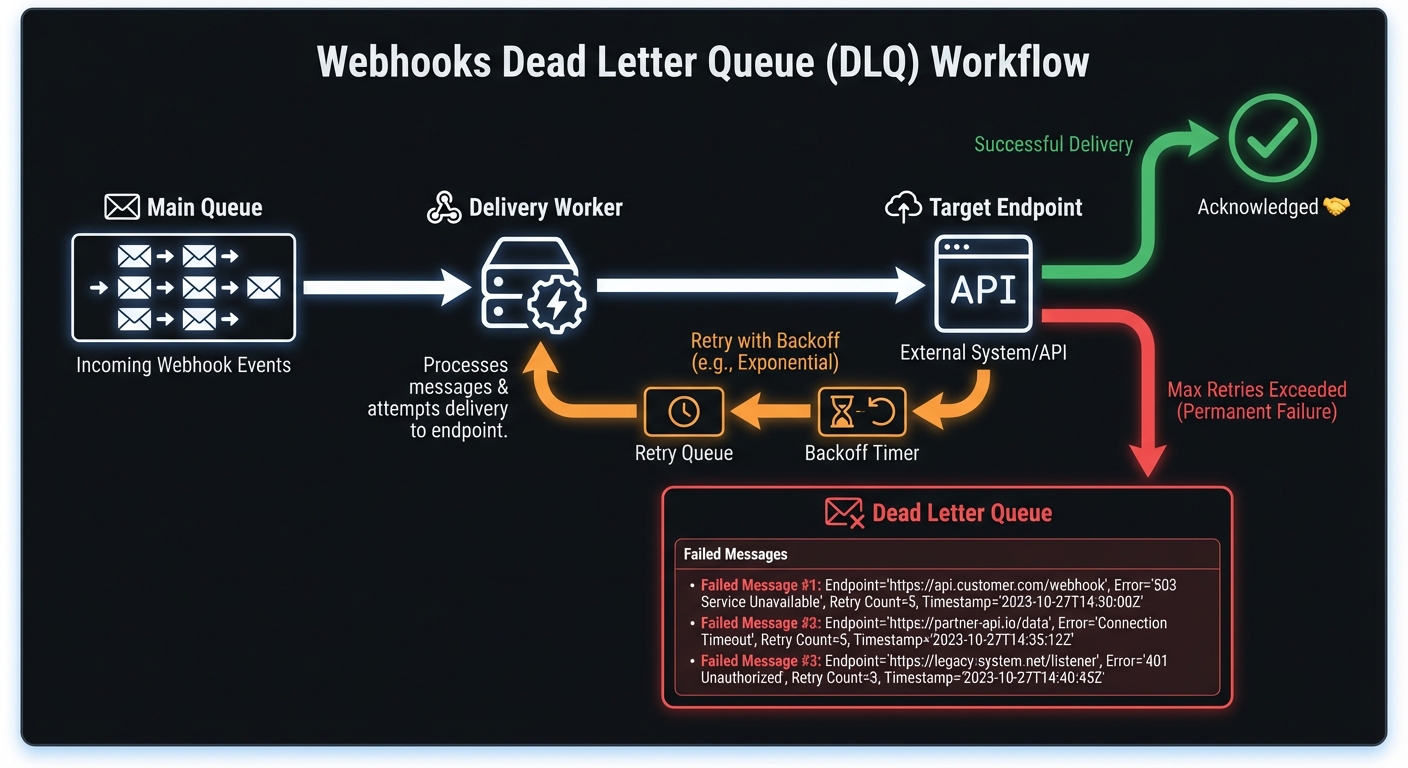
What Is a Dead Letter Queue?
A DLQ is a specialized queue capturing undeliverable messages requiring human intervention. Instead of losing failed webhooks, you preserve them for analysis and recovery.
The term originates from postal services: "dead letters" couldn't be delivered or returned. The pattern translates perfectly to message systems.
When Webhooks Enter the Dead Letter Queue
Exhausted Retry Attempts
Most webhook systems implement exponential backoff with a maximum retry count. A typical policy might retry 5-8 times over several hours. When all attempts fail, the message moves to the DLQ rather than being discarded.
# Example retry policy that leads to DLQ
RETRY_CONFIG = {
    "max_retries": 6,
    "initial_delay_seconds": 30,
    "max_delay_seconds": 3600,
    "backoff_multiplier": 2
}
# After ~2 hours of retrying, failed messages go to DLQ
Invalid endpoints: HTTP 410, DNS failures, consistent 404s → route directly to DLQ. Circuit breakers help identify these early.
Malformed payloads: 400-level rejections on consistent formats → DLQ to investigate. Retries waste resources.
Auth failures: Expired credentials, revoked keys → won't resolve without intervention.
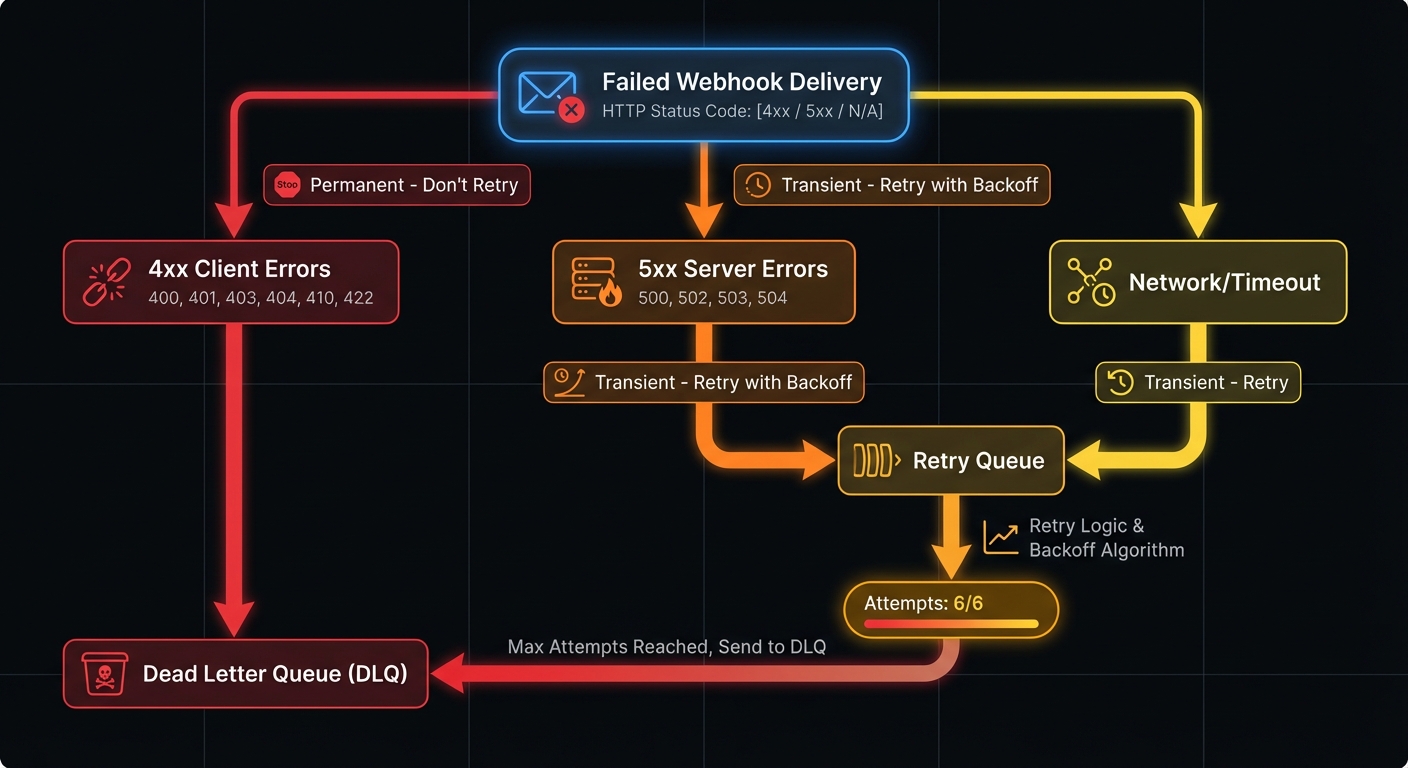
Permanent vs Transient Failures
Distinguishing failure types prevents wasted retries and ensures appropriate routing:
| Error Type | Examples | Action | Rationale |
|---|---|---|---|
| Permanent (4xx) | 400, 401, 403, 404, 410, 422 | Route to DLQ immediately | Won't resolve without code/config changes |
| Transient (5xx) | 500, 502, 503, 504 | Retry with backoff | Server-side issues often self-resolve |
| Network | Timeout, DNS failure, connection refused | Retry with backoff | Infrastructure issues typically temporary |
| Exhausted | Max retries exceeded | Route to DLQ | Transient became permanent |
Why You Need a DLQ
Data preservation: Failed webhooks don't vanish—you retain visibility for debugging and recovery.
Compliance: DLQs provide audit trails and payload retention (required by many regulations).
Customer communication: Alert affected users proactively instead of waiting for them to discover problems.
Health insights: DLQ depth spikes reveal systemic issues worth investigating immediately.
Implementation: Setting Up Your DLQ
Let's walk through implementing a webhook DLQ using popular queue technologies.
AWS SQS Implementation
SQS provides native DLQ support through redrive policies. Here's a complete setup:
import boto3
import json

sqs = boto3.client('sqs')

# Create the dead letter queue
dlq_response = sqs.create_queue(
    QueueName='webhook-deliveries-dlq',
    Attributes={
        'MessageRetentionPeriod': '1209600',  # 14 days
        'VisibilityTimeout': '300'
    }
)
dlq_url = dlq_response['QueueUrl']
dlq_arn = sqs.get_queue_attributes(
    QueueUrl=dlq_url,
    AttributeNames=['QueueArn']
)['Attributes']['QueueArn']

# Create main queue with redrive policy
main_queue = sqs.create_queue(
    QueueName='webhook-deliveries',
    Attributes={
        'RedrivePolicy': json.dumps({
            'deadLetterTargetArn': dlq_arn,
            'maxReceiveCount': '5'
        }),
        'VisibilityTimeout': '60'
    }
)
RabbitMQ Implementation
RabbitMQ uses exchange routing for dead letter handling:
import pika

connection = pika.BlockingConnection(
    pika.ConnectionParameters('localhost')
)
channel = connection.channel()

# Declare the dead letter exchange and queue
channel.exchange_declare(
    exchange='webhook.dlx',
    exchange_type='direct',
    durable=True
)
channel.queue_declare(
    queue='webhook.dlq',
    durable=True,
    arguments={'x-message-ttl': 1209600000}  # 14 days in ms
)
channel.queue_bind(
    queue='webhook.dlq',
    exchange='webhook.dlx',
    routing_key='failed'
)

# Declare main queue with DLX configuration
channel.queue_declare(
    queue='webhook.deliveries',
    durable=True,
    arguments={
        'x-dead-letter-exchange': 'webhook.dlx',
        'x-dead-letter-routing-key': 'failed'
    }
)
Database-Backed DLQ
For simpler deployments or when you need tighter integration with your application, a database table works as an effective DLQ:
CREATE TABLE webhook_dead_letters (
    id UUID PRIMARY KEY DEFAULT gen_random_uuid(),
    original_event_id UUID NOT NULL,
    endpoint_url TEXT NOT NULL,
    payload JSONB NOT NULL,
    failure_reason VARCHAR(50) NOT NULL,
    last_http_status INTEGER,
    last_error_message TEXT,
    retry_count INTEGER DEFAULT 0,
    first_attempt_at TIMESTAMP NOT NULL,
    final_attempt_at TIMESTAMP NOT NULL,
    created_at TIMESTAMP DEFAULT NOW(),
    resolved_at TIMESTAMP,
    resolution_type VARCHAR(20), -- 'replayed', 'archived', 'discarded'
    INDEX idx_dlq_endpoint (endpoint_url),
    INDEX idx_dlq_created (created_at),
    INDEX idx_dlq_unresolved (resolved_at) WHERE resolved_at IS NULL
);
Query patterns for operations:
-- Unresolved failures by endpoint (find systemic issues)
SELECT endpoint_url, COUNT(*) as failures,
       array_agg(DISTINCT failure_reason) as reasons
FROM webhook_dead_letters
WHERE resolved_at IS NULL
GROUP BY endpoint_url
ORDER BY failures DESC;

-- Messages older than 24 hours (neglected failures)
SELECT * FROM webhook_dead_letters
WHERE resolved_at IS NULL
  AND created_at < NOW() - INTERVAL '24 hours';
Defining Failure Criteria
Your delivery worker needs clear rules for when to route messages to the DLQ:
class WebhookDeliveryWorker:
    PERMANENT_FAILURE_CODES = {400, 401, 403, 404, 410, 422}
    MAX_RETRIES = 6

    def process_delivery(self, message):
        attempt = self.deliver_webhook(message)

        if attempt.success:
            return self.acknowledge(message)

        if attempt.status_code in self.PERMANENT_FAILURE_CODES:
            return self.send_to_dlq(message, reason='permanent_http_error')

        if message.retry_count >= self.MAX_RETRIES:
            return self.send_to_dlq(message, reason='max_retries_exceeded')

        # Transient failure - schedule retry
        return self.schedule_retry(message)

    def send_to_dlq(self, message, reason):
        dlq_message = {
            'original_payload': message.payload,
            'endpoint': message.endpoint,
            'failure_reason': reason,
            'last_error': message.last_error,
            'retry_count': message.retry_count,
            'first_attempt': message.created_at,
            'final_attempt': datetime.utcnow().isoformat()
        }
        self.dlq_client.send_message(dlq_message)
Processing Your Dead Letter Queue
Messages in the DLQ need attention—but not immediate, blind reprocessing. Verify the root cause is fixed before replaying messages, or you'll just move them back to the DLQ.
Controlled Replay Strategies
Never blindly reprocess. Before replaying DLQ messages:
- Identify the root cause - Was it endpoint misconfiguration, expired credentials, or a bug in the consumer?
- Verify resolution - Test with a single message or health check before bulk replay
- Throttle replay rate - Don't overwhelm a recovering endpoint with queued messages
- Track replay attempts - Prevent infinite replay loops by limiting total attempts across DLQ cycles
class SafeReplayStrategy:
    MAX_TOTAL_ATTEMPTS = 10  # Across all DLQ cycles
    REPLAY_THROTTLE_RPS = 5  # Messages per second

    def replay_messages(self, messages):
        for msg in self.throttle(messages, self.REPLAY_THROTTLE_RPS):
            total_attempts = msg.retry_count + msg.dlq_replay_count
            if total_attempts >= self.MAX_TOTAL_ATTEMPTS:
                self.archive_permanently(msg)
                continue

            msg.dlq_replay_count += 1
            self.main_queue.send_message(msg.payload)
Manual Review Dashboard
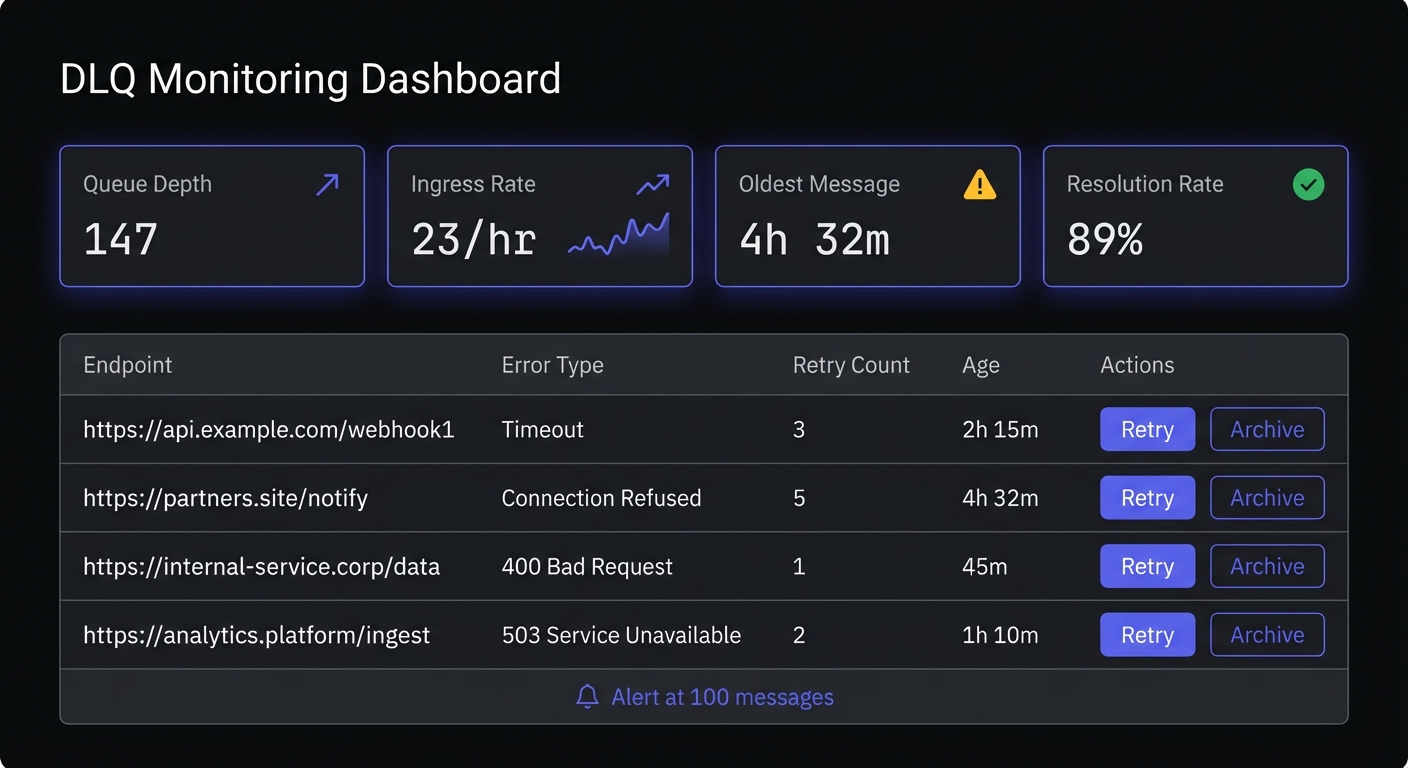
Build tooling for operations teams to inspect and act on failed deliveries:
class DLQDashboard:
    def list_failed_deliveries(self, filters=None):
        messages = self.dlq_client.receive_messages(max_count=100)
        return [{
            'id': msg.id,
            'endpoint': msg.body['endpoint'],
            'failure_reason': msg.body['failure_reason'],
            'payload_preview': self.truncate(msg.body['original_payload']),
            'failed_at': msg.body['final_attempt']
        } for msg in messages]

    def retry_delivery(self, message_id):
        message = self.dlq_client.get_message(message_id)
        self.main_queue.send_message(message.body['original_payload'])
        self.dlq_client.delete_message(message_id)

    def bulk_retry_by_endpoint(self, endpoint):
        messages = self.dlq_client.query(endpoint=endpoint)
        for msg in messages:
            self.retry_delivery(msg.id)
Automated Retry Logic
Some failures resolve themselves. Implement automated retry for specific scenarios:
class DLQProcessor:
    def process_recoverable_failures(self):
        messages = self.dlq_client.receive_messages()

        for message in messages:
            if self.is_recoverable(message):
                self.main_queue.send_message(
                    message.body['original_payload'],
                    delay_seconds=3600  # Wait an hour
                )
                self.dlq_client.delete_message(message.id)

    def is_recoverable(self, message):
        # Retry if endpoint is now responding
        if message.body['failure_reason'] == 'max_retries_exceeded':
            return self.endpoint_health_check(message.body['endpoint'])
        return False
Monitoring and Alerting
DLQ monitoring prevents small problems from becoming big ones. This is a critical component of webhook observability.
CloudWatch Alerting for SQS
import boto3

cloudwatch = boto3.client('cloudwatch')

cloudwatch.put_metric_alarm(
    AlarmName='webhook-dlq-depth-warning',
    MetricName='ApproximateNumberOfMessagesVisible',
    Namespace='AWS/SQS',
    Dimensions=[{
        'Name': 'QueueName',
        'Value': 'webhook-deliveries-dlq'
    }],
    Statistic='Average',
    Period=300,
    EvaluationPeriods=2,
    Threshold=100,
    ComparisonOperator='GreaterThanThreshold',
    AlarmActions=['arn:aws:sns:us-east-1:123456789:ops-alerts']
)
Key Metrics to Track
Monitor these indicators for DLQ health:
- Queue depth: Total messages waiting for processing
- Ingress rate: How quickly new failures arrive
- Age of oldest message: Identifies neglected failures
- Failure reason distribution: Spots systemic issues
Best Practices for DLQ Management
Never Ignore Your DLQ
A growing DLQ represents real business impact. Customers aren't receiving data they expect. Schedule regular reviews and assign ownership for DLQ processing.
Set Aggressive Alerts
Alert early. A threshold of 10-50 messages catches problems before they escalate. Include rate-of-change alerts to detect sudden spikes.
Implement Message Expiration
DLQ messages shouldn't live forever. Set retention policies (14 days is common) and archive expired messages to cold storage if compliance requires it.
Tiered retention strategy:
RETENTION_POLICY = {
    'hot_storage': 14,      # Days in DLQ (fast access)
    'warm_storage': 90,     # Days in S3/blob storage
    'cold_archive': 365,    # Days in Glacier/archive (compliance)
}

def archive_expired_messages():
    # Move 14+ day messages to S3
    expired = dlq.query(older_than_days=14)
    for msg in expired:
        s3.put_object(
            Bucket='webhook-dlq-archive',
            Key=f"{msg.endpoint}/{msg.created_at.isoformat()}/{msg.id}.json",
            Body=json.dumps(msg.to_dict()),
            StorageClass='STANDARD_IA'
        )
        dlq.delete(msg.id)
FIFO Queue Considerations
If your webhooks require strict ordering (e.g., state machine transitions, sequential updates), avoid using a DLQ—or use it carefully:
- Problem: Moving message 3 to DLQ while messages 4-10 process breaks order guarantees
- Alternative: Block the entire message group until the failing message resolves
- Compromise: Use DLQ but track sequence numbers; replay in order during recovery
For most webhook use cases, ordering isn't critical. Design consumers to handle out-of-order delivery with idempotency.
Document Recovery Procedures
When the DLQ fills up at 2 AM, your on-call engineer needs clear runbooks. Document common failure scenarios and their resolutions.
Preserve Context
Store rich metadata with DLQ messages: original timestamps, all error responses, endpoint configuration at time of failure. This context proves invaluable during investigation.
Essential metadata to capture:
- Original event timestamp - When the event occurred (not when delivery was attempted)
- All HTTP responses - Status codes and response bodies from each attempt
- Endpoint configuration - URL, headers, timeout settings at time of failure
- Retry history - Timestamps and errors for each attempt
- Consumer version - Which code version processed the webhook (aids debugging)
Categorize Failures for Triage
Group DLQ messages by failure type to prioritize resolution:
| Category | Priority | Action |
|---|---|---|
| Auth failures (401/403) | High | Contact customer, credential rotation needed |
| Endpoint gone (404/410) | Medium | Customer may have changed URL |
| Validation errors (400/422) | High | Possible schema mismatch, investigate payload |
| Rate limited (429) | Low | Wait and replay with throttling |
| Server errors (5xx) | Medium | Customer's issue, notify and monitor |
Conclusion
DLQs transform webhook failures from silent data loss into manageable, recoverable events. Clear failure criteria, automated processing, and vigilant monitoring build systems that handle distributed system failures gracefully.
DLQs are part of webhook reliability engineering—combining retry logic, circuit breakers, and observability. Start with the basics: capture permanent failures, alert on depth, review regularly. As systems mature, add automated recovery and sophisticated analysis. Proper debugging workflows make resolution faster when issues arise.
Related Posts
Webhook Retry Strategies: Linear vs Exponential Backoff
A technical deep-dive into webhook retry strategies, comparing linear and exponential backoff approaches, with code examples and best practices for building reliable webhook delivery systems.
Webhook Circuit Breakers: Protect Your Infrastructure
Learn how to implement the circuit breaker pattern for webhook delivery to prevent cascading failures, handle failing endpoints gracefully, and protect your infrastructure from retry storms.
Webhook Idempotency: Why It Matters and How to Implement It
A comprehensive technical guide to implementing idempotency for webhooks. Learn about idempotency keys, deduplication strategies, and implementation patterns with Node.js and Python code examples.
Webhook Observability: Logging, Metrics, and Tracing
A comprehensive technical guide to implementing observability for webhook systems. Learn about structured logging, key metrics to track, distributed tracing with OpenTelemetry, and alerting best practices.
Debugging Webhooks in Production: A Systematic Approach
Learn how to debug webhook issues in production with a systematic approach covering signature failures, timeouts, parsing errors, and more. Includes practical tools, real examples, and step-by-step checklists.