Receive and Verify Webhooks in Node.js: A Complete Guide
Learn how to securely receive and verify webhooks in Node.js using Express.js. Covers HMAC signature verification, timestamp validation, replay attack prevention, and common mistakes to avoid.
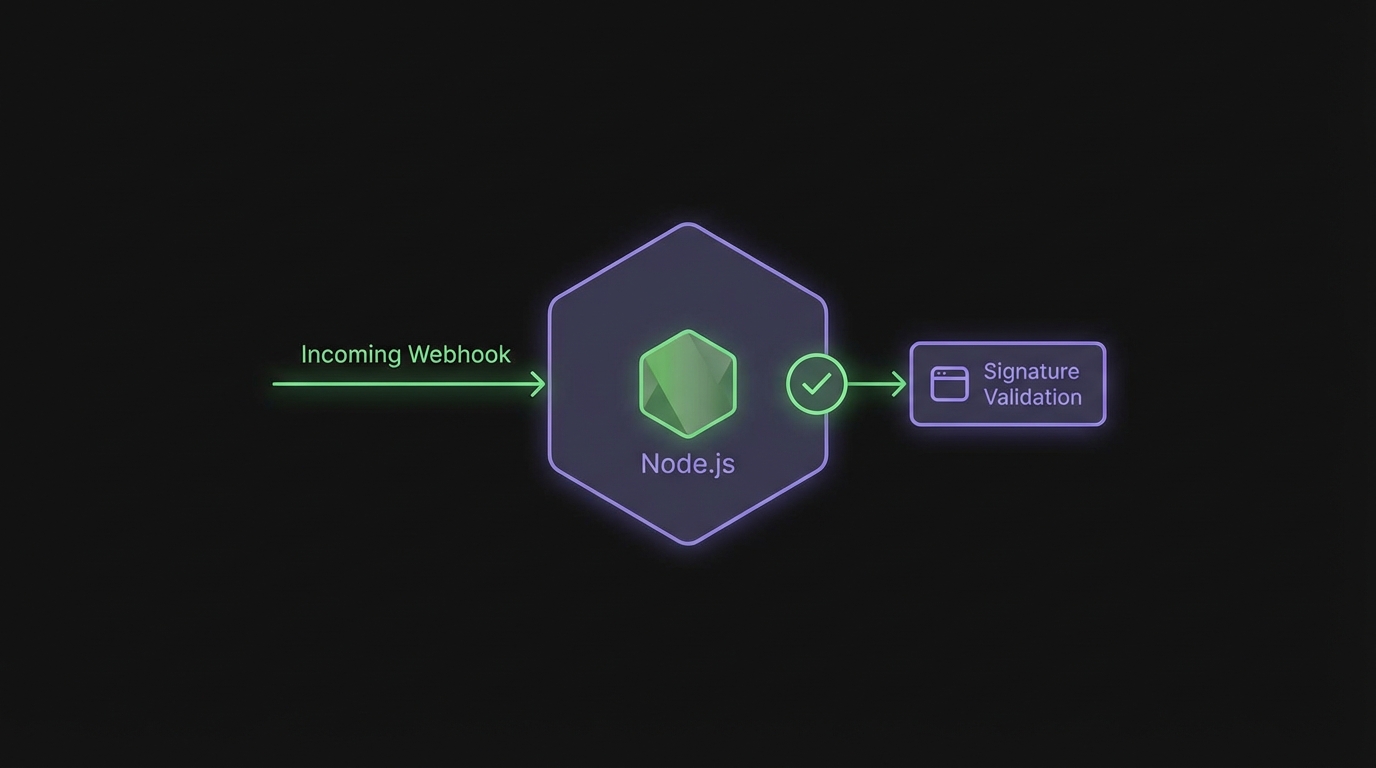
Receive and Verify Webhooks in Node.js
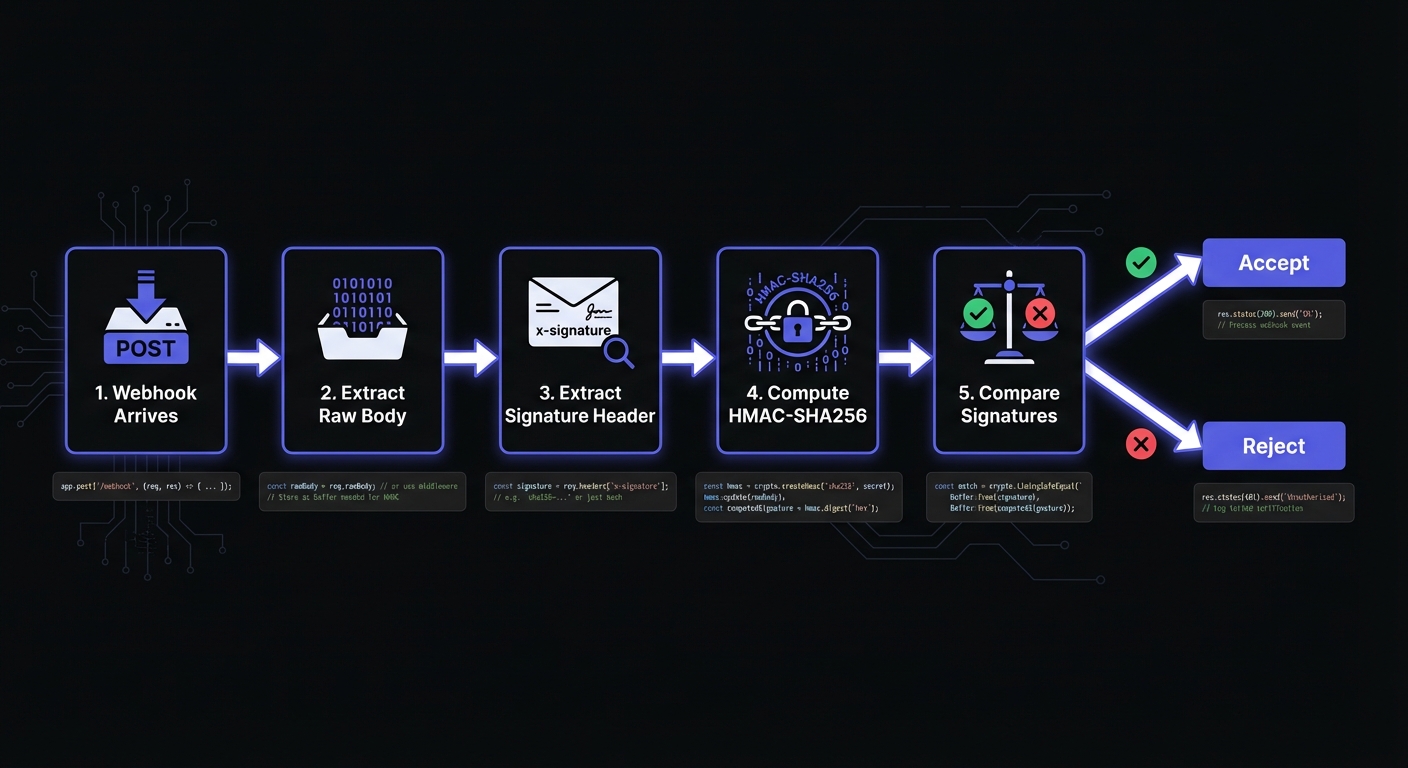
Receiving webhooks securely requires more than setting up an endpoint. Without proper verification, anyone discovering your URL can send fake requests—an attacker could forge a "payment completed" event and trick your system into granting unauthorized access. This guide walks you through building secure webhook endpoints in Node.js.
Setting Up Your Express Webhook Endpoint
Start with a basic Express server that can receive POST requests. The key here is accessing the raw request body before any JSON parsing occurs.
const express = require('express');
const crypto = require('crypto');

const app = express();

// Critical: Use express.raw() to get the raw body for signature verification
app.post('/webhooks', express.raw({ type: 'application/json' }), (req, res) => {
  const rawBody = req.body; // This is a Buffer
  const signature = req.headers['x-hookmesh-signature'];

  // We'll add verification logic here
  console.log('Webhook received');

  res.status(200).send('OK');
});

app.listen(3000, () => {
  console.log('Webhook server listening on port 3000');
});
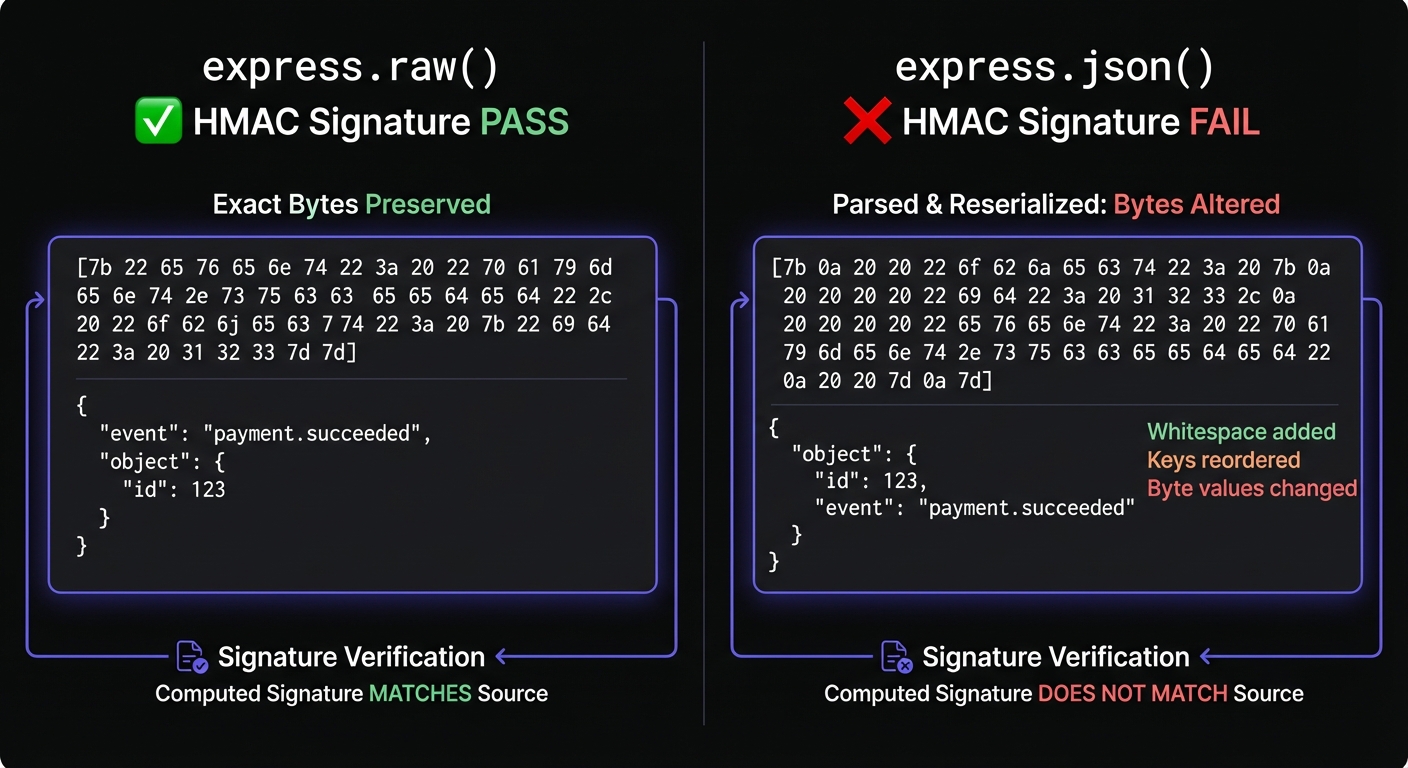
Notice we use express.raw() instead of express.json(). This is intentional and critical for security.
Why Raw Body Access Matters
HMAC signatures are computed over exact request bytes. When Express parses JSON, it may alter whitespace, key ordering, or encoding—completely invalidating the signature.
Consider this payload:
{"event":"order.created","id":"12345"}If Express parses and re-serializes it, you might get:
{ "event": "order.created", "id": "12345" }Different bytes invalidate signatures. Always verify raw body first, then parse.
Implementing HMAC Signature Verification
HMAC-SHA256 lets senders prove payload authenticity using a shared secret. Here's a complete verification function for Hook Mesh webhooks:
function verifyHookMeshSignature(rawBody, signatureHeader, secret) {
  if (!signatureHeader) {
    return { valid: false, error: 'Missing signature header' };
  }

  // Hook Mesh signature format: t=timestamp,v1=signature
  const parts = {};
  signatureHeader.split(',').forEach(part => {
    const [key, value] = part.split('=');
    parts[key] = value;
  });

  const timestamp = parts['t'];
  const signature = parts['v1'];

  if (!timestamp || !signature) {
    return { valid: false, error: 'Invalid signature format' };
  }

  // Reconstruct the signed payload (timestamp + raw body)
  const signedPayload = `${timestamp}.${rawBody.toString()}`;

  // Compute expected signature
  const expectedSignature = crypto
    .createHmac('sha256', secret)
    .update(signedPayload, 'utf8')
    .digest('hex');

  // Timing-safe comparison prevents timing attacks
  const signatureBuffer = Buffer.from(signature, 'hex');
  const expectedBuffer = Buffer.from(expectedSignature, 'hex');

  if (signatureBuffer.length !== expectedBuffer.length) {
    return { valid: false, error: 'Signature length mismatch' };
  }

  const isValid = crypto.timingSafeEqual(signatureBuffer, expectedBuffer);

  return {
    valid: isValid,
    timestamp: parseInt(timestamp, 10),
    error: isValid ? null : 'Signature mismatch'
  };
}
Timing-Safe Comparison Explained
Never use === for signature comparison. Standard comparison returns false immediately on mismatch, letting attackers measure response times to discover signatures byte-by-byte. crypto.timingSafeEqual() always takes the same duration, eliminating this side channel.
Adding Timestamp Validation
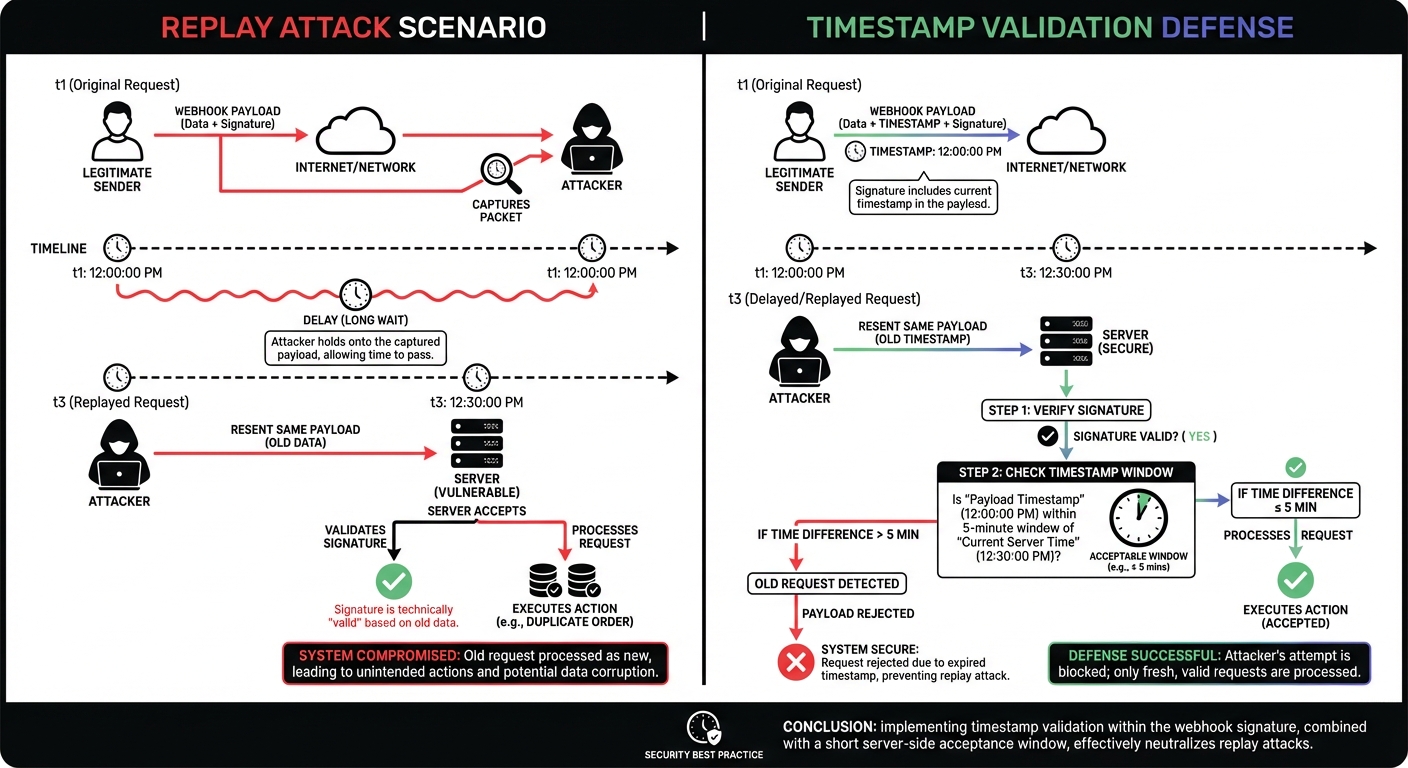
Signature verification alone doesn't prevent replay attacks. An attacker who captures a valid webhook can replay it indefinitely—the signature remains valid because the payload hasn't changed. Timestamp validation limits the window for reusing captured webhooks.
function validateTimestamp(timestamp, toleranceSeconds = 300) {
  const currentTime = Math.floor(Date.now() / 1000);
  const difference = Math.abs(currentTime - timestamp);

  if (difference > toleranceSeconds) {
    return {
      valid: false,
      error: `Timestamp too old: ${difference} seconds (max: ${toleranceSeconds})`
    };
  }

  return { valid: true };
}
A five-minute tolerance accommodates clock skew; high-security apps may reduce to 60 seconds.
The Complete Webhook Handler
Bring everything together into a production endpoint:
const express = require('express');
const crypto = require('crypto');

const app = express();
const WEBHOOK_SECRET = process.env.HOOKMESH_WEBHOOK_SECRET;

function verifyHookMeshSignature(rawBody, signatureHeader, secret) {
  if (!signatureHeader) {
    return { valid: false, error: 'Missing signature header' };
  }

  const parts = {};
  signatureHeader.split(',').forEach(part => {
    const [key, value] = part.split('=');
    parts[key] = value;
  });

  const timestamp = parts['t'];
  const signature = parts['v1'];

  if (!timestamp || !signature) {
    return { valid: false, error: 'Invalid signature format' };
  }

  const signedPayload = `${timestamp}.${rawBody.toString()}`;
  const expectedSignature = crypto
    .createHmac('sha256', secret)
    .update(signedPayload, 'utf8')
    .digest('hex');

  const signatureBuffer = Buffer.from(signature, 'hex');
  const expectedBuffer = Buffer.from(expectedSignature, 'hex');

  if (signatureBuffer.length !== expectedBuffer.length) {
    return { valid: false, error: 'Signature length mismatch' };
  }

  const isValid = crypto.timingSafeEqual(signatureBuffer, expectedBuffer);

  return {
    valid: isValid,
    timestamp: parseInt(timestamp, 10),
    error: isValid ? null : 'Signature mismatch'
  };
}

app.post('/webhooks', express.raw({ type: 'application/json' }), (req, res) => {
  const signatureHeader = req.headers['x-hookmesh-signature'];

  // Step 1: Verify signature
  const verification = verifyHookMeshSignature(req.body, signatureHeader, WEBHOOK_SECRET);

  if (!verification.valid) {
    console.error('Webhook verification failed:', verification.error);
    return res.status(401).json({ error: 'Invalid signature' });
  }

  // Step 2: Validate timestamp
  const currentTime = Math.floor(Date.now() / 1000);
  const timestampAge = Math.abs(currentTime - verification.timestamp);

  if (timestampAge > 300) {
    console.error('Webhook timestamp too old:', timestampAge, 'seconds');
    return res.status(401).json({ error: 'Request expired' });
  }

  // Step 3: Parse the verified payload
  let event;
  try {
    event = JSON.parse(req.body.toString());
  } catch (err) {
    console.error('Invalid JSON payload');
    return res.status(400).json({ error: 'Invalid JSON' });
  }

  // Step 4: Respond quickly, then process
  res.status(200).json({ received: true });

  // Process the webhook asynchronously
  processWebhookEvent(event).catch(err => {
    console.error('Webhook processing failed:', err);
  });
});

async function processWebhookEvent(event) {
  console.log('Processing event:', event.type);
  // Your business logic here
}

app.listen(3000, () => {
  console.log('Webhook server ready');
});
Responding Correctly: The 2xx Rule
Acknowledge receipt immediately and process asynchronously to prevent timeouts and duplicates.
// Good: Respond first, process later
res.status(200).json({ received: true });
processWebhookEvent(event).catch(console.error);

// Bad: Processing blocks the response
await processWebhookEvent(event);  // This might take 10 seconds
res.status(200).json({ received: true });  // Provider already timed out
Return 2xx as soon as verified. Use a job queue (Bull, BullMQ, database) for background processing. For more patterns, see our webhook security best practices.
Common Mistakes to Avoid
Parsing JSON before verification: Always verify raw body first.
// Wrong: JSON parsing before verification
app.post('/webhooks', express.json(), (req, res) => {
  const payload = JSON.stringify(req.body);  // Already different from original
  verifySignature(payload, ...);  // Will fail
});

// Correct: Raw body verification first
app.post('/webhooks', express.raw({ type: 'application/json' }), (req, res) => {
  verifySignature(req.body.toString(), ...);  // Original bytes
  const event = JSON.parse(req.body);  // Parse after verification
});
Missing error handling: Unhandled exceptions crash your server or leave requests hanging.
// Add error handling
app.post('/webhooks', express.raw({ type: 'application/json' }), async (req, res) => {
  try {
    // Verification and processing logic
    res.status(200).send('OK');
  } catch (err) {
    console.error('Webhook error:', err);
    res.status(500).json({ error: 'Internal error' });
  }
});
Using string comparison for signatures: Always use crypto.timingSafeEqual().
Ignoring timestamp validation: Captured webhooks can be replayed indefinitely without it.
Preventing Replay Attacks with Event IDs
For complete protection, track processed event IDs. This implements idempotent webhook handlers:
const processedEvents = new Set(); // Use Redis in production

async function handleWebhook(event) {
  const eventId = event.id;

  if (processedEvents.has(eventId)) {
    console.log('Duplicate event ignored:', eventId);
    return { duplicate: true };
  }

  processedEvents.add(eventId);
  // In production, store in Redis with TTL:
  // await redis.setex(`webhook:${eventId}`, 86400, '1');

  await processWebhookEvent(event);
  return { duplicate: false };
}
Hook Mesh includes unique event IDs with every delivery, making this pattern straightforward to implement.
Environment Configuration
Never hardcode secrets. Use environment variables and validate they exist at startup:
const WEBHOOK_SECRET = process.env.HOOKMESH_WEBHOOK_SECRET;

if (!WEBHOOK_SECRET) {
  console.error('HOOKMESH_WEBHOOK_SECRET environment variable is required');
  process.exit(1);
}
Testing Your Webhook Endpoint
Local Testing with curl
Generate test signatures locally to verify your verification logic:
# Generate a test signature
TIMESTAMP=$(date +%s)
PAYLOAD='{"type":"test","data":{}}'
SECRET="your_test_secret"
SIGNATURE=$(echo -n "${TIMESTAMP}.${PAYLOAD}" | openssl dgst -sha256 -hmac "${SECRET}" | cut -d' ' -f2)

curl -X POST http://localhost:3000/webhooks \
  -H "Content-Type: application/json" \
  -H "X-HookMesh-Signature: t=${TIMESTAMP},v1=${SIGNATURE}" \
  -d "${PAYLOAD}"
Exposing localhost with ngrok
External webhook providers cannot reach localhost. Use ngrok to create a public tunnel:
# Install ngrok
brew install ngrok  # macOS
# or download from ngrok.com

# Start your server
node server.js

# In another terminal, create tunnel
ngrok http 3000
ngrok provides a public URL like https://abc123.ngrok.io that forwards to your local server. Use this URL when configuring webhooks in external services during development.
Hook Mesh provides a test webhook feature in the dashboard that sends sample events to your endpoint, making it easy to verify your implementation works correctly before going live.
Adapting to Different Webhook Providers
Different providers use different signature formats. Here's how common providers structure their signatures:
| Provider | Header Name | Signature Format |
|---|---|---|
| Hook Mesh | X-HookMesh-Signature | t=timestamp,v1=signature |
| Stripe | Stripe-Signature | t=timestamp,v1=signature |
| GitHub | X-Hub-Signature-256 | sha256=signature |
| Shopify | X-Shopify-Hmac-SHA256 | Base64-encoded signature |
GitHub Webhook Verification
function verifyGitHubSignature(rawBody, signatureHeader, secret) {
  if (!signatureHeader) return false;

  const signature = signatureHeader.replace('sha256=', '');
  const expected = crypto
    .createHmac('sha256', secret)
    .update(rawBody)
    .digest('hex');

  return crypto.timingSafeEqual(
    Buffer.from(signature, 'hex'),
    Buffer.from(expected, 'hex')
  );
}
Stripe Webhook Verification
// Stripe uses the same format as Hook Mesh
// You can use the Stripe SDK or manual verification
const stripe = require('stripe')(process.env.STRIPE_SECRET_KEY);

app.post('/stripe-webhooks', express.raw({ type: 'application/json' }), (req, res) => {
  const sig = req.headers['stripe-signature'];
  let event;

  try {
    event = stripe.webhooks.constructEvent(req.body, sig, endpointSecret);
  } catch (err) {
    return res.status(400).send(`Webhook Error: ${err.message}`);
  }

  res.status(200).json({ received: true });
});
The core pattern remains the same: access raw body, compute HMAC, compare with timing-safe equality.
Conclusion
Secure webhook handling in Node.js requires: raw body access, HMAC verification, timing-safe comparison, timestamp validation, and fast responses. These patterns apply to any provider—Stripe, GitHub, or custom services.
Hook Mesh provides automatic signature generation, configurable retry policies, and detailed delivery logs. Combined with the verification code here, you have reliable, secure webhook integrations.
To send webhooks from Node.js, see our sending webhooks with Node.js guide. For Express patterns and middleware, see Express.js webhook best practices. For more tutorials, visit our webhook implementation guides.
Related Posts
Send Webhooks with Node.js: A Complete Tutorial
Learn how to send webhooks from your Node.js application. This hands-on tutorial covers payload structure, HMAC signatures, error handling, retry logic, and testing—with complete code examples using modern ES modules and fetch.
HMAC-SHA256 Webhook Signatures: Implementation Guide
Learn how to implement secure webhook signature verification using HMAC-SHA256. Complete guide with code examples for signing and verifying webhook payloads in Node.js and Python.
Webhook Security Best Practices: The Complete Guide
Learn how to secure your webhook implementations with HMAC signature verification, replay attack prevention, SSRF mitigation, and more. Includes code examples in Node.js and Python.
Webhook Idempotency: Why It Matters and How to Implement It
A comprehensive technical guide to implementing idempotency for webhooks. Learn about idempotency keys, deduplication strategies, and implementation patterns with Node.js and Python code examples.
Building Webhooks with Express.js: Best Practices
Learn how to build production-ready webhooks with Express.js. Complete guide covering sending webhooks, receiving webhooks, raw body parsing, signature verification middleware, error handling, and queue integration.