Building Webhooks with Next.js and Hook Mesh
Learn how to send and receive webhooks in Next.js 14+ using App Router conventions. Complete guide covering route handlers, signature verification, edge runtime, and Hook Mesh SDK integration.
Building Webhooks with Next.js and Hook Mesh
With Next.js 14+ App Router, building webhook endpoints is straightforward: send webhooks through Hook Mesh, receive them in route handlers, verify signatures securely, and deploy to Vercel. For language-specific implementations, see our webhook implementation guides.
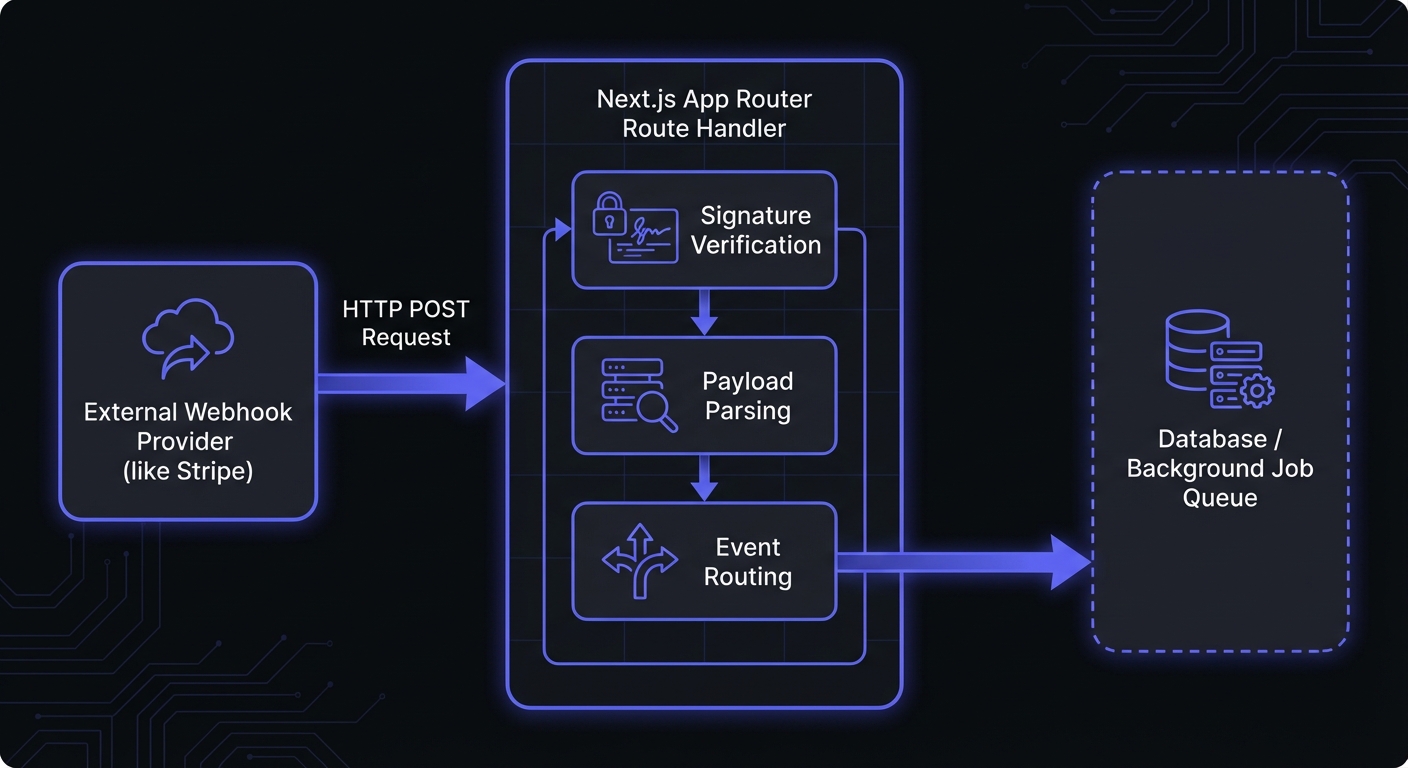
Understanding Webhooks in Next.js
Webhooks in Next.js use Route Handlers—files named route.ts in the app directory. You need:
- POST handler to receive incoming webhooks
- Raw request body for signature verification
- Environment variables for secrets and API keys
- Idempotent handlers to handle duplicate deliveries
Sending Webhooks with Hook Mesh
When your Next.js application needs to notify external systems about events, Hook Mesh handles the delivery complexity—retries, failure handling, and logging—so you can focus on your application logic.
Installing the SDK
npm install @hookmesh/nodeConfiguring Your Environment
Add your Hook Mesh API key to your environment variables:
# .env.local
HOOKMESH_API_KEY=sk_live_your_api_key_here
Sending Events from Route Handlers
Here's how to trigger a webhook when something happens in your API:
// app/api/orders/[id]/complete/route.ts
import { NextRequest, NextResponse } from 'next/server';
import { HookMesh } from '@hookmesh/node';

const hookmesh = new HookMesh(process.env.HOOKMESH_API_KEY!);

export async function POST(
  request: NextRequest,
  { params }: { params: Promise<{ id: string }> }
) {
  const { id } = await params;

  // Your business logic to complete the order
  const order = await completeOrder(id);

  // Send webhook event through Hook Mesh
  await hookmesh.events.send({
    eventType: 'order.completed',
    payload: {
      orderId: order.id,
      customerId: order.customerId,
      total: order.total,
      currency: order.currency,
      completedAt: new Date().toISOString(),
    },
  });

  return NextResponse.json({ success: true, order });
}
Receiving Webhooks in Next.js
Basic Route Handler
// app/api/webhooks/stripe/route.ts
import { NextRequest, NextResponse } from 'next/server';

export async function POST(request: NextRequest) {
  try {
    const payload = await request.json();

    // Process the webhook
    console.log('Received webhook:', payload.type);

    // Handle different event types
    switch (payload.type) {
      case 'payment_intent.succeeded':
        await handlePaymentSuccess(payload.data);
        break;
      case 'customer.subscription.deleted':
        await handleSubscriptionCancelled(payload.data);
        break;
      default:
        console.log(`Unhandled event type: ${payload.type}`);
    }

    return NextResponse.json({ received: true });
  } catch (error) {
    console.error('Webhook error:', error);
    return NextResponse.json(
      { error: 'Webhook processing failed' },
      { status: 500 }
    );
  }
}
Error Handling Best Practices
Return appropriate HTTP status codes so webhook providers know whether to retry:
| Status Code | Meaning | Provider Action |
|---|---|---|
| 200-299 | Success | No retry |
| 400 | Bad request (invalid payload) | No retry |
| 401/403 | Authentication failed | No retry |
| 500 | Server error | Retry with backoff |
| 502/503/504 | Temporary failure | Retry with backoff |
Log errors with context for debugging:
export async function POST(request: NextRequest) {
  const requestId = request.headers.get('x-request-id') ?? crypto.randomUUID();

  try {
    // ... processing logic
  } catch (error) {
    console.error({
      message: 'Webhook processing failed',
      requestId,
      error: error instanceof Error ? error.message : 'Unknown error',
      timestamp: new Date().toISOString(),
    });

    // Return 500 so the provider retries
    return NextResponse.json(
      { error: 'Processing failed', requestId },
      { status: 500 }
    );
  }
}
Signature Verification
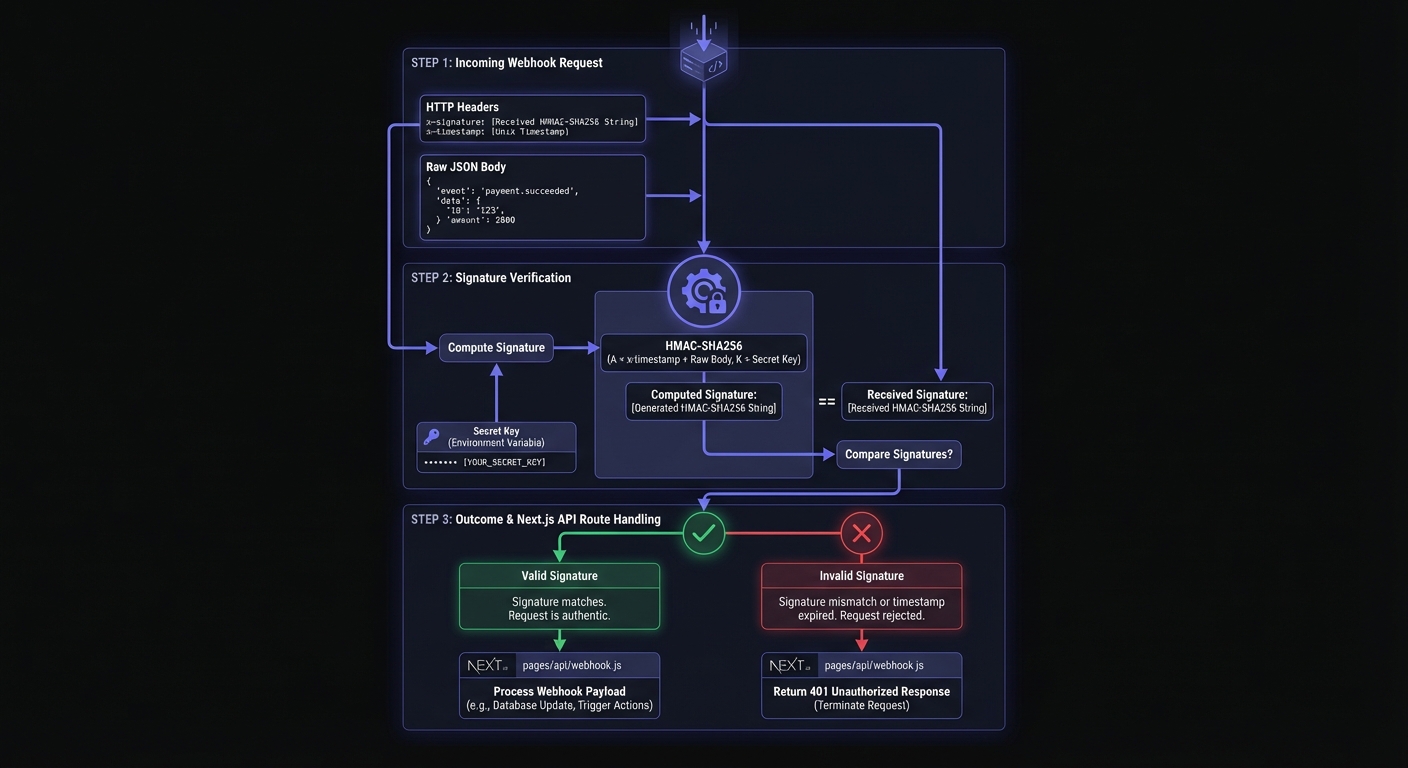
Always verify the signature—it ensures the request came from the expected sender. Here's how to verify HMAC-SHA256 signatures in Next.js. For more on signature algorithms and security patterns, see our webhook security best practices.
// app/api/webhooks/incoming/route.ts
import { NextRequest, NextResponse } from 'next/server';
import crypto from 'crypto';

const WEBHOOK_SECRET = process.env.WEBHOOK_SECRET!;

function verifySignature(payload: string, signature: string): boolean {
  const expectedSignature = crypto
    .createHmac('sha256', WEBHOOK_SECRET)
    .update(payload, 'utf8')
    .digest('hex');

  const signatureBuffer = Buffer.from(signature, 'hex');
  const expectedBuffer = Buffer.from(expectedSignature, 'hex');

  if (signatureBuffer.length !== expectedBuffer.length) {
    return false;
  }

  return crypto.timingSafeEqual(signatureBuffer, expectedBuffer);
}

export async function POST(request: NextRequest) {
  // Get the raw body as text for signature verification
  const rawBody = await request.text();
  const signature = request.headers.get('x-webhook-signature');

  if (!signature) {
    return NextResponse.json(
      { error: 'Missing signature header' },
      { status: 401 }
    );
  }

  if (!verifySignature(rawBody, signature)) {
    return NextResponse.json(
      { error: 'Invalid signature' },
      { status: 401 }
    );
  }

  // Signature verified - safe to process
  const payload = JSON.parse(rawBody);

  // Process your webhook...
  await processWebhookEvent(payload);

  return NextResponse.json({ received: true });
}Important: Use request.text() to get the raw body before parsing. Using request.json() first would prevent you from accessing the original string needed for signature verification. This same pattern applies when verifying webhooks in Node.js with Express or other frameworks.
Timestamp Validation for Replay Protection
Prevent replay attacks by validating the timestamp included with the webhook:
// lib/webhook-utils.ts
import crypto from 'crypto';

interface VerificationResult {
  valid: boolean;
  error?: string;
}

export function verifyWebhookWithTimestamp(
  payload: string,
  signature: string,
  timestamp: string,
  secret: string
): VerificationResult {
  // Reject requests older than 5 minutes
  const MAX_AGE_SECONDS = 300;
  const currentTime = Math.floor(Date.now() / 1000);
  const requestTime = parseInt(timestamp, 10);

  if (isNaN(requestTime)) {
    return { valid: false, error: 'Invalid timestamp format' };
  }

  if (Math.abs(currentTime - requestTime) > MAX_AGE_SECONDS) {
    return { valid: false, error: 'Request timestamp expired' };
  }

  // Include timestamp in signed payload
  const signedPayload = `${timestamp}.${payload}`;
  const expectedSignature = crypto
    .createHmac('sha256', secret)
    .update(signedPayload, 'utf8')
    .digest('hex');

  const isValid = crypto.timingSafeEqual(
    Buffer.from(signature, 'hex'),
    Buffer.from(expectedSignature, 'hex')
  );

  return { valid: isValid, error: isValid ? undefined : 'Invalid signature' };
}
Edge Runtime Considerations
Edge Runtime offers lower latency but lacks the full Node.js crypto module. For signature verification, use the Web Crypto API:
// app/api/webhooks/edge/route.ts
import { NextRequest, NextResponse } from 'next/server';

export const runtime = 'edge';

async function verifySignatureEdge(
  payload: string,
  signature: string,
  secret: string
): Promise<boolean> {
  const encoder = new TextEncoder();
  const key = await crypto.subtle.importKey(
    'raw',
    encoder.encode(secret),
    { name: 'HMAC', hash: 'SHA-256' },
    false,
    ['sign']
  );

  const signatureBytes = await crypto.subtle.sign(
    'HMAC',
    key,
    encoder.encode(payload)
  );

  const expectedSignature = Array.from(new Uint8Array(signatureBytes))
    .map((b) => b.toString(16).padStart(2, '0'))
    .join('');

  return signature === expectedSignature;
}

export async function POST(request: NextRequest) {
  const rawBody = await request.text();
  const signature = request.headers.get('x-webhook-signature') ?? '';

  const isValid = await verifySignatureEdge(
    rawBody,
    signature,
    process.env.WEBHOOK_SECRET!
  );

  if (!isValid) {
    return NextResponse.json({ error: 'Invalid signature' }, { status: 401 });
  }

  const payload = JSON.parse(rawBody);

  // Queue for background processing instead of processing inline
  await queueWebhookForProcessing(payload);

  return NextResponse.json({ received: true });
}
For most webhook endpoints, use the default Node.js runtime for its timingSafeEqual security guarantees:
export const runtime = 'nodejs';Local Development and Testing
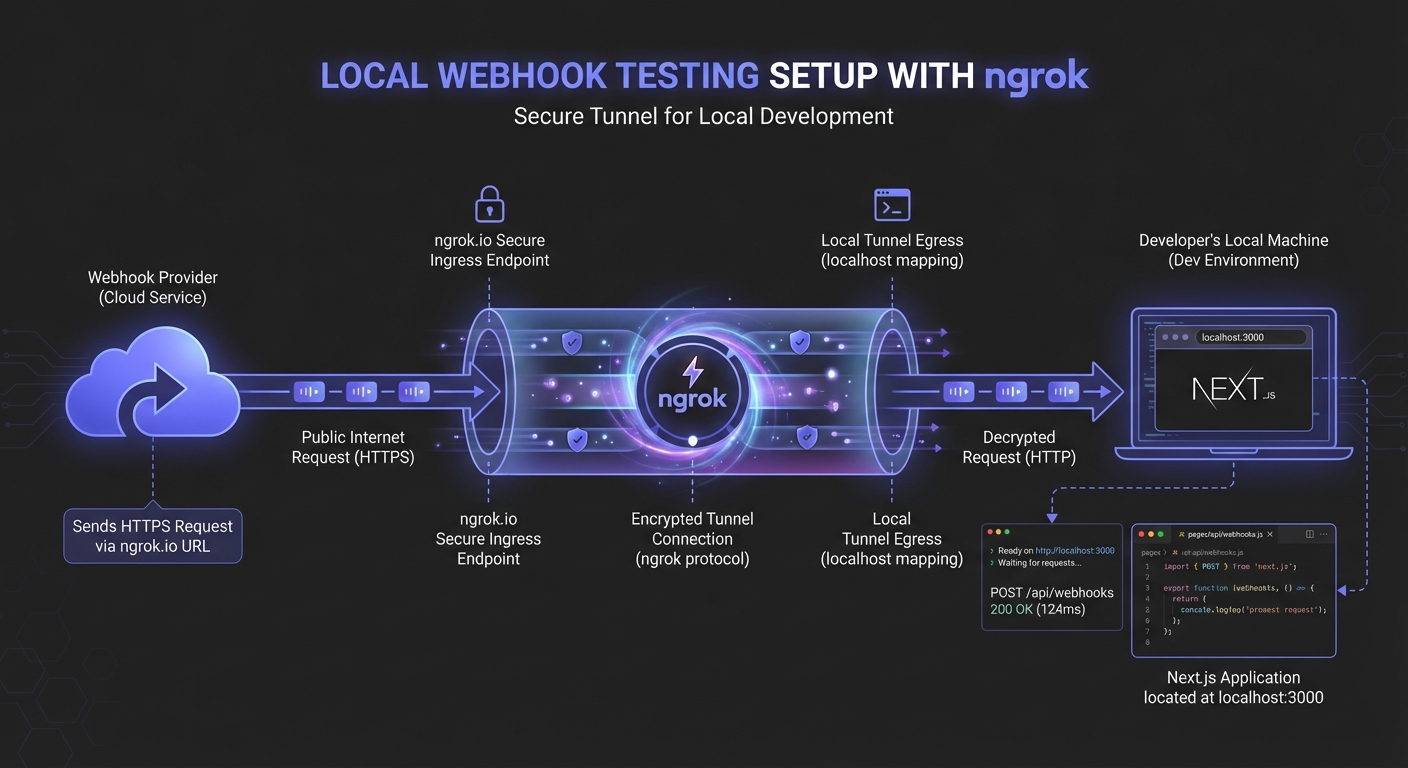
Testing webhooks locally requires exposing your development server to the internet. Tools like ngrok or localtunnel create a secure tunnel to your localhost.
Using ngrok
# Start your Next.js dev server
npm run dev

# In another terminal, create a tunnel
ngrok http 3000
ngrok provides a public URL (e.g., https://abc123.ngrok.io) that forwards requests to localhost:3000. Configure this URL in your webhook provider's dashboard during development.
Testing Webhook Delivery
Send test webhooks using curl:
# Generate a test signature
PAYLOAD='{"type":"test.event","data":{"id":"123"}}'
TIMESTAMP=$(date +%s)
SIGNATURE=$(echo -n "${TIMESTAMP}.${PAYLOAD}" | openssl dgst -sha256 -hmac "your-secret" | cut -d' ' -f2)

# Send the webhook
curl -X POST https://abc123.ngrok.io/api/webhooks/incoming \
  -H "Content-Type: application/json" \
  -H "x-webhook-signature: ${SIGNATURE}" \
  -H "x-webhook-timestamp: ${TIMESTAMP}" \
  -d "${PAYLOAD}"
Middleware Exclusions
If your Next.js app uses authentication middleware, exclude webhook routes from protection. Webhook providers cannot authenticate like users:
// middleware.ts
import { NextResponse } from 'next/server';
import type { NextRequest } from 'next/server';

export function middleware(request: NextRequest) {
  // Skip authentication for webhook routes
  if (request.nextUrl.pathname.startsWith('/api/webhooks')) {
    return NextResponse.next();
  }

  // Apply auth middleware to other routes
  // ...your auth logic
}

export const config = {
  matcher: ['/api/:path*', '/dashboard/:path*'],
};
Without this exclusion, webhook requests hit your login page instead of your handler—a common cause of webhook failures.
Deployment on Vercel
Environment Variables
Configure your secrets in the Vercel dashboard under Project Settings > Environment Variables:
HOOKMESH_API_KEY: Your Hook Mesh API key for sending webhooksWEBHOOK_SECRET: Secret for verifying incoming webhooks
Never commit these to your repository.
Function Timeout
Vercel serverless functions have execution time limits (10 seconds on Hobby, 60 seconds on Pro). For webhook handlers:
- Acknowledge quickly: Return a 200 response as soon as you've validated the webhook
- Process asynchronously: Queue heavy work for background processing
export async function POST(request: NextRequest) {
  // Verify signature...

  const payload = JSON.parse(rawBody);

  // Queue for async processing (use Vercel KV, Upstash, etc.)
  await redis.lpush('webhook-queue', JSON.stringify(payload));

  // Return immediately
  return NextResponse.json({ received: true });
}
Webhook URL Configuration
Your endpoint URL:
https://your-app.vercel.app/api/webhooks/incoming
Configure your webhook providers to use your production domain. For other serverless platforms, see webhooks in serverless environments.
Complete Example: Full Webhook Integration
Here's a complete example tying everything together:
// app/api/webhooks/hookmesh/route.ts
import { NextRequest, NextResponse } from 'next/server';
import crypto from 'crypto';

export const runtime = 'nodejs';

const WEBHOOK_SECRET = process.env.INCOMING_WEBHOOK_SECRET!;

function verifyHookMeshSignature(
  payload: string,
  signature: string,
  timestamp: string
): boolean {
  const signedPayload = `${timestamp}.${payload}`;
  const expectedSignature = crypto
    .createHmac('sha256', WEBHOOK_SECRET)
    .update(signedPayload, 'utf8')
    .digest('hex');

  try {
    return crypto.timingSafeEqual(
      Buffer.from(signature, 'hex'),
      Buffer.from(expectedSignature, 'hex')
    );
  } catch {
    return false;
  }
}

export async function POST(request: NextRequest) {
  const rawBody = await request.text();
  const signature = request.headers.get('x-hookmesh-signature') ?? '';
  const timestamp = request.headers.get('x-hookmesh-timestamp') ?? '';

  // Verify timestamp is recent (within 5 minutes)
  const requestAge = Math.abs(Date.now() / 1000 - parseInt(timestamp, 10));
  if (requestAge > 300) {
    return NextResponse.json({ error: 'Request expired' }, { status: 401 });
  }

  // Verify signature
  if (!verifyHookMeshSignature(rawBody, signature, timestamp)) {
    return NextResponse.json({ error: 'Invalid signature' }, { status: 401 });
  }

  const event = JSON.parse(rawBody);

  // Route to appropriate handler
  switch (event.type) {
    case 'user.created':
      await handleUserCreated(event.data);
      break;
    case 'order.completed':
      await handleOrderCompleted(event.data);
      break;
    case 'payment.failed':
      await handlePaymentFailed(event.data);
      break;
    default:
      console.log(`Received unhandled event: ${event.type}`);
  }

  return NextResponse.json({ received: true, eventId: event.id });
}

async function handleUserCreated(data: any) {
  // Send welcome email, create CRM record, etc.
}

async function handleOrderCompleted(data: any) {
  // Update inventory, notify fulfillment, etc.
}

async function handlePaymentFailed(data: any) {
  // Send notification, update subscription status, etc.
}
Conclusion
- Use
request.text()for raw body signature verification - Always verify signatures with timing-safe comparison
- Use Node.js runtime for full crypto support
- Acknowledge quickly, process asynchronously
Hook Mesh handles delivery, retries, and customer-facing features. Ready to add webhooks to your Next.js app? Get started with Hook Mesh.
Related Posts
Building Webhooks with Express.js: Best Practices
Learn how to build production-ready webhooks with Express.js. Complete guide covering sending webhooks, receiving webhooks, raw body parsing, signature verification middleware, error handling, and queue integration.
Receive and Verify Webhooks in Node.js: A Complete Guide
Learn how to securely receive and verify webhooks in Node.js using Express.js. Covers HMAC signature verification, timestamp validation, replay attack prevention, and common mistakes to avoid.
Webhook Security Best Practices: The Complete Guide
Learn how to secure your webhook implementations with HMAC signature verification, replay attack prevention, SSRF mitigation, and more. Includes code examples in Node.js and Python.
Webhook Idempotency: Why It Matters and How to Implement It
A comprehensive technical guide to implementing idempotency for webhooks. Learn about idempotency keys, deduplication strategies, and implementation patterns with Node.js and Python code examples.
Serverless Webhooks: Lambda, Vercel, Cloudflare Workers
A comprehensive tutorial on implementing webhooks in serverless architectures. Learn how to send and receive webhooks on AWS Lambda, Vercel Functions, and Cloudflare Workers with practical code examples and best practices.