Clerk Webhooks: User Authentication Events
Learn how to integrate Clerk webhooks for user authentication events. Complete guide covering user.created, user.updated, session, and organization events with Svix signature verification and Node.js code examples.

Clerk Webhooks: User Authentication Events
Clerk webhooks notify your application when users sign up, update profiles, start sessions, or join organizations. This guide covers event types, dashboard setup, Svix signature verification, and use cases like user provisioning and profile sync.
Understanding Clerk Webhook Events
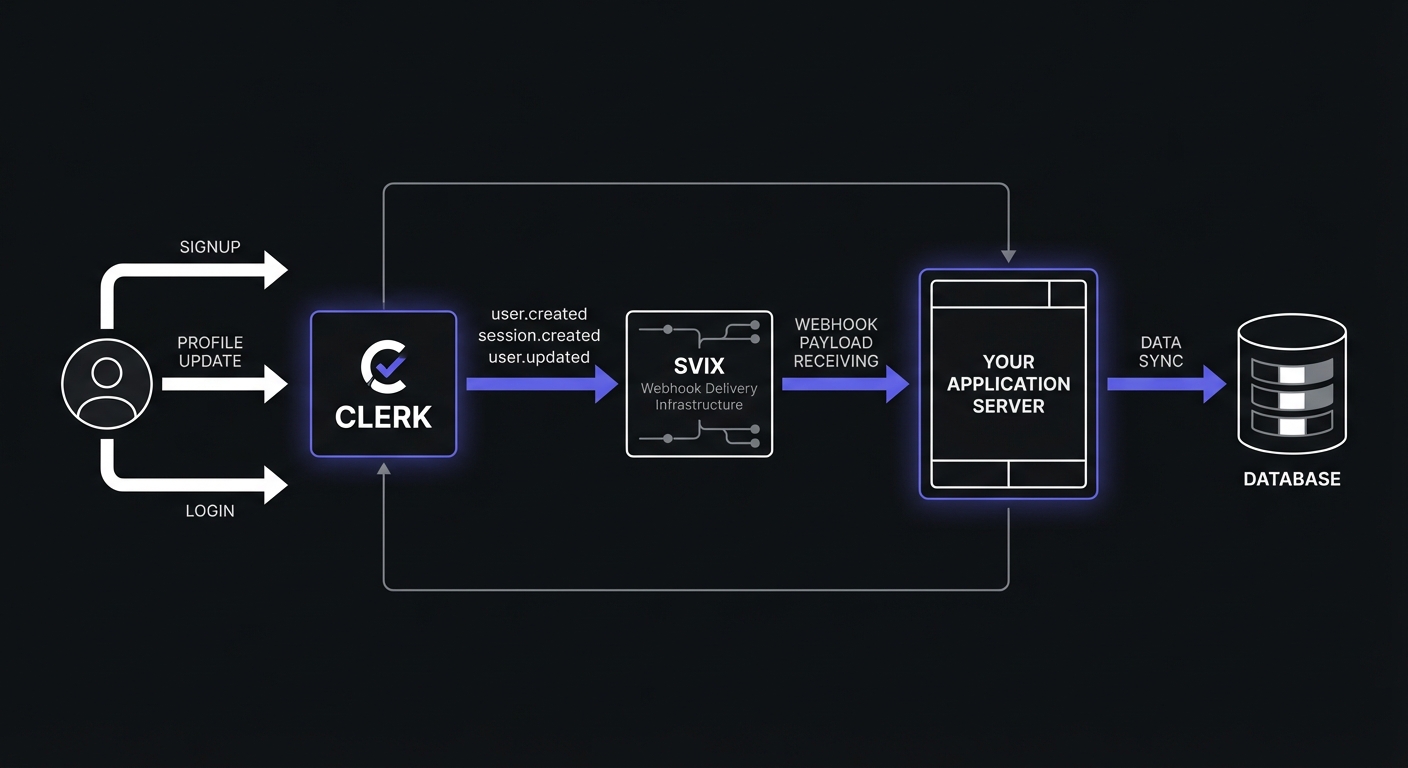
User Events
Fire when accounts are created, modified, or deleted.
- user.created: Triggered when a new user signs up through any authentication method (email, social login, SSO)
- user.updated: Fired when user profile data changes, including email, phone, metadata, or profile image
- user.deleted: Sent when a user account is removed from your application
Session Events
Track user authentication state.
- session.created: Triggered when a user successfully signs in
- session.ended: Fired when a user signs out or their session expires
- session.revoked: Sent when a session is forcefully terminated (e.g., by an admin or security policy)
Organization Events
For applications using Clerk's organization features, these events track team and membership changes.
- organization.created: Triggered when a new organization is created
- organization.updated: Fired when organization details change
- organization.deleted: Sent when an organization is removed
- organizationMembership.created: Triggered when a user joins an organization
- organizationMembership.updated: Fired when membership roles or permissions change
- organizationMembership.deleted: Sent when a user leaves or is removed from an organization
Setting Up Webhooks in the Clerk Dashboard
- Navigate to Webhooks in your Clerk Dashboard sidebar
- Click Add Endpoint to create a new webhook subscription
- Enter your endpoint URL (must be HTTPS in production)
- Select the events you want to receive
- Click Create to save the endpoint
Clerk will display a Signing Secret after creating the endpoint. Copy this secret and store it securely in your environment variables. You will need it to verify incoming webhook signatures.
For local development, use ngrok to expose your server. Clerk provides a Test button to send sample payloads.
Svix-Powered Signature Verification
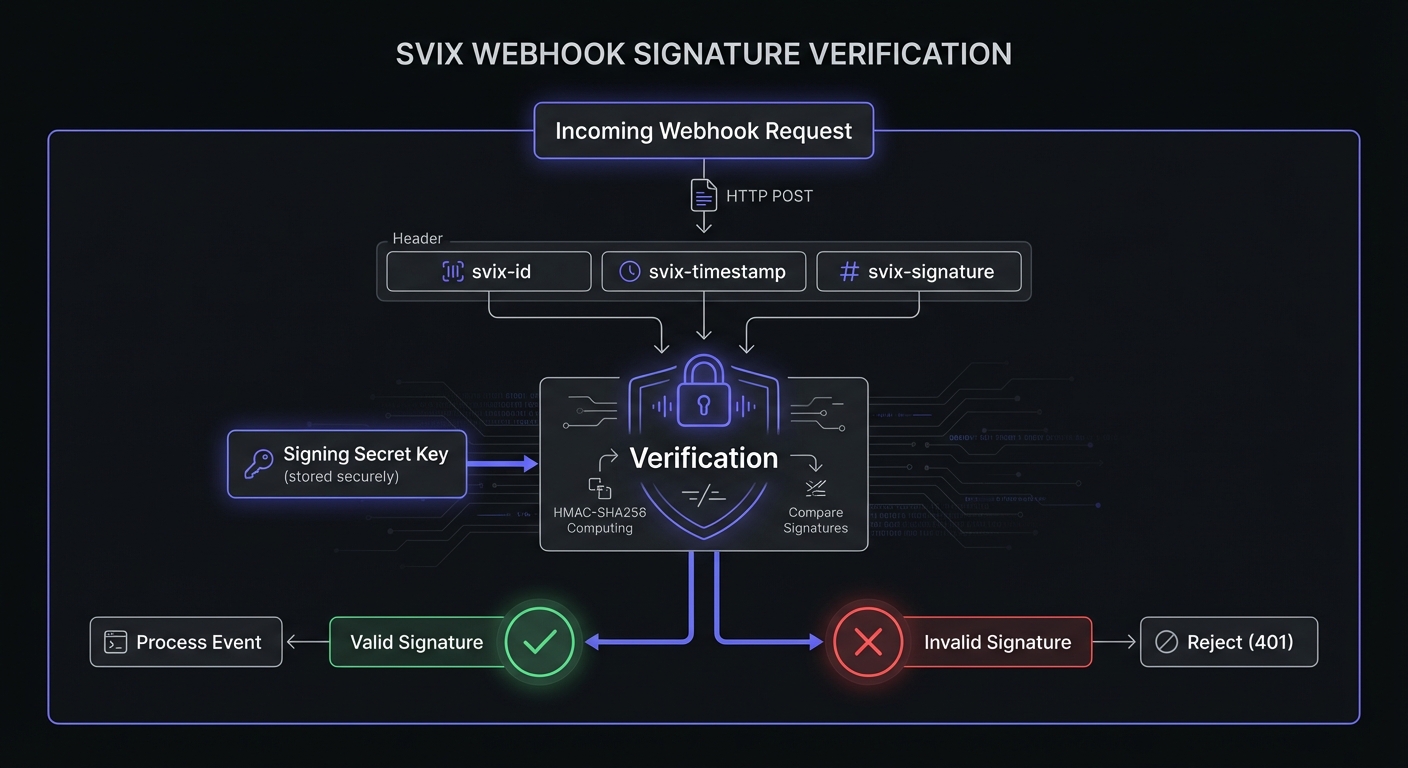
Clerk uses Svix for webhook delivery. Use the official Svix library for signature verification—more reliable than manual implementation. See our webhook authentication methods comparison for Svix, HMAC, and mTLS approaches.
Installing the Svix Library
npm install svixVerifying Webhooks with Svix
The Svix library handles signature verification, including timestamp validation and replay attack prevention:
const { Webhook } = require('svix');
const express = require('express');

const app = express();

// Important: Use raw body for signature verification
app.post('/webhooks/clerk', express.raw({ type: 'application/json' }), (req, res) => {
  const CLERK_WEBHOOK_SECRET = process.env.CLERK_WEBHOOK_SECRET;

  if (!CLERK_WEBHOOK_SECRET) {
    console.error('Missing CLERK_WEBHOOK_SECRET environment variable');
    return res.status(500).json({ error: 'Server configuration error' });
  }

  // Get the Svix headers
  const svixId = req.headers['svix-id'];
  const svixTimestamp = req.headers['svix-timestamp'];
  const svixSignature = req.headers['svix-signature'];

  // Verify all required headers are present
  if (!svixId || !svixTimestamp || !svixSignature) {
    return res.status(400).json({ error: 'Missing Svix headers' });
  }

  const wh = new Webhook(CLERK_WEBHOOK_SECRET);
  let event;

  try {
    event = wh.verify(req.body, {
      'svix-id': svixId,
      'svix-timestamp': svixTimestamp,
      'svix-signature': svixSignature,
    });
  } catch (err) {
    console.error('Webhook verification failed:', err.message);
    return res.status(401).json({ error: 'Invalid signature' });
  }

  // Process the verified event
  console.log('Received verified webhook:', event.type);
  handleClerkEvent(event);

  res.status(200).json({ received: true });
});

function handleClerkEvent(event) {
  switch (event.type) {
    case 'user.created':
      handleUserCreated(event.data);
      break;
    case 'user.updated':
      handleUserUpdated(event.data);
      break;
    case 'user.deleted':
      handleUserDeleted(event.data);
      break;
    case 'session.created':
      handleSessionCreated(event.data);
      break;
    case 'organizationMembership.created':
      handleOrgMembershipCreated(event.data);
      break;
    default:
      console.log('Unhandled event type:', event.type);
  }
}
The Svix library automatically validates the timestamp to prevent replay attacks. By default, it rejects webhooks older than 5 minutes, which protects against attackers capturing and resending legitimate requests.
Use Case: Syncing Clerk Users to Your Database
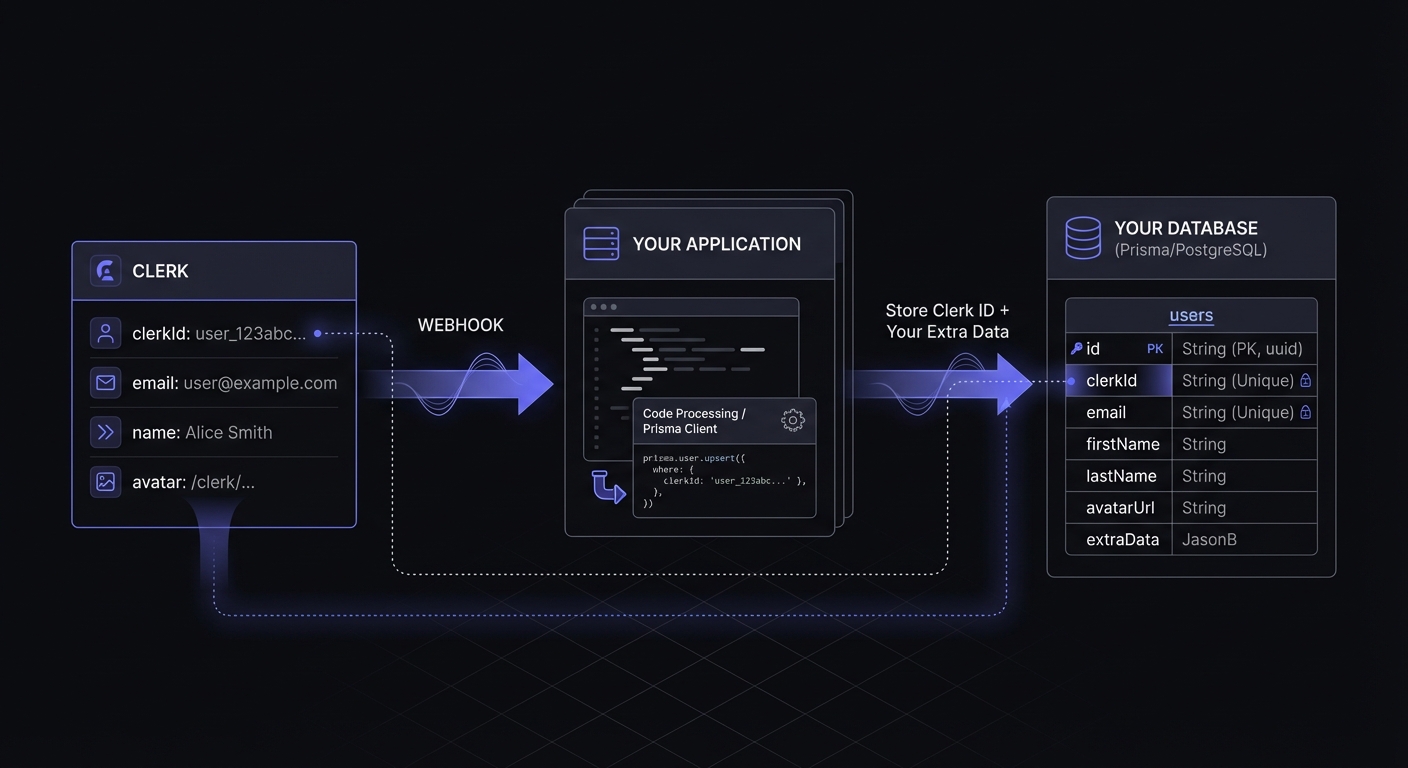
Synchronize users to your database to store additional data and relationships without hitting Clerk API. See Supabase webhooks for complementary patterns if using Supabase.
const { PrismaClient } = require('@prisma/client');
const prisma = new PrismaClient();

async function handleUserCreated(data) {
  const { id, email_addresses, first_name, last_name, image_url, created_at } = data;

  // Get the primary email address
  const primaryEmail = email_addresses.find(e => e.id === data.primary_email_address_id);

  try {
    await prisma.user.create({
      data: {
        clerkId: id,
        email: primaryEmail?.email_address,
        firstName: first_name,
        lastName: last_name,
        avatarUrl: image_url,
        createdAt: new Date(created_at),
      },
    });
    console.log(`Created user record for Clerk user ${id}`);
  } catch (err) {
    console.error(`Failed to create user ${id}:`, err);
    throw err; // Rethrow to trigger retry
  }
}

async function handleUserUpdated(data) {
  const { id, email_addresses, first_name, last_name, image_url } = data;
  const primaryEmail = email_addresses.find(e => e.id === data.primary_email_address_id);

  try {
    await prisma.user.update({
      where: { clerkId: id },
      data: {
        email: primaryEmail?.email_address,
        firstName: first_name,
        lastName: last_name,
        avatarUrl: image_url,
        updatedAt: new Date(),
      },
    });
    console.log(`Updated user record for Clerk user ${id}`);
  } catch (err) {
    console.error(`Failed to update user ${id}:`, err);
    throw err;
  }
}

async function handleUserDeleted(data) {
  const { id } = data;

  try {
    await prisma.user.delete({
      where: { clerkId: id },
    });
    console.log(`Deleted user record for Clerk user ${id}`);
  } catch (err) {
    // User might not exist if they were never synced
    if (err.code !== 'P2025') {
      console.error(`Failed to delete user ${id}:`, err);
      throw err;
    }
  }
}
Use Case: Session Management and Activity Tracking
Track user activity patterns, enforce security policies, and maintain presence information.
async function handleSessionCreated(data) {
  const { id, user_id, client_id, created_at, last_active_at } = data;

  // Log the sign-in event for security auditing
  await prisma.securityLog.create({
    data: {
      userId: user_id,
      eventType: 'SIGN_IN',
      sessionId: id,
      clientId: client_id,
      timestamp: new Date(created_at),
    },
  });

  // Update user's last active timestamp
  await prisma.user.update({
    where: { clerkId: user_id },
    data: { lastActiveAt: new Date(last_active_at) },
  });
}

async function handleSessionEnded(data) {
  const { id, user_id } = data;

  await prisma.securityLog.create({
    data: {
      userId: user_id,
      eventType: 'SIGN_OUT',
      sessionId: id,
      timestamp: new Date(),
    },
  });
}
Use Case: Organization Membership Changes
Track organization membership for B2B access control and billing.
async function handleOrgMembershipCreated(data) {
  const { id, organization, public_user_data, role } = data;

  await prisma.organizationMember.create({
    data: {
      clerkMembershipId: id,
      organizationId: organization.id,
      userId: public_user_data.user_id,
      role: role,
      joinedAt: new Date(),
    },
  });

  // Trigger onboarding workflow for new team members
  await triggerOnboardingEmail(public_user_data.user_id, organization.name);
}

async function handleOrgMembershipDeleted(data) {
  const { id, organization, public_user_data } = data;

  await prisma.organizationMember.delete({
    where: { clerkMembershipId: id },
  });

  // Revoke access to organization resources
  await revokeOrganizationAccess(public_user_data.user_id, organization.id);
}
Best Practices for Clerk Webhook Integration
Always Verify with the Svix Library
Never skip verification, even in development. The Svix library handles edge cases—timestamp validation, encoding issues—that manual implementations miss. See HMAC-SHA256 signatures for cryptography fundamentals.
Handle All User Lifecycle Events
Subscribe to all user events (created, updated, deleted) to keep databases synchronized. Missing even one event type causes hard-to-debug inconsistencies.
Implement Idempotent Processing
Webhooks can be delivered multiple times. Use event IDs to ensure duplicate processing produces the same result. See idempotent webhook handlers for strategies including database-level techniques.
async function handleUserCreatedIdempotent(data) {
  const { id } = data;

  // Use upsert instead of create to handle duplicates
  await prisma.user.upsert({
    where: { clerkId: id },
    create: {
      clerkId: id,
      email: getPrimaryEmail(data),
      firstName: data.first_name,
      lastName: data.last_name,
    },
    update: {
      // Only update if this is a genuine duplicate delivery
      email: getPrimaryEmail(data),
      firstName: data.first_name,
      lastName: data.last_name,
    },
  });
}
Respond Quickly, Process Asynchronously
Return 200 immediately after verification. Queue long operations asynchronously to avoid timeouts.
Log Webhook Activity
Maintain detailed logs for debugging and audit purposes. Include the event type, user ID, and timestamp at minimum.
Troubleshooting Common Issues
Invalid Signature Errors
The most common cause: parsing the request body before verification. The Svix library needs the raw body, not a parsed JSON object. Use express.raw({ type: 'application/json' }) middleware for the webhook route.
Other causes:
- Wrong signing secret (check you're using the webhook-specific secret, not your API key)
- Request body modified by middleware or proxy
- Clock skew exceeding 5 minutes (Svix rejects old timestamps)
Missing Svix Headers
If svix-id, svix-timestamp, or svix-signature headers are missing, the request isn't from Clerk. Check that:
- The request is actually hitting your webhook endpoint
- No proxy is stripping headers
- You're reading headers correctly (case-insensitive in Express)
Webhook Not Firing
Verify in the Clerk dashboard:
- Endpoint URL is correct and HTTPS
- Events are subscribed (user.created, etc.)
- No failed deliveries in the webhook logs
For local development, use ngrok to expose your server: ngrok http 3000. Update the Clerk endpoint URL to use the ngrok forwarding URL.
Eventual Consistency Considerations
Webhook delivery is asynchronous. A user might be redirected to your app before the user.created webhook arrives. Handle this by:
- Checking if the user exists in your database, creating on-demand if missing
- Using Clerk's session token for immediate access to user data
- Implementing graceful degradation for missing profile data
Adding Hook Mesh for Additional Reliability
Hook Mesh adds a reliability layer between Clerk and your application with automatic retries, dead letter queues, and detailed logs. If your app experiences downtime, Hook Mesh queues events for delivery on recovery—critical for user creation events.
Conclusion
Clerk webhooks provide real-time user authentication visibility. Subscribe to user, session, and organization events to keep databases synchronized.
Key points: Verify signatures with Svix, handle all event types, and implement idempotent processing. For production reliability, Hook Mesh adds protection against missed events.
Explore more in our Platform Integration Hub.
Related Posts
Webhook Authentication: HMAC vs JWT vs mTLS Compared
A comprehensive comparison of webhook authentication methods including HMAC-SHA256, JWT, mTLS, Basic Auth, and API Keys. Learn when to use each method, with code examples and security recommendations.
Webhook Idempotency: Why It Matters and How to Implement It
A comprehensive technical guide to implementing idempotency for webhooks. Learn about idempotency keys, deduplication strategies, and implementation patterns with Node.js and Python code examples.
Supabase Webhooks: Database Triggers and Edge Functions
Learn how to implement webhooks in Supabase using database triggers, pg_net extension, and Edge Functions. Complete guide with code examples for row changes, user sync, and audit logging.
HMAC-SHA256 Webhook Signatures: Implementation Guide
Learn how to implement secure webhook signature verification using HMAC-SHA256. Complete guide with code examples for signing and verifying webhook payloads in Node.js and Python.