Webhook Integration Guides: Connect with Any Platform
Comprehensive guides for integrating webhooks from Stripe, GitHub, Shopify, Twilio, and 10+ other platforms. Learn best practices for reliable webhook handling across your entire stack.
Webhook Integration Guides: Connect with Any Platform
Quick Reference

A quick comparison of how major providers handle webhook delivery:
| Platform | Signature | Timeout | Retries | Test Tool |
|---|---|---|---|---|
| Stripe | HMAC-SHA256 | 30s | 3 days, exponential backoff | Stripe CLI |
| PayPal | Certificate chain | 30s | 3 days | Sandbox environment |
| Shopify | HMAC-SHA256 | 5s | 48 hours | Partner dashboard |
| GitHub | HMAC-SHA256 | 10s | Limited (manual redeliver) | webhook.site |
| Twilio | HMAC-SHA1 | 15s | None by default | Request inspector |
| SendGrid | ECDSA | 30s | 24 hours | Event webhook tester |
| Slack | HMAC-SHA256 | 3s | 3 retries | Slack CLI |
| HubSpot | None (IP allowlist) | 5s | 10 attempts | Workflow tester |
| Clerk | HMAC-SHA256 (Svix) | 15s | Multiple days | Svix dashboard |
Table of Contents
- Platform Comparison Matrix
- Payments and E-commerce
- Developer Tools
- Communication and Email
- CRM and Marketing
- Authentication
- Testing Webhooks Locally
- Troubleshooting Common Webhook Issues
- Common Patterns Across Platforms
- Getting Started with Hook Mesh
Payments and E-commerce
Platform Guides
Verify Stripe signatures, handle critical payment and subscription events, build idempotent handlers.
| Attribute | Value |
|---|---|
| Signature | HMAC-SHA256 |
| Header | Stripe-Signature |
| Timeout | 30 seconds |
| Retries | 3 days, exponential backoff |
| Test Tool | Stripe CLI |
Most Important Events
- Payments:
payment_intent.succeeded,payment_intent.payment_failed,charge.failed - Subscriptions:
customer.subscription.created,customer.subscription.updated,customer.subscription.deleted,invoice.paid,invoice.payment_failed - Checkout:
checkout.session.completed,checkout.session.expired - Disputes:
charge.dispute.created,charge.dispute.closed
Verifying Stripe Signatures in Node.js
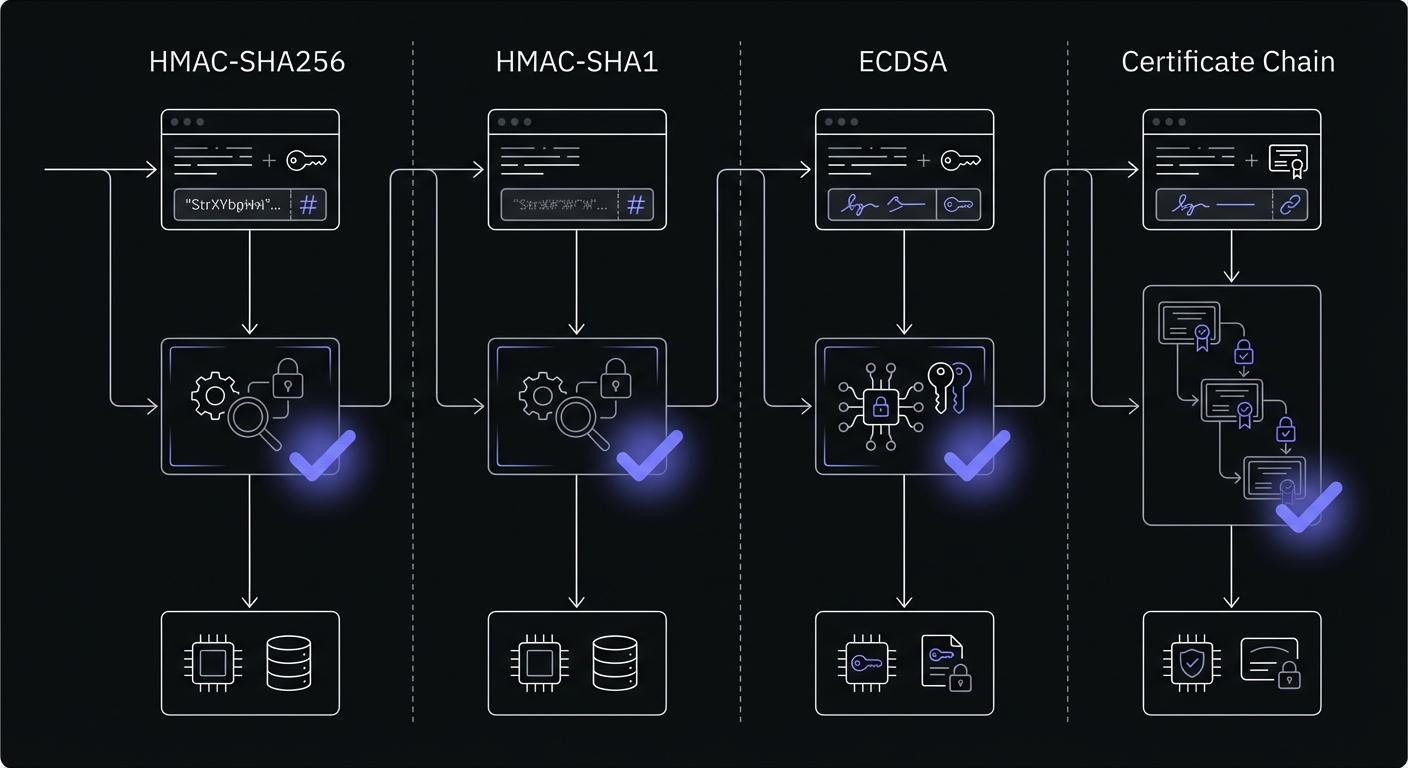
Stripe uses HMAC-SHA256 to sign webhook payloads. Always verify signatures to prevent processing forged webhooks:
import crypto from 'crypto';
import express from 'express';

const app = express();
const webhookSecret = process.env.STRIPE_WEBHOOK_SECRET;

// Important: Use raw body, not parsed JSON
app.post('/webhooks/stripe', express.raw({type: 'application/json'}), (req, res) => {
  const sig = req.headers['stripe-signature'];
  const body = req.body;

  try {
    // Stripe sends: timestamp.payload.signature
    // We reconstruct and verify
    const [timestamp, hash] = sig.split(',').map(part => {
      const [key, value] = part.split('=');
      return key === 't' ? value : key === 'v1' ? value : null;
    });

    // Use Stripe's official library for production
    const event = stripe.webhooks.constructEvent(body, sig, webhookSecret);

    // Handle event
    switch (event.type) {
      case 'payment_intent.succeeded':
        handlePaymentSuccess(event.data.object);
        break;
      case 'customer.subscription.created':
        handleSubscriptionCreated(event.data.object);
        break;
      // Handle other events...
    }

    res.json({received: true});
  } catch (err) {
    console.error('Webhook signature verification failed:', err.message);
    res.status(400).send(`Webhook Error: ${err.message}`);
  }
});
For production applications, use the official Stripe Node.js library which handles signature verification internally.
Certificate chain verification, handle both classic and modern webhook formats.
| Attribute | Value |
|---|---|
| Signature | Certificate chain verification |
| Header | Paypal-Transmission-Sig |
| Timeout | 30 seconds |
| Retries | 3 days |
| Test Tool | Sandbox environment |
Most Important Events
- Transactions:
PAYMENT.SALE.COMPLETED,PAYMENT.SALE.DENIED,PAYMENT.SALE.REFUNDED - Subscriptions:
BILLING.SUBSCRIPTION.CREATED,BILLING.SUBSCRIPTION.UPDATED,BILLING.SUBSCRIPTION.CANCELLED - Disputes:
CUSTOMER.DISPUTE.CREATED,CUSTOMER.DISPUTE.RESOLVED - Account:
ACCOUNT.UPDATED,ACCOUNT.MERCHANT.ONBOARDED
HMAC-SHA256 verification, order and customer events, webhook quotas, retry strategies.
| Attribute | Value |
|---|---|
| Signature | HMAC-SHA256 |
| Header | X-Shopify-Hmac-Sha256 |
| Timeout | 5 seconds |
| Retries | 48 hours, 19 attempts |
| Test Tool | Partner dashboard |
Most Important Events
- Orders:
orders/create,orders/paid,orders/cancelled,orders/fulfilled - Customers:
customers/create,customers/update,customers/delete - Products:
products/create,products/update,products/delete,inventory/update - Shop:
app/installed,app/uninstalled,shop/update
Developer Tools
Platform Guides
HMAC-SHA256 signature verification, push/PR events, GitHub Actions integration, organization webhooks.
| Attribute | Value |
|---|---|
| Signature | HMAC-SHA256 |
| Header | X-Hub-Signature-256 |
| Timeout | 10 seconds |
| Retries | Limited (manual redeliver) |
| Test Tool | webhook.site, Recent Deliveries |
Most Important Events
- Code & Commits:
push,create,delete,tag_creation - Pull Requests:
pull_request,pull_request_review,pull_request_review_comment - CI/CD:
workflow_run,check_run,check_suite - Security:
dependabot_alert,secret_scanning_alert,repository_vulnerability_alert - Issues:
issues,issue_comment,discussions,discussion_comment
Verifying GitHub Signatures in Node.js
GitHub signs webhooks with HMAC-SHA256, encoding the signature in the X-Hub-Signature-256 header. Verify it before processing:
import crypto from 'crypto';
import express from 'express';

const app = express();
const webhookSecret = process.env.GITHUB_WEBHOOK_SECRET;

app.post('/webhooks/github', express.json(), (req, res) => {
  const signature = req.headers['x-hub-signature-256'];
  const payload = JSON.stringify(req.body);

  try {
    // GitHub format: sha256=hex_encoded_hash
    const expectedSignature = 'sha256=' +
      crypto
        .createHmac('sha256', webhookSecret)
        .update(payload)
        .digest('hex');

    // Use timing-safe comparison to prevent timing attacks
    const isValid = crypto.timingSafeEqual(
      Buffer.from(signature),
      Buffer.from(expectedSignature)
    );

    if (!isValid) {
      return res.status(401).send('Invalid signature');
    }

    const event = req.body;

    // Handle event
    switch (event.action || event.type) {
      case 'opened': // Pull request or issue opened
        handleOpened(event);
        break;
      case 'push':
        handlePush(event);
        break;
      case 'completed': // Workflow run completed
        if (event.workflow_run) {
          handleWorkflowRun(event);
        }
        break;
      // Handle other events...
    }

    res.json({message: 'OK'});
  } catch (err) {
    console.error('Webhook verification failed:', err.message);
    res.status(400).send('Webhook error: ' + err.message);
  }
});
GitHub includes the webhook ID in X-GitHub-Delivery and the event type in X-GitHub-Event headers for convenient routing.
Database triggers, realtime subscriptions, Edge Functions, row-level security.
Communication and Email
Platform Guides
HMAC-SHA1 signature validation, TwiML responses, status callbacks, phone number configuration.
| Attribute | Value |
|---|---|
| Signature | HMAC-SHA1 |
| Header | X-Twilio-Signature |
| Timeout | 15 seconds |
| Retries | None by default |
| Test Tool | Request inspector, ngrok |
Most Important Events
- Messages:
inbound,message,sms - Calls:
call,recording,application - Status:
delivery,connect,hangup - Errors:
error,exception
ECDSA signature verification, delivery confirmation, bounce notifications, engagement tracking.
| Attribute | Value |
|---|---|
| Signature | ECDSA (Elliptic Curve) |
| Header | X-Twilio-Email-Event-Webhook-Signature |
| Timeout | 30 seconds |
| Retries | 24 hours |
| Test Tool | Event webhook tester |
Most Important Events
- Delivery:
bounce,delivered,dropped,deferred - Engagement:
open,click,unsubscribe,spam_report - Processing:
processed,send,invalid_email - Suppression:
group_unsubscribe,group_resubscribe
HMAC-SHA256 verification, incoming webhooks, Events API, slash commands, interactive messages.
| Attribute | Value |
|---|---|
| Signature | HMAC-SHA256 |
| Header | X-Slack-Signature |
| Timeout | 3 seconds |
| Retries | 3 retries over 1 hour |
| Test Tool | Slack CLI, Request URL verify |
Most Important Events
- Messages:
message,app_mention,message_metadata_posted - Channels:
channel_created,channel_renamed,channel_deleted - Reactions:
emoji_changed,reaction_added,reaction_removed - Users:
user_change,team_join,user_status_changed - Interactions:
event_callback,url_verification,slash_commands
CRM and Marketing
Platform Guides
IP allowlist verification, workflow-based webhooks, contact/deal/company sync, subscription events.
| Attribute | Value |
|---|---|
| Signature | None (use IP allowlist) |
| Header | N/A |
| Timeout | 5 seconds |
| Retries | 10 attempts over 24 hours |
| Test Tool | Workflow tester |
Most Important Events
- Contacts:
contact.creation,contact.change,contact.deletion - Deals:
deal.creation,deal.change,deal.deletion - Companies:
company.creation,company.change,company.deletion - Workflows:
workflow.execution,workflow.event
Authentication
Platform Guides
Svix HMAC-SHA256 signatures, user lifecycle events, organization webhooks, session events.
| Attribute | Value |
|---|---|
| Signature | HMAC-SHA256 (Svix) |
| Header | svix-signature |
| Timeout | 15 seconds |
| Retries | Multiple days, exponential backoff |
| Test Tool | Svix dashboard |
Most Important Events
- Users:
user.created,user.updated,user.deleted - Sessions:
session.created,session.ended,session.revoked - Organizations:
organization.created,organization.updated,organization.deleted - Memberships:
organizationMembership.created,organizationMembership.updated,organizationMembership.deleted - Security:
email_address.updated,phone_number.updated,password.updated
Testing Webhooks Locally
One of the biggest challenges in webhook development is testing locally. Your development machine isn't accessible from the internet, so external services can't reach your localhost webhook handler. Here are proven solutions:
Stripe CLI
For Stripe specifically, use the Stripe CLI to forward webhooks to your local environment:
# Install Stripe CLI (macOS)
brew install stripe/stripe-cli/stripe

# Authenticate
stripe login

# Forward webhooks to your local server
stripe listen --forward-to localhost:8000/webhooks/stripe

# View all forwarded events
stripe events resend evt_1234567890
ngrok: Free Tunneling Service
ngrok creates a secure tunnel from the internet to your local machine. This works for any webhook provider:
# Install ngrok
brew install ngrok/ngrok/ngrok

# Create tunnel to your local server
ngrok http 8000

# Example output:
# Forwarding                    https://abc123.ngrok.io -> http://localhost:8000
Then configure your webhook URL to https://abc123.ngrok.io/webhooks/stripe (for example). ngrok includes request inspection tools accessible at http://localhost:4040.
Benefits: Works with all providers, shows request/response details, supports authentication.
Drawbacks: Free tier has limited concurrent connections and session time limits.
webhook.site: Inspect Without Code
For quickly inspecting webhook payloads without writing any code, use webhook.site:
- Visit webhook.site
- Copy your unique URL (e.g.,
https://webhook.site/abc123-def456) - Configure this URL as your webhook endpoint in the provider's settings
- All incoming requests appear in real-time with full payload details
This is perfect for understanding payload structure before building handlers.
Localtunnel: Another Free Alternative
Localtunnel is another tunneling option:
# Install globally
npm install -g localtunnel

# Create tunnel
lt --port 8000 --subdomain my-api

# Tunnel available at: https://my-api.loca.lt
Best Practice: Environment-Based Configuration
In production, separate your webhook handling by environment:
// config/webhooks.js
export const getWebhookConfig = () => {
  if (process.env.NODE_ENV === 'development') {
    // Use ngrok URL from .env.local
    return {
      webhookUrl: process.env.NGROK_URL,
      // Disable signature verification in dev (or use provider's test mode)
    };
  }

  return {
    webhookUrl: process.env.PRODUCTION_WEBHOOK_URL,
    signatureVerification: true,
  };
};
Always test signature verification in at least one environment before deploying to production. Most providers offer test/sandbox modes where you can trigger webhooks without making real transactions.
Troubleshooting Common Webhook Issues
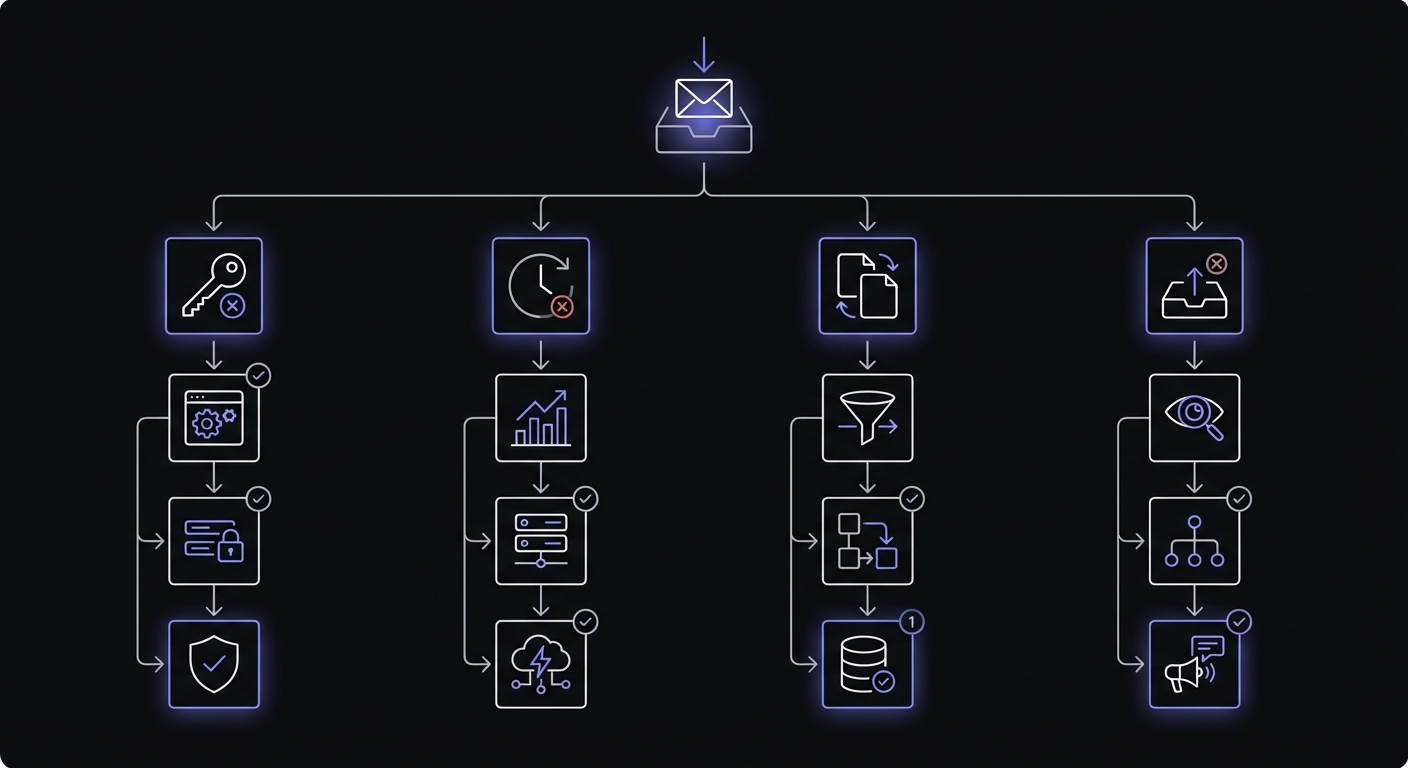
Even with careful implementation, webhook integrations can fail silently. Here's how to diagnose and fix the most common problems:
Signature Verification Failures
Problem: Webhooks are rejected with "invalid signature" errors, even though the setup looks correct.
Common Causes:
-
Timestamp drift: Some providers include a timestamp in the signature calculation. If your server's clock is significantly out of sync, verification fails.
- Fix: Run
ntpdate -s time.nist.gov(macOS) or sync via System Preferences - Better: Use a monotonic clock for verification if possible
- Fix: Run
-
Raw body vs parsed body: Signature verification must use the exact raw bytes received, not a parsed/re-encoded JSON object.
- Fix: Use
express.raw({type: 'application/json'})instead ofexpress.json()to preserve the exact request body - Wrong:
JSON.stringify(JSON.parse(body))will change byte content - Right: Store the raw bytes before parsing
- Fix: Use
-
Encoding mismatches: Different platforms encode signatures in different ways (hex vs base64, digest formats vary).
- Fix: Check the provider's documentation for exact format
- Stripe: Hex encoding, HMAC-SHA256
- GitHub:
sha256=prefix, hex encoding - Shopify: Base64 encoding
- Slack:
sha256=prefix, hex encoding
Timeout Errors
Problem: Your webhook handler is timing out, and the provider retries indefinitely.
Common Causes:
- Synchronous processing: Doing all work (database writes, API calls, etc.) inside the webhook handler.
- Fix: Return a 200 response immediately, queue the work asynchronously:
app.post('/webhooks/stripe', async (req, res) => {
  // Verify signature immediately
  const event = verifyStripeSignature(req);

  // Queue for async processing
  await queue.enqueue('process-stripe-event', event);

  // Return immediately
  res.json({received: true});

  // Process in background without blocking response
});-
Network timeouts: Making external API calls inside the webhook handler.
- Fix: Queue the event and process asynchronously. Add retry logic for external calls.
-
Database locks: A long-running transaction blocking webhook processing.
- Fix: Use transactions carefully. Write minimal data in the webhook, queue the rest.
Best Practice: Return 200 within 5 seconds, process everything else asynchronously.
Duplicate Events
Problem: The same event is processed multiple times, causing duplicate charges, double-sent emails, etc.
Causes: Webhooks are delivered "at least once," so duplicates are expected. The solution is idempotency.
Implementation: Idempotency Keys
app.post('/webhooks/stripe', async (req, res) => {
  const event = verifyStripeSignature(req);
  const idempotencyKey = event.id; // Use provider's event ID

  // Check if we've already processed this event
  const existing = await db.webhookEvents.findOne({
    eventId: idempotencyKey,
  });

  if (existing) {
    // Already processed, return success
    return res.json({received: true});
  }

  try {
    // Process event
    if (event.type === 'payment_intent.succeeded') {
      await processPayment(event.data.object);
    }

    // Record successful processing
    await db.webhookEvents.create({
      eventId: idempotencyKey,
      type: event.type,
      processedAt: new Date(),
    });

    res.json({received: true});
  } catch (err) {
    // Don't record on error, let provider retry
    res.status(500).json({error: err.message});
  }
});
Better Option: Database-Backed Deduplication
Use a database with unique constraints:
CREATE TABLE webhook_events (
  id UUID PRIMARY KEY,
  event_id VARCHAR UNIQUE NOT NULL,
  event_type VARCHAR NOT NULL,
  payload JSONB NOT NULL,
  processed BOOLEAN DEFAULT FALSE,
  created_at TIMESTAMP DEFAULT NOW()
);

-- Insert or ignore
INSERT INTO webhook_events (id, event_id, event_type, payload)
VALUES (gen_random_uuid(), $1, $2, $3)
ON CONFLICT (event_id) DO NOTHING
RETURNING id;
Missing Events
Problem: Some events never arrive, and the order is inconsistent.
Causes: Network failures, provider issues, or your endpoint being down.
Solution: Reconciliation Jobs
Don't rely 100% on webhooks. Run periodic reconciliation:
// Run every 5 minutes
setInterval(async () => {
  // Get last processed webhook timestamp
  const lastEvent = await db.webhookEvents
    .findOne()
    .sort({createdAt: -1});

  const since = lastEvent?.createdAt || new Date(0);

  // Query provider's API for events since that time
  const providerEvents = await stripe.events.list({
    created: {gte: Math.floor(since.getTime() / 1000)},
  });

  // Process any we haven't seen
  for (const event of providerEvents.data) {
    const existing = await db.webhookEvents.findOne({
      eventId: event.id,
    });

    if (!existing) {
      await processWebhookEvent(event);
      await recordEvent(event);
    }
  }
}, 5 * 60 * 1000);
Endpoint Health Monitoring
Track webhook delivery failures:
// In your webhook handler
app.post('/webhooks/stripe', async (req, res) => {
  const event = verifyStripeSignature(req);

  try {
    await processEvent(event);
    res.json({received: true});
  } catch (err) {
    // Log failures for monitoring
    await db.webhookFailures.create({
      eventId: event.id,
      error: err.message,
      timestamp: new Date(),
    });

    // Alert if failure rate exceeds threshold
    const recentFailures = await db.webhookFailures.countDocuments({
      timestamp: {$gte: new Date(Date.now() - 3600000)},
    });

    if (recentFailures > 10) {
      await alertOps('High webhook failure rate detected');
    }

    res.status(500).json({error: err.message});
  }
});
Out-of-Order Delivery
Problem: Events arrive in the wrong order, causing state inconsistencies.
Example: payment_intent.succeeded arrives before invoice.created, but your code expects invoices to exist first.
Solution 1: Timestamp-Based Ordering
Store events and process in timestamp order:
app.post('/webhooks/stripe', async (req, res) => {
  const event = verifyStripeSignature(req);

  // Store event for later processing
  await db.pendingEvents.create({
    eventId: event.id,
    type: event.type,
    timestamp: event.created, // Use provider's timestamp
    payload: event.data.object,
  });

  res.json({received: true});

  // Process in background, ordered by timestamp
  const events = await db.pendingEvents
    .find({processed: false})
    .sort({timestamp: 1})
    .limit(10);

  for (const evt of events) {
    try {
      await processEvent(evt);
      await db.pendingEvents.updateOne({_id: evt._id}, {processed: true});
    } catch (err) {
      console.error('Processing failed:', err);
      // Retry later
    }
  }
});
Solution 2: State Machine Approach
Define valid state transitions:
const VALID_TRANSITIONS = {
  'invoice.created': ['invoice.finalized', 'invoice.deleted'],
  'invoice.finalized': ['payment_intent.created', 'invoice.deleted'],
  'payment_intent.created': ['payment_intent.succeeded', 'payment_intent.payment_failed'],
};

function canProcess(currentState, eventType) {
  return VALID_TRANSITIONS[currentState]?.includes(eventType);
}

app.post('/webhooks/stripe', async (req, res) => {
  const event = verifyStripeSignature(req);
  const resource = event.data.object;

  const subscription = await db.subscriptions.findOne({id: resource.id});

  if (!canProcess(subscription.state, event.type)) {
    // Out of order, queue for retry
    await db.deferredEvents.create({event, retryAt: new Date(Date.now() + 5000)});
    return res.json({received: true});
  }

  // Safe to process
  await processEvent(event);
  res.json({received: true});
});
Common Patterns Across Platforms
Foundational Guides
Webhook Idempotency Guide - Handle duplicate deliveries safely.
HMAC-SHA256 Webhook Signatures - Cryptographic verification for Stripe, Shopify, GitHub, Clerk, and more.
Debugging Webhooks in Production - Logging, replay testing, and health monitoring strategies.
Getting Started with Hook Mesh
Hook Mesh handles webhook infrastructure: automatic retries, signature verification, idempotency, real-time monitoring, replay capabilities, and fan-out delivery.
Start Free Trial | Documentation | Pricing
Keep Learning
This pillar page is continuously updated as we add new platform guides. Bookmark it and check back for coverage of additional platforms including:
- Zoom webhooks for meeting events
- Notion webhooks for workspace changes
- Linear webhooks for issue tracking
- Intercom webhooks for customer messaging
- QuickBooks webhooks for accounting sync
Have a platform you'd like us to cover? Let us know.