Supabase Webhooks: Database Triggers and Edge Functions
Learn how to implement webhooks in Supabase using database triggers, pg_net extension, and Edge Functions. Complete guide with code examples for row changes, user sync, and audit logging.
Supabase Webhooks: Database Triggers and Edge Functions
Notify external services about database changes using Supabase webhooks. This guide covers database triggers with pg_net and Edge Functions for incoming webhook requests.
Understanding Webhook Options in Supabase
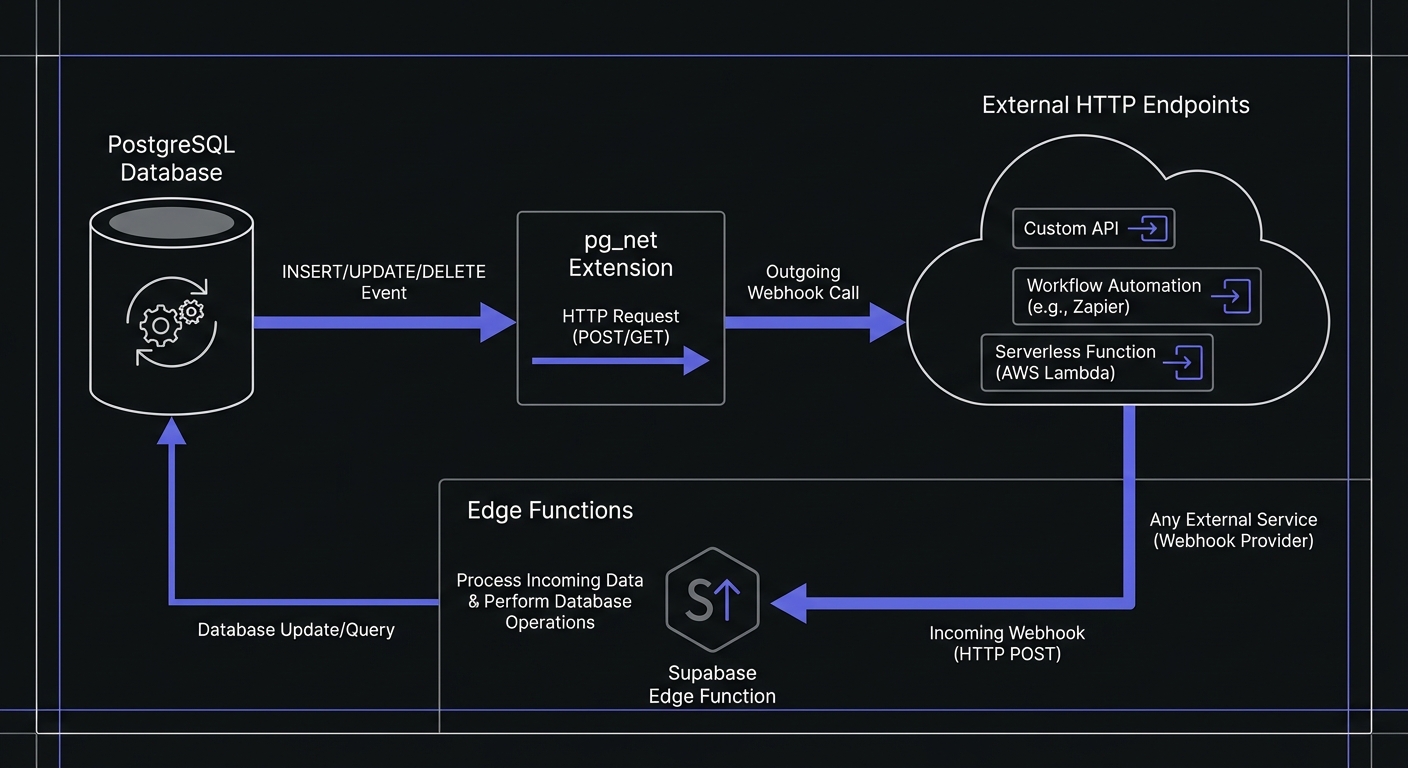
- pg_net extension: Send HTTP requests directly from PostgreSQL
- Database triggers: Automatically fire on row changes
- Edge Functions: Serverless functions for receiving webhooks
- Realtime subscriptions: WebSocket-based change notifications (for connected clients)
Use webhooks for external services that cannot maintain persistent connections.
Setting Up Database Webhooks with pg_net
pg_net allows PostgreSQL to make HTTP requests asynchronously from database triggers without blocking transactions.
Enable the extension:
-- Enable the pg_net extension
create extension if not exists pg_net;
Now you can make HTTP requests from SQL:
-- Simple POST request to an external webhook endpoint
select net.http_post(
  url := 'https://api.example.com/webhooks/user-created',
  headers := jsonb_build_object(
    'Content-Type', 'application/json',
    'Authorization', 'Bearer your-webhook-secret'
  ),
  body := jsonb_build_object(
    'event', 'user.created',
    'user_id', '123',
    'email', 'user@example.com',
    'timestamp', now()
  )
);
The request executes asynchronously, meaning your transaction completes immediately while pg_net handles the HTTP call in the background.
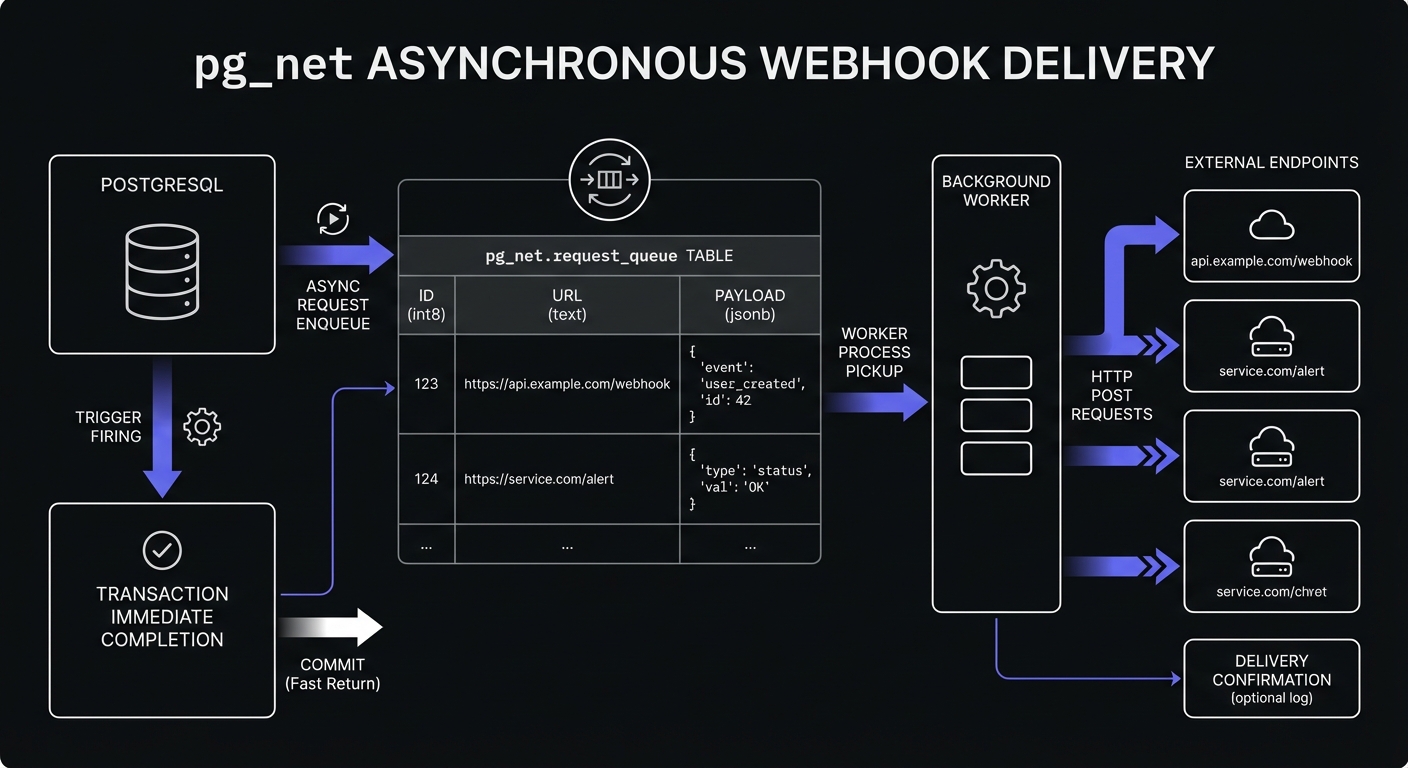
pg_net can handle up to 200 requests per second. Responses are stored in the net._http_response table for 6 hours by default—useful for debugging failed deliveries.
Database Triggers That Call Webhooks
Combine triggers with pg_net to notify external services about database changes. Example for user synchronization:
-- Create a function that sends webhooks on user changes
create or replace function notify_user_change()
returns trigger as $$
declare
  payload jsonb;
  webhook_url text := 'https://hooks.hookmesh.com/v1/your-endpoint-id';
begin
  -- Build the webhook payload
  payload := jsonb_build_object(
    'event', TG_OP,
    'table', TG_TABLE_NAME,
    'timestamp', extract(epoch from now()),
    'data', case
      when TG_OP = 'DELETE' then row_to_json(OLD)::jsonb
      else row_to_json(NEW)::jsonb
    end
  );

  -- Send the webhook via pg_net
  perform net.http_post(
    url := webhook_url,
    headers := jsonb_build_object(
      'Content-Type', 'application/json',
      'X-Webhook-Event', TG_OP,
      'X-Webhook-Signature', encode(
        hmac(payload::text, current_setting('app.webhook_secret'), 'sha256'),
        'hex'
      )
    ),
    body := payload
  );

  return coalesce(NEW, OLD);
end;
$$ language plpgsql security definer;

-- Attach the trigger to your users table
create trigger user_changes_webhook
  after insert or update or delete on public.users
  for each row execute function notify_user_change();
This trigger fires on any change to the users table and sends a webhook with the operation type, timestamp, and affected row data.
Edge Functions for Webhook Handling
Use Edge Functions to receive incoming webhooks from external services. They provide a serverless environment with database access. See webhooks with Lambda, Vercel, and Cloudflare for more serverless patterns.
// supabase/functions/webhook-handler/index.ts
import { serve } from 'https://deno.land/std@0.177.0/http/server.ts'
import { createClient } from 'https://esm.sh/@supabase/supabase-js@2'

const supabaseUrl = Deno.env.get('SUPABASE_URL')!
const supabaseKey = Deno.env.get('SUPABASE_SERVICE_ROLE_KEY')!

serve(async (req) => {
  // Verify webhook signature
  const signature = req.headers.get('x-webhook-signature')
  const body = await req.text()

  const expectedSignature = await computeHmac(
    body,
    Deno.env.get('WEBHOOK_SECRET')!
  )

  if (signature !== expectedSignature) {
    return new Response('Invalid signature', { status: 401 })
  }

  const payload = JSON.parse(body)
  const supabase = createClient(supabaseUrl, supabaseKey)

  // Process the webhook based on event type
  switch (payload.event) {
    case 'payment.completed':
      await supabase
        .from('orders')
        .update({ status: 'paid', paid_at: new Date().toISOString() })
        .eq('payment_id', payload.data.payment_id)
      break

    case 'subscription.canceled':
      await supabase
        .from('subscriptions')
        .update({ status: 'canceled', canceled_at: new Date().toISOString() })
        .eq('external_id', payload.data.subscription_id)
      break

    default:
      console.log('Unhandled event type:', payload.event)
  }

  // Log the webhook for debugging
  await supabase.from('webhook_logs').insert({
    event_type: payload.event,
    payload: payload,
    processed_at: new Date().toISOString()
  })

  return new Response(JSON.stringify({ received: true }), {
    headers: { 'Content-Type': 'application/json' }
  })
})

async function computeHmac(data: string, secret: string): Promise<string> {
  const encoder = new TextEncoder()
  const key = await crypto.subtle.importKey(
    'raw',
    encoder.encode(secret),
    { name: 'HMAC', hash: 'SHA-256' },
    false,
    ['sign']
  )
  const signature = await crypto.subtle.sign('HMAC', key, encoder.encode(data))
  return Array.from(new Uint8Array(signature))
    .map(b => b.toString(16).padStart(2, '0'))
    .join('')
}
Deploy the function with:
supabase functions deploy webhook-handlerRealtime Subscriptions vs Webhooks
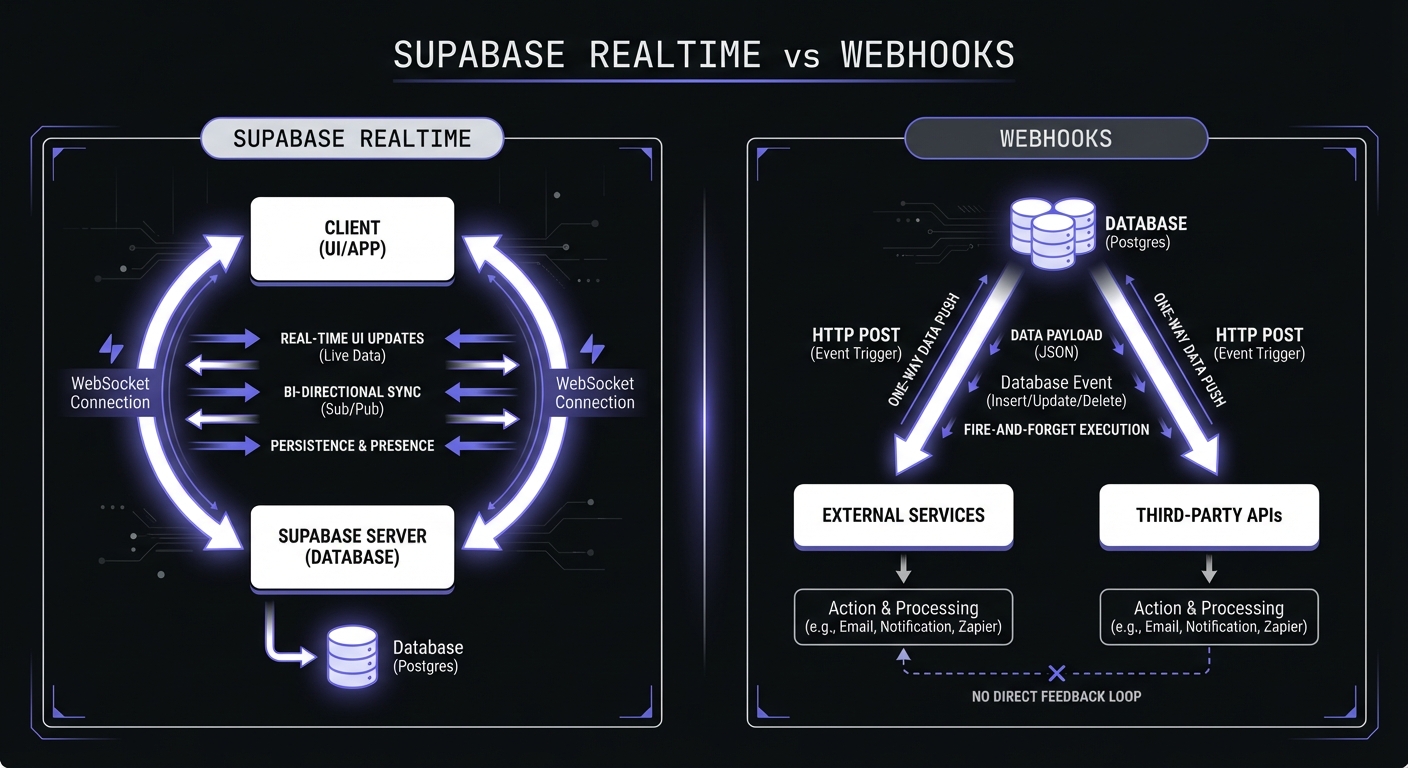
Use Realtime when: Clients maintain WebSocket connections, need instant UI updates, can handle reconnection logic.
Use webhooks when: Notifying external services, systems cannot maintain WebSocket connections, needing guaranteed delivery with retries.
Many applications use both—Realtime for UI, webhooks for external sync.
Use Cases and Implementation Patterns
Row Changes to External Services
Sync product inventory changes:
create or replace function sync_inventory_changes()
returns trigger as $$
begin
  perform net.http_post(
    url := 'https://hooks.hookmesh.com/v1/inventory-sync',
    headers := '{"Content-Type": "application/json"}'::jsonb,
    body := jsonb_build_object(
      'product_id', NEW.id,
      'sku', NEW.sku,
      'quantity', NEW.quantity,
      'updated_at', NEW.updated_at
    )
  );
  return NEW;
end;
$$ language plpgsql;
User Sync to CRM
Auto-sync user signups. See Clerk webhooks for authentication layer sync:
create or replace function sync_user_to_crm()
returns trigger as $$
begin
  perform net.http_post(
    url := 'https://hooks.hookmesh.com/v1/crm-sync',
    body := jsonb_build_object(
      'action', 'create_contact',
      'email', NEW.email,
      'name', NEW.raw_user_meta_data->>'full_name',
      'created_at', NEW.created_at
    )
  );
  return NEW;
end;
$$ language plpgsql security definer;

create trigger new_user_crm_sync
  after insert on auth.users
  for each row execute function sync_user_to_crm();
Audit Logging
Create comprehensive audit logs for compliance:
create or replace function audit_log_webhook()
returns trigger as $$
begin
  perform net.http_post(
    url := 'https://hooks.hookmesh.com/v1/audit-log',
    body := jsonb_build_object(
      'table', TG_TABLE_NAME,
      'operation', TG_OP,
      'old_data', case when TG_OP != 'INSERT' then row_to_json(OLD) else null end,
      'new_data', case when TG_OP != 'DELETE' then row_to_json(NEW) else null end,
      'user_id', current_setting('request.jwt.claims', true)::jsonb->>'sub',
      'timestamp', now()
    )
  );
  return coalesce(NEW, OLD);
end;
$$ language plpgsql;
Best Practices for Supabase Webhooks
Use Edge Functions for receiving. They provide a secure, scalable endpoint with auth and database access. Always verify signatures. See webhook security best practices.
Use pg_net for sending. Asynchronous delivery prevents blocking database transactions. Failed requests don't roll back data changes.
Handle retries. pg_net doesn't auto-retry. For critical webhooks, use a dedicated service.
Implement idempotency. Include unique event IDs and check for duplicates on the receiving end. See webhook idempotency guide.
Monitor delivery. Log outbound webhooks and responses. Alert on failure spikes. Query the net._http_response table to debug failures:
-- Check recent webhook responses
select id, status_code, content, error_msg, created
from net._http_response
order by created desc
limit 10;
Reliable Webhook Delivery with Hook Mesh
pg_net works for simple scenarios, but production needs guaranteed delivery, retries, and logs. Hook Mesh provides enterprise-grade infrastructure for Supabase.
Route webhooks through Hook Mesh instead of direct delivery:
perform net.http_post(
  url := 'https://hooks.hookmesh.com/v1/your-endpoint-id',
  headers := jsonb_build_object(
    'Content-Type', 'application/json',
    'X-HookMesh-Target', 'https://api.their-service.com/webhook'
  ),
  body := your_payload
);
Hook Mesh handles retries with exponential backoff, provides status webhooks, and offers a monitoring dashboard. Valuable when external services go down—your triggers continue while Hook Mesh queues and retries.
Local Development Tips
When testing webhooks locally with Supabase, the PostgreSQL database runs inside Docker. localhost in your webhook URL refers to the container, not your host machine.
Use host.docker.internal to reach services on your local machine:
perform net.http_post(
  url := 'http://host.docker.internal:3000/api/webhooks',
  body := your_payload
);
For Edge Functions receiving external webhooks during development, use a tunneling service like ngrok to expose your local endpoint.
Conclusion
Database triggers with pg_net enable outbound webhooks from PostgreSQL. Edge Functions handle incoming webhooks. Choose based on your need—and supplement with Hook Mesh for guaranteed delivery.
Start with these patterns, monitor delivery rates, and consider Hook Mesh for business-critical integrations.
For more guides, visit our Platform Integration Hub.
Related Posts
Clerk Webhooks: User Authentication Events
Learn how to integrate Clerk webhooks for user authentication events. Complete guide covering user.created, user.updated, session, and organization events with Svix signature verification and Node.js code examples.
Serverless Webhooks: Lambda, Vercel, Cloudflare Workers
A comprehensive tutorial on implementing webhooks in serverless architectures. Learn how to send and receive webhooks on AWS Lambda, Vercel Functions, and Cloudflare Workers with practical code examples and best practices.
Webhook Security Best Practices: The Complete Guide
Learn how to secure your webhook implementations with HMAC signature verification, replay attack prevention, SSRF mitigation, and more. Includes code examples in Node.js and Python.
Webhook Idempotency: Why It Matters and How to Implement It
A comprehensive technical guide to implementing idempotency for webhooks. Learn about idempotency keys, deduplication strategies, and implementation patterns with Node.js and Python code examples.