GitHub Webhooks: Setup, Security, and Best Practices
A comprehensive guide to setting up GitHub webhooks, implementing secure signature verification, and following best practices for CI/CD triggers, issue automation, and deployment notifications.

GitHub Webhooks: Setup, Security, and Best Practices
GitHub webhooks enable real-time communication between GitHub and your applications, triggering CI/CD pipelines, automating issue management, and sending deployment notifications.
Webhooks are HTTP callbacks GitHub sends whenever events occur—commits pushed, pull requests opened, issues created. This event-driven architecture reduces API calls and enables real-time integrations.
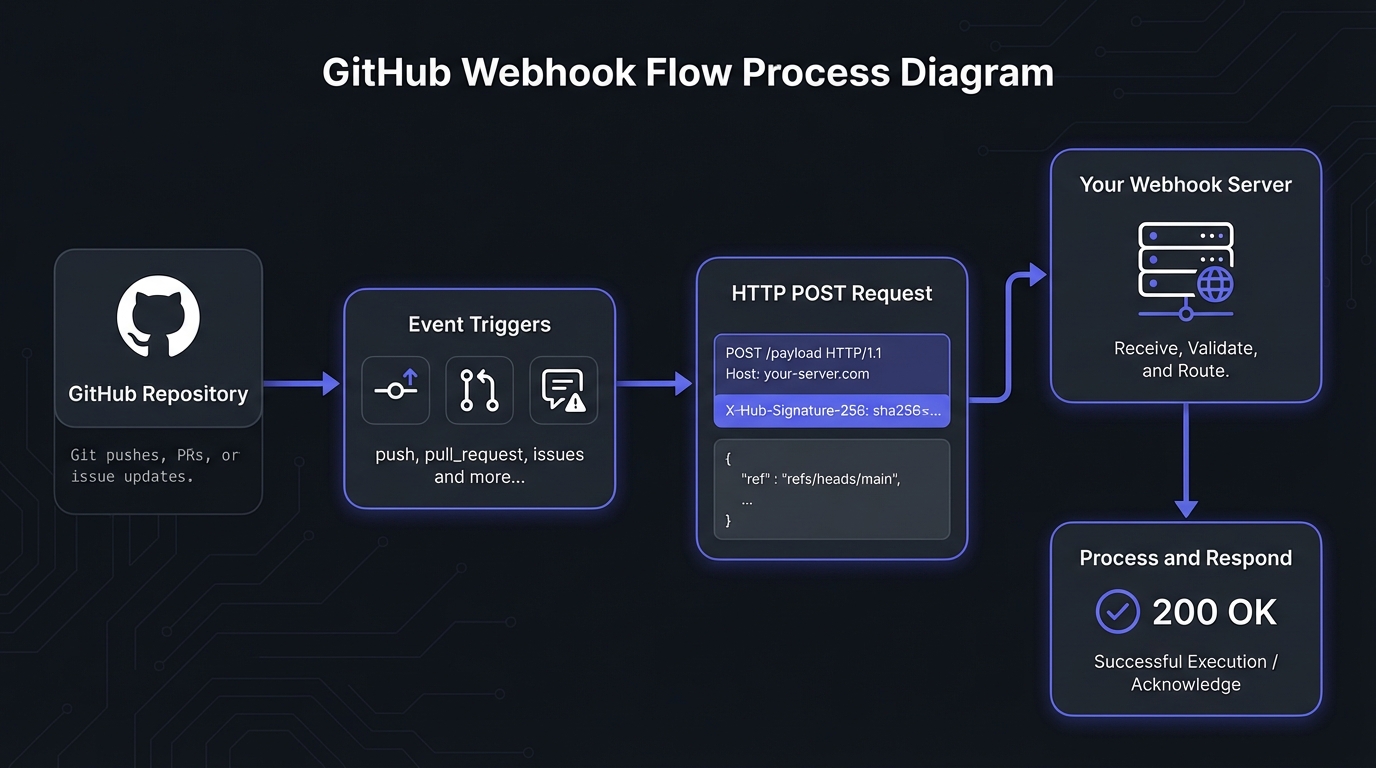
Setting Up GitHub Webhooks
GitHub offers three levels of webhook configuration.
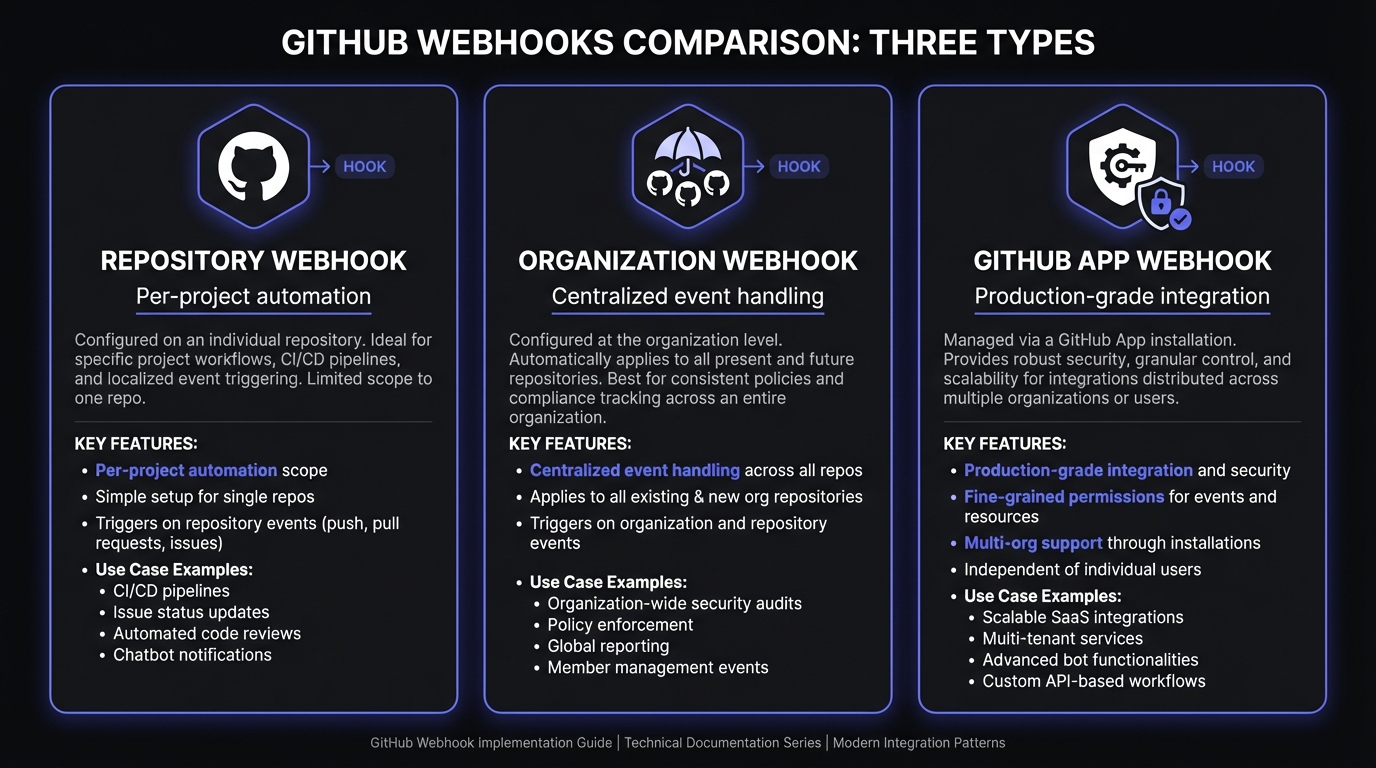
Repository Webhooks
Repository webhooks enable project-specific automations:
- Settings > Webhooks > Add webhook
- Enter Payload URL (endpoint for events)
- Select Content type (
application/json) - Enter Secret for signature verification
- Choose event types
- Click Add webhook
Use repository webhooks to trigger builds, run tests, or notify channels.
Organization Webhooks
Organization webhooks provide centralized event handling for multiple repositories:
- Organization page > Settings > Webhooks > Add webhook
- Configure similarly to repository webhooks
Use organization webhooks for company-wide CI/CD, security scanning, or audit logging.
GitHub App Webhooks
GitHub Apps offer the most flexible, secure integration:
- Settings > Developer settings > GitHub Apps
- Create app or edit existing
- Under Webhook, enter Payload URL and secret
- Select event types
Use GitHub Apps for production—they offer fine-grained permissions, higher rate limits, and multi-organization installation.
Understanding GitHub Event Types
GitHub supports over 40 event types. Here are the most commonly used:
Code Events
- push: Triggered when commits are pushed to a branch
- create/delete: Fired when branches or tags are created or deleted
- pull_request: Covers PR opened, closed, merged, and synchronized events
- pull_request_review: Triggered when reviews are submitted
Issue and Project Events
- issues: Fired when issues are opened, edited, closed, or labeled
- issue_comment: Triggered for comments on issues and PRs
- project_card: Covers project board card movements
Release and Deployment Events
- release: Triggered when releases are published or edited
- deployment: Fired when deployments are created
- deployment_status: Updates on deployment progress
Repository Events
- repository: Covers repository creation, deletion, and visibility changes
- member: Triggered when collaborators are added or removed
- star/watch: Fired when users star or watch repositories
Webhook Payload Structure
Every GitHub webhook delivery includes a JSON payload with event-specific data. Here is an example push event payload:
{
  "ref": "refs/heads/main",
  "before": "abc123...",
  "after": "def456...",
  "repository": {
    "id": 12345678,
    "name": "my-project",
    "full_name": "myorg/my-project",
    "private": false
  },
  "pusher": {
    "name": "developer",
    "email": "dev@example.com"
  },
  "commits": [
    {
      "id": "def456...",
      "message": "Add new feature",
      "timestamp": "2026-01-20T10:30:00Z",
      "author": {
        "name": "Developer",
        "email": "dev@example.com"
      }
    }
  ]
}
GitHub also sends important metadata in HTTP headers:
X-GitHub-Event: The event type (e.g.,push,pull_request)X-GitHub-Delivery: A unique GUID for the deliveryX-Hub-Signature-256: HMAC-SHA256 signature for verification
Securing Your Webhooks
Never skip verification when exposing webhook endpoints. See our webhook security best practices guide for comprehensive overview.
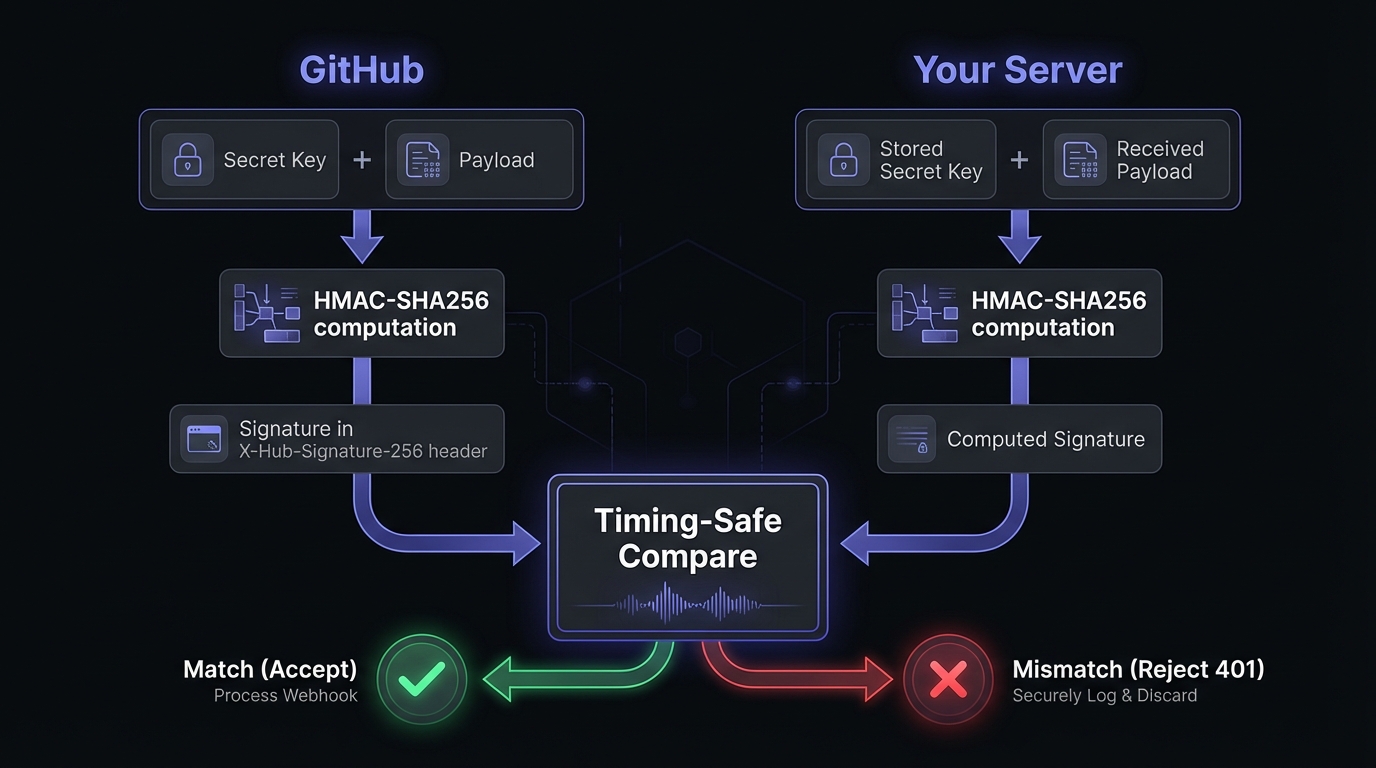
Secret Token Verification with HMAC-SHA256
GitHub signs every webhook payload using your secret. Always verify this signature before processing. See our HMAC-SHA256 signature verification guide for cryptographic details.
Complete Node.js implementation:
const crypto = require('crypto');
const express = require('express');

const app = express();
const WEBHOOK_SECRET = process.env.GITHUB_WEBHOOK_SECRET;

// Use raw body for signature verification
app.use('/webhook', express.raw({ type: 'application/json' }));

function verifySignature(payload, signature) {
  if (!signature) {
    return false;
  }

  const expectedSignature = 'sha256=' + crypto
    .createHmac('sha256', WEBHOOK_SECRET)
    .update(payload)
    .digest('hex');

  // Use timing-safe comparison to prevent timing attacks
  return crypto.timingSafeEqual(
    Buffer.from(signature),
    Buffer.from(expectedSignature)
  );
}

app.post('/webhook', (req, res) => {
  const signature = req.headers['x-hub-signature-256'];
  const event = req.headers['x-github-event'];
  const deliveryId = req.headers['x-github-delivery'];

  if (!verifySignature(req.body, signature)) {
    console.error(`Invalid signature for delivery ${deliveryId}`);
    return res.status(401).send('Invalid signature');
  }

  const payload = JSON.parse(req.body);

  console.log(`Received ${event} event (${deliveryId})`);

  // Process the webhook based on event type
  switch (event) {
    case 'push':
      handlePush(payload);
      break;
    case 'pull_request':
      handlePullRequest(payload);
      break;
    case 'issues':
      handleIssue(payload);
      break;
    default:
      console.log(`Unhandled event type: ${event}`);
  }

  res.status(200).send('OK');
});

app.listen(3000, () => {
  console.log('Webhook server running on port 3000');
});
IP Allowlisting
GitHub publishes its webhook IP ranges via the Meta API. For additional security, restrict incoming traffic to these addresses:
const https = require('https');

async function getGitHubWebhookIPs() {
  return new Promise((resolve, reject) => {
    https.get('https://api.github.com/meta', {
      headers: { 'User-Agent': 'webhook-server' }
    }, (res) => {
      let data = '';
      res.on('data', chunk => data += chunk);
      res.on('end', () => {
        const meta = JSON.parse(data);
        resolve(meta.hooks);
      });
    }).on('error', reject);
  });
}

// Example output: ['192.30.252.0/22', '185.199.108.0/22', ...]
Configure your firewall or reverse proxy to only accept connections from these CIDR ranges.
Testing Webhooks Locally
GitHub cannot reach localhost directly. Use tunneling tools to expose your local server during development.
ngrok
The most popular option for local webhook testing:
# Install ngrok
brew install ngrok  # macOS
# or download from ngrok.com

# Expose local server
ngrok http 3000
ngrok provides a public URL like https://abc123.ngrok.io that forwards to your local server. Use this URL as your webhook Payload URL in GitHub.
Smee.io
GitHub's recommended tool for development. Unlike ngrok, Smee stores payloads temporarily if your server is offline:
# Install Smee client
npm install -g smee-client

# Create a channel at smee.io, then connect
smee -u https://smee.io/your-channel -t http://localhost:3000/webhook
webhook.site
For quick payload inspection without running code, use webhook.site. It captures and displays incoming webhooks instantly—useful for understanding payload structure before implementing handlers.
GitHub's Recent Deliveries
GitHub logs the last 8 days of webhook deliveries in your webhook settings. For each delivery, you can:
- View request headers and payload
- See response status and body
- Redeliver the webhook for testing
Use this to debug failed deliveries without triggering new events.
Common Use Cases
CI/CD Pipeline Triggers
The most popular use case is triggering builds and deployments:
function handlePush(payload) {
  const branch = payload.ref.replace('refs/heads/', '');

  if (branch === 'main') {
    // Trigger production deployment
    triggerDeployment('production', payload.after);
  } else if (branch === 'develop') {
    // Trigger staging deployment
    triggerDeployment('staging', payload.after);
  }

  // Always run tests on push
  triggerCI(payload.repository.full_name, payload.after);
}
Issue Automation
Automate issue triage and notifications. A common pattern is sending alerts to Slack via incoming webhooks when issues are created:
function handleIssue(payload) {
  if (payload.action === 'opened') {
    const issue = payload.issue;

    // Auto-label based on title keywords
    if (issue.title.toLowerCase().includes('bug')) {
      addLabel(issue.number, 'bug');
    }

    // Notify team on Slack
    notifySlack(`New issue: ${issue.title}\n${issue.html_url}`);
  }
}
Deployment Notifications
Keep your team informed about releases:
function handleRelease(payload) {
  if (payload.action === 'published') {
    const release = payload.release;

    notifySlack({
      text: `New release published: ${release.tag_name}`,
      attachments: [{
        title: release.name,
        text: release.body,
        color: '#28a745'
      }]
    });
  }
}
Best Practices for Production
Filter Events at the Source
Only subscribe to events you actually need. Select specific events rather than "Send me everything."
Handle Large Payloads Gracefully
Some events produce substantial payloads. Set body size limits and process asynchronously:
app.use('/webhook', express.raw({
  type: 'application/json',
  limit: '5mb'
}));
Respond Quickly, Process Asynchronously
GitHub expects a response within 10 seconds. Acknowledge immediately and process asynchronously:
app.post('/webhook', async (req, res) => {
  // Verify signature first
  if (!verifySignature(req.body, req.headers['x-hub-signature-256'])) {
    return res.status(401).send('Invalid signature');
  }

  // Acknowledge immediately
  res.status(202).send('Accepted');

  // Process asynchronously
  const payload = JSON.parse(req.body);
  await queue.add('process-webhook', {
    event: req.headers['x-github-event'],
    payload
  });
});
Monitor Webhook Deliveries
GitHub provides delivery logs in your webhook settings. Monitor these for failed deliveries and investigate any patterns. Common issues include:
- Timeout errors (processing takes too long)
- 5xx errors (application crashes)
- SSL certificate problems
Understand GitHub's Retry Behavior
GitHub retries failed deliveries automatically. A delivery is considered failed when:
- Your server times out (10 seconds)
- You return a 5xx status code
- The connection fails
GitHub uses exponential backoff, retrying at increasing intervals. You can also manually redeliver any webhook from the "Recent Deliveries" tab in your webhook settings.
Implement Idempotency
Webhooks can be delivered multiple times. Use the X-GitHub-Delivery header to deduplicate. See our webhook idempotency guide for sophisticated approaches:
const processedDeliveries = new Set();

app.post('/webhook', (req, res) => {
  const deliveryId = req.headers['x-github-delivery'];

  if (processedDeliveries.has(deliveryId)) {
    return res.status(200).send('Already processed');
  }

  processedDeliveries.add(deliveryId);
  // Process webhook...
});
Troubleshooting Common Issues
Signature Verification Failures
The most common cause is payload modification before verification. Ensure you:
- Use raw body: Parse JSON after verification, not before
- Match encoding: Handle UTF-8 payloads correctly
- Check the secret: Verify the environment variable is set
// Wrong: body already parsed
app.use(express.json());  // This breaks signature verification

// Right: raw body for webhook endpoint
app.use('/webhook', express.raw({ type: 'application/json' }));
Timeout Errors
GitHub times out after 10 seconds. If processing takes longer:
- Return 202 immediately
- Queue the payload for async processing
- Use a job queue like BullMQ or SQS
Duplicate Deliveries
GitHub retries on timeouts and 5xx errors with exponential backoff. Expect duplicates when:
- Your server is slow to respond
- You return error status codes
- Network issues cause retries
Always implement idempotency using X-GitHub-Delivery.
SSL Certificate Errors
GitHub requires valid SSL certificates. Common fixes:
- Use a trusted CA (Let's Encrypt works)
- Ensure certificate chain is complete
- Check certificate expiration
For local development, ngrok and Smee handle SSL automatically.
Scaling GitHub Webhooks with Hook Mesh
Production systems need additional resilience. Hook Mesh provides enterprise-grade webhook delivery:
- Automatic retries with exponential backoff for failed deliveries
- Payload persistence ensuring no webhook is ever lost
- Real-time monitoring with alerting for delivery failures
- Fan-out to route events to multiple destinations
- Transformation pipelines to modify payloads before delivery
Focus on building features instead of debugging delivery failures.
Conclusion
GitHub webhooks power CI/CD pipelines, automate issue management, and inform deployments. Set them up correctly at the repository, organization, or app level. Implement HMAC-SHA256 verification and follow best practices for event filtering and asynchronous processing.
Always verify signatures, respond quickly, and monitor deliveries. For mission-critical reliability, consider Hook Mesh to ensure automation never misses. Explore more platform guides in our Platform Webhook Integration Hub.
Related Posts
HMAC-SHA256 Webhook Signatures: Implementation Guide
Learn how to implement secure webhook signature verification using HMAC-SHA256. Complete guide with code examples for signing and verifying webhook payloads in Node.js and Python.
Webhook Security Best Practices: The Complete Guide
Learn how to secure your webhook implementations with HMAC signature verification, replay attack prevention, SSRF mitigation, and more. Includes code examples in Node.js and Python.
Slack Webhooks: Incoming, Outgoing, and Event Subscriptions
A comprehensive guide to Slack webhooks covering incoming webhooks, outgoing webhooks, and the Events API. Learn how to integrate Slack with your applications using Node.js code examples and best practices.
Webhook Idempotency: Why It Matters and How to Implement It
A comprehensive technical guide to implementing idempotency for webhooks. Learn about idempotency keys, deduplication strategies, and implementation patterns with Node.js and Python code examples.
Receive and Verify Webhooks in Node.js: A Complete Guide
Learn how to securely receive and verify webhooks in Node.js using Express.js. Covers HMAC signature verification, timestamp validation, replay attack prevention, and common mistakes to avoid.