Slack Webhooks: Incoming, Outgoing, and Event Subscriptions
A comprehensive guide to Slack webhooks covering incoming webhooks, outgoing webhooks, and the Events API. Learn how to integrate Slack with your applications using Node.js code examples and best practices.
Slack Webhooks: Incoming, Outgoing, and Event Subscriptions
Slack webhooks enable automated notifications, message responses, and workflow automations. This guide covers three approaches: Incoming Webhooks for posting messages, Outgoing Webhooks (legacy), and the modern Events API.
Understanding Slack Webhook Types
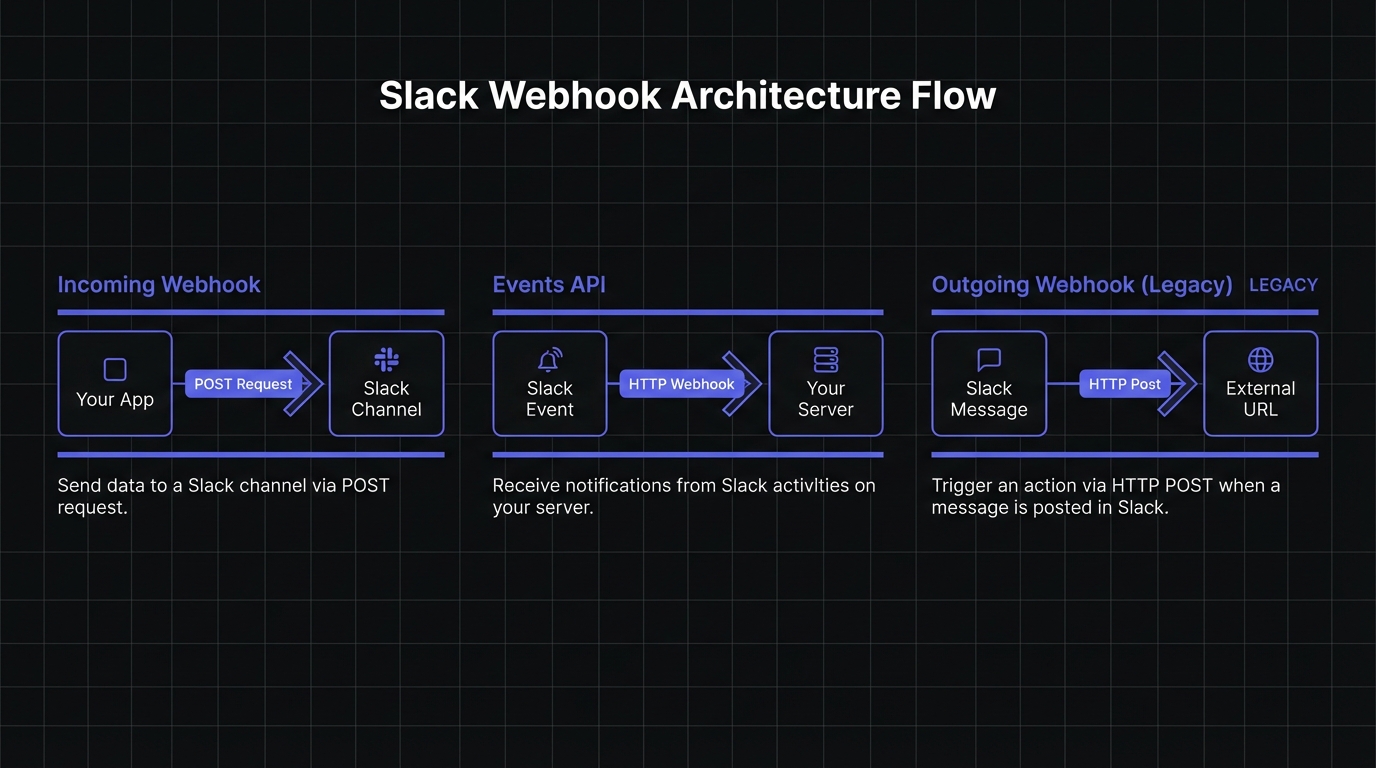
| Type | Direction | Use Case | Status |
|---|---|---|---|
| Incoming Webhooks | App → Slack | Send notifications to channels | Active |
| Events API | Slack → App | Receive real-time events (messages, reactions, file uploads) | Recommended |
| Outgoing Webhooks | Slack → App | Trigger on keyword mentions | Legacy (deprecated) |
Incoming Webhooks: Posting to Slack
Incoming Webhooks send messages from your application to Slack. Create a Slack app, enable Incoming Webhooks, and generate a webhook URL for each channel.
Setting Up an Incoming Webhook
Step 1: Create a Slack app at api.slack.com/apps
Step 2: Enable Incoming Webhooks in Features → Incoming Webhooks
Step 3: Click "Add New Webhook to Workspace" and select your target channel
Step 4: Copy the generated webhook URL (treat it as a secret)
Send a basic message using Node.js:
const axios = require('axios');

const SLACK_WEBHOOK_URL = process.env.SLACK_WEBHOOK_URL;

async function sendSlackNotification(message) {
  try {
    const response = await axios.post(SLACK_WEBHOOK_URL, {
      text: message
    });

    console.log('Message sent successfully');
    return response.data;
  } catch (error) {
    console.error('Failed to send Slack message:', error.message);
    throw error;
  }
}

// Send a simple notification
sendSlackNotification('New user signup: john@example.com');
Rich Message Formatting with Block Kit
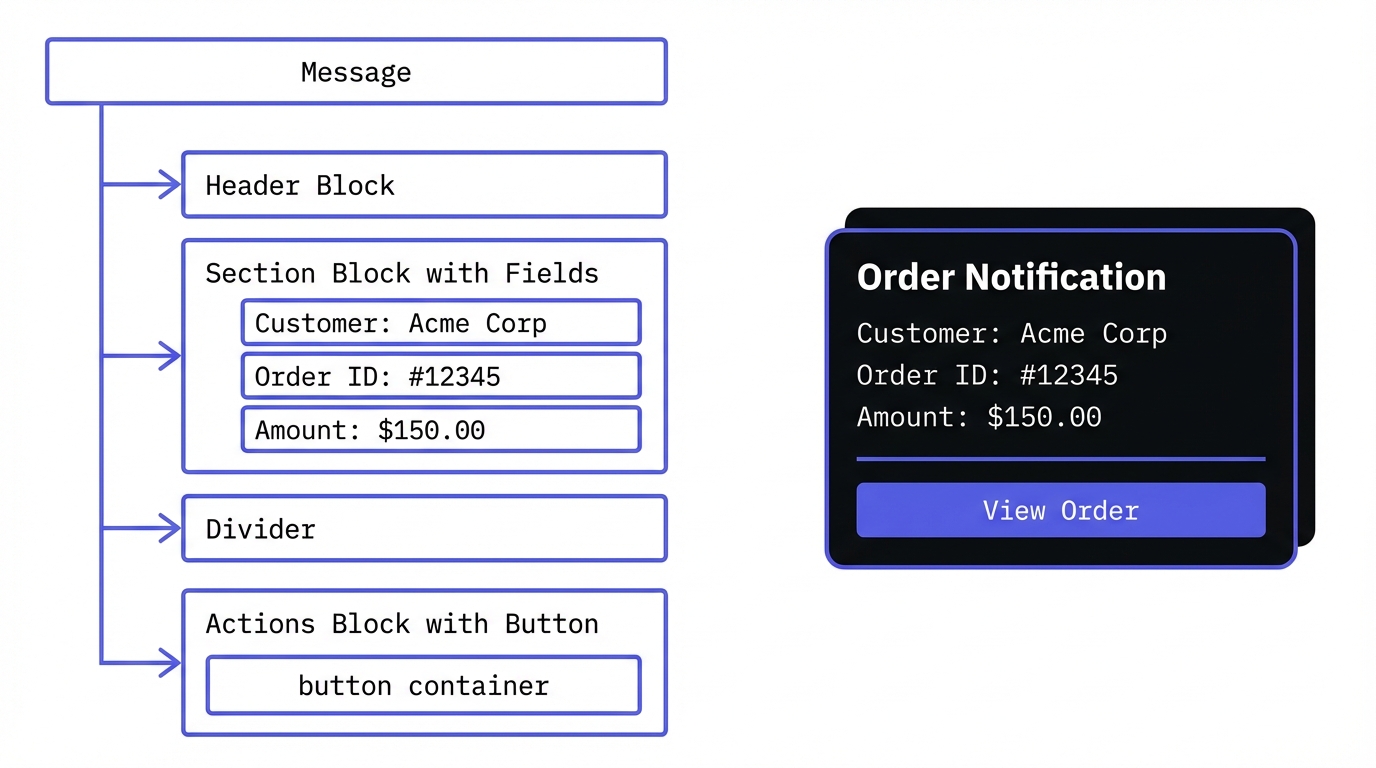
Block Kit provides structured components for rich messages. Use the Block Kit Builder to prototype layouts visually.
Available block types:
- Header: Large text titles (plain_text only)
- Section: Text with optional fields and accessories
- Divider: Visual separator
- Actions: Interactive buttons and menus
- Context: Small text and images for metadata
- Image: Inline images with alt text
async function sendRichNotification(order) {
  const payload = {
    blocks: [
      {
        type: 'header',
        text: {
          type: 'plain_text',
          text: 'New Order Received',
          emoji: true
        }
      },
      {
        type: 'section',
        fields: [
          {
            type: 'mrkdwn',
            text: `*Customer:*\n${order.customerName}`
          },
          {
            type: 'mrkdwn',
            text: `*Order ID:*\n${order.id}`
          },
          {
            type: 'mrkdwn',
            text: `*Amount:*\n$${order.total.toFixed(2)}`
          },
          {
            type: 'mrkdwn',
            text: `*Items:*\n${order.itemCount} items`
          }
        ]
      },
      {
        type: 'actions',
        elements: [
          {
            type: 'button',
            text: {
              type: 'plain_text',
              text: 'View Order'
            },
            url: `https://dashboard.example.com/orders/${order.id}`
          }
        ]
      }
    ]
  };

  await axios.post(SLACK_WEBHOOK_URL, payload);
}
Threading Messages
Reply to existing messages using the thread_ts parameter:
async function replyInThread(parentTs, message) {
  await axios.post(SLACK_WEBHOOK_URL, {
    text: message,
    thread_ts: parentTs  // timestamp of parent message
  });
}Note: Retrieve the parent ts value via the Web API since incoming webhooks don't return it.
Incoming Webhook Limitations
- Cannot delete messages after posting (use
chat.postMessageAPI instead) - Cannot override channel, username, or icon at runtime
- Cannot upload files (use
files.uploadAPI) - Rate limited to 1 request per second per webhook
- Maximum 50 blocks per message
Outgoing Webhooks: The Legacy Approach
Outgoing Webhooks trigger on specific keywords in channels. While functional, the Events API supersedes them for most use cases.
const express = require('express');
const app = express();

app.use(express.urlencoded({ extended: true }));

app.post('/slack/outgoing', (req, res) => {
  const { token, text, user_name, channel_name, trigger_word } = req.body;

  // Verify the token matches your Slack app
  if (token !== process.env.SLACK_OUTGOING_TOKEN) {
    return res.status(401).send('Unauthorized');
  }

  // Extract the command after the trigger word
  const command = text.replace(trigger_word, '').trim();

  console.log(`${user_name} in #${channel_name}: ${command}`);

  // Respond with a message (optional)
  res.json({
    text: `Processing your request: ${command}`
  });
});

app.listen(3000);Important: Outgoing Webhooks only work in public channels and have limited functionality compared to the Events API. For new integrations, we strongly recommend using the Events API instead.
Events API: The Modern Approach
The Events API receives real-time events with broader event support, all channel types, and request signing. The implementation patterns below demonstrate receiving and verifying webhooks in Node.js.
Socket Mode vs HTTP Endpoints
HTTP Endpoints (recommended for production):
- Requires public URL
- Works with any hosting provider
- Supports horizontal scaling
Socket Mode (for development/firewalled environments):
- No public URL needed
- WebSocket connection to Slack
- Enable in app settings under "Socket Mode"
URL Verification Challenge
When you configure an Events API endpoint, Slack sends a verification challenge to confirm your server is ready to receive events:
const express = require('express');
const crypto = require('crypto');
const app = express();

app.use(express.raw({ type: 'application/json' }));

app.post('/slack/events', (req, res) => {
  const body = JSON.parse(req.body);

  // Handle URL verification challenge
  if (body.type === 'url_verification') {
    console.log('Received URL verification challenge');
    return res.json({ challenge: body.challenge });
  }

  // Process other events
  handleSlackEvent(body);

  // Always respond quickly with 200 OK
  res.status(200).send();
});

function handleSlackEvent(payload) {
  const { event } = payload;

  switch (event.type) {
    case 'message':
      console.log(`New message from ${event.user}: ${event.text}`);
      break;
    case 'app_mention':
      console.log(`App mentioned by ${event.user}`);
      break;
    case 'member_joined_channel':
      console.log(`${event.user} joined ${event.channel}`);
      break;
    default:
      console.log(`Received event: ${event.type}`);
  }
}

app.listen(3000);
Request Signing Verification
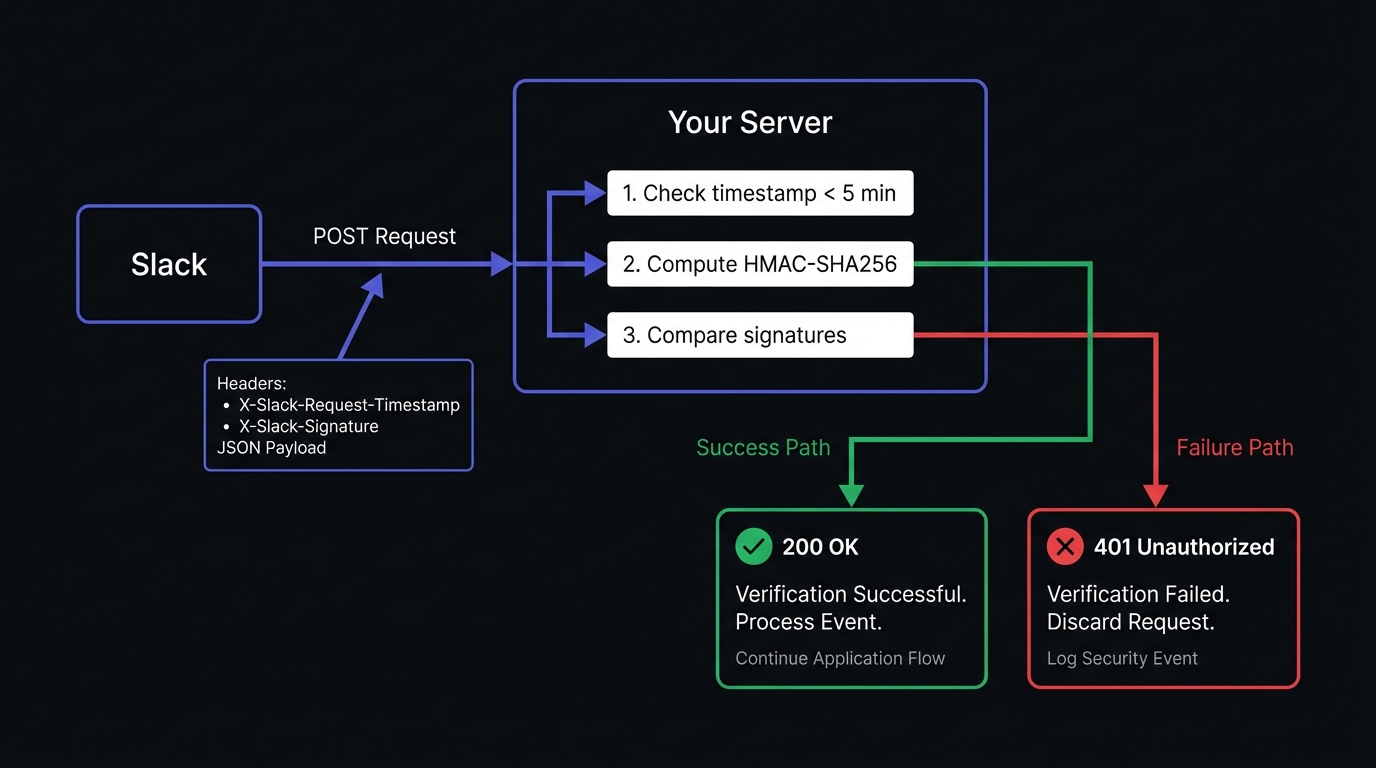
Always verify Slack request signatures to ensure authenticity. This aligns with webhook security best practices:
const crypto = require('crypto');

function verifySlackSignature(req) {
  const slackSigningSecret = process.env.SLACK_SIGNING_SECRET;
  const timestamp = req.headers['x-slack-request-timestamp'];
  const signature = req.headers['x-slack-signature'];

  // Protect against replay attacks
  const fiveMinutesAgo = Math.floor(Date.now() / 1000) - (60 * 5);
  if (parseInt(timestamp) < fiveMinutesAgo) {
    throw new Error('Request timestamp too old');
  }

  // Create the signature base string
  const sigBaseString = `v0:${timestamp}:${req.body}`;

  // Generate the expected signature
  const expectedSignature = 'v0=' + crypto
    .createHmac('sha256', slackSigningSecret)
    .update(sigBaseString)
    .digest('hex');

  // Compare signatures using timing-safe comparison
  if (!crypto.timingSafeEqual(
    Buffer.from(signature),
    Buffer.from(expectedSignature)
  )) {
    throw new Error('Invalid signature');
  }

  return true;
}

// Middleware for signature verification
function slackSignatureMiddleware(req, res, next) {
  try {
    verifySlackSignature(req);
    next();
  } catch (error) {
    console.error('Signature verification failed:', error.message);
    res.status(401).send('Unauthorized');
  }
}

app.post('/slack/events', slackSignatureMiddleware, (req, res) => {
  // Request is verified, process the event
  const body = JSON.parse(req.body);
  // ... handle events
});
Rate Limits and Retry Behavior
Events API limits:
- 30,000 events per workspace per app per 60 minutes
- Maintain >5% success rate per 60 minutes or your app may be disabled
Retry schedule (on failure):
- Immediate retry
- 1 minute delay
- 5 minutes delay
Local Development Testing
Test webhooks locally using tunneling tools:
ngrok (most popular):
ngrok http 3000
# Provides URL like https://abc123.ngrok.io
Pinggy (open source alternative):
ssh -p 443 -R0:localhost:3000 a.pinggy.ioConfigure the generated public URL as your Events API Request URL in Slack app settings.
Error Handling
Incoming webhooks return descriptive HTTP errors:
| Status | Error Code | Cause |
|---|---|---|
| 400 | invalid_payload | Malformed JSON or unescaped characters |
| 403 | action_prohibited | App lacks required permissions |
| 404 | channel_not_found | Channel deleted or app removed |
| 404 | no_active_hooks | Webhook disabled or revoked |
| 410 | channel_is_archived | Target channel archived |
async function sendWithErrorHandling(payload) {
  try {
    await axios.post(SLACK_WEBHOOK_URL, payload);
  } catch (error) {
    if (error.response) {
      const { status, data } = error.response;

      if (status === 404 && data === 'channel_is_archived') {
        console.log('Channel archived, removing webhook');
        await disableWebhook();
      } else if (status === 400) {
        console.error('Invalid payload:', data);
      }
    }
    throw error;
  }
}
Common Use Cases
1. Automated Notifications
Send real-time alerts when important events occur in your application:
// Notify team about critical errors
async function notifyErrorToSlack(error, context) {
  await sendSlackNotification({
    blocks: [
      {
        type: 'section',
        text: {
          type: 'mrkdwn',
          text: `*Alert: Application Error*\n\`${error.message}\`\nContext: ${context}`
        }
      }
    ]
  });
}
2. Bot Interactions
Build bots that respond to mentions and direct messages:
async function handleAppMention(event) {
  const command = event.text.toLowerCase();

  if (command.includes('status')) {
    const status = await getSystemStatus();
    await postToChannel(event.channel, `System Status: ${status}`);
  } else if (command.includes('help')) {
    await postToChannel(event.channel, 'Available commands: status, deploy, help');
  }
}
3. Workflow Automation
Trigger complex workflows based on Slack events:
async function handleReactionAdded(event) {
  if (event.reaction === 'white_check_mark') {
    // Approval workflow - mark task as complete
    await markTaskComplete(event.item.ts);
    await notifyAssignee(event.item.ts, 'Task approved!');
  }
}
Best Practices for Slack Webhooks
1. Always Verify Signatures
Skip verification only in local development. It prevents spoofed requests in production.
2. Respond Within 3 Seconds
Slack expects a 3-second response. Acknowledge immediately, then process asynchronously:
app.post('/slack/events', slackSignatureMiddleware, async (req, res) => {
  const body = JSON.parse(req.body);

  // Acknowledge immediately
  res.status(200).send();

  // Process asynchronously
  setImmediate(() => {
    processEventAsync(body).catch(console.error);
  });
});
3. Use the Acknowledgment Pattern
For interactive components and slash commands, acknowledge first, then respond with the actual content:
app.post('/slack/interactive', async (req, res) => {
  // Send immediate acknowledgment
  res.status(200).send();

  const payload = JSON.parse(req.body.payload);

  // Process and send follow-up response
  const result = await processInteraction(payload);
  await axios.post(payload.response_url, {
    text: result,
    replace_original: false
  });
});
4. Handle Retries Gracefully
Slack retries failed deliveries. Use idempotent handlers to prevent duplicates:
const processedEvents = new Set();

async function handleEvent(payload) {
  const eventId = payload.event_id;

  if (processedEvents.has(eventId)) {
    console.log(`Skipping duplicate event: ${eventId}`);
    return;
  }

  processedEvents.add(eventId);
  // Process the event...
}
5. Secure Your Webhook URLs
- Store webhook URLs in environment variables, never in code
- Slack actively scans for and revokes leaked webhook URLs
- Use separate webhooks for different environments (dev/staging/prod)
Reliable Slack Integrations with Hook Mesh
Hook Mesh provides reliable delivery with automatic retries, exponential backoff, and detailed logs. It handles infrastructure complexity so you focus on integration logic.
Conclusion
Incoming Webhooks send notifications. The Events API handles interactive bots and automation. Always verify signatures, respond within 3 seconds, and implement idempotent handlers.
Start with Incoming Webhooks for basic notifications, then move to the Events API as needs grow.
For more integrations, see our GitHub webhooks guide or platform integrations hub.
Related Posts
GitHub Webhooks: Setup, Security, and Best Practices
A comprehensive guide to setting up GitHub webhooks, implementing secure signature verification, and following best practices for CI/CD triggers, issue automation, and deployment notifications.
Webhook Security Best Practices: The Complete Guide
Learn how to secure your webhook implementations with HMAC signature verification, replay attack prevention, SSRF mitigation, and more. Includes code examples in Node.js and Python.
Receive and Verify Webhooks in Node.js: A Complete Guide
Learn how to securely receive and verify webhooks in Node.js using Express.js. Covers HMAC signature verification, timestamp validation, replay attack prevention, and common mistakes to avoid.
Webhook Idempotency: Why It Matters and How to Implement It
A comprehensive technical guide to implementing idempotency for webhooks. Learn about idempotency keys, deduplication strategies, and implementation patterns with Node.js and Python code examples.
Webhook Integration Guides: Connect with Any Platform
Comprehensive guides for integrating webhooks from Stripe, GitHub, Shopify, Twilio, and 10+ other platforms. Learn best practices for reliable webhook handling across your entire stack.