PayPal Webhooks: IPN vs Webhooks, Implementation Guide
Complete guide to PayPal webhooks implementation. Learn the differences between IPN and modern webhooks, set up event listeners, verify signatures, and migrate from legacy IPN to webhooks for reliable payment notifications.
PayPal Webhooks: IPN vs Webhooks, Implementation Guide
PayPal webhooks notify you of payment events—captures, refunds, subscriptions. This guide covers everything from legacy IPN vs modern webhooks to secure verification and event handling.
IPN vs Webhooks: Understanding the Difference
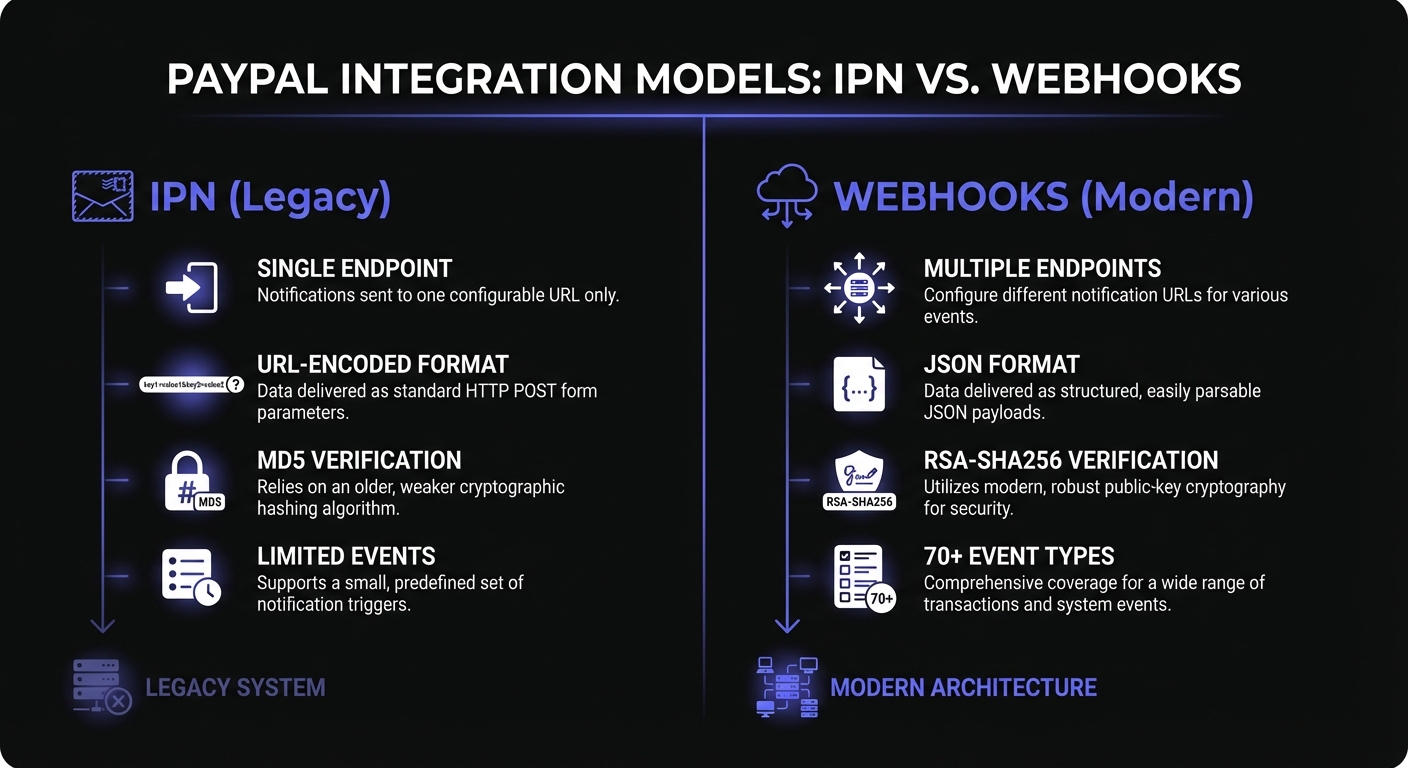
PayPal offers two notification systems: Instant Payment Notification (IPN) and Webhooks. Both notify you of payment events but differ significantly in architecture and capabilities.
Instant Payment Notification (IPN) - Legacy
IPN is PayPal's original notification system, introduced in the early 2000s. It sends HTTP POST messages to your server when transactions occur.
Characteristics of IPN:
- Single endpoint configuration in PayPal account settings
- Limited event types focused on core transactions
- Verification requires posting the entire message back to PayPal
- No built-in retry mechanism for failed deliveries
- Older message format with URL-encoded parameters
Webhooks - Modern Approach
PayPal's webhook system is the modern, REST API-based notification system that offers significant improvements over IPN. If you're also integrating Stripe payments, our Stripe webhooks guide covers similar patterns for that platform.
Advantages of Webhooks:
- Multiple webhook endpoints per application
- Over 70 event types covering all PayPal products
- Cryptographic signature verification
- Automatic retries with exponential backoff
- JSON payload format
- Sandbox and production environment separation
For new integrations, PayPal recommends using webhooks exclusively. If you're maintaining a legacy system with IPN, planning a migration should be a priority.
Setting Up PayPal Webhooks
- Navigate to PayPal Developer Dashboard (developer.paypal.com) and create a REST API app
- Add a webhook URL in application settings (must be HTTPS)
- Subscribe to event types organized by product area
Example endpoint:
https://your-domain.com/webhooks/paypal
Essential PayPal Webhook Event Types
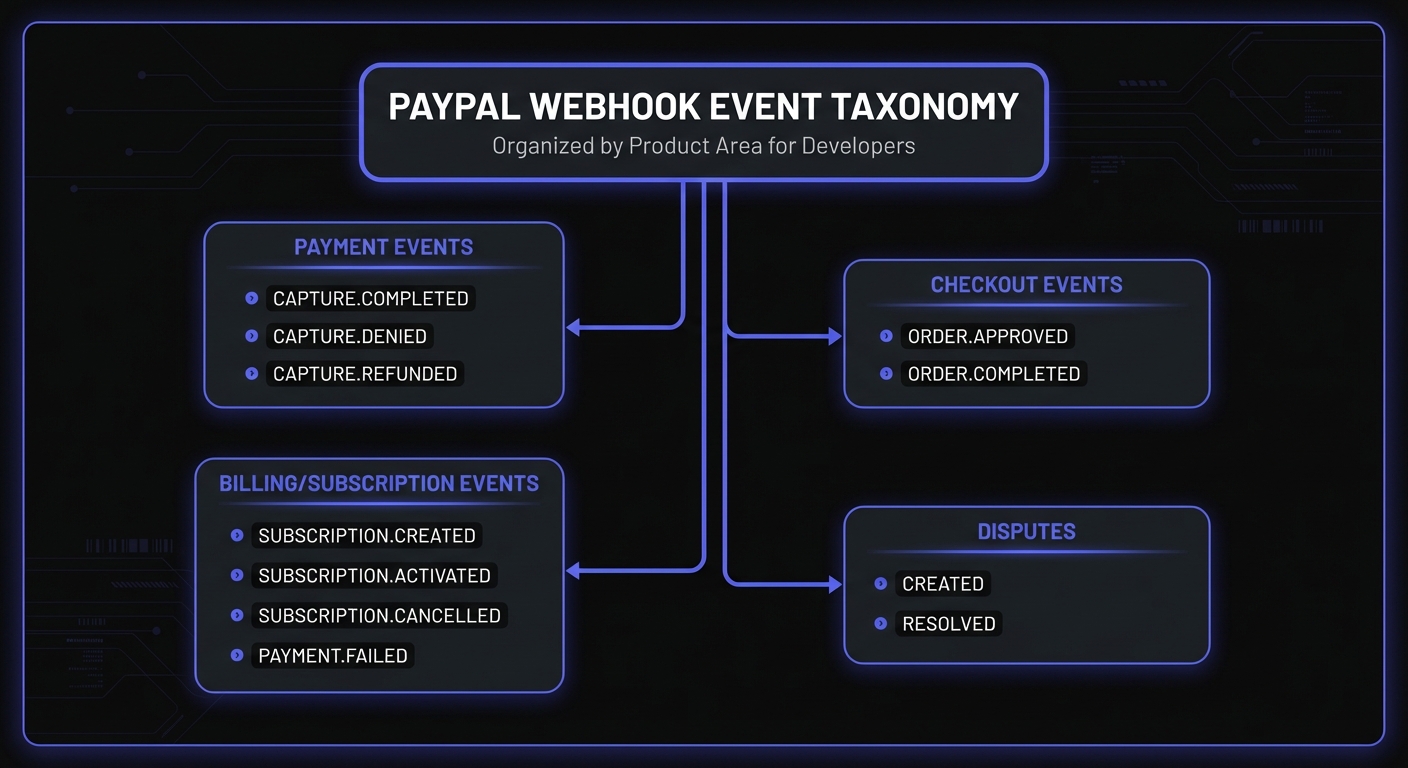
PAYMENT.* Events
These events cover one-time payment transactions:
PAYMENT.CAPTURE.COMPLETED- Payment successfully capturedPAYMENT.CAPTURE.DENIED- Payment capture was deniedPAYMENT.CAPTURE.REFUNDED- Payment was refundedPAYMENT.CAPTURE.PENDING- Payment is pending review
CHECKOUT.* Events
Checkout events track the order lifecycle:
CHECKOUT.ORDER.APPROVED- Customer approved the paymentCHECKOUT.ORDER.COMPLETED- Order successfully completedCHECKOUT.ORDER.VOIDED- Order was voided
BILLING.* Events
Billing events are critical for subscription-based businesses:
BILLING.SUBSCRIPTION.CREATED- New subscription createdBILLING.SUBSCRIPTION.ACTIVATED- Subscription is now activeBILLING.SUBSCRIPTION.CANCELLED- Subscription was cancelledBILLING.SUBSCRIPTION.SUSPENDED- Subscription suspended after payment failuresBILLING.SUBSCRIPTION.PAYMENT.FAILED- Subscription payment failedBILLING.PLAN.CREATED- New billing plan created
DISPUTE.* Events
Handle customer disputes and chargebacks:
CUSTOMER.DISPUTE.CREATED- Customer opened a disputeCUSTOMER.DISPUTE.RESOLVED- Dispute resolved (won or lost)CUSTOMER.DISPUTE.UPDATED- Dispute status changed
Implementing Webhook Verification in Node.js
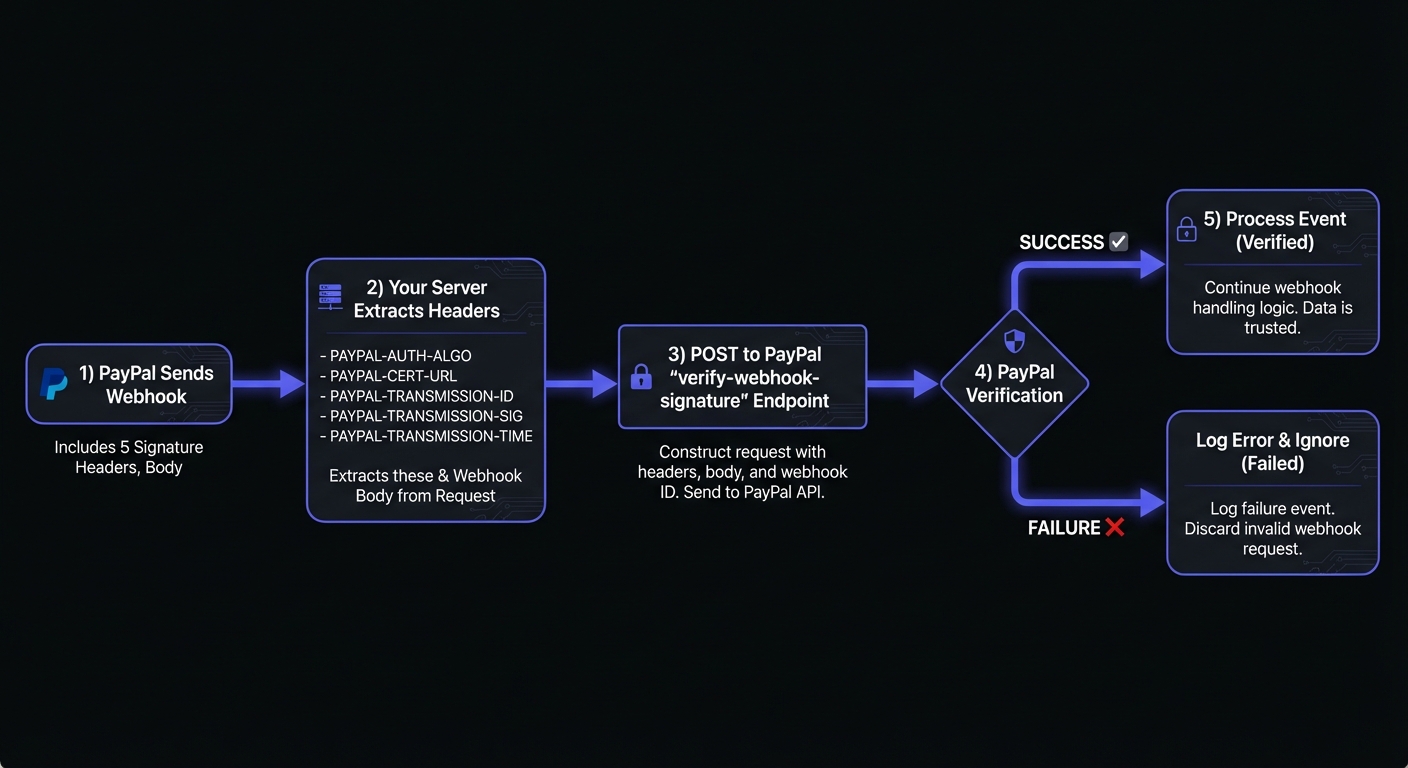
PayPal uses signature-based verification by calling their verification API endpoint.
Basic Webhook Handler
Critical: Preserve the raw request body for signature verification. Parsed JSON may have different formatting than the original payload, causing verification failures.
const express = require('express');
const axios = require('axios');

const app = express();

// Preserve raw body for signature verification
app.use(express.json({
  verify: (req, res, buf) => {
    req.rawBody = buf.toString();
  }
}));

// PayPal API credentials
const PAYPAL_CLIENT_ID = process.env.PAYPAL_CLIENT_ID;
const PAYPAL_CLIENT_SECRET = process.env.PAYPAL_CLIENT_SECRET;
const PAYPAL_WEBHOOK_ID = process.env.PAYPAL_WEBHOOK_ID;

// Environment-specific base URL
const PAYPAL_BASE_URL = process.env.NODE_ENV === 'production'
  ? 'https://api-m.paypal.com'
  : 'https://api-m.sandbox.paypal.com';

app.post('/webhooks/paypal', async (req, res) => {
  try {
    // Immediately acknowledge receipt
    res.status(200).send('OK');

    // Verify the webhook signature
    const isValid = await verifyWebhookSignature(req);

    if (!isValid) {
      console.error('Invalid webhook signature');
      return;
    }

    // Process the event
    await processWebhookEvent(req.body);

  } catch (error) {
    console.error('Webhook processing error:', error);
  }
});
PayPal Signature Verification
Unlike services that use HMAC signatures, PayPal requires you to call their verification endpoint. PayPal sends five signature-related headers with each webhook: PAYPAL-AUTH-ALGO, PAYPAL-CERT-URL, PAYPAL-TRANSMISSION-ID, PAYPAL-TRANSMISSION-SIG, and PAYPAL-TRANSMISSION-TIME.
async function getAccessToken() {
  const auth = Buffer.from(
    `${PAYPAL_CLIENT_ID}:${PAYPAL_CLIENT_SECRET}`
  ).toString('base64');

  const response = await axios.post(
    `${PAYPAL_BASE_URL}/v1/oauth2/token`,
    'grant_type=client_credentials',
    {
      headers: {
        'Authorization': `Basic ${auth}`,
        'Content-Type': 'application/x-www-form-urlencoded'
      }
    }
  );

  return response.data.access_token;
}

async function verifyWebhookSignature(req) {
  const accessToken = await getAccessToken();

  const verificationPayload = {
    auth_algo: req.headers['paypal-auth-algo'],
    cert_url: req.headers['paypal-cert-url'],
    transmission_id: req.headers['paypal-transmission-id'],
    transmission_sig: req.headers['paypal-transmission-sig'],
    transmission_time: req.headers['paypal-transmission-time'],
    webhook_id: PAYPAL_WEBHOOK_ID,
    webhook_event: req.body
  };

  const response = await axios.post(
    `${PAYPAL_BASE_URL}/v1/notifications/verify-webhook-signature`,
    verificationPayload,
    {
      headers: {
        'Authorization': `Bearer ${accessToken}`,
        'Content-Type': 'application/json'
      }
    }
  );

  return response.data.verification_status === 'SUCCESS';
}
Processing Different Event Types
async function processWebhookEvent(event) {
  const { event_type, resource } = event;

  switch (event_type) {
    case 'PAYMENT.CAPTURE.COMPLETED':
      await handlePaymentCompleted(resource);
      break;

    case 'PAYMENT.CAPTURE.REFUNDED':
      await handleRefund(resource);
      break;

    case 'BILLING.SUBSCRIPTION.ACTIVATED':
      await handleSubscriptionActivated(resource);
      break;

    case 'BILLING.SUBSCRIPTION.CANCELLED':
      await handleSubscriptionCancelled(resource);
      break;

    case 'BILLING.SUBSCRIPTION.PAYMENT.FAILED':
      await handleSubscriptionPaymentFailed(resource);
      break;

    default:
      console.log(`Unhandled event type: ${event_type}`);
  }
}

async function handlePaymentCompleted(resource) {
  const orderId = resource.supplementary_data?.related_ids?.order_id;
  const amount = resource.amount.value;
  const currency = resource.amount.currency_code;

  // Update your database
  await db.orders.update({
    where: { paypalOrderId: orderId },
    data: {
      status: 'paid',
      paidAmount: amount,
      paidAt: new Date()
    }
  });

  // Trigger fulfillment
  await fulfillmentService.processOrder(orderId);
}
Implementing Idempotency
PayPal may send the same webhook multiple times. Implement idempotency to prevent duplicate processing. Duplicate processing could lead to double charges or fulfillment issues. See our webhook idempotency guide for comprehensive patterns.
async function processWebhookEvent(event) {
  const eventId = event.id;

  // Check if we've already processed this event
  const existingEvent = await db.webhookEvents.findUnique({
    where: { eventId }
  });

  if (existingEvent) {
    console.log(`Event ${eventId} already processed, skipping`);
    return;
  }

  // Record the event before processing
  await db.webhookEvents.create({
    data: {
      eventId,
      eventType: event.event_type,
      processedAt: new Date()
    }
  });

  // Process the event
  await handleEvent(event);
}
Testing with PayPal's Webhook Simulator
PayPal provides a webhook simulator for testing your endpoint before processing real events.
Using the Simulator
- Navigate to Applications in the PayPal Developer Dashboard
- Select Webhooks Simulator under your REST API app
- Choose an event type and target your webhook URL
- Click Send Test Webhook
Important limitations:
- Simulated webhooks cannot be verified using the signature verification API—they're mock data only
- Use the simulator to test endpoint connectivity and event handling logic
- For signature verification testing, trigger real events in sandbox mode
Local Development Testing
For localhost testing, use a tunneling service:
# Using ngrok
ngrok http 3000

# Configure your tunnel URL in PayPal:
# https://abc123.ngrok.io/webhooks/paypal
Alternatively, use webhook relay services like Hookdeck to forward PayPal sandbox events to your local environment while maintaining proper signature verification.
Handling Out-of-Order Events
PayPal does not guarantee webhook delivery order. Network conditions and retry logic may cause events to arrive out of sequence.
Use Timestamps for Ordering
async function handleSubscriptionEvent(event) {
  const { resource, event_type } = event;
  const eventTime = new Date(resource.update_time || resource.create_time);

  // Fetch current subscription state
  const subscription = await db.subscriptions.findUnique({
    where: { paypalSubscriptionId: resource.id }
  });

  // Skip if we've already processed a more recent event
  if (subscription && subscription.lastEventTime > eventTime) {
    console.log('Skipping out-of-order event');
    return;
  }

  // Process and update last event time
  await processSubscriptionUpdate(event);
  await db.subscriptions.update({
    where: { paypalSubscriptionId: resource.id },
    data: { lastEventTime: eventTime }
  });
}
Reconciliation Jobs
Don't rely solely on webhooks. Run periodic reconciliation jobs to catch missed events:
async function reconcileSubscriptions() {
  const subscriptions = await db.subscriptions.findMany({
    where: { status: 'active' }
  });

  for (const sub of subscriptions) {
    const paypalStatus = await fetchPayPalSubscriptionStatus(sub.paypalSubscriptionId);

    if (paypalStatus.status !== sub.status) {
      await syncSubscriptionState(sub.id, paypalStatus);
    }
  }
}
Handling Subscription Payment Failures
When BILLING.SUBSCRIPTION.PAYMENT.FAILED fires, implement dunning logic to recover revenue.
Automatic Suspension
PayPal automatically suspends subscriptions based on your payment_failure_threshold setting. For example, if set to 2, the subscription enters SUSPEND state after two consecutive failures, triggering BILLING.SUBSCRIPTION.SUSPENDED.
Dunning Implementation
async function handleSubscriptionPaymentFailed(resource) {
  const subscriptionId = resource.id;
  const outstandingBalance = resource.billing_info?.outstanding_balance?.value;

  // Track failure count
  const failureCount = await db.subscriptionFailures.count({
    where: {
      subscriptionId,
      createdAt: { gte: thirtyDaysAgo() }
    }
  });

  // Send appropriate dunning email
  if (failureCount === 1) {
    await sendEmail(resource.subscriber.email_address, 'payment-failed-first');
  } else if (failureCount === 2) {
    await sendEmail(resource.subscriber.email_address, 'payment-failed-final-warning');
  }

  // Log for monitoring
  await db.subscriptionFailures.create({
    data: {
      subscriptionId,
      amount: outstandingBalance,
      failedAt: new Date()
    }
  });
}
Migration Path: IPN to Webhooks
If you're running a legacy IPN integration, here's a practical migration strategy:
Phase 1: Parallel Operation
Set up webhook endpoints alongside your existing IPN handler. Log both to compare data and ensure consistency.
Phase 2: Primary Switchover
Make webhooks your primary notification source while keeping IPN as a fallback. Update your business logic to prefer webhook data.
Phase 3: IPN Deprecation
Once you've verified webhook reliability over several weeks, disable IPN processing and remove the legacy code.
Key Migration Considerations
- Webhook event names differ from IPN transaction types
- JSON payloads require different parsing than URL-encoded IPN data
- Verification mechanism is completely different
- Consider using a webhook management service during transition
Handling Sandbox vs Production
Always maintain separate configurations for sandbox and production environments:
const config = {
  sandbox: {
    baseUrl: 'https://api-m.sandbox.paypal.com',
    clientId: process.env.PAYPAL_SANDBOX_CLIENT_ID,
    clientSecret: process.env.PAYPAL_SANDBOX_CLIENT_SECRET,
    webhookId: process.env.PAYPAL_SANDBOX_WEBHOOK_ID
  },
  production: {
    baseUrl: 'https://api-m.paypal.com',
    clientId: process.env.PAYPAL_PRODUCTION_CLIENT_ID,
    clientSecret: process.env.PAYPAL_PRODUCTION_CLIENT_SECRET,
    webhookId: process.env.PAYPAL_PRODUCTION_WEBHOOK_ID
  }
};

const activeConfig = config[process.env.NODE_ENV] || config.sandbox;
PayPal's Retry Behavior
Understanding PayPal's retry logic helps you design resilient handlers.
Retry policy:
- PayPal retries failed deliveries up to 25 times over 3 days
- Any non-2xx response triggers a retry
- After 3 days of failures, delivery is marked as Failed
- Failed events can be manually resent from the Webhook Events dashboard
Best response pattern:
app.post('/webhooks/paypal', async (req, res) => {
  // Return 200 immediately to acknowledge receipt
  res.status(200).send('OK');

  // Process asynchronously to avoid timeouts
  setImmediate(async () => {
    try {
      await processWebhookEvent(req.body, req.rawBody, req.headers);
    } catch (error) {
      console.error('Webhook processing error:', error);
      // Log for manual review; PayPal won't retry after 200
    }
  });
});
Timeout considerations:
- PayPal expects a response within seconds
- Long-running processing should happen asynchronously
- Use a message queue for complex fulfillment logic
Common Use Cases
Payment Confirmations
Listen for CHECKOUT.ORDER.APPROVED to capture the payment, then PAYMENT.CAPTURE.COMPLETED to trigger fulfillment, send confirmation emails, and update inventory.
Subscription Management
Track the full subscription lifecycle with BILLING.SUBSCRIPTION.* events. Handle activation, cancellation, suspension, and failed payments to maintain accurate subscription states.
Refund Handling
Process PAYMENT.CAPTURE.REFUNDED events to update order status, restore inventory, and notify customers of successful refunds.
Dispute Management
Monitor CUSTOMER.DISPUTE.CREATED to pause fulfillment and gather evidence. Track CUSTOMER.DISPUTE.RESOLVED to update order status based on the outcome.
Simplifying PayPal Webhooks with Hook Mesh
Hook Mesh handles the complexity of managing PayPal webhooks:
- Automatic retry handling for failed webhook deliveries
- Event logging and replay for debugging payment issues
- Signature verification as a service
- Environment routing to direct sandbox and production events appropriately
- Alerting when payment webhooks fail repeatedly
Best Practices Summary
- Always verify signatures - See webhook security best practices
- Implement idempotency - Use event IDs to prevent duplicate processing
- Respond quickly - Return 200 immediately, process asynchronously
- Separate environments - Maintain distinct sandbox and production configurations
- Log everything - Keep detailed logs for debugging discrepancies
- Plan for failures - Use Hook Mesh or build robust retry mechanisms
- Monitor actively - Set up alerts for failed payment webhooks
For more payment platform integrations, visit our platform integrations hub.
Related Posts
How to Receive Stripe Webhooks Reliably
A comprehensive guide to setting up, verifying, and handling Stripe webhooks in production. Learn best practices for idempotency, event ordering, and building reliable webhook endpoints with Node.js and Python examples.
Webhook Idempotency: Why It Matters and How to Implement It
A comprehensive technical guide to implementing idempotency for webhooks. Learn about idempotency keys, deduplication strategies, and implementation patterns with Node.js and Python code examples.
Webhook Retry Strategies: Linear vs Exponential Backoff
A technical deep-dive into webhook retry strategies, comparing linear and exponential backoff approaches, with code examples and best practices for building reliable webhook delivery systems.
Webhook Security Best Practices: The Complete Guide
Learn how to secure your webhook implementations with HMAC signature verification, replay attack prevention, SSRF mitigation, and more. Includes code examples in Node.js and Python.
Webhook Integration Guides: Connect with Any Platform
Comprehensive guides for integrating webhooks from Stripe, GitHub, Shopify, Twilio, and 10+ other platforms. Learn best practices for reliable webhook handling across your entire stack.