SendGrid Webhook Events: How to Handle Email Notifications
Learn how to set up and handle SendGrid Event Webhooks for email delivery tracking. Complete guide covering event types, payload structure, signature verification, and best practices with Node.js code examples.

SendGrid Webhook Events: How to Handle Email Notifications
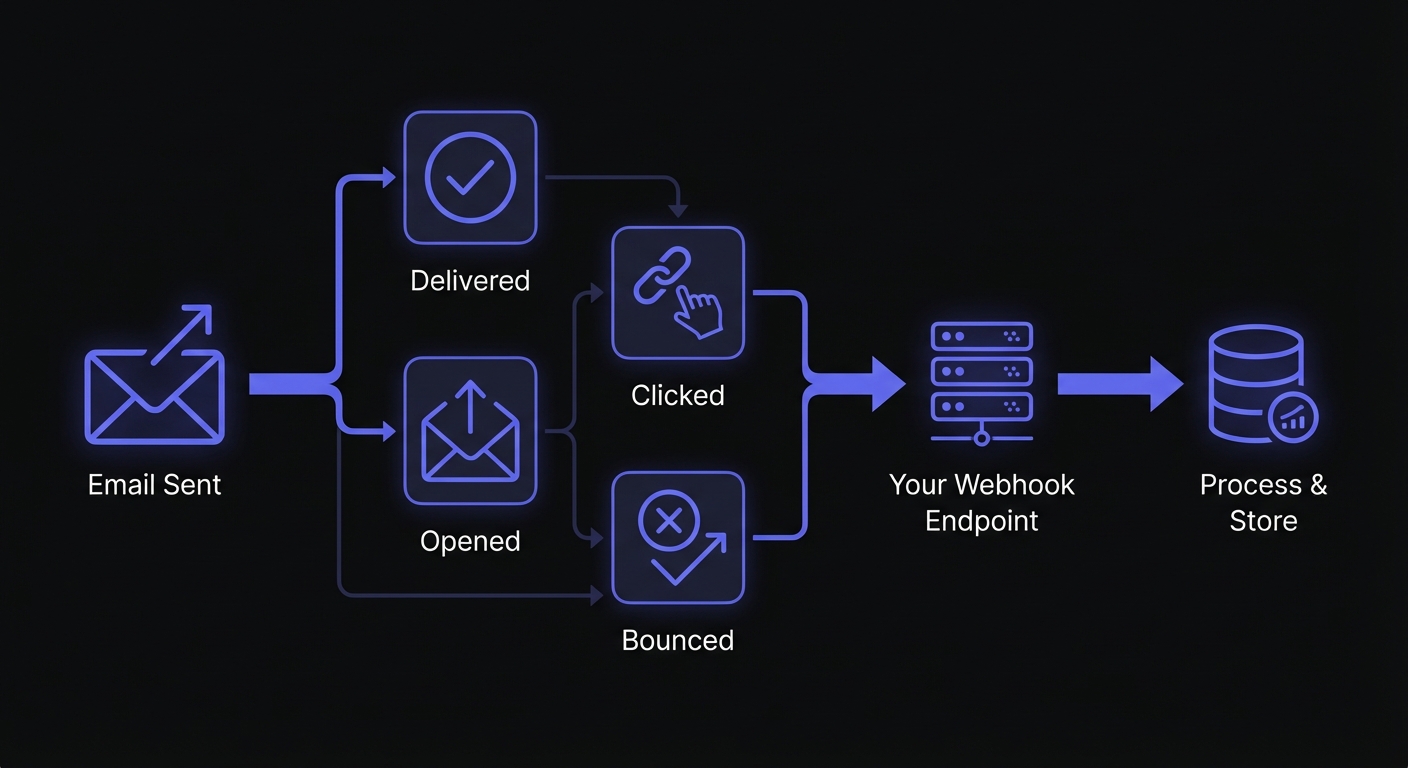
SendGrid webhooks notify your application in real-time when emails are delivered, opened, clicked, or bounced. This guide covers setup, event types, signature verification, and best practices for reliable email event processing.
Understanding SendGrid Event Webhooks
SendGrid webhooks post JSON data when email events occur—processing, delivery, engagement (opens, clicks), and compliance (bounces, spam, unsubscribes). Real-time data enables customer record updates, follow-up actions, and analytics dashboards.
Setting Up the SendGrid Event Webhook
Before receiving events, you need to configure your webhook endpoint in SendGrid:
- Log into your SendGrid dashboard
- Navigate to Settings > Mail Settings > Event Webhooks
- Click Create new webhook
- Enter your endpoint URL (must be HTTPS in production)
- Select the events you want to receive
- Enable Signed Event Webhook for security (highly recommended)
- Save and activate the webhook
SendGrid will send a test POST request to verify your endpoint is reachable. Your endpoint should respond with a 2xx status code within 3 seconds to be considered successful.
Testing Webhooks Locally
Your local development machine isn't accessible from the internet, so SendGrid can't reach localhost. Use these tools:
- ngrok: Creates a secure tunnel exposing your local server. Run
ngrok http 3000to get a public URL likehttps://abc123.ngrok.iothat forwards to your local port. - webhook.site: Instantly captures incoming webhooks for payload inspection without writing code. Useful for verifying SendGrid is sending the expected events.
For production, use separate webhook URLs and verification keys for test and production environments to isolate traffic and prevent test data from polluting production analytics.
SendGrid Event Types Explained
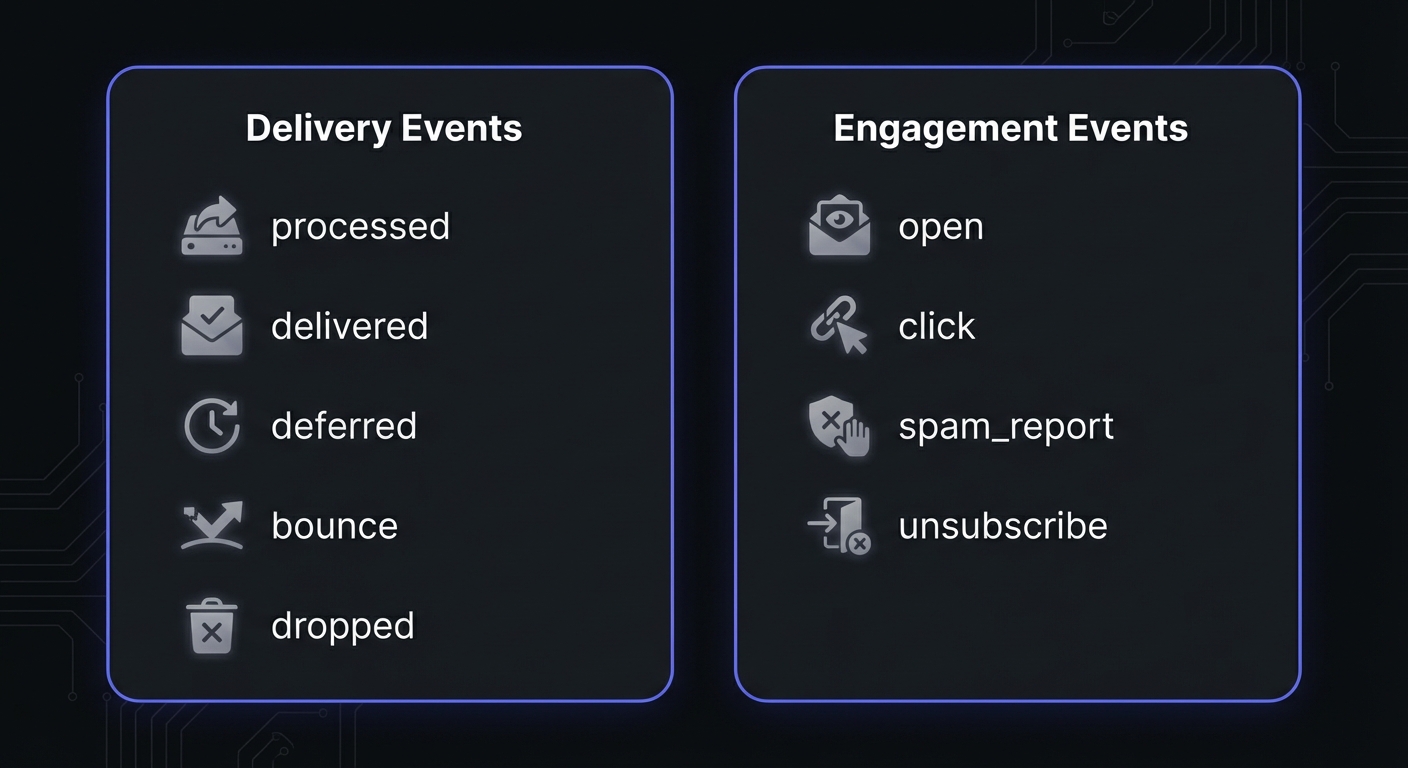
SendGrid tracks two primary categories: delivery events (did the email arrive?) and engagement events (did the recipient interact?).
Delivery Events
processed: Email entered the sending pipeline.
delivered: Mail server accepted the email (server acceptance, not inbox placement).
deferred: Mail server temporarily rejected. SendGrid retries for up to 72 hours.
Engagement Events
open: Recipient opened the email (detected via tracking pixel). Requires Open Tracking enabled in SendGrid settings. Note: Some opens are machine-generated by email security scanners—check the sg_machine_open field to filter these.
click: Recipient clicked a tracked link (each click = separate event). Requires Click Tracking enabled.
Problem Events
bounce: Permanent delivery failure (hard bounce). The address doesn't exist or permanently rejects mail. Remove immediately to protect sender reputation. SendGrid classifies bounces by reason: Invalid Address, Technical, Content, Reputation, Frequency/Volume, or Mailbox Unavailable.
blocked: Temporary delivery denial (soft bounce). The server temporarily can't accept mail—full mailbox, server down, or rate limited. These may resolve on retry; don't suppress immediately.
dropped: SendGrid prevented sending (bounced address, unsubscribe, or spam). Protects sender reputation.
spam_report: Recipient marked as spam (serious signal—damages deliverability). Keep hard bounces under 5% to maintain good deliverability.
unsubscribe: Recipient clicked unsubscribe. Honor requests to maintain compliance.
Webhook Payload Structure
SendGrid sends events in batches as JSON arrays. Each event has common fields plus event-specific data:
[
  {
    "email": "recipient@example.com",
    "timestamp": 1706140800,
    "smtp-id": "<14c5d75ce93.dfd.64b469@example.com>",
    "event": "delivered",
    "category": ["welcome-series"],
    "sg_event_id": "ZGVsaXZlcmVkLTAtMjY0NzU4NjctV0JFd0FRPT0",
    "sg_message_id": "14c5d75ce93.dfd.64b469.filter0001.16648.5515E0B88.0",
    "response": "250 OK"
  },
  {
    "email": "recipient@example.com",
    "timestamp": 1706140920,
    "event": "open",
    "sg_event_id": "b3BlbmVkLTAtMjY0NzU4NjctV0JFd0FRPT0",
    "sg_message_id": "14c5d75ce93.dfd.64b469.filter0001.16648.5515E0B88.0",
    "useragent": "Mozilla/5.0 (Macintosh; Intel Mac OS X 10_15_7)",
    "ip": "192.0.2.1"
  }
]
Key fields include:
- email: The recipient's email address
- timestamp: Unix timestamp when the event occurred
- event: The event type (delivered, open, bounce, etc.)
- sg_event_id: Unique identifier for this specific event
- sg_message_id: Identifier linking all events for a single email
- category: Custom categories you assigned when sending
Bounce events include additional fields like reason and type (bounce or blocked), while click events include the url that was clicked.
Handling Events in Node.js
See receiving and verifying webhooks in Node.js for complete implementation patterns:
const express = require('express');
const crypto = require('crypto');

const app = express();

// Use raw body for signature verification
app.use('/webhooks/sendgrid', express.raw({ type: 'application/json' }));

app.post('/webhooks/sendgrid', async (req, res) => {
  const signature = req.headers['x-twilio-email-event-webhook-signature'];
  const timestamp = req.headers['x-twilio-email-event-webhook-timestamp'];

  // Verify signature before processing
  if (!verifySignature(req.body, signature, timestamp)) {
    console.error('Invalid SendGrid webhook signature');
    return res.status(401).send('Unauthorized');
  }

  // Respond immediately to prevent timeouts
  res.status(200).send('OK');

  // Parse and process events asynchronously
  const events = JSON.parse(req.body.toString());
  await processEvents(events);
});

async function processEvents(events) {
  for (const event of events) {
    try {
      switch (event.event) {
        case 'delivered':
          await handleDelivered(event);
          break;
        case 'open':
          await handleOpen(event);
          break;
        case 'click':
          await handleClick(event);
          break;
        case 'bounce':
          await handleBounce(event);
          break;
        case 'dropped':
          await handleDropped(event);
          break;
        case 'spam_report':
          await handleSpamReport(event);
          break;
        case 'unsubscribe':
          await handleUnsubscribe(event);
          break;
        default:
          console.log(`Unhandled event type: ${event.event}`);
      }
    } catch (err) {
      console.error(`Error processing event ${event.sg_event_id}:`, err);
    }
  }
}
Event Handler Examples
async function handleBounce(event) {
  // Mark email as bounced
  await db.emailLogs.update({
    where: { messageId: event.sg_message_id },
    data: { status: 'bounced', bounceReason: event.reason }
  });

  // Suppress future sends to this address
  await db.emailSuppressions.upsert({
    where: { email: event.email },
    create: { email: event.email, reason: 'bounce' },
    update: { reason: 'bounce' }
  });
}

async function handleSpamReport(event) {
  // Immediately suppress and alert team
  await db.emailSuppressions.upsert({
    where: { email: event.email },
    create: { email: event.email, reason: 'spam_report' },
    update: { reason: 'spam_report' }
  });
  await alertTeam(`Spam report received for ${event.email}`);
}
Verifying SendGrid Webhook Signatures
SendGrid uses ECDSA signatures to prevent forged events. Always verify in production. See webhook security best practices.
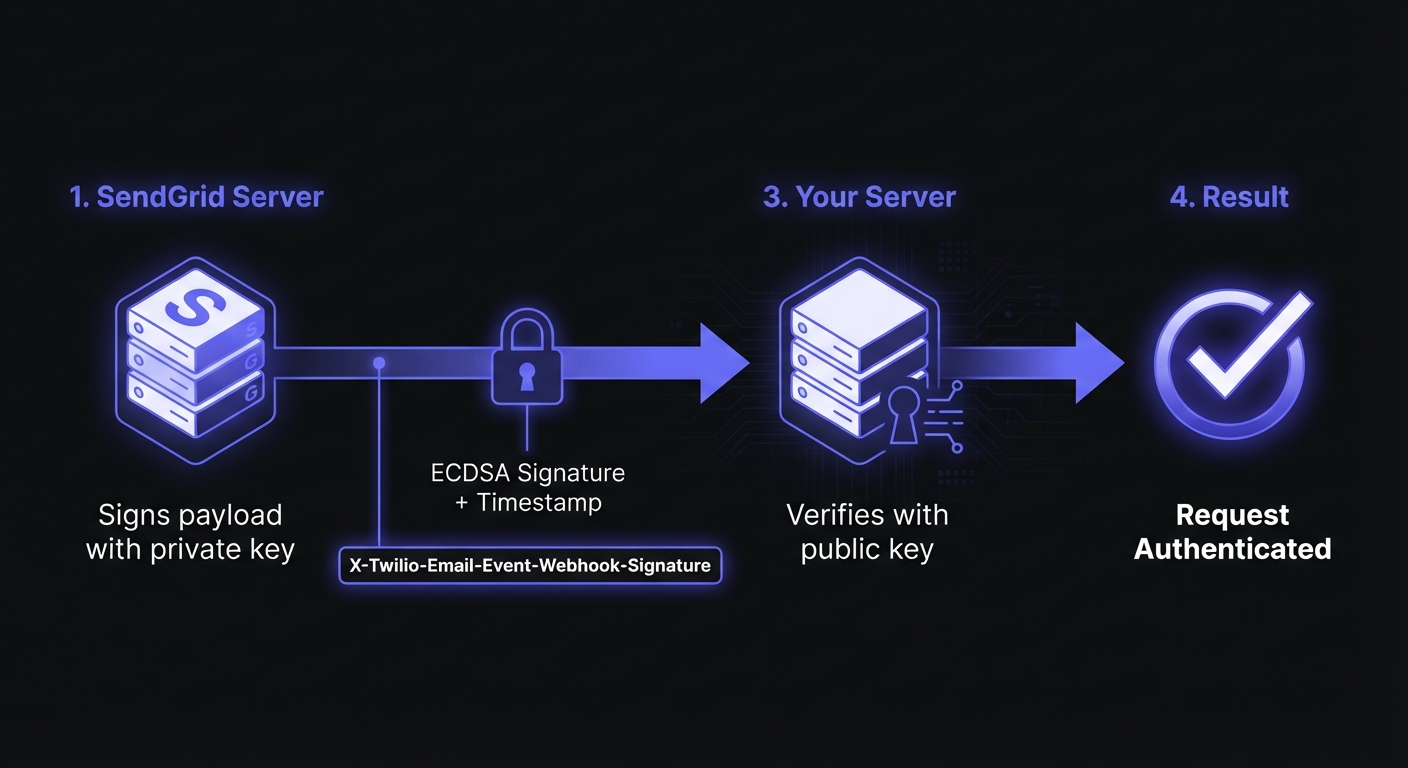
SendGrid includes two headers:
X-Twilio-Email-Event-Webhook-Signature: ECDSA signatureX-Twilio-Email-Event-Webhook-Timestamp: Signing timestamp
To enable signature verification:
- Navigate to Settings > Mail Settings in SendGrid
- Under Security Features, toggle Enable Signed Event Webhook
- Copy the generated Verification Key and store it as an environment variable
Verify the signature:
const crypto = require('crypto');

// Your verification key from SendGrid dashboard
const SENDGRID_VERIFICATION_KEY = process.env.SENDGRID_WEBHOOK_VERIFICATION_KEY;

function verifySignature(payload, signature, timestamp) {
  if (!signature || !timestamp) {
    return false;
  }

  try {
    // Construct the signed payload
    const payloadString = typeof payload === 'string'
      ? payload
      : payload.toString();
    const signedPayload = timestamp + payloadString;

    // Verify ECDSA signature
    const verifier = crypto.createVerify('sha256');
    verifier.update(signedPayload);

    const publicKey = `-----BEGIN PUBLIC KEY-----\n${SENDGRID_VERIFICATION_KEY}\n-----END PUBLIC KEY-----`;

    return verifier.verify(publicKey, signature, 'base64');
  } catch (err) {
    console.error('Signature verification error:', err);
    return false;
  }
}
Always verify signatures. Skipping verification exposes you to forged events that corrupt analytics or trigger unauthorized actions.
Using the Official SendGrid SDK
The @sendgrid/eventwebhook package provides helpers for signature verification:
const { EventWebhook } = require('@sendgrid/eventwebhook');

function verifyWithSDK(publicKey, payload, signature, timestamp) {
  const eventWebhook = new EventWebhook();
  const ecPublicKey = eventWebhook.convertPublicKeyToECDSA(publicKey);
  return eventWebhook.verifySignature(ecPublicKey, payload, signature, timestamp);
}Critical: The payload must be the raw request body (Buffer or string), not parsed JSON. If using express.json() or bodyParser.json(), exclude the webhook path from JSON parsing.
Handling Batch Events and Duplicates
SendGrid batches multiple events (single POST may have dozens). Handle gracefully.
Retry Behavior
If your server doesn't return a 2xx response, SendGrid retries at increasing intervals for up to 24 hours. This rolling window means each failing event gets its own 24-hour retry period. Design your handlers to be idempotent since the same event may arrive multiple times.
Event Ordering
SendGrid does not guarantee event delivery order. You might receive an "open" event before "delivered" due to network timing. Use the timestamp field to sort events chronologically, and design state machines that handle out-of-order updates gracefully.
SendGrid may send duplicates during retries. Use idempotent handlers to prevent double-processing:
const processedEvents = new Map(); // Use Redis in production

async function processEventsWithDeduplication(events) {
  for (const event of events) {
    const eventId = event.sg_event_id;

    // Check for duplicate
    if (await isDuplicate(eventId)) {
      console.log(`Skipping duplicate event: ${eventId}`);
      continue;
    }

    // Process the event
    await processEvent(event);

    // Mark as processed with TTL
    await markProcessed(eventId);
  }
}

async function isDuplicate(eventId) {
  // In production, use Redis: return await redis.exists(`event:${eventId}`)
  return processedEvents.has(eventId);
}

async function markProcessed(eventId) {
  // In production, use Redis with TTL: await redis.setex(`event:${eventId}`, 86400, '1')
  processedEvents.set(eventId, Date.now());
}
Best Practices for Production
Respond Quickly, Process Asynchronously
SendGrid expects a 3-second response. Repeated timeouts disable the webhook. Acknowledge immediately, then process in background:
app.post('/webhooks/sendgrid', async (req, res) => {
  // Verify signature
  if (!verifySignature(req.body, signature, timestamp)) {
    return res.status(401).send('Unauthorized');
  }

  // Respond immediately
  res.status(200).send('OK');

  // Queue for async processing
  const events = JSON.parse(req.body.toString());
  await eventQueue.add('process-sendgrid-events', { events });
});
Store Events and Monitor Health
Store event data for analytics and debugging. Track response times under 3 seconds. Alert on verification failures and unusual patterns (bounce spikes, delivery drops).
Common Use Cases
Email Analytics: Aggregate open, click, and delivery rates for dashboards.
Bounce Management: Auto-suppress bounced addresses. Remove hard bounces immediately.
Engagement Scoring: Track engagement to prioritize active subscribers and identify re-engagement.
Transactional Monitoring: Verify critical email delivery and alert support on failures.
Reliable Email Event Processing with Hook Mesh
Hook Mesh provides a reliable ingestion layer between SendGrid and your application with automatic retries, event queuing, and detailed logs. Your events are buffered during deployments, retried on failures, and fully observable.
Conclusion
SendGrid webhooks provide real-time visibility into deliveries, engagement, and compliance.
Key points: Verify signatures, respond within 3 seconds, process asynchronously, handle duplicates, and store for analytics.
See Twilio webhooks for SMS and voice, or our Platform Integration Hub.
Related Posts
Twilio Webhooks: Complete Integration Guide
Learn how to configure and handle Twilio webhooks for SMS, Voice, and WhatsApp integrations. Includes code examples for signature validation, TwiML responses, and best practices for reliable webhook processing.
Webhook Security Best Practices: The Complete Guide
Learn how to secure your webhook implementations with HMAC signature verification, replay attack prevention, SSRF mitigation, and more. Includes code examples in Node.js and Python.
Webhook Idempotency: Why It Matters and How to Implement It
A comprehensive technical guide to implementing idempotency for webhooks. Learn about idempotency keys, deduplication strategies, and implementation patterns with Node.js and Python code examples.
Receive and Verify Webhooks in Node.js: A Complete Guide
Learn how to securely receive and verify webhooks in Node.js using Express.js. Covers HMAC signature verification, timestamp validation, replay attack prevention, and common mistakes to avoid.
Webhook Integration Guides: Connect with Any Platform
Comprehensive guides for integrating webhooks from Stripe, GitHub, Shopify, Twilio, and 10+ other platforms. Learn best practices for reliable webhook handling across your entire stack.