Twilio Webhooks: Complete Integration Guide
Learn how to configure and handle Twilio webhooks for SMS, Voice, and WhatsApp integrations. Includes code examples for signature validation, TwiML responses, and best practices for reliable webhook processing.
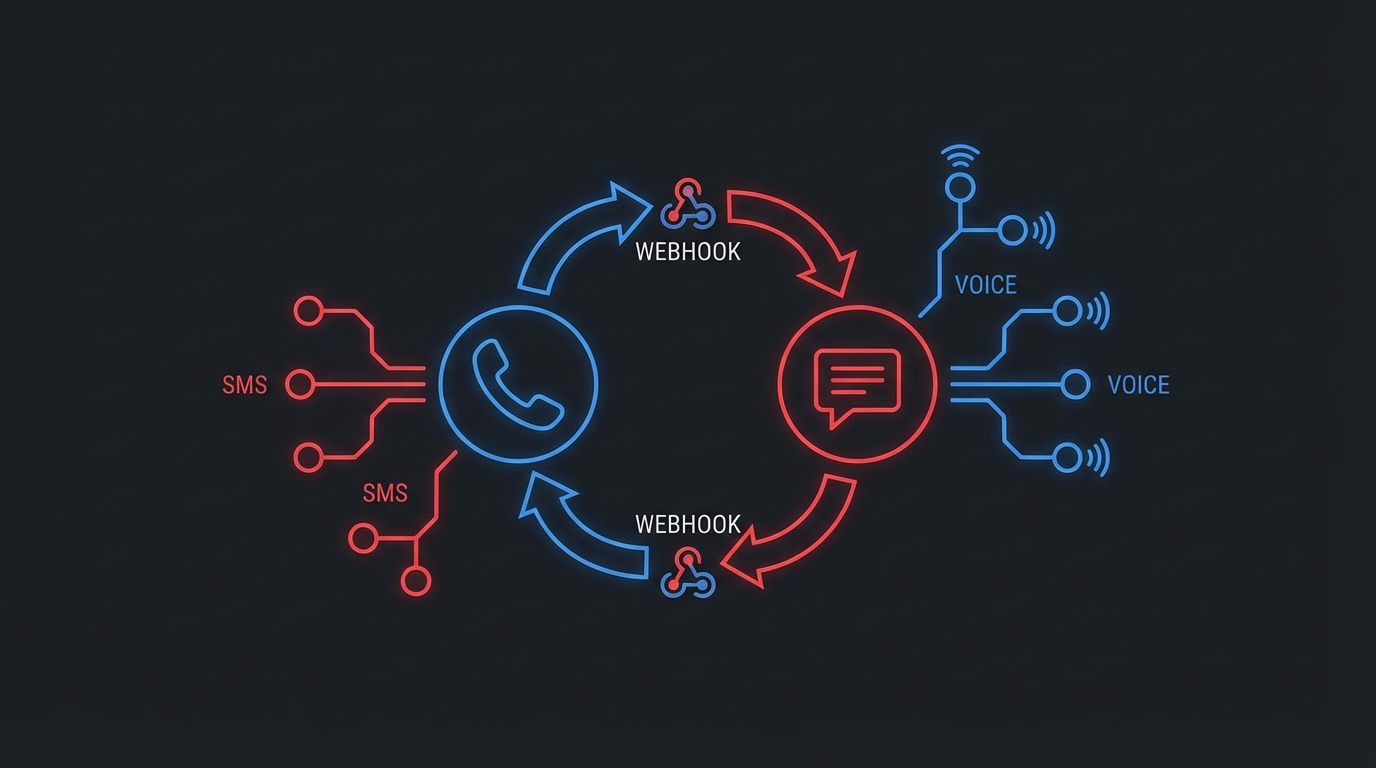
Twilio Webhooks: Complete Integration Guide
Twilio webhooks notify your application of SMS delivery, incoming calls, WhatsApp messages, and call status changes. This guide covers configuration, security validation, and best practices for reliable integrations.
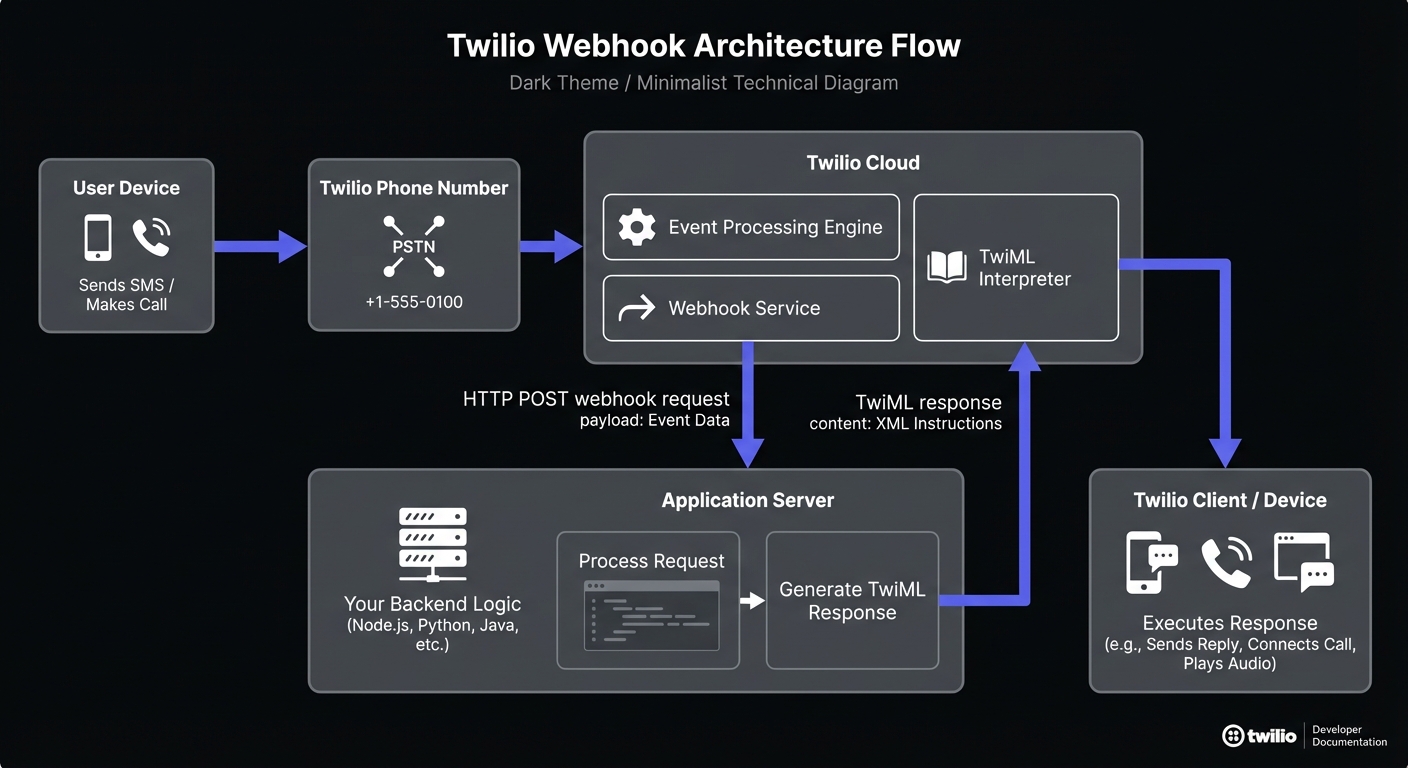
Understanding Twilio Webhook Types
Each Twilio communication channel has specific webhook events for real-time interaction with your application.
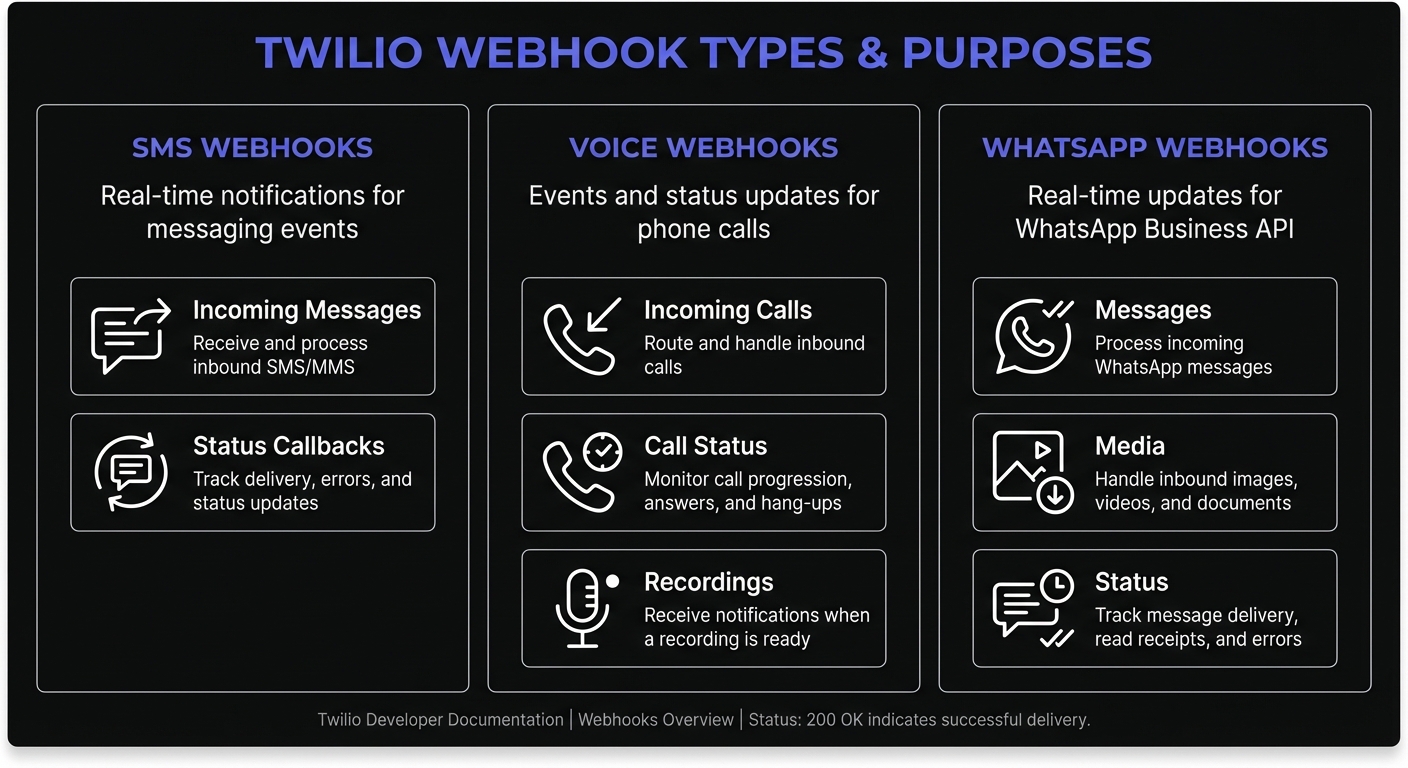
SMS Status Callbacks
When you send an SMS through Twilio, status callbacks inform you about the message lifecycle:
- queued: Message is queued for sending
- sent: Message sent to the carrier
- delivered: Carrier confirmed delivery
- undelivered: Message could not be delivered
- failed: Message failed to send
Use callbacks to track delivery rates, trigger follow-up actions, and maintain communication logs.
Voice Webhooks
Voice webhooks handle both inbound and outbound call events:
- Incoming call webhooks: Triggered when someone calls your Twilio number
- Status callbacks: Report call progress (ringing, in-progress, completed, busy, failed)
- Recording callbacks: Notify when call recordings are ready
- Transcription callbacks: Deliver speech-to-text results
WhatsApp Webhooks
Twilio's WhatsApp Business API uses webhooks for:
- Incoming messages: Text, images, documents, and location shares
- Message status updates: Sent, delivered, read, and failed statuses
- Template message responses: User replies to outbound templates
Configuring Webhook URLs
Setting Up SMS Webhooks
Configure SMS webhooks in the Twilio Console or programmatically when sending messages:
const twilio = require('twilio');
const client = twilio(accountSid, authToken);

const message = await client.messages.create({
  body: 'Your order has shipped!',
  from: '+15551234567',
  to: '+15559876543',
  statusCallback: 'https://webhooks.hookmesh.com/v1/twilio/sms-status'
});
Setting Up Voice Webhooks
Configure voice webhook URLs on your Twilio phone number:
const number = await client.incomingPhoneNumbers('PNXXXXXXX').update({
  voiceUrl: 'https://webhooks.hookmesh.com/v1/twilio/voice-incoming',
  voiceMethod: 'POST',
  statusCallback: 'https://webhooks.hookmesh.com/v1/twilio/voice-status',
  statusCallbackMethod: 'POST'
});
WhatsApp Configuration
WhatsApp webhooks are configured through the Twilio Console in the Messaging section, pointing to your webhook endpoint for the WhatsApp-enabled sender.
WhatsApp messages use the same webhook format as SMS, with two key differences:
ToandFromuse WhatsApp addresses:whatsapp:+15551234567- Media messages include
MediaUrl0,MediaContentType0fields for images, audio, and PDFs (up to 16MB)
app.post('/webhooks/twilio/whatsapp', validateTwilioRequest, (req, res) => {
  const { From, Body, NumMedia, MediaUrl0, MediaContentType0 } = req.body;

  // Handle media attachments
  if (parseInt(NumMedia) > 0) {
    console.log(`Received media: ${MediaContentType0} at ${MediaUrl0}`);
    processMediaMessage(MediaUrl0, MediaContentType0);
  }

  res.type('text/xml').send('<Response></Response>');
});
Configuring Fallback URLs
Twilio supports fallback URLs for error recovery. If your primary webhook returns an error or times out, Twilio automatically retries with your fallback endpoint:
const number = await client.incomingPhoneNumbers('PNXXXXXXX').update({
  voiceUrl: 'https://primary.example.com/voice',
  voiceFallbackUrl: 'https://backup.example.com/voice',
  smsUrl: 'https://primary.example.com/sms',
  smsFallbackUrl: 'https://backup.example.com/sms'
});
Fallback requests include ErrorCode and ErrorUrl parameters identifying what failed, enabling targeted debugging.
Testing Webhooks Locally
Twilio requires a publicly accessible URL, but you can use tunneling tools during development.
Using ngrok
ngrok creates a public URL that forwards to your local server:
# Start your local server on port 3000
node server.js

# In another terminal, create a tunnel
ngrok http 3000
ngrok provides a URL like https://abc123.ngrok.io - use this as your webhook URL in the Twilio Console. The Twilio CLI also supports automatic tunneling:
# Automatically creates ngrok tunnel for localhost URLs
twilio phone-numbers:update +15551234567 \
  --sms-url="http://localhost:3000/webhooks/sms"
Alternative Testing Tools
- webhook.site: Instantly captures incoming webhooks for inspection without running any code
- RequestBin: Similar to webhook.site, useful for debugging payload structure
- TwiML Bins: Twilio's serverless option - host TwiML responses without your own server
Request Validation: Securing Your Webhooks
Validate incoming webhooks to ensure they originate from Twilio and weren't tampered with. Twilio signs every request using your Auth Token. See our webhook security best practices guide for comprehensive authentication approaches.
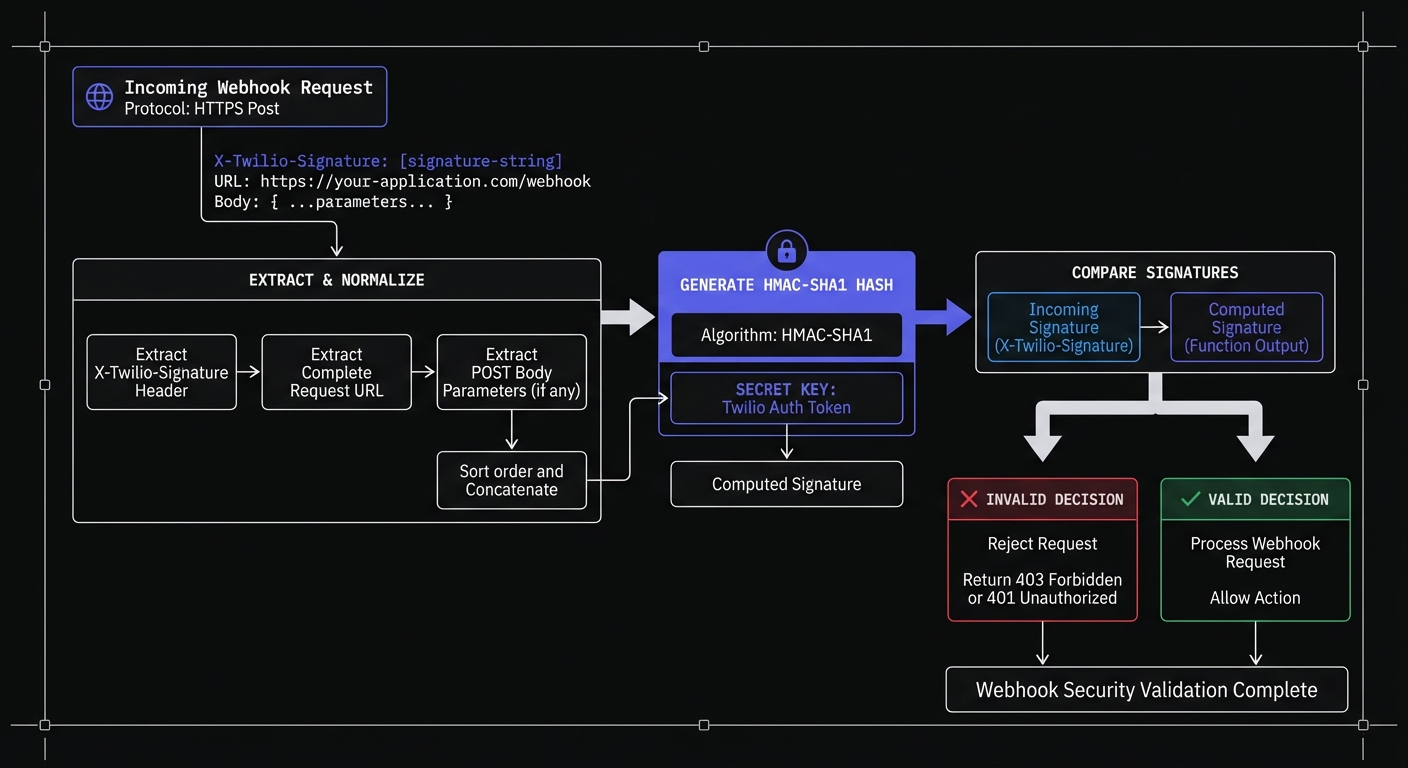
Twilio uses HMAC-SHA1 to sign requests. The signature combines your webhook URL, sorted request parameters, and your Auth Token as the secret key. Always use the official Twilio SDK for validation rather than implementing your own - the algorithm handles edge cases like empty parameter values that can break custom implementations.
Node.js Signature Validation
Twilio's SDK makes validation straightforward. See verifying webhooks in Node.js for details:
const twilio = require('twilio');
const express = require('express');
const app = express();

// Use raw body for signature validation
app.use('/webhooks/twilio', express.urlencoded({ extended: false }));

const validateTwilioRequest = (req, res, next) => {
  const twilioSignature = req.headers['x-twilio-signature'];
  const authToken = process.env.TWILIO_AUTH_TOKEN;
  const url = `${req.protocol}://${req.get('host')}${req.originalUrl}`;

  const isValid = twilio.validateRequest(
    authToken,
    twilioSignature,
    url,
    req.body
  );

  if (!isValid) {
    console.error('Invalid Twilio signature detected');
    return res.status(403).send('Forbidden');
  }

  next();
};

app.post('/webhooks/twilio/sms', validateTwilioRequest, (req, res) => {
  const { From, Body, MessageSid } = req.body;

  console.log(`Received SMS from ${From}: ${Body}`);

  // Process the message asynchronously
  processIncomingSms(req.body).catch(console.error);

  // Respond immediately
  res.type('text/xml').send('<Response></Response>');
});
Python Signature Validation
from flask import Flask, request, abort
from twilio.request_validator import RequestValidator
from functools import wraps
import os

app = Flask(__name__)

def validate_twilio_request(f):
    @wraps(f)
    def decorated(*args, **kwargs):
        validator = RequestValidator(os.environ['TWILIO_AUTH_TOKEN'])

        url = request.url
        post_vars = request.form.to_dict()
        signature = request.headers.get('X-Twilio-Signature', '')

        if not validator.validate(url, post_vars, signature):
            abort(403)

        return f(*args, **kwargs)
    return decorated

@app.route('/webhooks/twilio/sms', methods=['POST'])
@validate_twilio_request
def handle_sms():
    from_number = request.form.get('From')
    body = request.form.get('Body')
    message_sid = request.form.get('MessageSid')

    # Queue for async processing
    process_sms_async.delay(from_number, body, message_sid)

    return '<Response></Response>', 200, {'Content-Type': 'text/xml'}
TwiML Responses for Voice Webhooks
Voice webhooks expect TwiML (Twilio Markup Language) responses that instruct Twilio how to handle the call:
const VoiceResponse = require('twilio').twiml.VoiceResponse;

app.post('/webhooks/twilio/voice', validateTwilioRequest, (req, res) => {
  const twiml = new VoiceResponse();
  const { From, CallStatus } = req.body;

  // Greet the caller
  twiml.say({ voice: 'alice' }, 'Welcome to Acme Support.');

  // Gather input
  const gather = twiml.gather({
    numDigits: 1,
    action: '/webhooks/twilio/voice/menu',
    method: 'POST'
  });
  gather.say('Press 1 for sales, press 2 for support.');

  // Fallback if no input
  twiml.say('We didn\'t receive any input. Goodbye.');

  res.type('text/xml').send(twiml.toString());
});
Common Use Cases
SMS Delivery Receipts
Track message delivery for critical notifications:
app.post('/webhooks/twilio/sms-status', validateTwilioRequest, async (req, res) => {
  const { MessageSid, MessageStatus, ErrorCode } = req.body;

  await db.messages.update({
    where: { twilioSid: MessageSid },
    data: {
      status: MessageStatus,
      errorCode: ErrorCode || null,
      updatedAt: new Date()
    }
  });

  if (MessageStatus === 'failed' || MessageStatus === 'undelivered') {
    await alerting.notify(`SMS delivery failed: ${MessageSid}`);
  }

  res.sendStatus(200);
});
Incoming Message Handling
Build conversational experiences by responding to incoming messages:
@app.route('/webhooks/twilio/incoming', methods=['POST'])
@validate_twilio_request
def handle_incoming():
    body = request.form.get('Body', '').strip().lower()
    from_number = request.form.get('From')

    response = MessagingResponse()

    if body == 'status':
        order = get_latest_order(from_number)
        response.message(f'Your order #{order.id} is {order.status}')
    elif body == 'help':
        response.message('Reply STATUS for order updates, STOP to unsubscribe')
    else:
        response.message('Thanks for your message! Reply HELP for options.')

    return str(response), 200, {'Content-Type': 'text/xml'}
Call Status Updates
Monitor call center performance with status callbacks:
app.post('/webhooks/twilio/call-status', validateTwilioRequest, async (req, res) => {
  const { CallSid, CallStatus, CallDuration, From, To } = req.body;

  await analytics.trackCall({
    sid: CallSid,
    status: CallStatus,
    duration: parseInt(CallDuration) || 0,
    from: From,
    to: To,
    timestamp: new Date()
  });

  res.sendStatus(200);
});
Best Practices for Twilio Webhook Integration
1. Always Validate Requests
Never skip signature validation in production. Attackers easily spoof requests without verifying the X-Twilio-Signature header.
2. Respond Quickly
Twilio expects responses within 15 seconds. Voice webhook delays cause awkward silences for callers. Return immediately and process asynchronously:
app.post('/webhooks/twilio/sms', validateTwilioRequest, (req, res) => {
  // Respond immediately
  res.type('text/xml').send('<Response></Response>');

  // Process asynchronously
  messageQueue.add('process-sms', req.body);
});
3. Handle Retries Gracefully
Twilio retries failed deliveries. Implement idempotent handlers using MessageSid or CallSid to prevent duplicates:
const processedEvents = new Set(); // Use Redis in production

app.post('/webhooks/twilio/status', validateTwilioRequest, async (req, res) => {
  const eventKey = `${req.body.MessageSid}-${req.body.MessageStatus}`;

  if (processedEvents.has(eventKey)) {
    return res.sendStatus(200);
  }

  processedEvents.add(eventKey);
  await processStatusUpdate(req.body);

  res.sendStatus(200);
});
4. Use HTTPS Endpoints
Twilio requires HTTPS for webhook URLs in production. Ensure your SSL certificates are valid and properly configured. Self-signed certificates will fail - use certificates from trusted providers.
5. Configure Connection Timeouts
Twilio's default timeout is 15 seconds. For voice webhooks, long delays create awkward silences. Override timeouts per-request using URL query parameters:
https://example.com/webhooks/voice?ConnectionTimeout=5&Timeout=10
ConnectionTimeout: Maximum time to establish connection (default: 5s)Timeout: Maximum time for complete request/response cycle (default: 15s)
6. Log Everything
Comprehensive logging helps debug issues and provides an audit trail:
app.post('/webhooks/twilio/*', (req, res, next) => {
  console.log({
    path: req.path,
    timestamp: new Date().toISOString(),
    body: req.body,
    headers: {
      'x-twilio-signature': req.headers['x-twilio-signature'],
      'i-twilio-idempotency-token': req.headers['i-twilio-idempotency-token']
    }
  });
  next();
});
7. Use Twilio's Idempotency Token
Twilio includes the I-Twilio-Idempotency-Token header in retried requests. Use this token alongside MessageSid for more robust duplicate detection:
app.post('/webhooks/twilio/status', validateTwilioRequest, async (req, res) => {
  const idempotencyToken = req.headers['i-twilio-idempotency-token'];
  const eventKey = idempotencyToken || `${req.body.MessageSid}-${req.body.MessageStatus}`;

  if (await redis.exists(`processed:${eventKey}`)) {
    return res.sendStatus(200);
  }

  await redis.set(`processed:${eventKey}`, '1', 'EX', 86400);
  await processStatusUpdate(req.body);

  res.sendStatus(200);
});
Scaling Twilio Webhooks with Hook Mesh
Hook Mesh handles infrastructure complexity as your communication volume grows:
- Automatic retries: Never lose delivery receipts or incoming messages
- Request queuing: Buffer high-volume traffic during peak messaging
- Signature validation: Built-in verification before forwarding
- Real-time monitoring: Track delivery rates, latency, and error patterns
- Failover routing: Automatically route to backup endpoints if primary is unavailable
Conclusion
Twilio webhooks are fundamental to building responsive communication applications. Whether tracking SMS deliveries, handling calls with TwiML, or managing WhatsApp, proper implementation keeps your application synchronized with real-world events.
Focus on essentials: validate requests, respond quickly, process asynchronously. With Hook Mesh handling delivery logistics, scale from your first to your millionth message confidently. Explore more platforms in our guides on SendGrid email and Slack webhooks, or browse our platform integrations hub.
Related Posts
SendGrid Webhook Events: How to Handle Email Notifications
Learn how to set up and handle SendGrid Event Webhooks for email delivery tracking. Complete guide covering event types, payload structure, signature verification, and best practices with Node.js code examples.
Webhook Security Best Practices: The Complete Guide
Learn how to secure your webhook implementations with HMAC signature verification, replay attack prevention, SSRF mitigation, and more. Includes code examples in Node.js and Python.
Receive and Verify Webhooks in Node.js: A Complete Guide
Learn how to securely receive and verify webhooks in Node.js using Express.js. Covers HMAC signature verification, timestamp validation, replay attack prevention, and common mistakes to avoid.
Webhook Idempotency: Why It Matters and How to Implement It
A comprehensive technical guide to implementing idempotency for webhooks. Learn about idempotency keys, deduplication strategies, and implementation patterns with Node.js and Python code examples.
Webhook Integration Guides: Connect with Any Platform
Comprehensive guides for integrating webhooks from Stripe, GitHub, Shopify, Twilio, and 10+ other platforms. Learn best practices for reliable webhook handling across your entire stack.