Handling Shopify Webhooks: A Complete Guide
Learn how to receive and process Shopify webhooks reliably. This guide covers webhook topics, registration methods, HMAC verification, common challenges, and best practices for e-commerce integrations.

Handling Shopify Webhooks: A Complete Guide
Shopify webhooks let your application respond instantly to store events—orders, products, customers—instead of constantly polling the API. Handling them reliably requires understanding registration methods, signature verification, and retry behavior.
This guide covers everything e-commerce developers need: practical code examples and solutions to common production challenges.
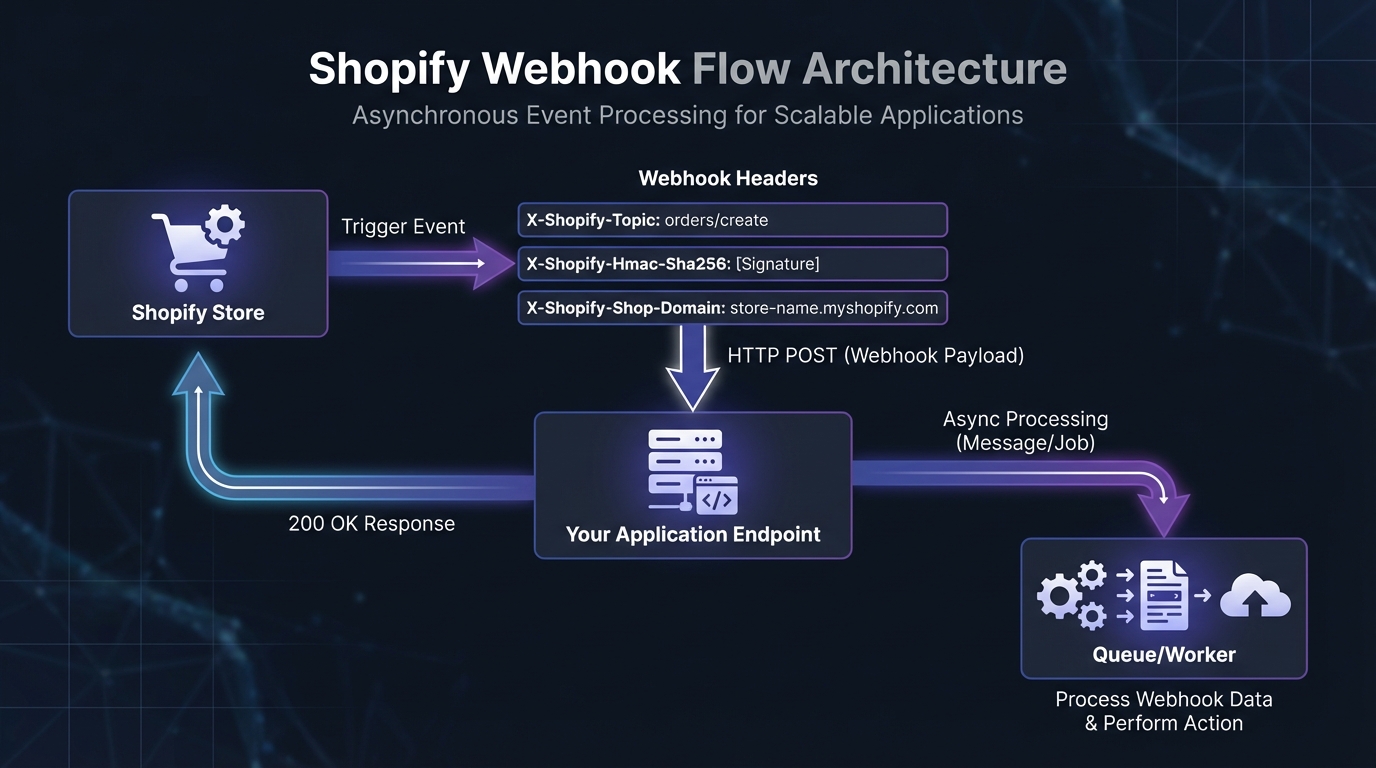
Understanding Shopify Webhook Topics
Shopify organizes webhooks around topics—specific events that trigger notifications. Choose the right topics to receive only the data you need.
Order Webhooks
Order webhooks are the most commonly used for e-commerce integrations:
- orders/create: Fires when a customer completes checkout. Use this to trigger fulfillment workflows, update external inventory systems, or send order data to your ERP.
- orders/updated: Triggers when any order attribute changes, including status updates, address edits, or line item modifications.
- orders/paid: Specifically fires when payment is captured—useful for apps that should only act on confirmed payments.
- orders/cancelled: Notifies when orders are cancelled, enabling automatic refund processing or inventory restoration.
- orders/fulfilled: Triggers when all items in an order are marked as fulfilled.
Product Webhooks
Product webhooks keep external systems synchronized with your catalog:
- products/create: Fires when new products are added to the store.
- products/update: Triggers on any product change—title, description, price, variants, images, or inventory levels.
- products/delete: Notifies when products are removed from the catalog.
Customer Webhooks
Customer webhooks power personalization and CRM integrations:
- customers/create: Fires when new customer accounts are created.
- customers/update: Triggers on profile changes, including address updates and marketing preferences.
- customers/delete: Notifies when customer data is removed (important for GDPR compliance).
Fulfillment Webhooks
Fulfillment webhooks enable shipping and logistics integrations:
- fulfillments/create: Fires when fulfillment records are created for orders.
- fulfillments/update: Triggers when tracking information is added or fulfillment status changes.
Registering Shopify Webhooks
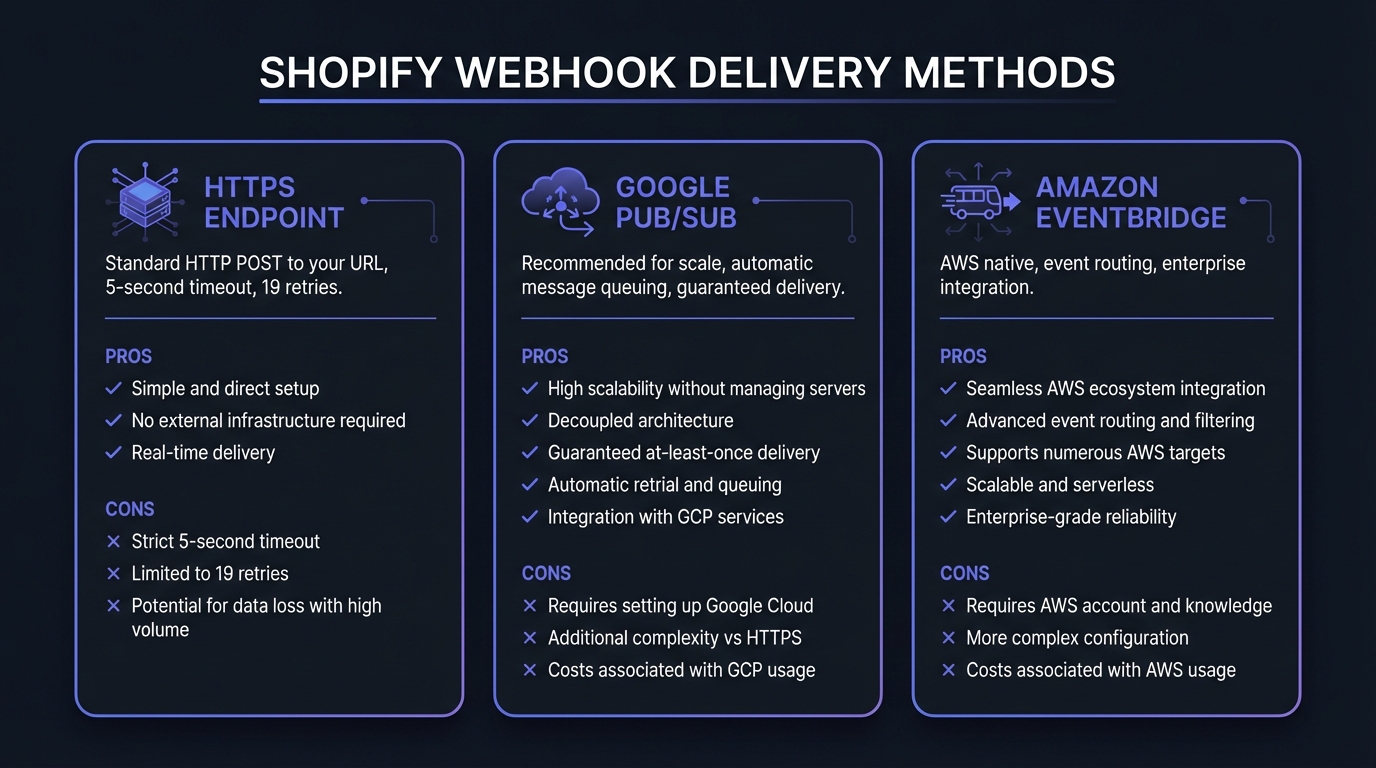
Shopify provides multiple delivery methods for webhooks. Understanding the tradeoffs helps you choose the right approach.
Delivery Methods
HTTPS Endpoints: The standard approach. Shopify sends HTTP POST requests directly to your URL. Simple to implement but requires fast response times (5-second timeout) and proper retry handling.
Google Cloud Pub/Sub: Shopify's recommended approach for scale. Messages queue automatically, providing guaranteed delivery and built-in retry logic. Ideal for high-volume stores or apps serving many merchants.
Amazon EventBridge: Native AWS integration for event-driven architectures. Route webhooks to multiple destinations, apply filtering rules, and integrate with other AWS services.
For most apps, HTTPS endpoints work well. Consider Pub/Sub or EventBridge when handling webhooks from thousands of stores or when you need guaranteed delivery during maintenance windows.
Registration Methods
Method 1: GraphQL Admin API (Recommended)
As of April 2025, Shopify requires all new public apps to use the GraphQL Admin API exclusively. The REST API is legacy.
const Shopify = require('@shopify/shopify-api');

async function registerWebhookGraphQL(session) {
  const client = new Shopify.clients.Graphql({ session });

  const response = await client.query({
    data: `mutation {
      webhookSubscriptionCreate(
        topic: ORDERS_CREATE
        webhookSubscription: {
          callbackUrl: "https://yourapp.com/webhooks/orders"
          format: JSON
        }
      ) {
        webhookSubscription {
          id
          topic
          endpoint {
            ... on WebhookHttpEndpoint {
              callbackUrl
            }
          }
        }
        userErrors {
          field
          message
        }
      }
    }`,
  });

  if (response.body.data.webhookSubscriptionCreate.userErrors.length === 0) {
    console.log('Webhook registered successfully');
  }
}
Method 2: REST Admin API (Legacy)
For existing apps still using REST, you can register webhooks directly:
const axios = require('axios');

async function createWebhook(shop, accessToken, topic, address) {
  const response = await axios.post(
    `https://${shop}/admin/api/2024-01/webhooks.json`,
    {
      webhook: {
        topic: topic,
        address: address,
        format: 'json'
      }
    },
    {
      headers: {
        'X-Shopify-Access-Token': accessToken,
        'Content-Type': 'application/json'
      }
    }
  );

  return response.data.webhook;
}

// Register multiple webhooks
const topics = ['orders/create', 'orders/updated', 'products/update'];
for (const topic of topics) {
  await createWebhook(shop, token, topic, 'https://yourapp.com/webhooks/shopify');
}
Method 3: Shopify Partner Dashboard
For public apps distributed through the Shopify App Store, configure webhooks in your Partner Dashboard under App Setup. This method automatically registers webhooks when merchants install your app.
Navigate to your app in the Partner Dashboard, select "App setup," and add webhook subscriptions. Specify the callback URL and select which topics your app needs. Shopify handles registration during the OAuth installation flow.
Mandatory Webhooks for App Store Apps
If you're building a public Shopify app, certain webhooks are mandatory for App Store approval:
- customers/data_request: Handle customer data export requests (GDPR)
- customers/redact: Process customer data deletion requests (GDPR)
- shop/redact: Clean up shop data when merchants uninstall your app
These compliance webhooks must return a 200 status within specific timeframes, even if processing happens asynchronously.
HMAC Signature Verification
Every Shopify webhook includes an HMAC-SHA256 signature in the X-Shopify-Hmac-Sha256 header. Verifying this signature confirms the webhook originated from Shopify and wasn't tampered with. See our HMAC-SHA256 webhook signatures guide for detailed explanation.
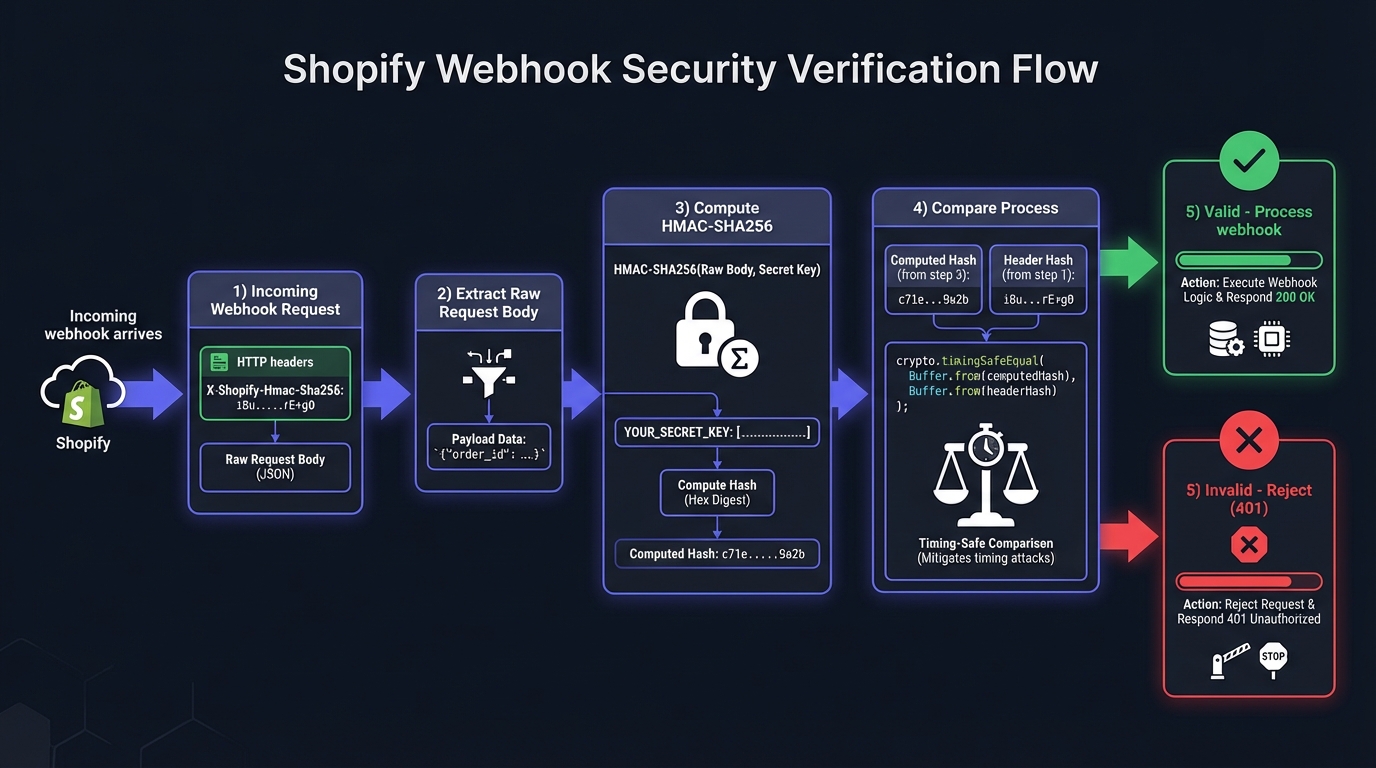
Node.js Verification Implementation
const crypto = require('crypto');

function verifyShopifyWebhook(rawBody, hmacHeader, secret) {
  const generatedHash = crypto
    .createHmac('sha256', secret)
    .update(rawBody, 'utf8')
    .digest('base64');

  return crypto.timingSafeEqual(
    Buffer.from(generatedHash),
    Buffer.from(hmacHeader)
  );
}

// Express.js middleware
const express = require('express');
const app = express();

app.post('/webhooks/shopify',
  express.raw({ type: 'application/json' }),
  (req, res) => {
    const hmac = req.headers['x-shopify-hmac-sha256'];
    const secret = process.env.SHOPIFY_WEBHOOK_SECRET;

    if (!verifyShopifyWebhook(req.body, hmac, secret)) {
      console.error('Webhook verification failed');
      return res.status(401).send('Unauthorized');
    }

    // Parse and process the verified webhook
    const data = JSON.parse(req.body.toString());
    const topic = req.headers['x-shopify-topic'];
    const shop = req.headers['x-shopify-shop-domain'];

    console.log(`Received ${topic} from ${shop}`);

    // Acknowledge immediately, process async
    res.status(200).send('OK');

    // Queue for background processing
    processWebhookAsync(topic, shop, data);
  }
);Critical: Use express.raw() to access the raw request body. If you use express.json(), the body gets parsed and re-serialization won't match the original bytes, causing verification failures.
Complete Verification Middleware
const verifyShopifyWebhookMiddleware = (req, res, next) => {
  const hmac = req.headers['x-shopify-hmac-sha256'];

  if (!hmac) {
    return res.status(401).json({ error: 'Missing HMAC header' });
  }

  const secret = process.env.SHOPIFY_WEBHOOK_SECRET;
  const generatedHash = crypto
    .createHmac('sha256', secret)
    .update(req.body, 'utf8')
    .digest('base64');

  const isValid = crypto.timingSafeEqual(
    Buffer.from(generatedHash),
    Buffer.from(hmac)
  );

  if (!isValid) {
    console.error('HMAC verification failed', {
      shop: req.headers['x-shopify-shop-domain'],
      topic: req.headers['x-shopify-topic']
    });
    return res.status(401).json({ error: 'Invalid signature' });
  }

  // Attach parsed data and metadata to request
  req.webhookData = JSON.parse(req.body.toString());
  req.webhookTopic = req.headers['x-shopify-topic'];
  req.webhookShop = req.headers['x-shopify-shop-domain'];

  next();
};
Working with Webhook Headers
Shopify sends several important headers with each webhook. Understanding these enables proper routing, debugging, and duplicate detection.
| Header | Purpose | Example |
|---|---|---|
X-Shopify-Topic | Event type that triggered the webhook | orders/create |
X-Shopify-Hmac-Sha256 | Signature for verification | XWmrwMey6OsLMeiZKw... |
X-Shopify-Shop-Domain | Store the webhook originated from | mystore.myshopify.com |
X-Shopify-API-Version | API version for payload format | 2026-01 |
X-Shopify-Webhook-Id | Unique delivery identifier | b54557e4-bdd9-... |
X-Shopify-Triggered-At | When the event occurred | 2026-01-20T15:30:00Z |
Important: HTTP headers are case-insensitive. Your app might receive X-Shopify-Topic, x-shopify-topic, or X-SHOPIFY-TOPIC. Handle all variations:
function getHeader(headers, name) {
  const normalized = name.toLowerCase();
  for (const [key, value] of Object.entries(headers)) {
    if (key.toLowerCase() === normalized) {
      return value;
    }
  }
  return null;
}

const topic = getHeader(req.headers, 'x-shopify-topic');
Common Challenges and Solutions
Challenge 1: Webhook Delivery Failures
Shopify expects a 2xx response within 5 seconds. Slow or unavailable endpoints trigger failed delivery and retries. See webhook retry strategies for handling retries gracefully.
Solution: Acknowledge webhooks immediately and process asynchronously.
app.post('/webhooks/shopify', verifyMiddleware, async (req, res) => {
  // Respond immediately
  res.status(200).send('OK');

  // Queue for background processing
  await webhookQueue.add('process-webhook', {
    topic: req.webhookTopic,
    shop: req.webhookShop,
    data: req.webhookData,
    receivedAt: new Date().toISOString()
  });
});
Challenge 2: Duplicate Webhooks
Shopify may send the same webhook multiple times during retries or network issues. Your handlers must be idempotent, especially for order webhooks where duplicates affect inventory or fulfillment. See our webhook idempotency guide for detailed patterns.
Solution: Track processed webhook IDs and skip duplicates.
async function processWebhook(topic, shop, data) {
  const webhookId = `${shop}-${topic}-${data.id}-${data.updated_at}`;

  // Check if already processed
  const exists = await redis.get(`webhook:${webhookId}`);
  if (exists) {
    console.log(`Skipping duplicate webhook: ${webhookId}`);
    return;
  }

  // Mark as processing
  await redis.setex(`webhook:${webhookId}`, 86400, 'processing');

  try {
    // Process the webhook
    await handleWebhookByTopic(topic, data);

    // Mark as completed
    await redis.setex(`webhook:${webhookId}`, 86400, 'completed');
  } catch (error) {
    // Remove lock on failure to allow retry
    await redis.del(`webhook:${webhookId}`);
    throw error;
  }
}
Challenge 3: Out-of-Order Delivery
Shopify doesn't guarantee webhook ordering within a topic or across topics. A products/update webhook might arrive before products/create, or an older update might arrive after a newer one.
Solution: Use timestamps to handle ordering.
async function processProductUpdate(shop, data) {
  const product = await db.products.findOne({
    shopifyId: data.id,
    shop: shop
  });

  // Check if we have newer data
  if (product && new Date(product.updatedAt) > new Date(data.updated_at)) {
    console.log(`Skipping stale update for product ${data.id}`);
    return;
  }

  // Process the update
  await db.products.upsert({
    shopifyId: data.id,
    shop: shop,
    data: data,
    updatedAt: data.updated_at
  });
}
For critical operations, fetch the current state from Shopify's API before making irreversible changes.
Challenge 4: Rate Limits
Shopify applies rate limits to webhook registrations (not deliveries). Implement backoff strategies when registering webhooks for many stores.
Solution: Batch registrations and respect rate limit headers.
async function registerWebhooksWithRateLimit(shops, topics) {
  for (const shop of shops) {
    for (const topic of topics) {
      try {
        await createWebhook(shop.domain, shop.token, topic, callbackUrl);
      } catch (error) {
        if (error.response?.status === 429) {
          const retryAfter = error.response.headers['retry-after'] || 2;
          await sleep(retryAfter * 1000);
          // Retry once
          await createWebhook(shop.domain, shop.token, topic, callbackUrl);
        } else {
          throw error;
        }
      }
      // Small delay between registrations
      await sleep(100);
    }
  }
}
Challenge 5: Missing Webhooks
Webhooks don't arrive due to endpoint issues, Shopify outages, or misconfiguration. Shopify retries 19 times over 48 hours, but extended downtime means lost data. Critical processes shouldn't rely solely on webhooks.
Solution: Implement reconciliation jobs that poll the API periodically.
async function reconcileOrders(shop, accessToken, since) {
  // Use updated_at filter for efficient queries
  const orders = await fetchOrdersSince(shop, accessToken, since);

  for (const order of orders) {
    const processed = await redis.get(`order:${order.id}`);
    if (!processed) {
      console.log(`Reconciliation found missed order: ${order.id}`);
      await processOrder(order);
    }
  }
}

// Run reconciliation every hour
setInterval(() => {
  const oneHourAgo = new Date(Date.now() - 3600000).toISOString();
  reconcileOrders(shop, token, oneHourAgo);
}, 3600000);
Challenge 6: Subscription Deletion
After 19 failed delivery attempts over 48 hours, Shopify deletes your webhook subscription entirely. You won't receive notifications—the subscription simply disappears.
Solution: Monitor webhook health and re-register on recovery.
async function ensureWebhookSubscriptions(shop, accessToken) {
  const existingWebhooks = await listWebhooks(shop, accessToken);
  const requiredTopics = ['orders/create', 'orders/updated', 'products/update'];

  for (const topic of requiredTopics) {
    const exists = existingWebhooks.some(w => w.topic === topic);
    if (!exists) {
      console.log(`Re-registering missing webhook: ${topic}`);
      await createWebhook(shop, accessToken, topic, callbackUrl);
    }
  }
}

// Check subscriptions daily or on app startup
Best Practices for Production
Use Message Queues
Never process webhooks synchronously in the HTTP handler. Use a message queue like Redis, RabbitMQ, or SQS to decouple receipt from processing.
const Queue = require('bull');
const webhookQueue = new Queue('shopify-webhooks', process.env.REDIS_URL);

webhookQueue.process('orders/create', async (job) => {
  const { shop, data } = job.data;
  await syncOrderToERP(shop, data);
  await updateInventory(data.line_items);
  await notifyFulfillment(data);
});

webhookQueue.on('failed', (job, err) => {
  console.error(`Webhook job failed: ${job.id}`, err);
  // Alert on repeated failures
  if (job.attemptsMade >= 3) {
    alertOps(`Webhook processing failed after 3 attempts: ${job.id}`);
  }
});
Implement Comprehensive Logging
Log every webhook with enough context for debugging but avoid logging sensitive customer data.
function logWebhook(topic, shop, data, status) {
  console.log(JSON.stringify({
    timestamp: new Date().toISOString(),
    type: 'webhook',
    topic,
    shop,
    resourceId: data.id,
    status,
    // Don't log PII
  }));
}
Monitor Delivery Health
Track webhook processing metrics: success rates, latency, error types. Set up alerts for anomalies that might indicate integration issues.
Simplify with Hook Mesh
Hook Mesh handles operational overhead—queue infrastructure, retry logic, monitoring, multi-tenant routing. For Shopify integrations specifically:
- Automatic deduplication based on webhook IDs and timestamps
- Intelligent routing to different handlers based on topic and shop
- Failure alerting when delivery issues affect specific stores
- Replay capability to reprocess webhooks after fixing bugs
Focus on application logic instead of webhook infrastructure.
Conclusion
Production-ready Shopify webhook implementations require careful attention to verification, idempotency, and reliability. Use HMAC verification for every webhook, process asynchronously with message queues, handle duplicates gracefully, and implement reconciliation for critical data.
For multi-channel e-commerce, you may also need payment webhooks from providers like Stripe. For a complete overview, visit our platform integrations hub.
Related Posts
How to Receive Stripe Webhooks Reliably
A comprehensive guide to setting up, verifying, and handling Stripe webhooks in production. Learn best practices for idempotency, event ordering, and building reliable webhook endpoints with Node.js and Python examples.
HMAC-SHA256 Webhook Signatures: Implementation Guide
Learn how to implement secure webhook signature verification using HMAC-SHA256. Complete guide with code examples for signing and verifying webhook payloads in Node.js and Python.
Webhook Idempotency: Why It Matters and How to Implement It
A comprehensive technical guide to implementing idempotency for webhooks. Learn about idempotency keys, deduplication strategies, and implementation patterns with Node.js and Python code examples.
Webhook Retry Strategies: Linear vs Exponential Backoff
A technical deep-dive into webhook retry strategies, comparing linear and exponential backoff approaches, with code examples and best practices for building reliable webhook delivery systems.
Webhook Integration Guides: Connect with Any Platform
Comprehensive guides for integrating webhooks from Stripe, GitHub, Shopify, Twilio, and 10+ other platforms. Learn best practices for reliable webhook handling across your entire stack.