Webhook Rate Limiting: Strategies for Senders and Receivers
A comprehensive technical guide to webhook rate limiting covering both sender and receiver perspectives, including implementation strategies, code examples, and best practices for handling high-volume event delivery.

Webhook Rate Limiting: Strategies for Senders and Receivers
Rate limiting is essential for reliable webhook infrastructure. Whether sending millions of events daily or receiving webhooks from dozens of services, understanding rate limiting builds systems that scale under pressure.
This covers both sides: sender rate limiting and receiver protection.
Why Rate Limiting Matters for Webhooks
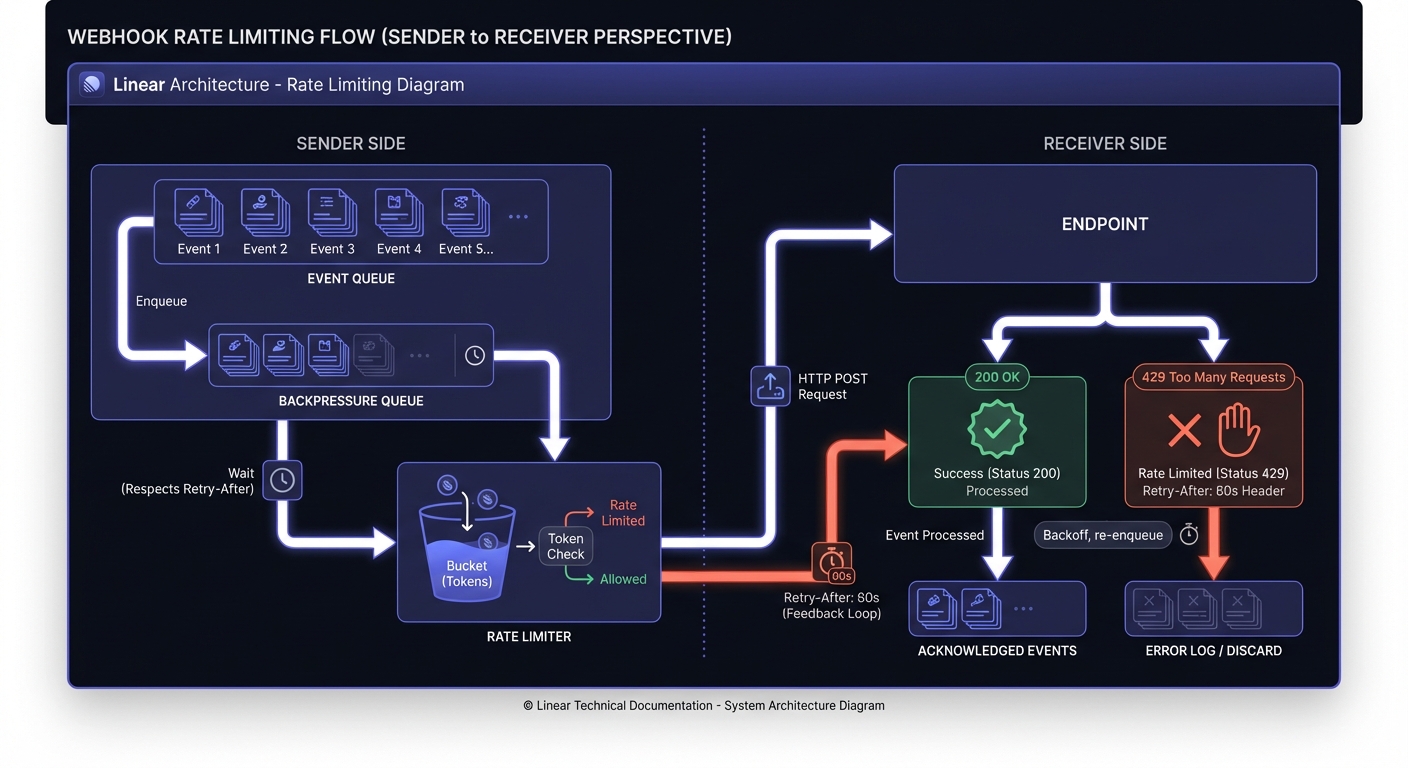
Unlike traditional APIs where clients control volume, webhooks flip the model—senders control traffic. A flash sale triggering thousands of webhooks can overwhelm unprepared endpoints.
Senders: Uncontrolled delivery exhausts resources, triggers blocks, loses events. Receivers: Lacking rate limiting means one misbehaving upstream service takes down your pipeline.
Rate Limiting for Webhook Senders
Why Limit Your Outbound Rate
Smart senders implement rate limiting to:
- Protect receivers: Not all can handle 1,000 req/sec
- Prevent cascading failures: Slow endpoints don't exhaust workers
- Maintain fairness: High-volume customers don't starve smaller ones
- Reduce retry storms: Controlled delivery doesn't overwhelm recovering endpoints
Implementing Per-Endpoint Limits
Maintain separate rate limits per endpoint. Isolates customers, allows capacity-based customization.
import time
from dataclasses import dataclass
from typing import Dict
import redis

@dataclass
class EndpointRateLimit:
    requests_per_second: int
    burst_size: int

class WebhookRateLimiter:
    def __init__(self, redis_client: redis.Redis):
        self.redis = redis_client
        self.default_limit = EndpointRateLimit(
            requests_per_second=10,
            burst_size=20
        )

    def can_send(self, endpoint_id: str) -> tuple[bool, float]:
        """
        Token bucket implementation for per-endpoint limiting.
        Returns (allowed, wait_time_seconds).
        """
        limit = self.get_endpoint_limit(endpoint_id)
        key = f"webhook_bucket:{endpoint_id}"
        now = time.time()

        pipe = self.redis.pipeline()
        pipe.hgetall(key)
        result = pipe.execute()[0]

        tokens = float(result.get(b'tokens', limit.burst_size))
        last_update = float(result.get(b'last_update', now))

        # Replenish tokens based on elapsed time
        elapsed = now - last_update
        tokens = min(
            limit.burst_size,
            tokens + elapsed * limit.requests_per_second
        )

        if tokens >= 1:
            # Consume a token and allow the request
            self.redis.hset(key, mapping={
                'tokens': tokens - 1,
                'last_update': now
            })
            self.redis.expire(key, 300)
            return True, 0

        # Calculate wait time for next available token
        wait_time = (1 - tokens) / limit.requests_per_second
        return False, wait_time

    def get_endpoint_limit(self, endpoint_id: str) -> EndpointRateLimit:
        # Load custom limits from config or return default
        custom = self.redis.hgetall(f"endpoint_config:{endpoint_id}")
        if custom:
            return EndpointRateLimit(
                requests_per_second=int(custom.get(b'rps', 10)),
                burst_size=int(custom.get(b'burst', 20))
            )
        return self.default_limit
Handling Backpressure
Queue events for later delivery instead of dropping or hammering unresponsive endpoints.
class BackpressureHandler:
    def __init__(self, rate_limiter: WebhookRateLimiter):
        self.limiter = rate_limiter
        self.queue = redis.Redis()

    async def deliver_webhook(self, endpoint_id: str, payload: dict):
        allowed, wait_time = self.limiter.can_send(endpoint_id)

        if not allowed:
            # Queue for delayed delivery instead of blocking
            scheduled_time = time.time() + wait_time
            self.queue.zadd(
                f"delayed_webhooks:{endpoint_id}",
                {json.dumps(payload): scheduled_time}
            )
            return {"status": "queued", "deliver_at": scheduled_time}

        return await self._send_webhook(endpoint_id, payload)
Respecting Retry-After Headers
When receivers return 429, they include guidance on when to retry. Respect these signals.
async def _send_webhook(self, endpoint_id: str, payload: dict):
    response = await httpx.post(endpoint_url, json=payload)

    if response.status_code == 429:
        retry_after = response.headers.get('Retry-After')

        if retry_after:
            if retry_after.isdigit():
                delay = int(retry_after)
            else:
                # Handle HTTP-date format
                retry_date = parsedate_to_datetime(retry_after)
                delay = (retry_date - datetime.now()).total_seconds()

            # Temporarily reduce rate limit for this endpoint
            self.limiter.apply_backoff(endpoint_id, delay)

        # Requeue with delay
        return self._requeue_with_delay(endpoint_id, payload, delay)

    return response
Rate Limiting for Webhook Receivers
Protecting Your Endpoints
Defend against high-volume senders and abuse. Implement rate limiting at ingestion.
const express = require('express');
const rateLimit = require('express-rate-limit');
const RedisStore = require('rate-limit-redis');

const app = express();

// Per-sender rate limiting using API key or signature
const webhookLimiter = rateLimit({
  store: new RedisStore({
    client: redisClient,
    prefix: 'webhook_rl:'
  }),
  windowMs: 60 * 1000, // 1 minute window
  max: 100, // 100 requests per minute per sender
  keyGenerator: (req) => {
    // Use webhook source identifier
    return req.headers['x-webhook-source'] || req.ip;
  },
  handler: (req, res) => {
    const retryAfter = Math.ceil(req.rateLimit.resetTime / 1000);
    res.set('Retry-After', retryAfter);
    res.status(429).json({
      error: 'rate_limit_exceeded',
      message: 'Too many webhooks received',
      retry_after: retryAfter
    });
  }
});

app.post('/webhooks/:source', webhookLimiter, processWebhook);
Rate Limiting Algorithms Compared
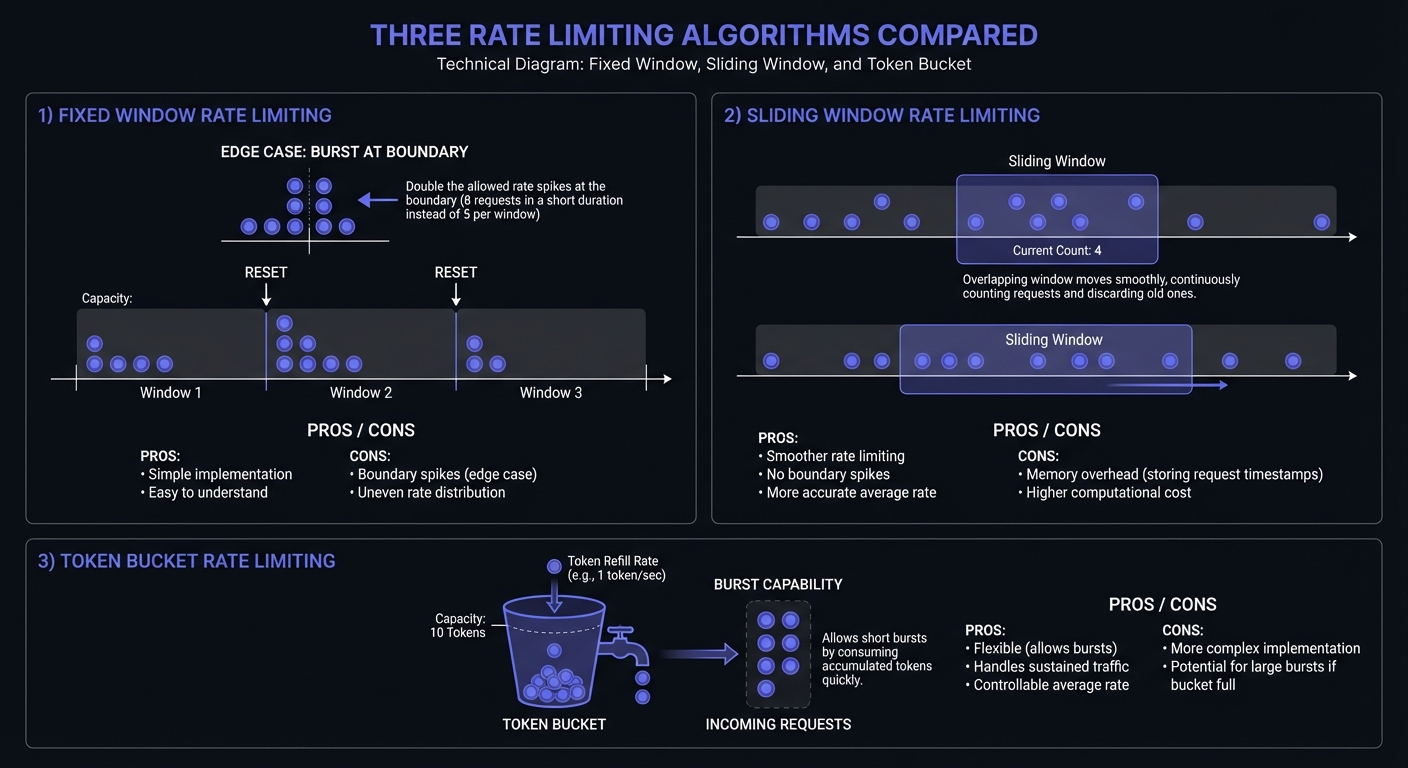
Three primary algorithms handle rate limiting, each with trade-offs:
Fixed Window: Counts requests in fixed time blocks (e.g., 100 requests per minute). Simple but allows boundary bursts—a client hitting 100 requests at 0:59 and 100 more at 1:01 effectively doubles their rate.
class FixedWindowLimiter:
    """Simple fixed window rate limiter."""
    def __init__(self, max_requests: int, window_seconds: int):
        self.max_requests = max_requests
        self.window_seconds = window_seconds
        self.redis = redis.Redis()

    def allow_request(self, key: str) -> bool:
        window = int(time.time() // self.window_seconds)
        window_key = f"{key}:{window}"

        current = self.redis.incr(window_key)
        if current == 1:
            self.redis.expire(window_key, self.window_seconds)

        return current <= self.max_requests
Sliding Window: Tracks request timestamps for smoother enforcement. Eliminates boundary exploitation but requires more memory.
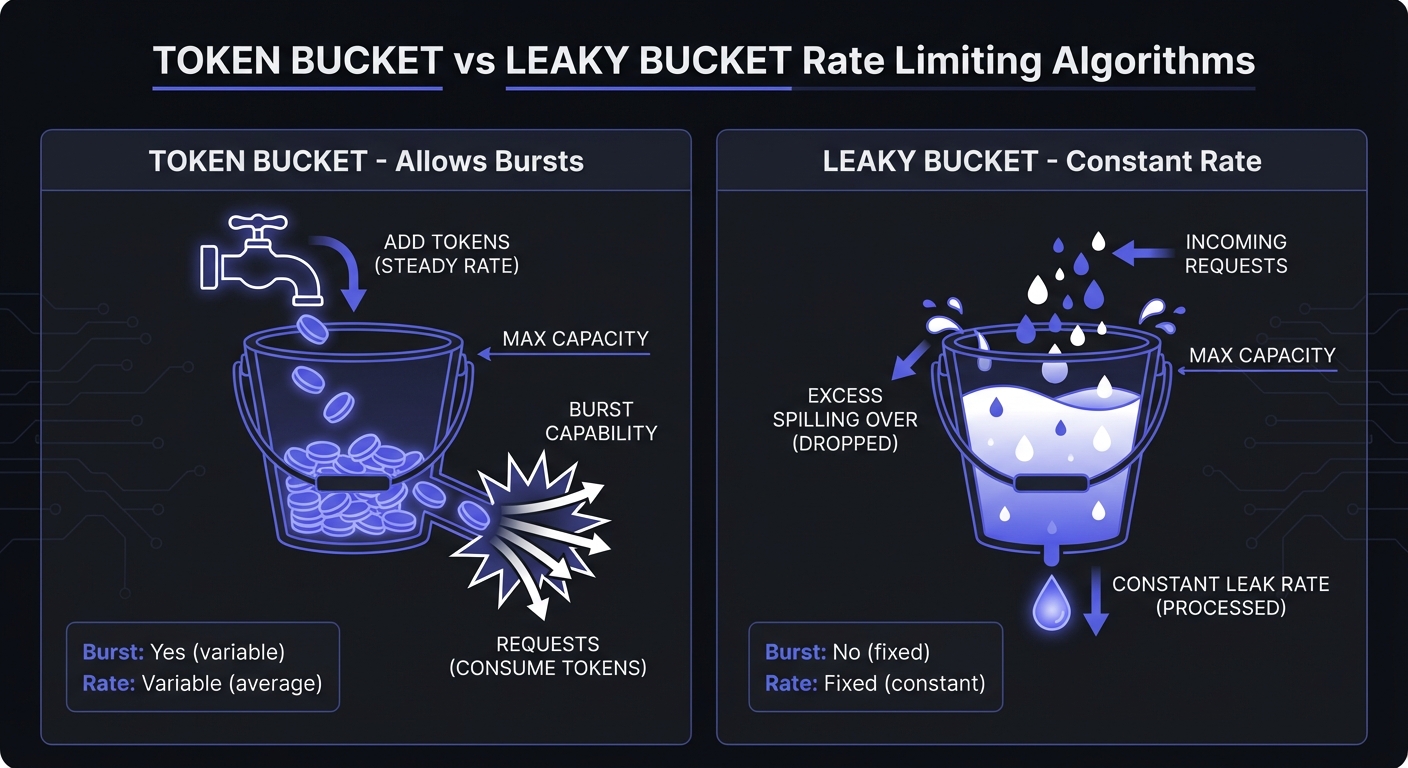
Token Bucket: Allows bursts up to bucket size, then steady rate. Accommodates traffic spikes—ideal for webhooks where events cluster around user actions.
Leaky Bucket: Constant processing rate, queues excess. Ensures consistent throughput—protects receivers from overwhelming bursts.
Choosing the Right Algorithm
| Algorithm | Best For | Avoid When |
|---|---|---|
| Fixed Window | Simple rate limits, low-stakes endpoints | Boundary exploitation is a concern |
| Sliding Window | Precise limits, compliance requirements | Memory is constrained |
| Token Bucket | Bursty traffic, user-facing features | Consistent throughput required |
| Leaky Bucket | Protecting downstream services | Burst tolerance needed |
For webhook senders, token bucket handles event clustering well. For receivers protecting their endpoints, leaky bucket provides consistent processing.
Leaky Bucket Implementation
class LeakyBucket:
    """
    Leaky bucket for consistent webhook processing rate.
    """
    def __init__(self, rate: float, capacity: int):
        self.rate = rate  # requests per second
        self.capacity = capacity
        self.water = 0
        self.last_leak = time.time()

    def allow_request(self) -> bool:
        now = time.time()

        # Leak water based on elapsed time
        elapsed = now - self.last_leak
        self.water = max(0, self.water - elapsed * self.rate)
        self.last_leak = now

        if self.water < self.capacity:
            self.water += 1
            return True
        return False
Queue-Based Processing
Decouple ingestion from processing. Accept quickly, process at controlled rate.
from celery import Celery

app = Celery('webhooks')

@app.route('/webhooks', methods=['POST'])
def receive_webhook():
    payload = request.json

    # Immediately queue for async processing
    process_webhook.apply_async(
        args=[payload],
        queue='webhooks',
        rate_limit='100/m'  # Celery built-in rate limiting
    )

    # Return 202 Accepted immediately
    return {'status': 'accepted'}, 202

@app.task(bind=True, max_retries=3)
def process_webhook(self, payload):
    try:
        handle_webhook_event(payload)
    except ProcessingError as e:
        raise self.retry(countdown=60)
Rate Limit Response Headers
Standard headers communicate rate limit state to webhook senders, enabling intelligent backoff:
| Header | Purpose | Example |
|---|---|---|
X-RateLimit-Limit | Maximum requests in window | 100 |
X-RateLimit-Remaining | Requests left in current window | 42 |
X-RateLimit-Reset | Unix timestamp when window resets | 1706140800 |
Retry-After | Seconds until retry is allowed | 60 |
Receivers should return these headers on every response, not just 429s. This allows proactive throttling before hitting limits.
// Express middleware adding rate limit headers
function rateLimitHeaders(req, res, next) {
  const info = req.rateLimit;
  res.set({
    'X-RateLimit-Limit': info.limit,
    'X-RateLimit-Remaining': Math.max(0, info.limit - info.current),
    'X-RateLimit-Reset': Math.ceil(info.resetTime.getTime() / 1000)
  });
  next();
}
Avoiding Thundering Herd with Jitter
When multiple webhook senders back off simultaneously (after a shared receiver returns 429), they may all retry at the same moment—creating another spike. Jitter randomizes retry timing to spread load.
import random

def calculate_backoff_with_jitter(
    attempt: int,
    base_delay: float = 1.0,
    max_delay: float = 60.0
) -> float:
    """Exponential backoff with full jitter."""
    # Exponential backoff: 1s, 2s, 4s, 8s...
    exponential_delay = base_delay * (2 ** attempt)

    # Cap at maximum
    capped_delay = min(exponential_delay, max_delay)

    # Full jitter: random between 0 and capped_delay
    return random.uniform(0, capped_delay)
Full jitter outperforms equal jitter and decorrelated jitter in distributed systems—AWS published analysis showing 3x reduction in total completion time under contention.
Monitoring Rate Limits
Track these metrics to identify bottlenecks and tune limits:
Sender metrics:
- Events queued per endpoint (backpressure indicator)
- 429 responses received (endpoint overwhelm)
- Retry queue depth (delivery delays)
- Token bucket fill rate (consumption patterns)
Receiver metrics:
- Requests rejected (429s served)
- Queue processing latency
- Per-source request distribution (identify abusers)
# Prometheus metrics example
from prometheus_client import Counter, Gauge, Histogram

rate_limit_rejections = Counter(
    'webhook_rate_limit_rejections_total',
    'Webhooks rejected due to rate limits',
    ['endpoint_id', 'source']
)

bucket_tokens = Gauge(
    'webhook_bucket_tokens',
    'Current tokens in rate limit bucket',
    ['endpoint_id']
)

delivery_latency = Histogram(
    'webhook_delivery_latency_seconds',
    'Time from event creation to delivery',
    ['endpoint_id'],
    buckets=[0.1, 0.5, 1, 5, 10, 30, 60]
)
See webhook observability guide for comprehensive monitoring setup.
Best Practices for Production Systems
Graceful degradation: Under pressure, prioritize stability. Use circuit breakers to reject rather than crash.
Burst handling: Configure limits with bursts. 10 req/sec with 50-burst handles normal traffic while protecting against overload.
Customer-specific limits: Enterprise customers handle higher rates than startups. Make configurable per endpoint.
Capacity planning: Anticipate spikes. Pre-scale for product launches. See scaling webhooks 0-10K req/sec.
Leave safety margins: If your endpoint handles 100 req/sec, configure limits at 80 req/sec. Distributed systems can briefly exceed configured limits.
Conclusion
Rate limiting requires both sides: senders protect receivers and handle backpressure; receivers defend endpoints with proper feedback.
Rate limiting combines with webhook reliability patterns: retries, circuit breakers, observability. Understanding these fundamentals builds systems that scale reliably.
Related Posts
Webhook Circuit Breakers: Protect Your Infrastructure
Learn how to implement the circuit breaker pattern for webhook delivery to prevent cascading failures, handle failing endpoints gracefully, and protect your infrastructure from retry storms.
Webhook Retry Strategies: Linear vs Exponential Backoff
A technical deep-dive into webhook retry strategies, comparing linear and exponential backoff approaches, with code examples and best practices for building reliable webhook delivery systems.
From 0 to 10K Webhooks: Scaling Your First Implementation
A practical guide for startups on how to scale webhooks from your first implementation to handling 10,000+ events per hour. Learn what breaks at each growth phase and how to fix it before your customers notice.
Build vs Buy: Webhook Infrastructure Decision Guide
A practical guide for engineering teams deciding whether to build webhook delivery infrastructure from scratch or use a managed service. Covers engineering costs, timelines, and when each approach makes sense.
Webhook Observability: Logging, Metrics, and Tracing
A comprehensive technical guide to implementing observability for webhook systems. Learn about structured logging, key metrics to track, distributed tracing with OpenTelemetry, and alerting best practices.