Webhooks vs APIs: When to Use Each
Learn the fundamental differences between webhooks and APIs, when to use push vs pull architectures, and how to choose the right approach for your integration needs.
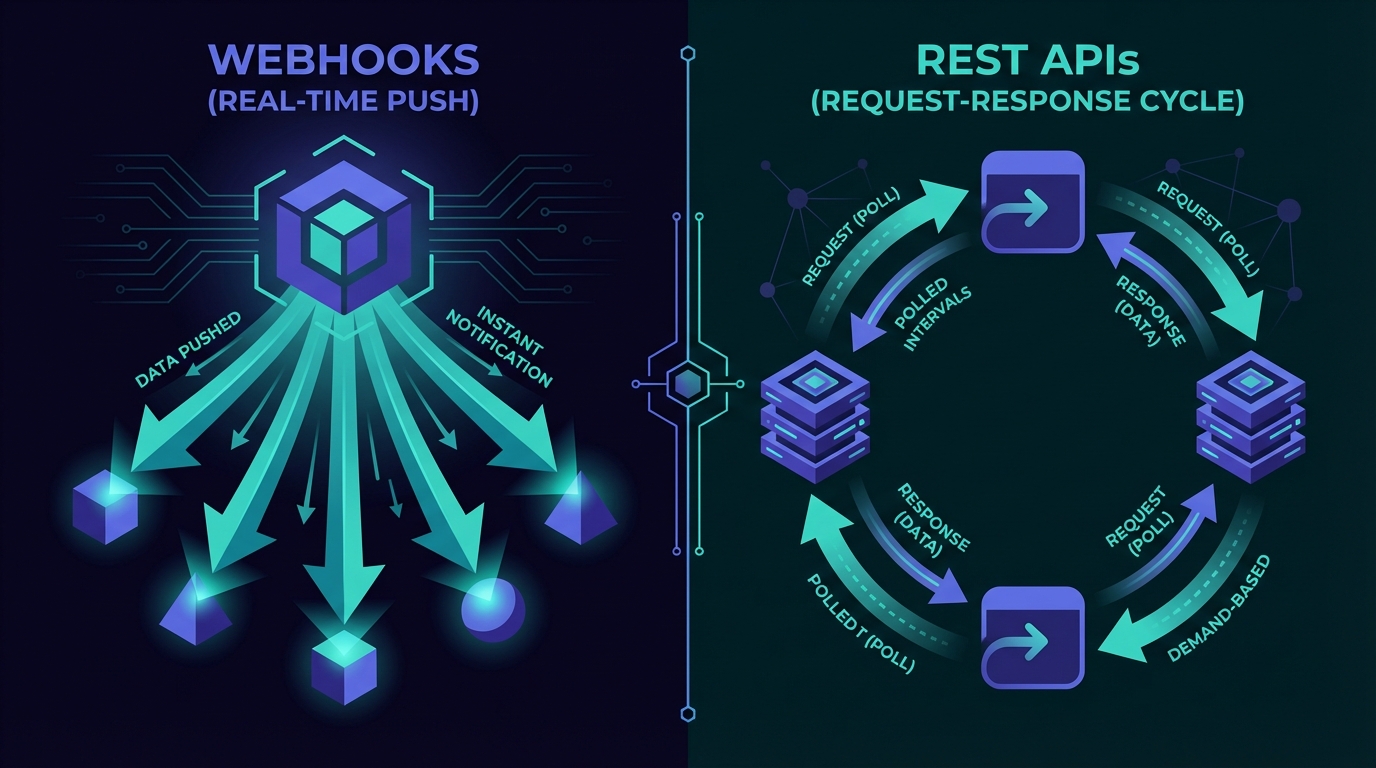
Webhooks vs APIs: When to Use Each
Building an integration? Decide: poll an API for updates or set up webhooks to receive them automatically. This choice shapes infrastructure costs and user experience. If you're new to webhooks, see our complete guide on what webhooks are.
Push vs Pull: The Fundamental Difference
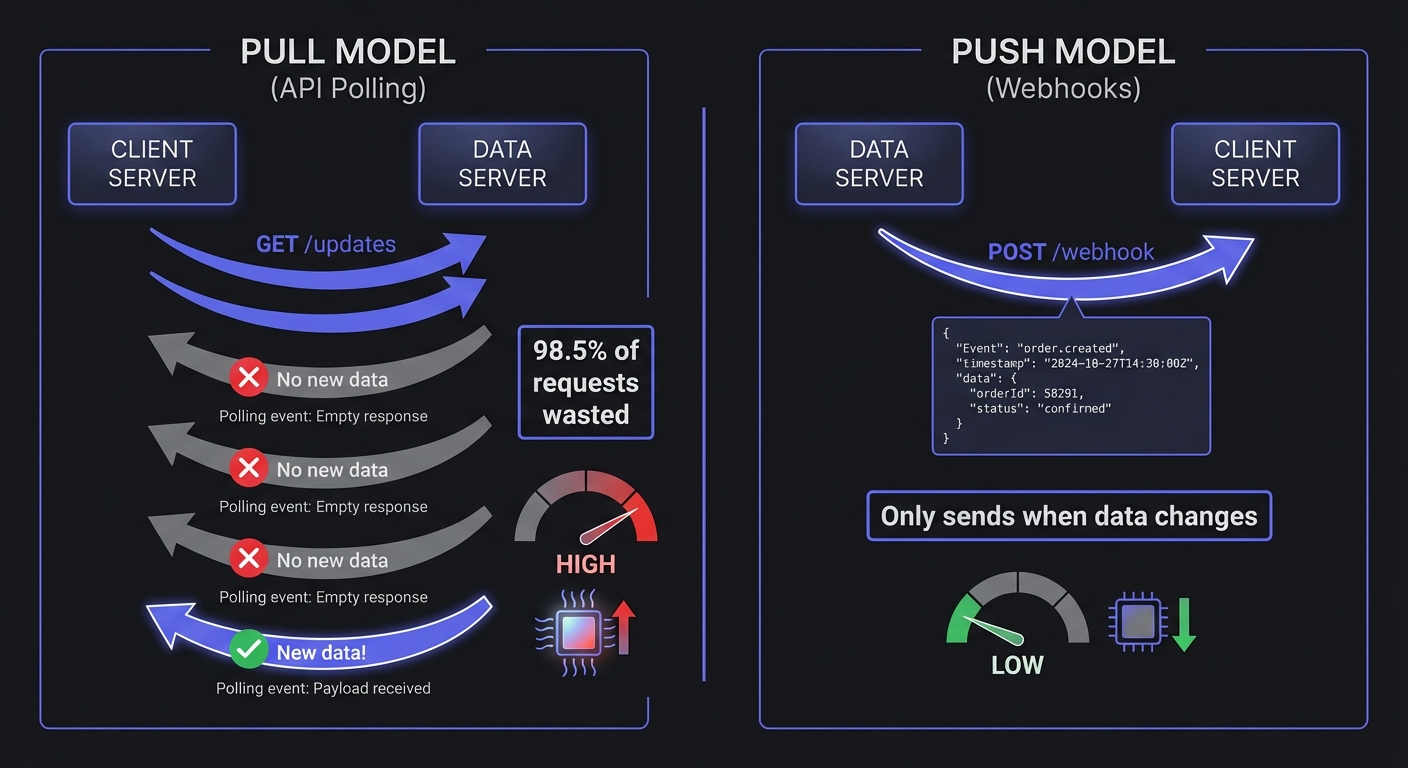
APIs: The Pull Model
With traditional REST APIs, your application asks for data when it needs it. Think of it like checking your mailbox—you walk out, look inside, and either find mail or don't. If you want to know the moment something arrives, you'd need to check constantly.
Your App                          External Service
   |                                     |
   |  GET /orders/latest                 |
   |------------------------------------>|
   |                                     |
   |  Response: { orders: [...] }        |
   |<------------------------------------|
   |                                     |
   |  (5 minutes later)                  |
   |  GET /orders/latest                 |
   |------------------------------------>|
   |                                     |
The problem: Zapier found that 98.5% of polling requests find no new data. That means 66x more server load compared to webhooks for the same information.
Webhooks: The Push Model
Webhooks flip this around. Instead of asking for updates, you tell the external service where to send them. Now imagine a mail carrier who rings your doorbell the moment a letter arrives—no more checking an empty mailbox.
Your App                          External Service
   |                                     |
   |  Subscribe to order.created         |
   |------------------------------------>|
   |                                     |
   |  (Event occurs)                     |
   |                                     |
   |  POST /your-webhook-endpoint        |
   |  { event: "order.created", ... }    |
   |<------------------------------------|
   |                                     |
Webhooks are 100% efficient—data only transfers when something actually happens.
Webhooks vs APIs: A Direct Comparison
| Factor | APIs (Polling) | Webhooks |
|---|---|---|
| Latency | Depends on poll interval (seconds to minutes) | Near real-time (milliseconds) |
| Resource Usage | High—constant requests even when nothing changes | Low—only fires when events occur |
| Complexity | Simple to implement initially | Requires endpoint setup, security, retry handling |
| Reliability | You control retry logic | Depends on sender's retry policy |
| Data Freshness | Potentially stale between polls | Always current |
| Cost | Higher API calls, more compute | Lower overall, but need infrastructure for receiving |
| Debugging | Easy to test and replay | Harder to reproduce issues |
When to Use APIs
On-demand data retrieval: When users request information (searching products, viewing order history), APIs are natural—you fetch specific data at a specific moment.
Bulk data operations: Syncing large datasets, batch processing, or generating reports work better with API calls where you can paginate and handle rate limits.
Low update frequency: If data changes once daily, polling every few hours is adequate. Webhook overhead isn't justified.
Need full control: APIs let you decide when to fetch data—essential when coordinating timing across systems or working within strict processing windows.
When to Use Webhooks
Payment Processing: Stripe, PayPal and others send webhooks instantly when charges succeed, fail, or subscriptions change. Delays here directly impact revenue and user experience.
Real-Time Notifications: Chat, collaboration tools, and social platforms need instant notifications. Webhooks avoid constant polling drains on batteries and bandwidth.
Inventory Updates: E-commerce platforms receive stock changes from suppliers via webhooks—preventing overselling and keeping availability accurate across channels.
CI/CD Pipelines: GitHub webhooks trigger builds and deployments when code is pushed. Polling commits would add unnecessary latency.
SaaS Integrations: CRM leads, support tickets, form submissions—webhooks let you react instantly, trigger automations, and sync systems in real-time.
When to Use Both
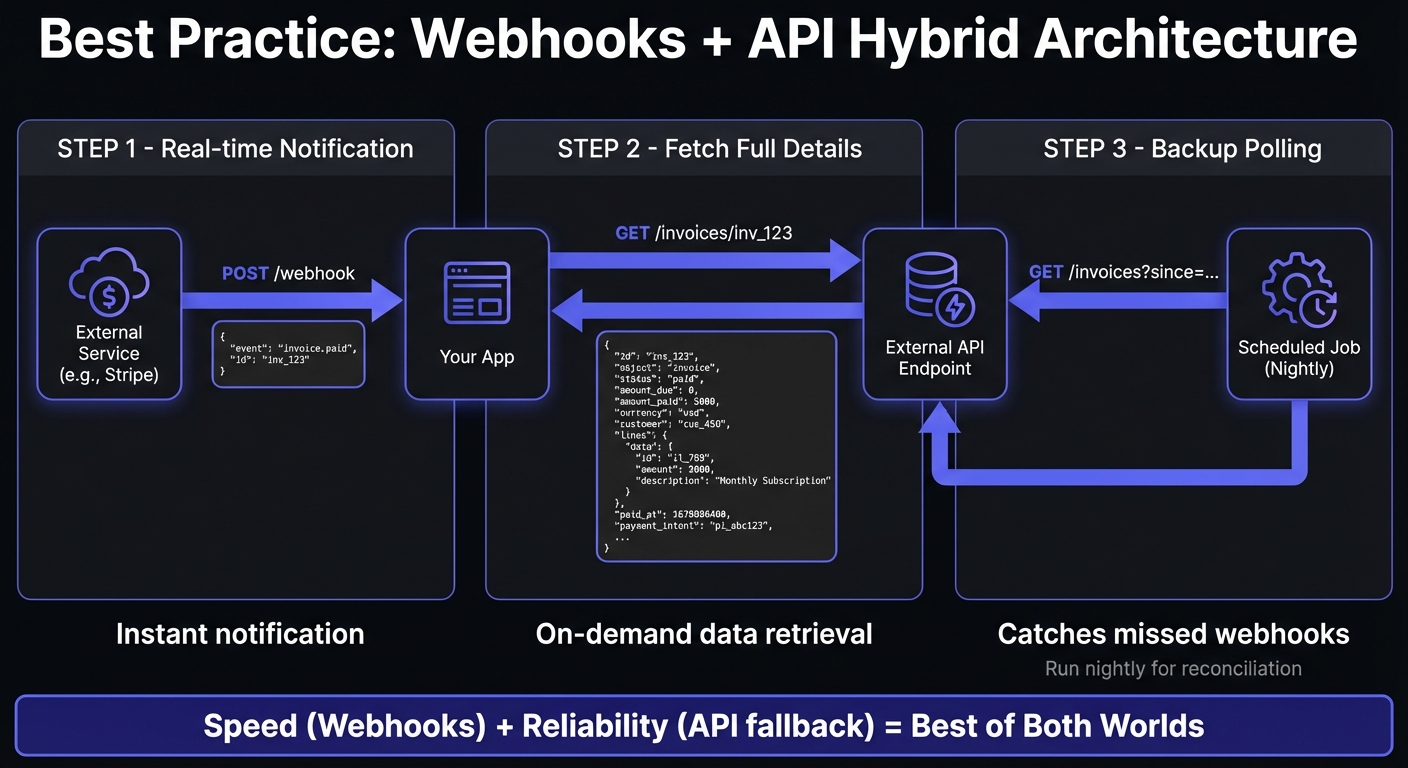
Speed + reliability: Use webhooks for real-time updates, fall back to API polling when webhooks fail to catch anything missed.
Minimal payloads: Webhooks notify you something happened, then you fetch complete records via API—reducing payload sizes and ensuring current data.
Initial sync + ongoing: Use APIs to pull historical data during onboarding, then switch to webhooks for future updates. Most CRM and data sync tools use this pattern.
Real-World Example: Subscription Billing
Building a SaaS product with Stripe subscriptions:
- Webhooks for events: Stripe sends
invoice.paid,customer.subscription.updated,payment_intent.failed—your system processes these in real-time, updating access and sending emails. - APIs for user actions: When customers view billing history or update payment methods, call Stripe's API directly.
- APIs for backup: A nightly job polls Stripe to reconcile your database, catching any failed webhooks.
Webhook Reliability Challenges
Webhooks require operational complexity: your endpoint must be highly available. If it's down when a webhook arrives, you lose critical events. You need exponential backoff retries, signature verification against spoofing, and idempotency handling for duplicates. Managed webhook services handle this infrastructure—automatic retries, verification, delivery logs, and replay—letting you focus on business logic instead of infrastructure.
Beyond Webhooks and APIs: Other Options
Webhooks and APIs aren't the only choices. Here's how other real-time technologies compare:
| Technology | Direction | Connection | Best For |
|---|---|---|---|
| Webhooks | Server → Client | One-time HTTP POST | Event notifications, integrations |
| API Polling | Client → Server | Repeated HTTP GET | On-demand data, batch operations |
| WebSockets | Bidirectional | Persistent connection | Chat, live updates, gaming |
| Server-Sent Events | Server → Client | Persistent connection | Live feeds, dashboards |
| Pub/Sub | Many-to-many | Message broker | Microservices, distributed systems |
WebSockets excel when you need bidirectional, persistent connections—chat applications, collaborative editing, live gaming. The connection stays open, enabling instant back-and-forth communication.
Server-Sent Events (SSE) provide server-to-client streaming over HTTP. Simpler than WebSockets when you only need one-way updates—live dashboards, social feeds, stock tickers.
Pub/Sub (publish-subscribe) systems like Kafka or RabbitMQ handle complex multi-consumer scenarios where many services need the same events. Webhooks are simpler for direct one-to-one integrations.
For most SaaS integrations—Stripe payments, GitHub commits, Shopify orders—webhooks remain the standard. They work over HTTP, require no persistent connections, and integrate with existing infrastructure.
Making Your Decision
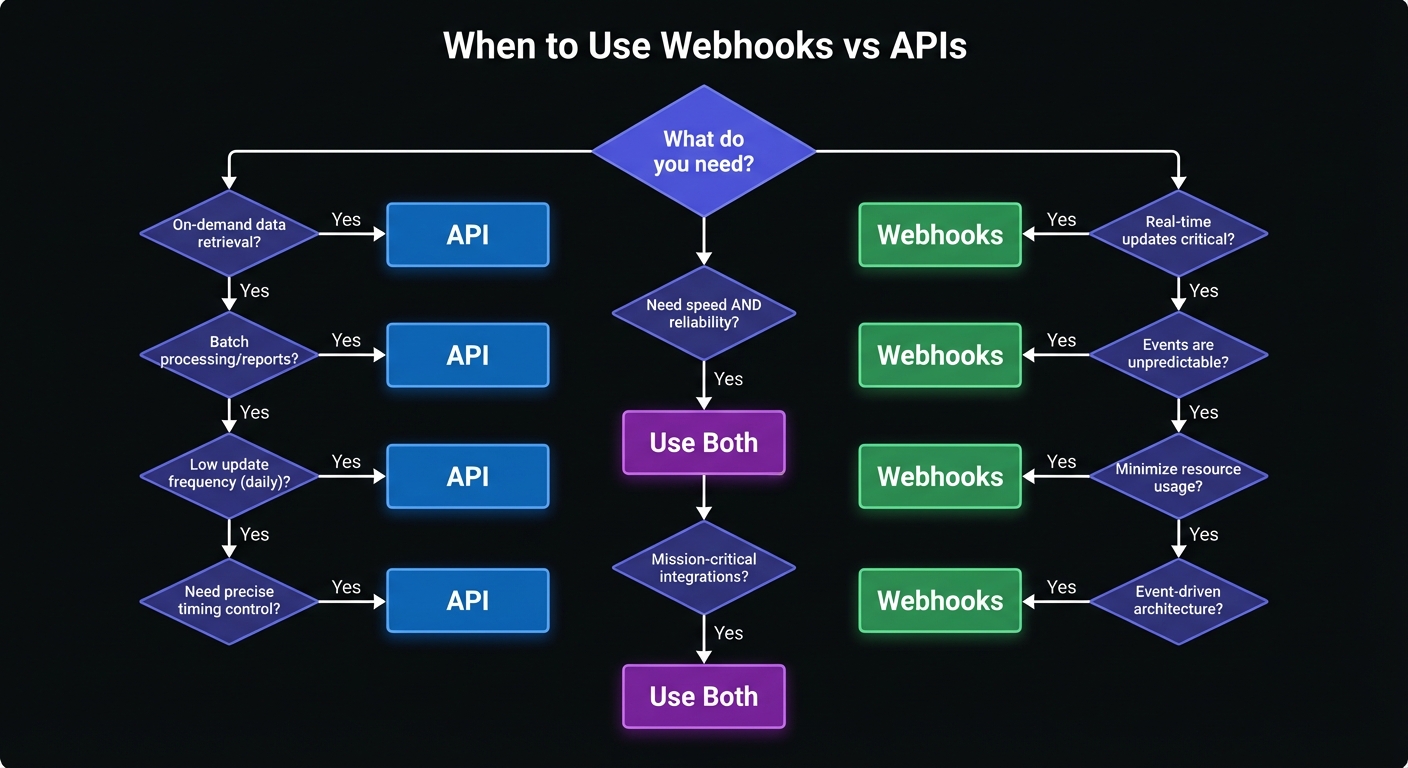
Choose APIs when:
- Users explicitly request data
- You're doing batch processing or reporting
- Update frequency is low (daily or less)
- You need precise control over timing
Choose Webhooks when:
- Real-time response matters
- Events are unpredictable or frequent
- You want to minimize resource usage
- You're integrating with modern SaaS tools
For startups deciding when to invest in webhook infrastructure, our guide on when startups should add webhooks provides a practical framework.
Use both when:
- You need real-time updates with guaranteed delivery
- You're building mission-critical integrations
- You want speed without sacrificing reliability
Conclusion
The choice isn't about a winner—it's about tradeoffs. APIs give control and simplicity; webhooks give speed and efficiency. Best integrations use both: webhooks for real-time events, APIs for data retrieval and recovery. As webhook technology evolves, these patterns become more critical.
Consider not just what's easiest today, but what scales with your needs. If webhook infrastructure management—retries, monitoring, signature verification—consumes more time than building features, a dedicated webhook service handles the complexity.
Ready to add webhooks to your product? See our guide on how to add webhooks to your SaaS for implementation details.
Related Posts
What Are Webhooks? A Complete Guide for Developers
Learn what webhooks are, how they work, and why they're essential for modern applications. This comprehensive guide covers webhook basics, real-world use cases, code examples, and best practices for startup developers.
Webhook Retry Strategies: Linear vs Exponential Backoff
A technical deep-dive into webhook retry strategies, comparing linear and exponential backoff approaches, with code examples and best practices for building reliable webhook delivery systems.
When Should Your Startup Add Webhooks?
A practical decision guide for startup founders and product managers on the right time to invest in webhook infrastructure, what signs to watch for, and how to avoid common timing mistakes.
Webhook Landscape 2026: Trends, Tools, and Predictions
Explore the key webhook trends shaping 2026, from event-driven architecture adoption to AI/ML callbacks. Learn what these shifts mean for startups and how to future-proof your integration strategy.
How to Add Webhooks to Your SaaS Product in 2026
A complete guide for SaaS founders and engineers on implementing webhooks—from event design and payload structure to build vs buy decisions and customer experience best practices.