What Are Webhooks? A Complete Guide for Developers
Learn what webhooks are, how they work, and why they're essential for modern applications. This comprehensive guide covers webhook basics, real-world use cases, code examples, and best practices for startup developers.

What Are Webhooks? A Complete Guide for Developers
If you've integrated Stripe for payments, GitHub for code updates, or Twilio for messaging, you've encountered webhooks. This guide breaks down what webhooks are, how they work, and why they've become essential for modern integrations.
What Are Webhooks?
A webhook is an automated message sent when a specific event occurs—a notification system where the service pushes data to you instead of your app constantly asking "did anything happen?" The term combines "web" (HTTP) and "hook" (event), sometimes called a "reverse API."
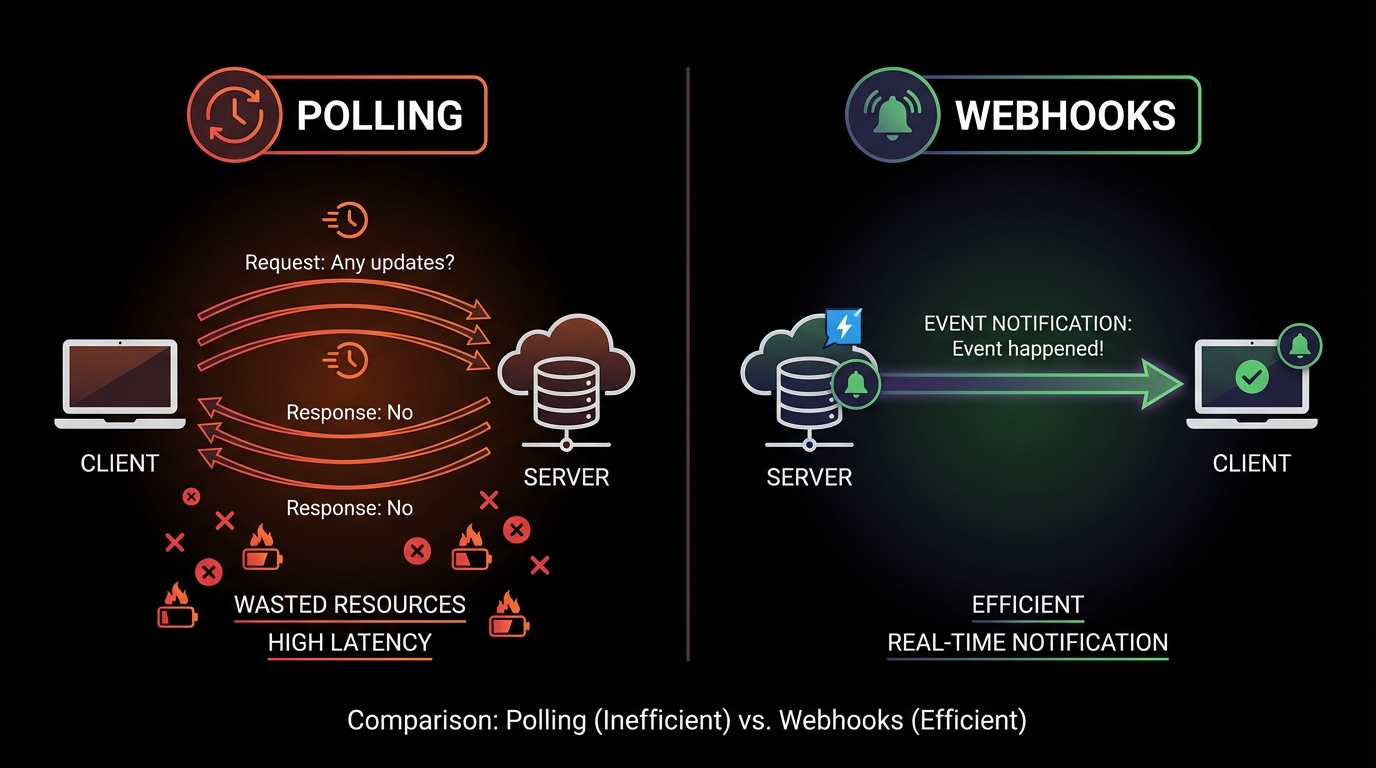
Think of it as a doorbell instead of checking your mailbox: instead of polling every five minutes, the service notifies you only when something happens.
How Webhooks Work
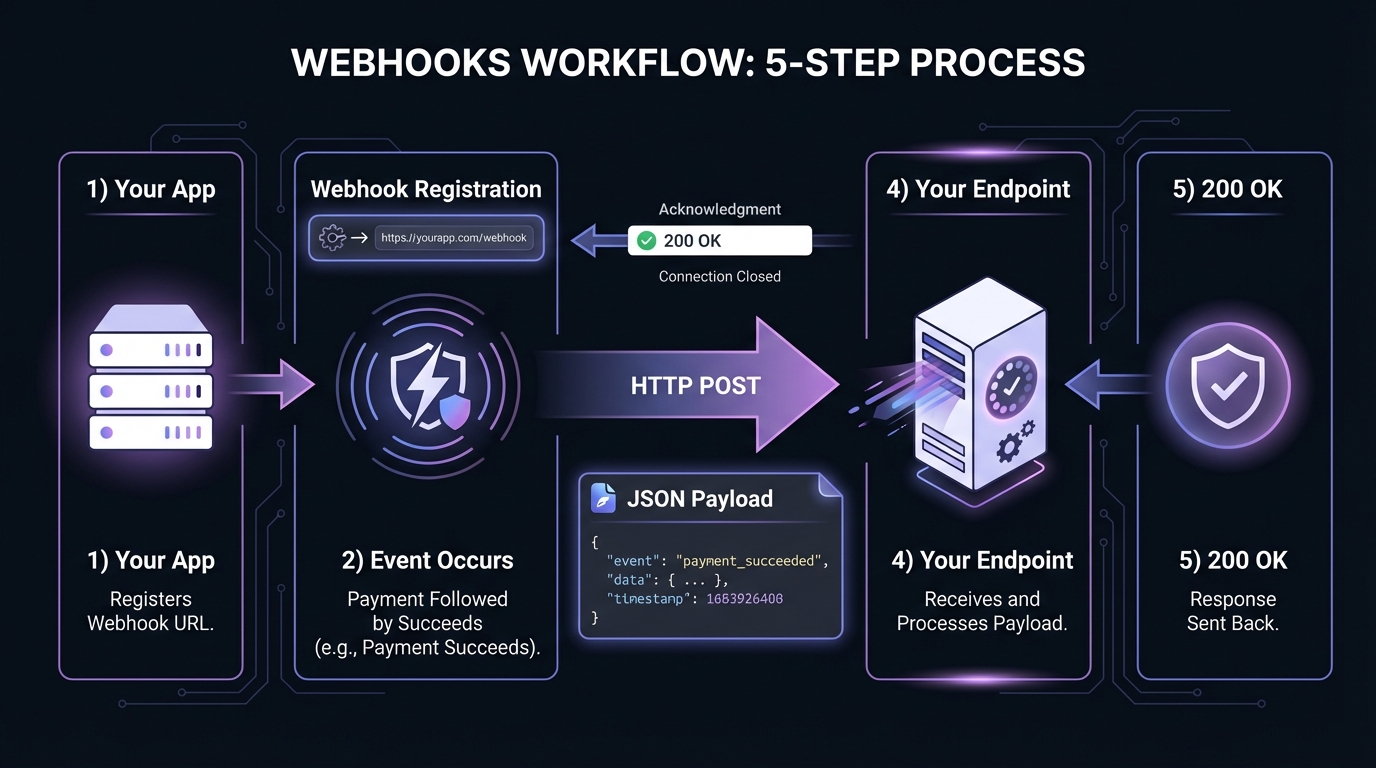
- Registration: You provide the webhook provider with a URL endpoint on your server (e.g.,
https://yourapp.com/webhooks/stripe) - Event occurs: Something happens in the provider's system—a payment succeeds, a user signs up, a file is uploaded
- HTTP request: The provider makes an HTTP POST request to your registered URL, containing details about the event
- Processing: Your server receives the request, validates it, and takes appropriate action
- Response: Your server responds with an HTTP status code (usually 200 OK) to acknowledge receipt
This entire process typically happens within milliseconds of the original event occurring.
Webhooks vs Polling
Understanding the differences between webhooks and APIs helps you choose the right approach for your integration needs.
| Aspect | Polling | Webhooks |
|---|---|---|
| Resource usage | High (constant requests) | Low (only when events occur) |
| Latency | Depends on poll interval | Near real-time |
| API rate limits | Easy to hit limits | Not a concern |
| Complexity | Simpler initial setup | Requires endpoint infrastructure |
| Reliability | Predictable | Requires retry handling |
With polling every 30 seconds, you make 2,880 API calls per day—even when nothing happens. Webhooks deliver notifications only when events occur. For startups, this efficiency gain is significant: fewer API calls, lower infrastructure costs.
Common Use Cases
Payment Processing: Stripe, PayPal, and other payment providers notify you when payments succeed, fail, or get refunded—letting you update order statuses, trigger fulfillment, or send receipts instantly.
CI/CD Pipelines: GitHub and GitLab send webhooks when code is pushed, pull requests are opened, or builds complete. This triggers automated testing, deployments, and notifications.
Communication Platforms: Slack, Discord, and Twilio use webhooks to deliver messages, notify you of user actions, or trigger workflows based on incoming communications.
E-commerce Events: Shopify sends webhooks for new orders, inventory changes, and customer updates, allowing you to sync data across systems in real-time.
CRM Updates: Salesforce and HubSpot push webhooks when leads are created, deals close, or contacts are updated, keeping your internal systems synchronized.
Infrastructure Monitoring: Services like Datadog and PagerDuty send webhooks for alerts, enabling automated incident response workflows.
Anatomy of a Webhook Request
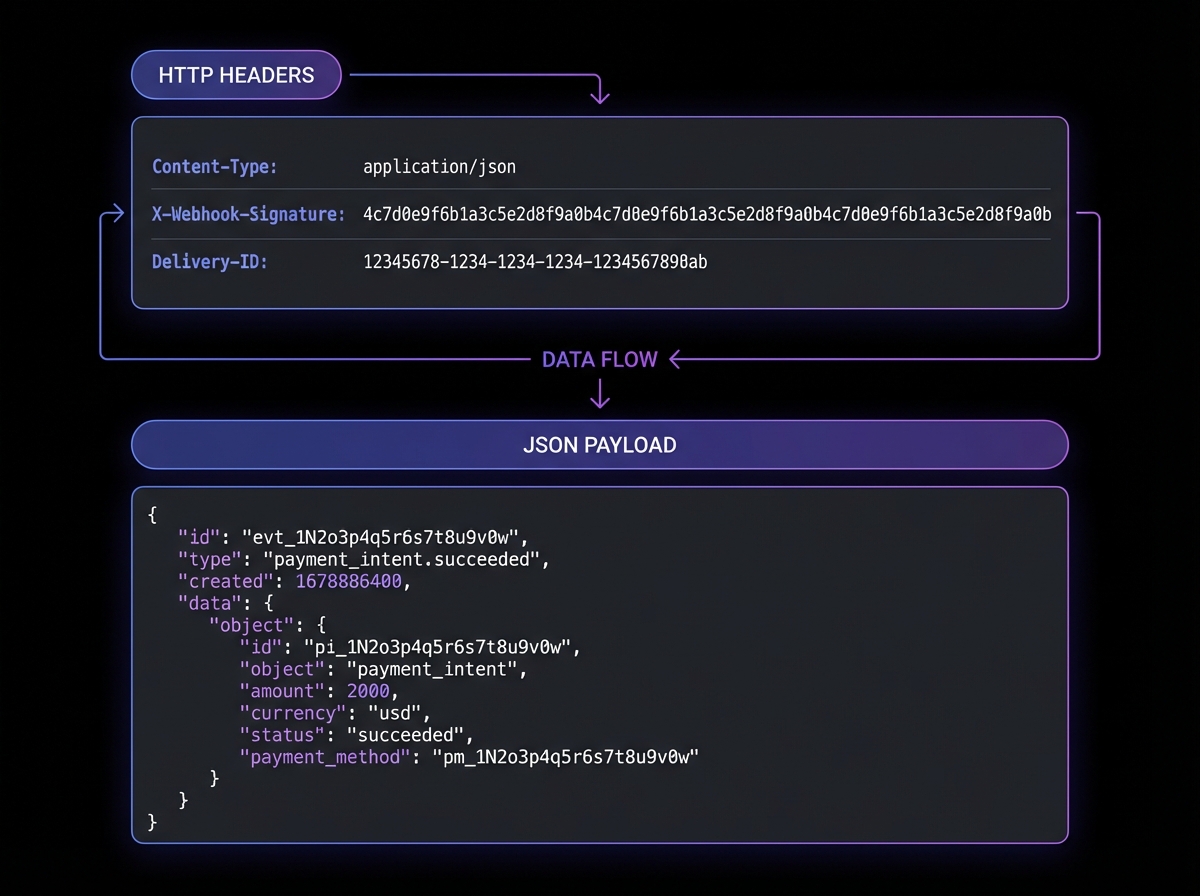
A typical Stripe webhook for a successful payment contains headers for authentication and metadata, plus a JSON payload with event details:
{
  "id": "evt_1NqIXK2eZvKYlo2C5X7xLmPQ",
  "object": "event",
  "api_version": "2023-10-16",
  "created": 1706745600,
  "type": "payment_intent.succeeded",
  "data": {
    "object": {
      "id": "pi_3NqIXJ2eZvKYlo2C1a2b3c4d",
      "amount": 2000,
      "currency": "usd",
      "status": "succeeded",
      "customer": "cus_ABC123",
      "metadata": {
        "order_id": "order_98765",
        "product": "pro_subscription"
      }
    }
  }
}
Key elements include:
- Event ID: A unique identifier for this specific webhook delivery
- Event type: Describes what happened (e.g.,
payment_intent.succeeded) - Timestamp: When the event occurred
- Data object: The actual payload containing relevant information
- Metadata: Custom data you attached to the original request
Most webhook providers also include important headers:
Content-Type: application/json- A signature header for verification (e.g.,
Stripe-Signature) - A unique delivery ID for tracking
Building a Simple Webhook Receiver
Create a basic webhook endpoint in Node.js with Express:
const express = require('express');
const crypto = require('crypto');

const app = express();

// Important: Use raw body for signature verification
app.use('/webhooks', express.raw({ type: 'application/json' }));

const WEBHOOK_SECRET = process.env.WEBHOOK_SECRET;

// Verify webhook signature
function verifySignature(payload, signature) {
  const expectedSignature = crypto
    .createHmac('sha256', WEBHOOK_SECRET)
    .update(payload)
    .digest('hex');

  return crypto.timingSafeEqual(
    Buffer.from(signature),
    Buffer.from(expectedSignature)
  );
}

app.post('/webhooks/payments', (req, res) => {
  const signature = req.headers['x-webhook-signature'];

  // Always verify the signature first
  if (!verifySignature(req.body, signature)) {
    console.error('Invalid webhook signature');
    return res.status(401).send('Invalid signature');
  }

  const event = JSON.parse(req.body);

  // Handle different event types
  switch (event.type) {
    case 'payment_intent.succeeded':
      handleSuccessfulPayment(event.data.object);
      break;
    case 'payment_intent.failed':
      handleFailedPayment(event.data.object);
      break;
    default:
      console.log(`Unhandled event type: ${event.type}`);
  }

  // Always respond quickly with 200
  res.status(200).json({ received: true });
});

function handleSuccessfulPayment(paymentIntent) {
  console.log(`Payment succeeded: ${paymentIntent.id}`);
  // Update database, send confirmation email, etc.
}

function handleFailedPayment(paymentIntent) {
  console.log(`Payment failed: ${paymentIntent.id}`);
  // Notify customer, log for review, etc.
}

app.listen(3000, () => {
  console.log('Webhook server running on port 3000');
});
Testing Webhooks Locally
Before deploying webhook handlers to production, you need a way to receive webhooks on your local development machine. Since webhook providers can't reach localhost, use these tools:
ngrok exposes your local server to the internet with a public URL. Run ngrok http 3000 to get a forwarding URL like https://abc123.ngrok.io that tunnels requests to your local port 3000. Register this URL with your webhook provider during development.
webhook.site provides an instant, unique URL that captures incoming webhooks for inspection. Use it to examine payload structure and headers before writing any handler code—useful for understanding exactly what data a provider sends.
RequestBin offers similar functionality with additional features for team collaboration and webhook history.
These tools let you iterate quickly without deploying to a server for every change.
Webhook Best Practices
Respond Quickly
Webhook providers typically expect a response within 5-30 seconds. If your processing takes longer, acknowledge the webhook immediately and handle the actual work asynchronously using a job queue. This prevents timeouts and duplicate deliveries.
Verify Signatures
Never trust incoming webhooks without verification. Most providers sign their payloads using HMAC-SHA256 or similar algorithms. Always validate these signatures before processing any data—this protects you from replay attacks and forged requests. For a deep dive into implementation, see our guide on HMAC-SHA256 webhook signature verification.
Handle Idempotency
Most webhook providers guarantee "at-least-once" delivery, meaning you may receive the same webhook multiple times due to network timeouts, retry logic, or provider-side failures. Design your handlers to be idempotent—an operation is idempotent if performing it multiple times has the same effect as performing it once. For webhooks, this means processing the same event twice should produce the same end state as processing it once.
Store the event ID and check for duplicates before taking action:
async function handleWebhook(event) {
  // Check if we've already processed this event
  const existing = await db.webhookEvents.findOne({ eventId: event.id });
  if (existing) {
    console.log(`Duplicate webhook ${event.id}, skipping`);
    return;
  }

  // Store the event ID before processing
  await db.webhookEvents.insert({ eventId: event.id, receivedAt: new Date() });

  // Now safe to process
  await processEvent(event);
}
Implement Retry Logic
When you're sending webhooks (not just receiving them), implement exponential backoff retry strategies for failed deliveries. A typical pattern might retry at 1 minute, 5 minutes, 30 minutes, 2 hours, and 24 hours before marking the delivery as failed. This is where managed services like Hook Mesh can save significant development time—handling retries, monitoring delivery status, and alerting on failures automatically.
Log Everything
Maintain detailed logs of incoming webhooks, including timestamps, payloads, and processing results. This is invaluable for debugging integration issues and auditing event history. Consider storing raw payloads for at least 30 days.
Secure Your Endpoints
Beyond signature verification, consider additional security measures: IP allowlisting (if the provider publishes their IP ranges), rate limiting to prevent abuse, and using HTTPS exclusively for all webhook endpoints. Our comprehensive webhook security best practices guide covers these topics in detail.
Plan for Failure
What happens when your webhook endpoint is down? Most providers will retry, but you should have monitoring in place to detect outages quickly. Consider what state your application might be in if webhooks are delayed or lost, and design recovery procedures accordingly.
Conclusion
Webhooks enable real-time integrations, reduce infrastructure costs compared to polling, and power the event-driven architectures users expect. The core principles remain the same: verify everything, respond quickly, handle failures gracefully, and design for idempotency.
For startups building SaaS products, see our guide on how to add webhooks to your SaaS for practical implementation advice. As your webhook volume increases and managing infrastructure becomes a burden, purpose-built webhook delivery platforms can help you focus on features rather than infrastructure maintenance.
Related Posts
Webhooks vs APIs: When to Use Each
Learn the fundamental differences between webhooks and APIs, when to use push vs pull architectures, and how to choose the right approach for your integration needs.
How to Add Webhooks to Your SaaS Product in 2026
A complete guide for SaaS founders and engineers on implementing webhooks—from event design and payload structure to build vs buy decisions and customer experience best practices.
Webhook Security Best Practices: The Complete Guide
Learn how to secure your webhook implementations with HMAC signature verification, replay attack prevention, SSRF mitigation, and more. Includes code examples in Node.js and Python.
Webhook Landscape 2026: Trends, Tools, and Predictions
Explore the key webhook trends shaping 2026, from event-driven architecture adoption to AI/ML callbacks. Learn what these shifts mean for startups and how to future-proof your integration strategy.
Webhooks for Startups: A Practical Guide
A comprehensive guide for startup founders and engineers on implementing webhooks - when to add them, what to build first, and how to scale without over-engineering.