HubSpot Webhooks: CRM Integration Patterns
Learn how to build reliable HubSpot webhook integrations for your CRM workflows. Complete guide covering event subscriptions, signature verification, batch processing, and real-world use cases for lead sync and sales automation.
HubSpot Webhooks: CRM Integration Patterns
HubSpot webhooks enable real-time data sync between CRM and external systems for lead routing, contact warehousing, and marketing automation. This guide covers setup through advanced batch processing.
Understanding HubSpot Webhook Subscriptions
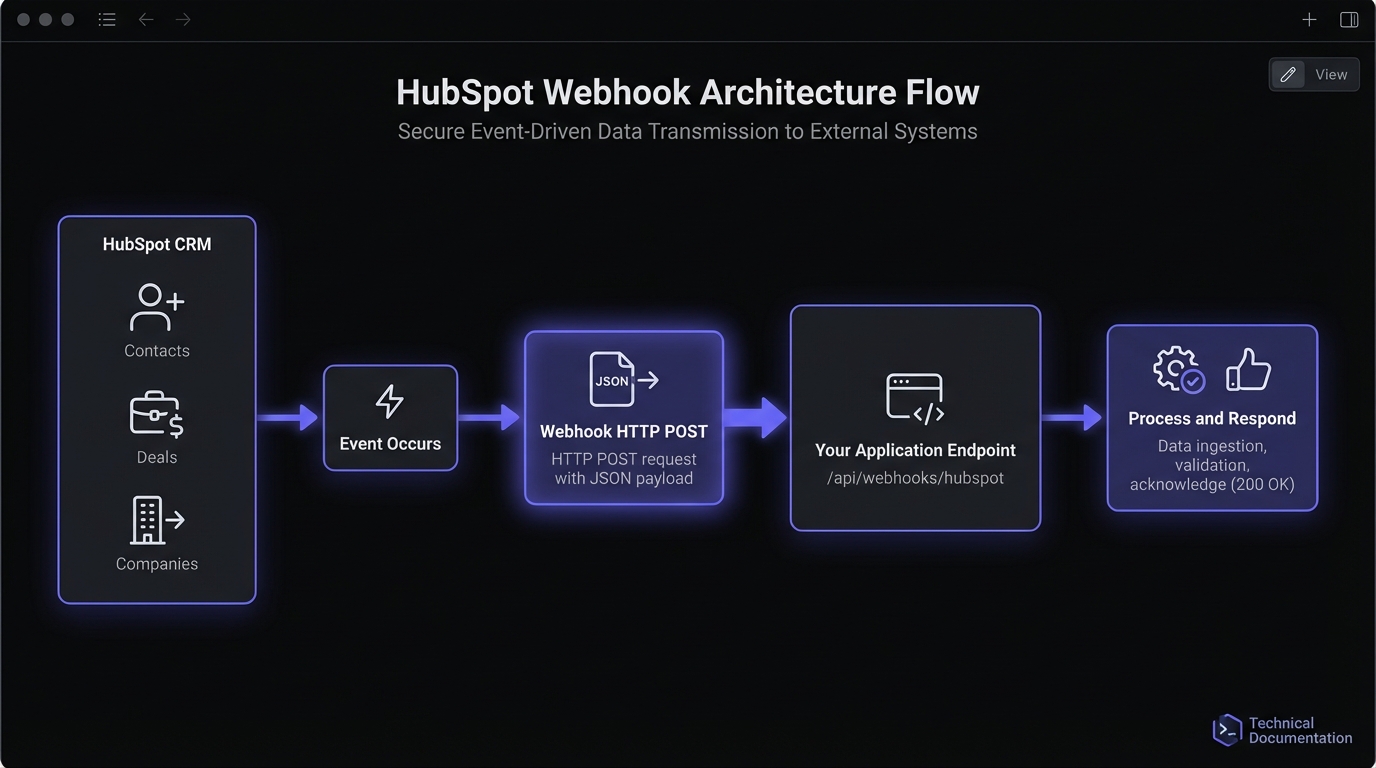
HubSpot uses a subscription-based model tied to your app. Two approaches exist: the Webhooks API (available on all tiers, including free) for developer apps, and Workflow webhooks (Operations Hub Professional+) for no-code automation.
Event Types
Contact Events
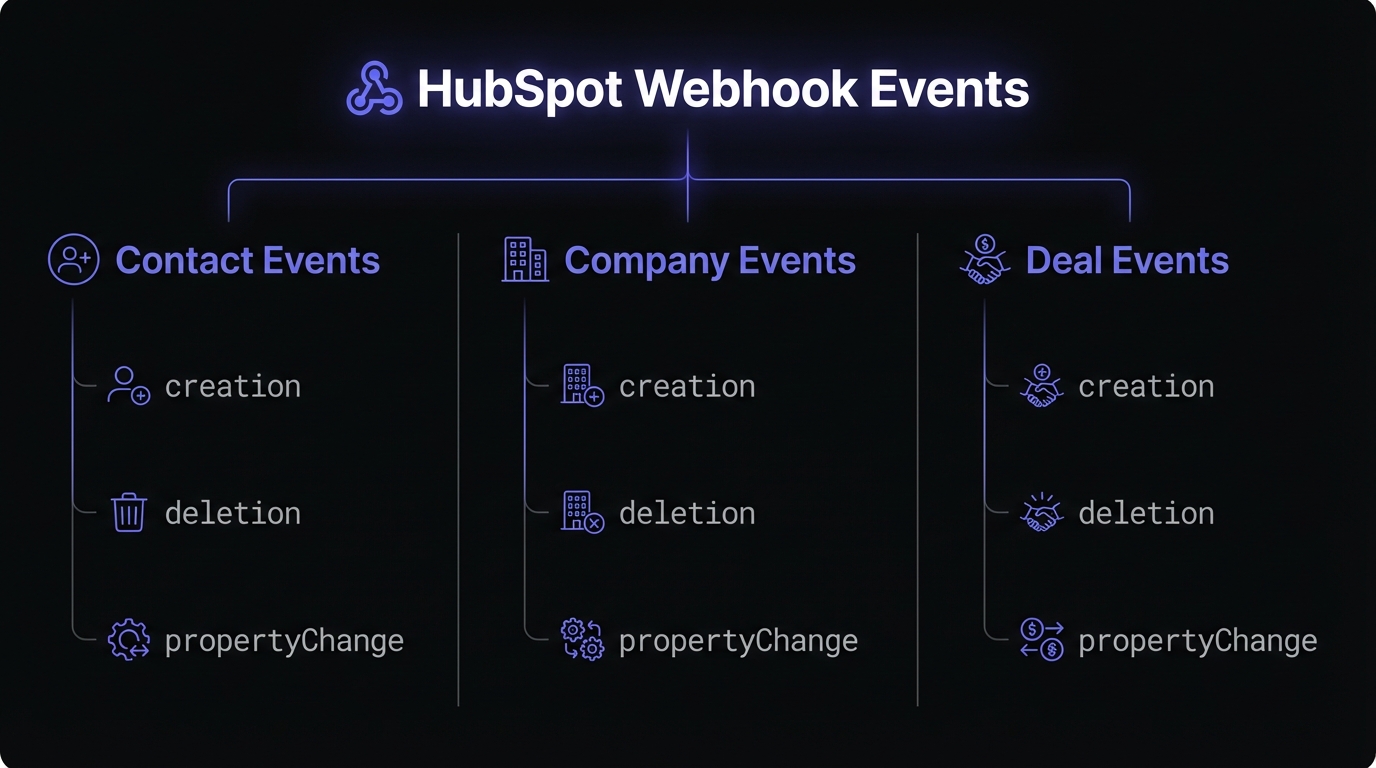
contact.creation- New contact added to CRMcontact.deletion- Contact removedcontact.propertyChange- Any contact property updatedcontact.privacyDeletion- GDPR deletion request
Company Events
company.creation- New company recordcompany.deletion- Company removedcompany.propertyChange- Company property updated
Deal Events
deal.creation- New deal createddeal.deletion- Deal removeddeal.propertyChange- Deal property changed (stages, amounts, etc.)
Conversation Events
conversation.creation- New conversation startedconversation.newMessage- Message added to conversation
Additional Events
ticket.creation/ticket.deletion/ticket.propertyChange- Support tickets*.merge- When records are merged*.associationChange- Association updates between objects
Setting Up Webhook Subscriptions
HubSpot offers two paths: the Webhooks API for developer apps (public or private) and workflow-based webhooks for Operations Hub users.
Via the HubSpot Developer Portal
- Navigate to your app in the HubSpot Developer Portal
- Select "Webhooks" from the left sidebar
- Configure your target URL endpoint
- Select the subscription types you need
- Save and activate the subscriptions
Programmatic Setup via API
For more control, create subscriptions programmatically:
const axios = require('axios');

async function createWebhookSubscription(appId, accessToken) {
  const subscriptions = [
    {
      subscriptionType: 'contact.creation',
      propertyName: null,
      active: true
    },
    {
      subscriptionType: 'contact.propertyChange',
      propertyName: 'email',
      active: true
    },
    {
      subscriptionType: 'deal.propertyChange',
      propertyName: 'dealstage',
      active: true
    }
  ];

  for (const subscription of subscriptions) {
    await axios.post(
      `https://api.hubapi.com/webhooks/v3/${appId}/subscriptions`,
      subscription,
      {
        headers: {
          'Authorization': `Bearer ${accessToken}`,
          'Content-Type': 'application/json'
        }
      }
    );
  }
}
propertyChange events require specifying which property to monitor—this keeps volume manageable.
Via Workflow Actions (Operations Hub)
For no-code setups, use workflow webhooks:
- Navigate to Automations > Workflows
- Create or edit a workflow with your desired trigger
- Add action: Data ops > Send a webhook
- Configure method (GET/POST), URL, and authentication
- Map properties to send in the request body
Workflow webhooks support rate limiting configuration directly in the UI—useful for protecting downstream systems.
Authentication Options
HubSpot supports multiple authentication methods for webhook endpoints:
- Request signature - HMAC-SHA256 signature in
X-HubSpot-Signature-v3header - API key - Passed as query parameter or header
- Bearer token - OAuth 2.0 access tokens
For private apps, configure webhooks under Settings > Integrations > Private Apps > [App Name] > Webhooks tab.
Handling HubSpot Webhook Events
HubSpot sends batched arrays, even for single events. Your endpoint must handle batch format. See receiving and verifying webhooks in Node.js.
Basic Event Handler
const express = require('express');
const crypto = require('crypto');

const app = express();
app.use(express.json());

const CLIENT_SECRET = process.env.HUBSPOT_CLIENT_SECRET;

app.post('/webhooks/hubspot', async (req, res) => {
  // HubSpot expects a response within 5 seconds
  res.status(200).send('OK');

  // Process events asynchronously
  processHubSpotEvents(req.body).catch(err => {
    console.error('Event processing failed:', err);
  });
});

async function processHubSpotEvents(events) {
  for (const event of events) {
    switch (event.subscriptionType) {
      case 'contact.creation':
        await handleNewContact(event);
        break;
      case 'contact.propertyChange':
        await handleContactUpdate(event);
        break;
      case 'deal.propertyChange':
        await handleDealChange(event);
        break;
      default:
        console.log('Unhandled event type:', event.subscriptionType);
    }
  }
}
Signature Verification
Always verify HubSpot signatures in production. This is critical webhook security best practice.
function verifyHubSpotSignature(req) {
  const signature = req.headers['x-hubspot-signature-v3'];
  const timestamp = req.headers['x-hubspot-request-timestamp'];

  // Reject requests older than 5 minutes
  const currentTime = Date.now();
  if (currentTime - parseInt(timestamp) > 300000) {
    throw new Error('Request timestamp too old');
  }

  // Build the signature base string
  const requestBody = JSON.stringify(req.body);
  const uri = `https://${req.headers.host}${req.originalUrl}`;
  const signatureBaseString = `${req.method}${uri}${requestBody}${timestamp}`;

  // Calculate expected signature
  const expectedSignature = crypto
    .createHmac('sha256', CLIENT_SECRET)
    .update(signatureBaseString)
    .digest('base64');

  if (signature !== expectedSignature) {
    throw new Error('Invalid signature');
  }

  return true;
}

// Middleware for signature verification
function hubspotSignatureMiddleware(req, res, next) {
  try {
    verifyHubSpotSignature(req);
    next();
  } catch (error) {
    console.error('Signature verification failed:', error.message);
    res.status(401).send('Unauthorized');
  }
}

app.post('/webhooks/hubspot', hubspotSignatureMiddleware, async (req, res) => {
  // Handler code here
});
Real-World Use Cases
Lead Sync to External Systems
Auto-sync new contacts to billing systems, support desks, or custom apps:
async function handleNewContact(event) {
  const contactId = event.objectId;

  // Fetch full contact details from HubSpot API
  const contact = await hubspotClient.crm.contacts.basicApi.getById(
    contactId,
    ['email', 'firstname', 'lastname', 'company', 'phone']
  );

  // Sync to your external system
  await externalCRM.createLead({
    email: contact.properties.email,
    name: `${contact.properties.firstname} ${contact.properties.lastname}`,
    company: contact.properties.company,
    source: 'hubspot',
    hubspotId: contactId
  });
}
Deal Stage Change Notifications
Trigger actions when deals move through pipeline:
async function handleDealChange(event) {
  if (event.propertyName !== 'dealstage') return;

  const dealId = event.objectId;
  const newStage = event.propertyValue;

  // Fetch deal details
  const deal = await hubspotClient.crm.deals.basicApi.getById(
    dealId,
    ['dealname', 'amount', 'hubspot_owner_id'],
    undefined,
    ['contacts']
  );

  // Stage-specific actions
  switch (newStage) {
    case 'qualifiedtobuy':
      await notifySalesTeam(deal);
      break;
    case 'closedwon':
      await triggerOnboarding(deal);
      await updateRevenueMetrics(deal);
      break;
    case 'closedlost':
      await logLostDealAnalytics(deal);
      break;
  }
}
Marketing Automation Triggers
Trigger marketing workflows on contact property changes:
async function handleContactUpdate(event) {
  const contactId = event.objectId;
  const propertyName = event.propertyName;
  const newValue = event.propertyValue;

  // Trigger campaigns based on lifecycle stage changes
  if (propertyName === 'lifecyclestage' && newValue === 'customer') {
    await marketingPlatform.enrollInCampaign(contactId, 'customer-onboarding');
  }

  // Update email preferences in external ESP
  if (propertyName === 'email') {
    await emailServiceProvider.updateSubscriber({
      oldEmail: event.propertyValueBefore,
      newEmail: newValue,
      hubspotId: contactId
    });
  }
}
Batch Processing Best Practices
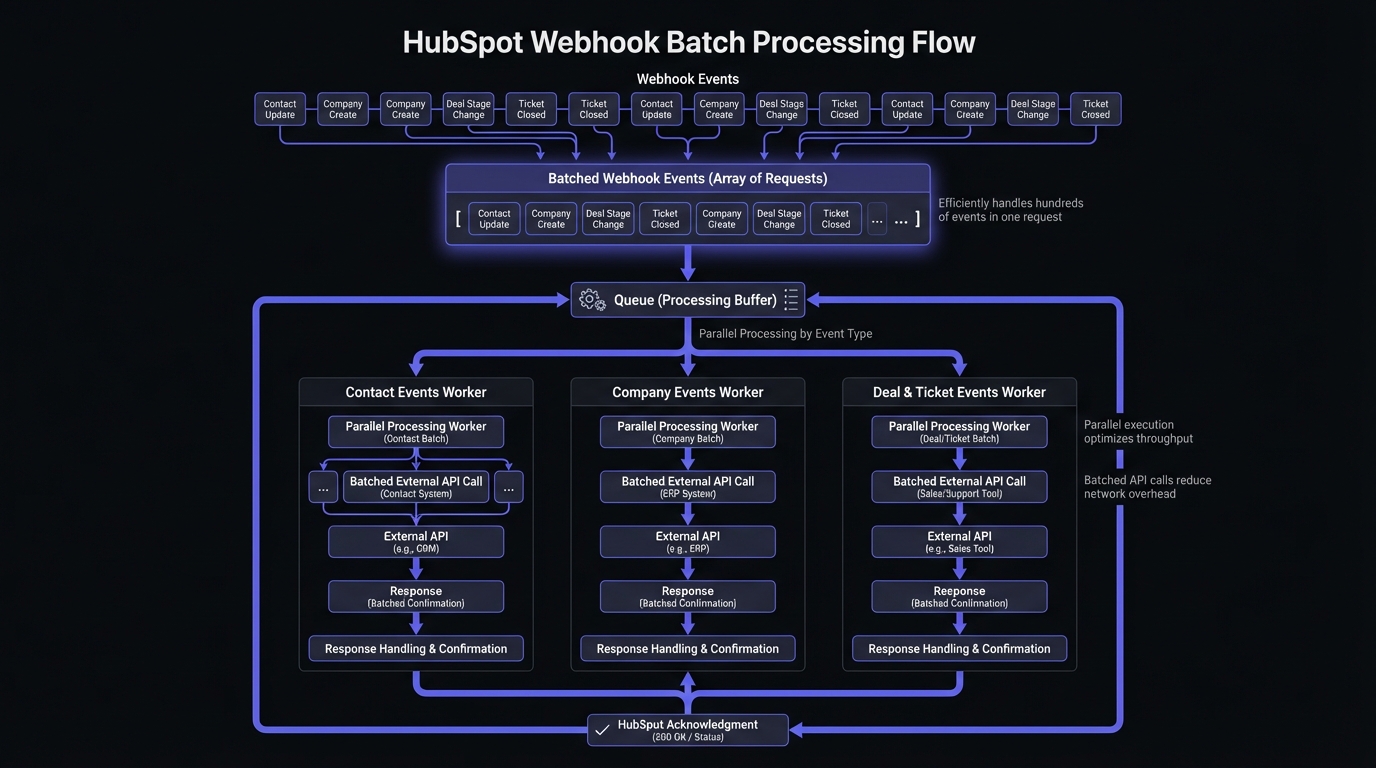
HubSpot batches events for efficiency. A single request may contain up to 100 events, especially during bulk imports or workflows. Bulk imports of 1,000 contacts can trigger 1,000+ webhook notifications simultaneously.
async function processHubSpotEvents(events) {
  // Group events by type for batch processing
  const eventsByType = events.reduce((acc, event) => {
    const type = event.subscriptionType;
    if (!acc[type]) acc[type] = [];
    acc[type].push(event);
    return acc;
  }, {});

  // Process each type in parallel
  const processors = Object.entries(eventsByType).map(([type, typeEvents]) => {
    return processBatchByType(type, typeEvents);
  });

  await Promise.all(processors);
}

async function processBatchByType(type, events) {
  // Fetch all records in one batch API call
  const records = await hubspotClient.crm.contacts.batchApi.read({
    inputs: events.map(e => ({ id: e.objectId })),
    properties: ['email', 'firstname', 'lastname']
  });

  for (const record of records.results) {
    await processRecord(type, record);
  }
}
Deduplication
HubSpot may send duplicates. Use idempotent handlers with event IDs:
const processedEvents = new Set(); // Use Redis in production

async function processEventWithDeduplication(event) {
  const eventKey = `${event.eventId}-${event.subscriptionType}`;

  if (processedEvents.has(eventKey)) {
    console.log('Skipping duplicate event:', eventKey);
    return;
  }

  processedEvents.add(eventKey);
  await processEvent(event);
}
Rate Limits and Retry Behavior
HubSpot's Limits
| Plan | Requests per 10 seconds | Daily requests |
|---|---|---|
| Professional | 100 | 650,000 |
| Enterprise | 100 | 1,000,000 |
HubSpot sets a concurrency limit of 10 simultaneous requests per account. Each batch can contain up to 100 events. Maximum subscriptions: 1,000 per application.
Retry Behavior
HubSpot retries failed webhooks up to 10 times over 24 hours:
- First retry: 1 minute after failure
- Subsequent retries: Increasing intervals, max 8 hours between attempts
- After exhausting retries, events are dropped
Monitor your endpoint health—HubSpot disables subscriptions that consistently fail.
Testing Webhooks
Before production deployment, test your endpoint:
- webhook.site - Capture and inspect payloads without code
- HubSpot Developer Portal - Use the "Test" button on subscription settings
- ngrok - Expose local development servers for end-to-end testing
For private apps, navigate to the Webhooks tab and click "Test" to send a sample payload to your configured URL.
Production Best Practices
Respond immediately: HubSpot expects 200 within 5 seconds.
Process asynchronously: Queue events (Redis, SQS, RabbitMQ) for background processing.
Handle bulk import floods: Implement queuing to absorb spikes from contact imports.
Monitor health: Track success rates, processing times, error counts. Set alerts for failure thresholds.
Implement retries: Build your own retry logic for downstream API failures with exponential backoff.
Simplifying CRM Webhooks with Hook Mesh
Hook Mesh provides managed CRM webhook delivery with automatic signature verification, intelligent retry policies, and event queuing for batched delivery. Let your team focus on business logic instead of infrastructure.
Conclusion
HubSpot webhooks enable real-time CRM workflows. Success requires understanding subscriptions, handling batched events, and verifying signatures.
Start with core event types, implement async processing from day one, and consider managed infrastructure as complexity grows.
See SendGrid email webhooks for delivery tracking or Slack webhooks for team notifications. Browse our Platform Integration Hub.
Related Posts
SendGrid Webhook Events: How to Handle Email Notifications
Learn how to set up and handle SendGrid Event Webhooks for email delivery tracking. Complete guide covering event types, payload structure, signature verification, and best practices with Node.js code examples.
Slack Webhooks: Incoming, Outgoing, and Event Subscriptions
A comprehensive guide to Slack webhooks covering incoming webhooks, outgoing webhooks, and the Events API. Learn how to integrate Slack with your applications using Node.js code examples and best practices.
Webhook Security Best Practices: The Complete Guide
Learn how to secure your webhook implementations with HMAC signature verification, replay attack prevention, SSRF mitigation, and more. Includes code examples in Node.js and Python.
Webhook Idempotency: Why It Matters and How to Implement It
A comprehensive technical guide to implementing idempotency for webhooks. Learn about idempotency keys, deduplication strategies, and implementation patterns with Node.js and Python code examples.
Webhook Integration Guides: Connect with Any Platform
Comprehensive guides for integrating webhooks from Stripe, GitHub, Shopify, Twilio, and 10+ other platforms. Learn best practices for reliable webhook handling across your entire stack.